
Indledning
This manual provides essential instructions for the safe and efficient operation of your Crayola Kids Bluetooth PA Stereo Speaker System. Please read this manual thoroughly before use and retain it for future reference.

Image: The Crayola Kids Bluetooth PA Stereo Speaker System in black, shown with its wired microphone.
Opsætning
1. Udpakning og indledende inspektion
- Fjern forsigtigt alle komponenter fra emballagen.
- Verify that the package contains the speaker unit, one wired microphone, and a USB-C charging cable.
- Inspect the unit for any signs of damage. If damage is present, do not use the product and contact customer support.
2. Opladning af højttaleren
- Oplad højttaleren helt før første brug.
- Connect the supplied USB-C charging cable to the USB-C charge port on the speaker.
- Tilslut den anden ende af kablet til en kompatibel USB-strømadapter (medfølger ikke).
- Opladningsindikatorlampen lyser. Når den er fuldt opladet, kan lampen skifte farve eller slukke.
- En fuld opladning giver cirka 2 timers spilletid.
3. Tænd/sluk
- Find tænd/sluk-knappen på kontrolpanelet.
- Press and hold the power button for a few seconds to turn the speaker ON or OFF.
Betjeningsvejledning
1. Bluetooth-parring

Image: The Crayola speaker shown with icons representing connectivity to a phone, MP3 player, iPad, and TV, illustrating its multifunctional Bluetooth capabilities.
- Ensure the speaker is powered ON and in Bluetooth mode. The speaker will typically enter Bluetooth pairing mode automatically upon power-on, indicated by a flashing LED.
- Aktiver Bluetooth på din enhed (smartphone, tablet osv.) og søg efter tilgængelige enheder.
- Select "Crayola Speaker" from the list of devices.
- Når højttaleren er parret, udsender den en bekræftelseslyd, og LED-indikatoren holder op med at blinke.
2. Brug af mikrofonen
- Plug the wired microphone into the designated microphone input port on the speaker.
- Sørg for, at mikrofonens tænd/sluk-knap er i ON-positionen.
- Tal ind i mikrofonen. Lyden vil være amplificeret gennem højttaleren.
- Note: The microphone volume is fixed and cannot be adjusted independently from the main speaker volume.
3. Ægte trådløs stereo (TWS) parring
TWS allows two Crayola Bluetooth speakers to connect wirelessly for a stereo sound experience.
- Ensure both speakers are powered ON and in Bluetooth mode, but not yet paired with any device.
- On one speaker, press and hold the 'MODE' button until you hear a pairing tone. This speaker will become the primary unit.
- De to højttalere vil automatisk oprette forbindelse til hinanden. Der lyder en bekræftelsestone, når der er oprettet forbindelse.
- Now, pair your device with the primary speaker via Bluetooth as described in the "Bluetooth Pairing" section.
4. FM-radiofunktion
- Press the 'MODE' button to switch to FM Radio mode.
- Press the 'SCAN' button to automatically scan and save available FM radio stations.
- Use the 'V-/K' and 'V+/L' buttons to navigate between saved stations.
5. Betjeningselementer og funktioner

Image: A hand pressing one of the control buttons on the top panel of the Crayola speaker, demonstrating user interaction.
| Knap | Fungere |
|---|---|
| MODE | Switches between Bluetooth, FM Radio, and other input modes. Long press for TWS pairing. |
| V-/K | Short press: Volume Down. Long press (in FM mode): Previous Station. |
| SCAN | Short press: Play/Pause (Bluetooth). Long press (in FM mode): Auto-scan FM stations. |
| V+/L | Short press: Volume Up. Long press (in FM mode): Next Station. |
Opretholdelse
- Rensning: Brug en blød, tør klud til at rengøre højttalerens yderside. Brug ikke flydende rengøringsmidler eller slibende materialer.
- Opbevaring: Opbevar højttaleren et køligt, tørt sted væk fra direkte sollys og ekstreme temperaturer.
- Batteripleje: To prolong battery life, avoid fully discharging the battery frequently. Recharge the speaker regularly, even if not in use for extended periods.
- Vandeksponering: Denne højttaler er ikke vandtæt. Undgå udsættelse for vand eller overdreven fugt.
Fejlfinding
| Problem | Mulig løsning |
|---|---|
| Højttaleren tænder ikke. | Ensure the battery is charged. Connect the USB-C cable and charge for at least 30 minutes before attempting to power on again. |
| Ingen lyd fra højttaleren. | Check the volume level on both the speaker and your connected device. Ensure the speaker is correctly paired via Bluetooth or in the correct mode (e.g., FM radio). |
| Bluetooth-parring mislykkes. | Ensure the speaker is in pairing mode. Turn off Bluetooth on your device and turn it back on. Move the speaker closer to your device. Disconnect any other Bluetooth devices from the speaker. |
| Microphone has excessive echo. | The microphone's volume is fixed. Ensure you are not too close to the speaker when using the microphone, as this can cause feedback or echo. |
| FM-radiomodtagelsen er dårlig. | Relocate the speaker to an area with better signal. Perform an auto-scan again to find stronger stations. |
Produktspecifikationer
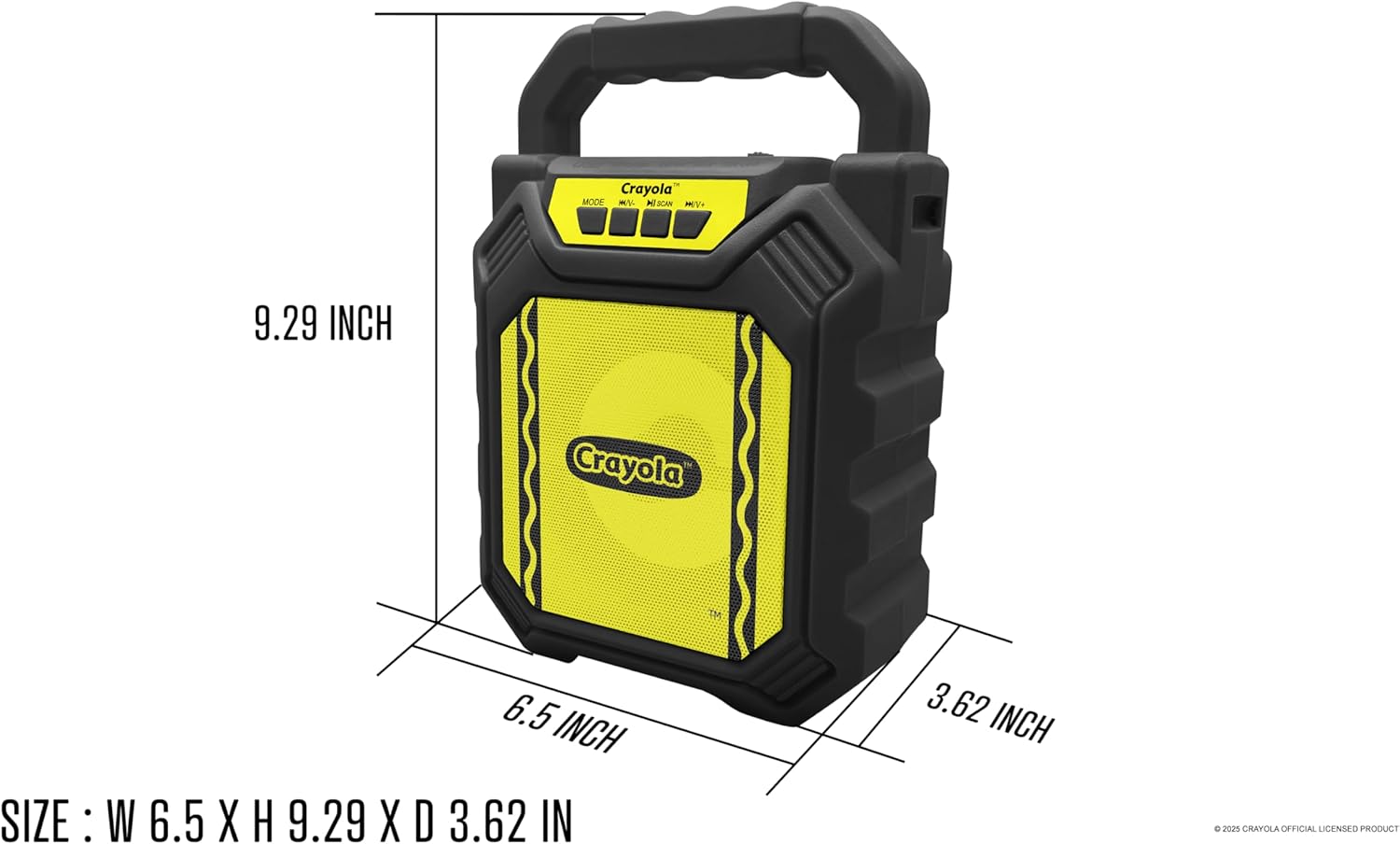
Image: Diagram illustrating the dimensions of the Crayola Kids Bluetooth PA Stereo Speaker System.
| Feature | Detalje |
|---|---|
| Modelnummer | B0FGYDFH7M |
| Mærke | Crayola |
| Forbindelsesteknologi | Bluetooth 5.0 |
| Driver størrelse | 4 tommer |
| Peak Power | 10W |
| Batterikapacitet | 1200mAh |
| Afspilningstid | Op til 2 timer (på en enkelt opladning) |
| Følsomhed | >85dB |
| Opladningsport | USB-C |
| Funktioner | Bluetooth, TWS, FM Radio, Microphone Input, LED Lights |
| Dimensioner (L x B x H) | 6.49 x 3.72 x 1.57 tommer |
| Varens vægt | 1.58 pund |
| Materiale | Plast |
| UPC | 605832373966 |
Garanti og support
For warranty information and customer support, please refer to the documentation included with your purchase or visit the official Crayola webwebsted. Gem din købsbevis til garantikrav.


