Indledning
This manual provides detailed instructions for the proper setup, operation, and maintenance of your Nady HT-450 Digital Handheld Microphone. The HT-450 is designed for use with Nady D-Series Wireless Systems, offering reliable and high-quality audio transmission for various applications, including live performances, presentations, and public speaking.
Pakkens indhold
Sørg for, at alle varer er til stede ved udpakning:
- Nady HT-450 Digital Handheld Microphone (Channel-A)
Produkt overview
The Nady HT-450 is a robust digital handheld microphone featuring an all-metal construction for durability. It incorporates a cardioid polar pattern for superior sound capture and minimization of background noise. The microphone offers 200 selectable channels and utilizes DQPSK digital modulation for reliable wireless signal transmission.
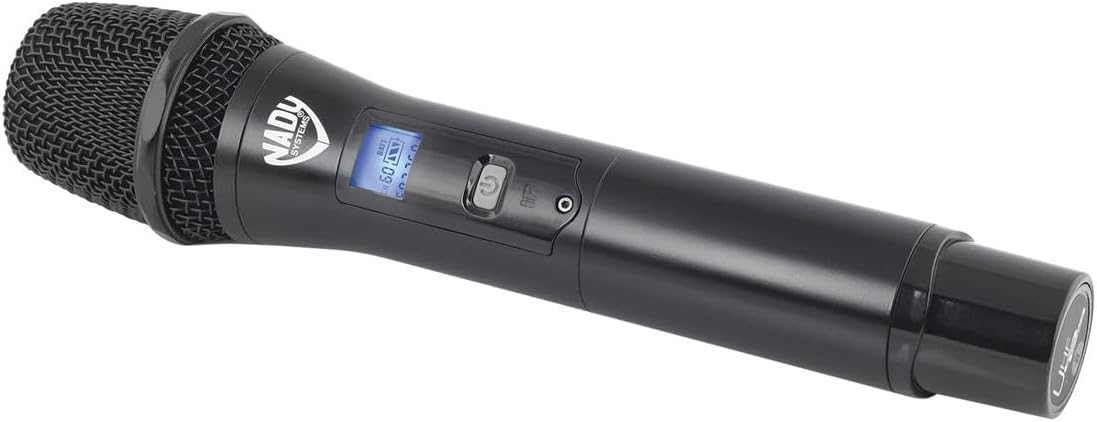
Figur 1: Nady HT-450 Digital Handheld Microphone. This image shows the microphone's main body, including the grille, power button, and backlit LCD display.
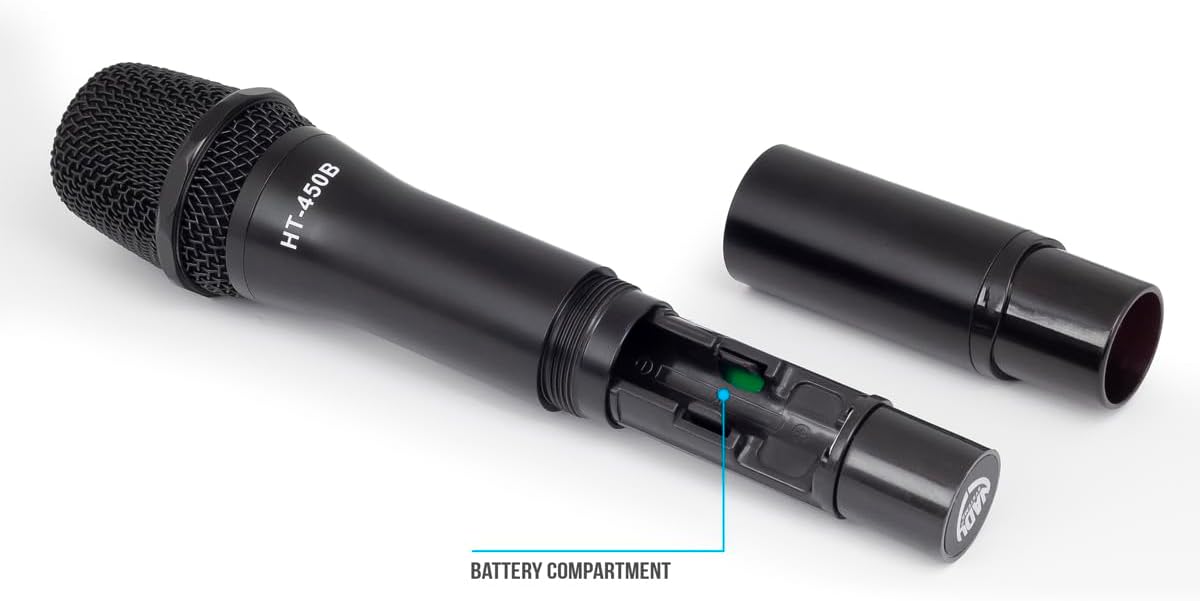
Figur 2: Nady HT-450 Digital Handheld Microphone with battery compartment open. This image illustrates the lower section of the microphone unscrewed, revealing the battery housing.
Opsætning
1. Batteriinstallation
- Unscrew the lower part of the microphone body to access the battery compartment (refer to Figure 2).
- Insert two AA alkaline batteries (not included) into the compartment, ensuring correct polarity (+/-).
- Securely screw the lower part of the microphone body back into place.
The microphone provides up to 10 hours of continuous use with fresh AA alkaline batteries.
2. Pairing with D-Series Wireless System
The HT-450 microphone is designed to seamlessly connect with Nady D-Series wireless receivers. Refer to your D-Series receiver's manual for specific pairing instructions. Generally, the process involves:
- Powering on both the microphone and the receiver.
- Selecting a clear channel on the receiver.
- Initiating the sync function on the receiver, then aligning the microphone's IR sensor (if applicable) with the receiver's IR transmitter to establish a connection.
- Confirming successful pairing via the receiver's display and the microphone's LCD.
Betjeningsvejledning
1. Tænd/sluk
- To power on, press and hold the power button located on the microphone body until the LCD illuminates.
- To power off, press and hold the power button again until the LCD display turns off.
2. LCD-skærm
The backlit LCD provides essential information, including:
- Batteriniveau: Indicates the remaining battery life. Replace batteries when the indicator is low.
- Kanalnummer: Displays the currently selected operating channel.
- Signalstyrke: Shows the strength of the wireless connection to the receiver.
3. Kanalvalg
The HT-450 offers 200 total channels to ensure clear transmission. Channel selection is typically managed through the paired D-Series receiver. Once a channel is selected on the receiver, the microphone will sync to that channel during the pairing process. If interference occurs, select a different channel on your receiver and re-sync the microphone.
Opretholdelse
- Rensning: Brug en blød, tør klud til at rengøre mikrofonhuset. Brug ikke flydende rengøringsmidler eller opløsningsmidler.
- Opbevaring: Store the microphone in a cool, dry place away from direct sunlight and extreme temperatures. Remove batteries if storing for extended periods to prevent leakage.
- Vedligeholdelse af gitter: Periodically check the microphone grille for debris. Gently clean with a soft brush if necessary.
Fejlfinding
| Problem | Mulig årsag | Løsning |
|---|---|---|
| Ingen lyd fra mikrofonen |
|
|
| Interferens eller frafald |
|
|
| Dårlig lydkvalitet |
|
|
Specifikationer
- Model: Nady HT-450
- Forbindelse teknologi: Trådløs
- Speciel funktion: LCD display
- Kompatible enheder: Audio Interface (with D-Series Receiver)
- Varens vægt: 0.8 pund (ca. 12.8 ounces)
- Produktmål (L x B x H): 10 x 2.25 x 2.25 tommer
- Strømkilde: 2 x AA alkaliske batterier (medfølger ikke)
- Batterilevetid: Op til 10 timer (omtrentlig)
- Kanaler: 200 total channels
- Modulering: DQPSK Digital
Garanti og support
For garantioplysninger og teknisk support henvises til den officielle Nady website or contact Nady customer service directly. Keep your purchase receipt as proof of purchase for any warranty claims.
Nady Webwebsted: www.nady.com


