Indledning
This manual provides comprehensive instructions for the ORICO Mini Pro Thunderbolt 5 SSD Enclosure (MST5P). This device is designed to expand storage and connectivity for your computer, offering high-speed data transfer and a compact form factor. Please read this manual thoroughly before using the product to ensure proper operation and longevity.

Image: The ORICO Mini Pro Thunderbolt 5 SSD Enclosure, showcasing its sleek design and compact size.
Opsætning
Follow these steps to set up your ORICO Mini Pro Thunderbolt 5 SSD Enclosure:
- Prepare the Enclosure: If your model requires SSD installation, ensure the NVMe SSD is correctly installed according to the product's internal instructions. For pre-installed SSD models, this step is not required.
- Insert Your Mac Mini (if applicable):
The enclosure is designed to house a Mac Mini for a vertical setup. To insert the Mac Mini:- Press the top switch to the right to unlock the back cover.
- Fjern bagdækslet.
- Carefully place your Mac Mini M4 (or compatible model) into the enclosure, ensuring it sits properly on the pre-installed silicone pads.
- Reinstall the back cover and slide the top switch to the left to secure it.
- Connect the Thunderbolt 5 Cable: Use the provided Thunderbolt 5 cable to connect the enclosure to your computer's USB-C port. Ensure a secure connection for optimal performance.
- Tænd: Press the power button on the enclosure (if present) or your Mac Mini to power on the system.

Image: Visual guide demonstrating the quick installation process of placing a Mac Mini into the ORICO Mini Pro enclosure. Steps include unlocking, removing the cover, inserting the device, and re-securing the cover.
Drift
The ORICO Mini Pro Thunderbolt 5 SSD Enclosure offers enhanced performance and expanded capabilities:
- Højhastighedsdataoverførsel: Experience 80Gbps Thunderbolt 5 speeds for rapid file transfers, ideal for large data backups, video editing, and other demanding applications.
- Udvidet lagerplads: Depending on your model, the enclosure comes with a built-in high-speed NVMe SSD (available in 1TB, 2TB, or 4TB capacities) to provide ample space for your projects and media.
- Universal kompatibilitet: The enclosure is compatible with a wide range of operating systems, including Windows, Mac OS, Linux, Android, and iPadOS, ensuring seamless integration with your devices.
- Yderligere porte: Utilize the integrated USB-C ports (10Gbps) and TF/SD card slots for connecting peripherals and accessing memory cards directly.
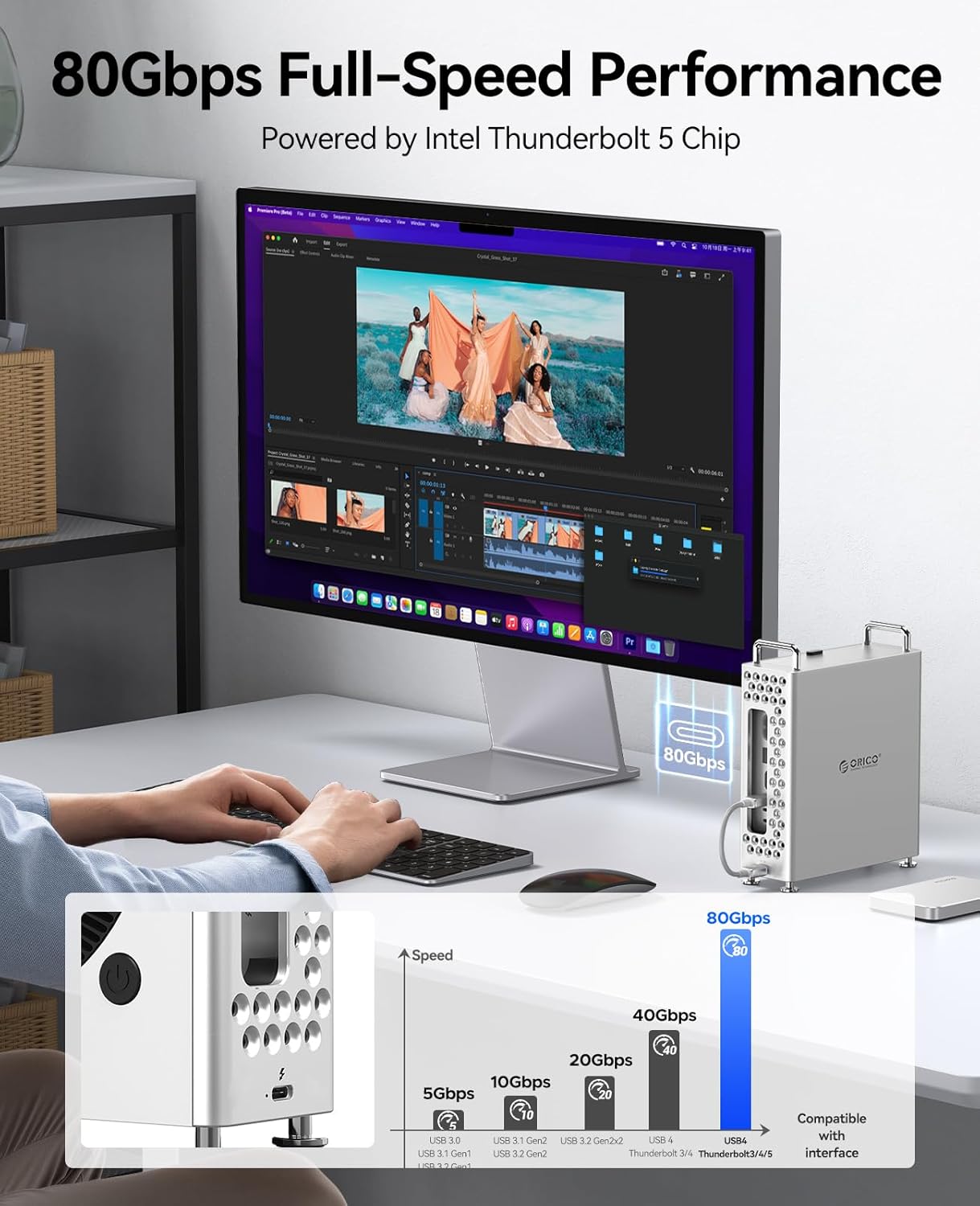
Image: A user working at a desk with a monitor displaying video editing software, highlighting the 80Gbps Thunderbolt 5 performance of the ORICO Mini Pro enclosure connected to a computer.

Image: The ORICO Mini Pro enclosure shown with various data types (video, information, database) and a speed indicator showing a maximum read/write speed of 6000MB/s, illustrating its built-in storage capacity options (1TB, 2TB, 4TB).
Opretholdelse
Proper maintenance ensures the longevity and optimal performance of your enclosure:
- Varmeafledning: The aluminum alloy chassis is designed for efficient heat dissipation. Ensure adequate airflow around the enclosure to prevent overheating, especially during prolonged high-performance tasks.
- Rensning: Use a soft, dry cloth to clean the exterior of the enclosure. Avoid using liquid cleaners or abrasive materials that could damage the finish.
- Beskyttelse: The enclosure features pre-installed soft silicone pads to protect your Mac Mini from scratches and provide anti-slip stability. Avoid placing heavy objects on the enclosure.

Image: An illustration of the ORICO Mini Pro enclosure with heat dissipation patterns, indicating enhanced ventilation and all-aluminum alloy construction for efficient cooling.

Image: The interior of the ORICO Mini Pro enclosure showing the pre-installed soft silicone pads, designed for anti-slip and scratch-resistant protection for the Mac Mini.
Fejlfinding
If you encounter issues with your ORICO Mini Pro Thunderbolt 5 SSD Enclosure, refer to the following common solutions:
- Enhed ikke genkendt:
- Ensure the Thunderbolt 5 cable is securely connected to both the enclosure and your computer.
- Try connecting the enclosure to a different USB-C/Thunderbolt port on your computer.
- Genstart din computer.
- Verify that your operating system drivers are up to date.
- Langsomme dataoverførselshastigheder:
- Confirm you are using the provided Thunderbolt 5 cable and connecting to a Thunderbolt 5 or compatible USB-C port on your computer.
- Close any background applications that might be consuming significant system resources.
- Check the health of the internal NVMe SSD using appropriate disk utility software.
- Overophedning:
- Ensure the enclosure is placed in a well-ventilated area.
- Avoid blocking the ventilation holes on the enclosure.
- Reduce the workload on the SSD if sustained high temperatures are observed.
If problems persist, please contact ORICO customer support for further assistance.
Specifikationer
| Feature | Detalje |
|---|---|
| Mærke | ORICO |
| Modelnummer | MST5P-1TB (varies by capacity) |
| Harddisktype | Solid State Drive (NVMe) |
| Interface | Thunderbolt 5 (80Gbps), USB-C |
| Kapacitetsmuligheder | 1TB, 2TB, 4TB |
| Kompatible enheder | Desktop (Windows, Mac OS, Linux, Android, iPadOS) |
| Samlet USB-porte | 1 (Thunderbolt 5 USB-C) + additional USB-C ports on enclosure |
| Number of Ports (Enclosure) | 5 (including TF/SD card slots) |
| Materiale | Aluminum Alloy and Plastic |
| Farve | Sølv |
| Varens vægt | 2.55 pund |
| Pakkedimensioner | 9.06 x 9.06 x 3.15 tommer |
Hvad er i æsken
The ORICO Mini Pro Thunderbolt 5 SSD Enclosure package typically includes:
- ORICO Mini Pro Thunderbolt 5 SSD Enclosure
- 0.15 m Thunderbolt 5-kabel
- Brugermanual

Image: The ORICO Mini Pro enclosure displayed next to its retail packaging box, indicating the contents of the product package.
Garanti og support
ORICO provides a warranty for this product:
- Garantiperiode: A 3-year warranty is provided for SSD models. Specific configurations may have a 1-year warranty. Please refer to your purchase documentation for exact details.
- Kundesupport: For technical assistance, troubleshooting, or warranty claims, please contact ORICO customer support through their official webwebstedet eller forhandleren, hvor produktet blev købt.


