1. Introduktion
The KONNWEI KW860 is a professional diagnostic scan tool designed to help you identify and resolve issues with your vehicle's engine, ABS, SRS (airbag), and transmission systems. This device supports all OBDII protocols and is compatible with most vehicles manufactured in the USA since 1996, EU gasoline vehicles since 2001, and EU diesel vehicles since 2003. It provides comprehensive diagnostic functions including reading and clearing Diagnostic Trouble Codes (DTCs), displaying live data, freeze frame data, and I/M readiness status.
This manual provides detailed instructions on how to set up, operate, and maintain your KW860 scanner to ensure accurate and efficient vehicle diagnostics.
2. Produktet er slutview
The KONNWEI KW860 features a user-friendly interface with a 2.8-inch TFT color screen for clear readability. Its robust design ensures durability for regular use.

Image 2.1: The KONNWEI KW860 OBD2 Scanner, showing its compact design and color display.
Key components include the main unit with its display and navigation buttons, and the integrated OBDII diagnostic cable. The device is powered directly from the vehicle's OBDII port, eliminating the need for external batteries during operation.
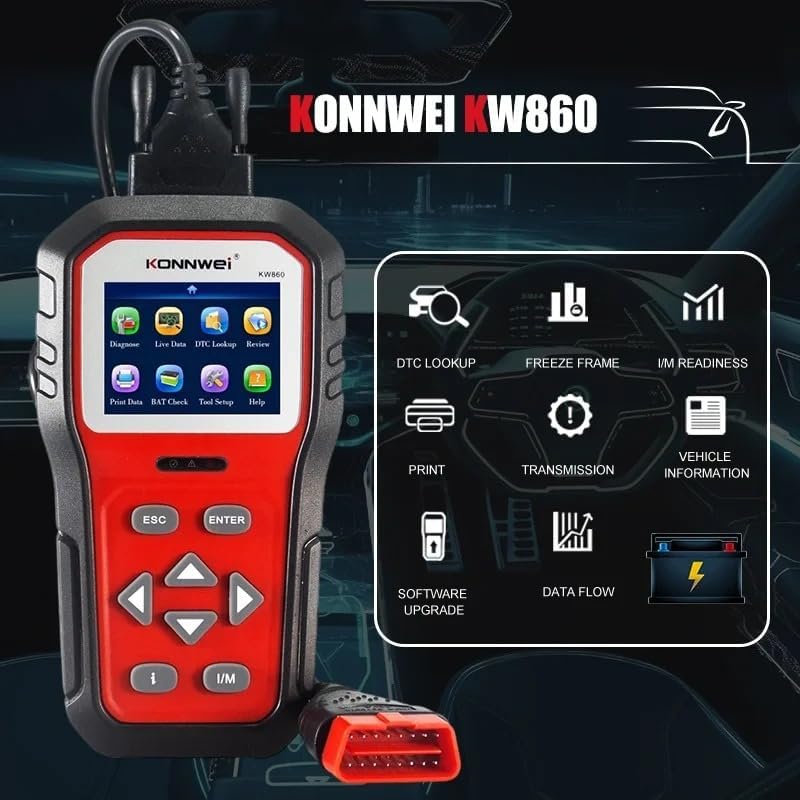
Image 2.2: The KW860 displaying its main menu with options such as Diagnose, Live Data, DTC Lookup, and Tool Setup.
3. Opsætning
Follow these steps to prepare your KONNWEI KW860 for use:
- Find OBDII-porten: The OBDII diagnostic port is typically located under the dashboard on the driver's side of the vehicle. Refer to your vehicle's owner's manual if you have difficulty locating it.
- Tilslut scanneren: With the vehicle's ignition off, firmly plug the KW860's OBDII connector into the vehicle's OBDII port.
- Tænd: Turn the vehicle's ignition to the 'ON' position (do not start the engine). The scanner will automatically power on.
- Sprogvalg: If this is your first time using the device, or after a factory reset, you may be prompted to select your preferred language. Use the navigation buttons to select 'English' and press 'ENTER'.
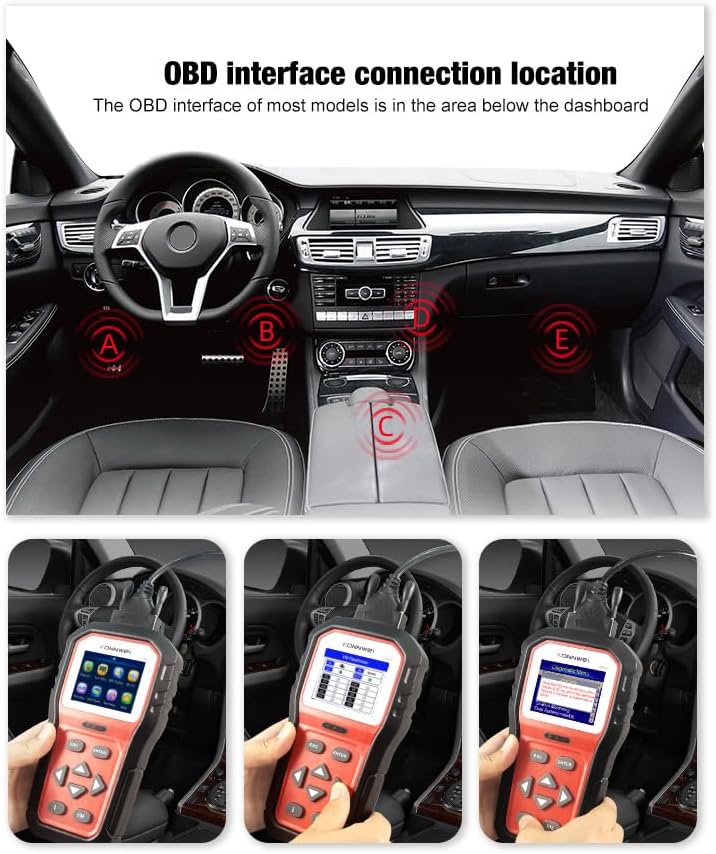
Image 3.1: Common locations for the OBDII port within a vehicle's interior, usually beneath the dashboard.
4. Betjeningsvejledning
The KW860 offers various diagnostic functions accessible through its main menu. Use the OP/NED arrow buttons to navigate and the ENTER knappen for at bekræfte valg. ESC knappen vender tilbage til den forrige skærm.

Image 4.1: The KW860 showing a menu with options such as Read Codes, Erase Codes, I/M Readiness, and Data Stream.
4.1. Diagnosticer
This is the primary function for reading and clearing trouble codes.
- Læs koder: Select 'Diagnose' from the main menu, then 'Read Codes'. The scanner will retrieve Diagnostic Trouble Codes (DTCs) from the vehicle's control modules.
- Slet koder: After addressing the underlying issue, select 'Erase Codes' to clear the DTCs and turn off the Check Engine Light (MIL). Ensure the ignition is on but the engine is off before clearing codes.
4.2. Live Data
View real-time operational parameters of the vehicle. This data can be displayed in text or graph format.
- Vælg 'Livedata' i hovedmenuen.
- Vælg 'View All Items' or specific parameters like RPM, coolant temperature, or fuel trim.
4.3. I/M-beredskab
This function checks the status of the vehicle's emission-related monitoring systems to determine if they are ready for an emissions test. Color-coded LED indicators on the device also provide a quick visual status.
- Tryk på den dedikerede JEG ER button or select 'I/M Readiness' from the menu.
- The display will show the status of various monitors (e.g., Misfire Monitor, Fuel System Monitor). 'OK' indicates the monitor has completed its test, 'INC' means incomplete.

Image 4.2: A visual representation of the KW860's quick check functions, highlighting I/M Readiness and O2 Sensor Test.
4.4. Frys ramme
When an emission-related fault occurs, the ECU records certain vehicle parameters at the moment the fault was detected. This data is called Freeze Frame data.
- Select 'Freeze Frame' from the main menu to view this snapshot of data.
4.5. DTC opslag
The built-in DTC library allows you to look up definitions of Diagnostic Trouble Codes.
- Select 'DTC Lookup' from the main menu.
- Enter the DTC code using the navigation buttons to get its definition.

Image 4.3: The KW860's diagnostic menu providing brief explanations for functions like Read Codes and Data Stream.
4.6. Batteri Voltage Test
Overvåg køretøjets batterivolumentage i realtid.
- Select 'BAT Check' from the main menu to view det aktuelle batteri voltage.
4.7. Andre funktioner

Billede 4.4: En omfattende oversigtview of the KW860's diagnostic capabilities, presented as a grid of icons and labels.
- O2-sensortest: Henter testresultater for O2-sensormonitoren for de senest gennemførte test fra køretøjets indbyggede computer.
- Test af indbygget skærm: Henter testresultater for emissionsrelaterede drivlinjekomponenter og -systemer, der ikke overvåges kontinuerligt.
- Test af fordampningssystem: Starter en test af fordampningsemissionskontrolsystemet.
- Køretøjsoplysninger: Displays the Vehicle Identification Number (VIN), Calibration ID (CALID), and Calibration Verification Number (CVN) of the test vehicle.
- Udskriftsdata: Allows you to print diagnostic data via a connected PC.
- Review: Få adgang til tidligere gemte diagnostiske data.
5. Vedligeholdelse
Korrekt vedligeholdelse sikrer din KW860-scanners lange levetid og optimale ydeevne.
- Softwareopdateringer: The KW860 offers free lifetime software updates. Connect the scanner to a Windows PC (Windows 7/8/10) using the provided USB cable and visit the KONNWEI official website for update instructions and software. Regular updates ensure compatibility with newer vehicles and improved functionality.
- Rensning: Rengør enheden med en blød, damp klæde. Brug ikke slibende rengøringsmidler eller opløsningsmidler.
- Opbevaring: Store the scanner in its protective nylon bag in a dry, cool environment when not in use.
6. Fejlfinding
Hvis du støder på problemer med din KW860-scanner, skal du se følgende almindelige fejlfindingstrin:
| Problem | Mulig årsag | Løsning |
|---|---|---|
| Scanneren tænder ikke | Loose connection; Vehicle ignition off; Blown fuse in vehicle's OBDII circuit | Ensure secure connection; Turn ignition to 'ON'; Check vehicle's fuse box for OBDII fuse. |
| Link Error / Communication Error | Incorrect protocol; Faulty connection; Vehicle not OBDII compliant | Verify vehicle compatibility; Re-establish connection; Try on another OBDII compliant vehicle. |
| Skærmen er frosset | Softwarefejl | Disconnect the scanner from the vehicle, then reconnect. If issue persists, perform a software update. |
7. Specifikationer
- Model: KW860
- Vise: 2.8 tommer TFT farveskærm
- Operativsystem: Linux
- Dimensioner (L x B x H): 7.8" x 4" x 1.6" (19.8 cm x 10.2 cm x 4.1 cm)
- Varens vægt: 1.47 pund (0.67 kg)
- Strømkilde: Ledningsbaseret elektrisk (via OBDII-port)
- Understøttede protokoller: ISO9141, KWP2000, CAN, J1850 PWM, J1850 VPW
- Understøttede sprog: engelsk, tysk
- Biltilpasningstype: Universal Fit (OBDII compliant vehicles)
8. Hvad er der i æsken
- KONNWEI KW860 OBD2-scanner
- Brugermanual
- OBD2 kabel
- USB kabel
- Protective Nylon Bag
9. Garanti og support
KONNWEI-produkter er designet til pålidelighed og ydeevne. For garantioplysninger, teknisk support eller serviceforespørgsler henvises til garantikortet, der følger med dit produkt, eller besøg den officielle KONNWEI-websted. webwebsted. Behold din købskvittering som købsbevis i tilfælde af garantikrav.


