1. Introduktion
The ANNKE 32CH H.265 Pro+ 3K Lite Digital Video Recorder (DVR) is a versatile surveillance solution designed for both home and business security. This hybrid DVR supports various camera types, including TVI, AHD, CVI, CVBS, and IP cameras, offering comprehensive monitoring capabilities. It features advanced H.265 Pro+ compression for efficient storage, intelligent human and vehicle detection, and convenient remote access.
This manual provides detailed instructions for setting up, operating, maintaining, and troubleshooting your ANNKE DVR system.

Billede: Overview of the ANNKE 32CH 3K Lite 5-in-1 Hybrid DVR system.
2. Hvad er der i æsken
Upon opening your ANNKE DVR package, please verify that all the following items are included:
- 1 x 32CH DVR (No Hard Drive Included)
- 1 x USB-mus
- 1 x strømadapter
- 1 x User's Manual For DVR
- 1 x HDMI kabel
- 1 x netværkskabel

Image: All components included in the ANNKE DVR package.
Note: Hard drive is not included and must be purchased separately if 24/7 recording is desired.
Video: An unboxing video demonstrating the contents of the ANNKE 32CH 3K Lite DVR package.
3. Opsætning
3.1 Fysiske forbindelser
Before powering on the DVR, ensure all necessary connections are made:
- Connect your surveillance cameras to the BNC video input ports on the back of the DVR.
- Connect a monitor to the HDMI or VGA output port for local viewing.
- Connect the USB mouse to one of the USB ports for system navigation.
- Connect the network cable from the DVR's LAN port to your router or network switch for remote access.
- Connect the power adapter to the DVR's power input and then to a power outlet.

Billede: Foran og bagpå views of the ANNKE DVR, highlighting various input and output ports for connection.
Image: Detailed diagram showing the dimensions and labeled ports on the ANNKE DVR.
Video: A guide on how to connect an ANNKE NVR system, applicable to DVR setup for initial connections.
3.2 Indledende konfiguration
Upon first power-on, the DVR will guide you through an initial setup wizard:
- Set Account Password: Create a strong password for the 'admin' user. This is crucial for security. It is recommended to fill in a password reminder in case you forget the password. The device will not work without activation.
- Time Zone & Date Format: Select your local time zone and preferred date format.
- Netværkskonfiguration: The system typically uses DHCP by default. Ensure the DVR obtains an IP address from your network.
- Hard Disk Formatting: If you have installed a new hard drive, you will need to format it for the DVR to recognize and use it for recording. Follow the on-screen prompts to format the hard disk. If your recorder does not have a hard disk, you can directly click 'Next'.
- Remote Access (P2P): Enable the P2P (Peer-to-Peer) function for easy remote access via the mobile app. You may need to enable Stream Encryption and set a verification code.
After completing the wizard, the DVR will be ready for operation.
4. Betjening af DVR
4.1 Live View
Once configured, you can view live feeds from your connected cameras on the monitor. The DVR supports simultaneous playback of multiple channels.

Image: A monitor displaying live feeds from multiple cameras connected to the ANNKE DVR.
4.2 Smarte detektionsfunktioner
The ANNKE DVR includes advanced AI-powered detection capabilities:
- Detektion af mennesker og køretøjer: Accurately identifies humans and vehicles, reducing false alarms from environmental factors like falling leaves.
- Line Crossing & Intrusion Detection: Define specific areas or lines to trigger alerts when crossed or intruded upon.
These features provide instant app/email alerts for enhanced surveillance.

Image: Illustration of human and vehicle detection capabilities, showing a person carrying a box and a vehicle.

Billede: Eksamples of app, email, and buzzer alerts triggered by motion detection.
4.3 Smart afspilning
Efficiently search for important events using the smart playback feature, which allows you to filter recordings by detected events (e.g., person, vehicle).

Image: The smart playback interface with a timeline indicating detected person and vehicle events.

Image: A detailed smart playback timeline with thumbnails of recorded events, such as a person or vehicle.
4.4 Fjernadgang
Access your surveillance footage in real-time from various devices, including Android/iOS phones, tablets, or PCs, using the dedicated mobile application.

Image: Various devices (phone, tablet, laptop, desktop) connected to and displaying surveillance footage på afstand.

Image: A smartphone displaying the remote access interface for the DVR.

Image: Remote access to surveillance footage across various devices, including phones, tablets, and computers.
Video: En overview of the ANNKE 32CH 3K Lite DVR's AI features and remote access capabilities.
5. Vedligeholdelse
5.1 Harddiskstyring
The DVR supports up to 20TB (2x10TB) of storage. Regular maintenance of the hard drive ensures continuous recording and optimal performance.

Image: Visual representation of the DVR's support for up to 20TB of storage.
5.2 H.265 Pro+ Compression
The H.265 Pro+ video compression technology significantly reduces file sizes while maintaining high image quality, maximizing storage efficiency and allowing for longer recording periods compared to older compression standards like H.264.
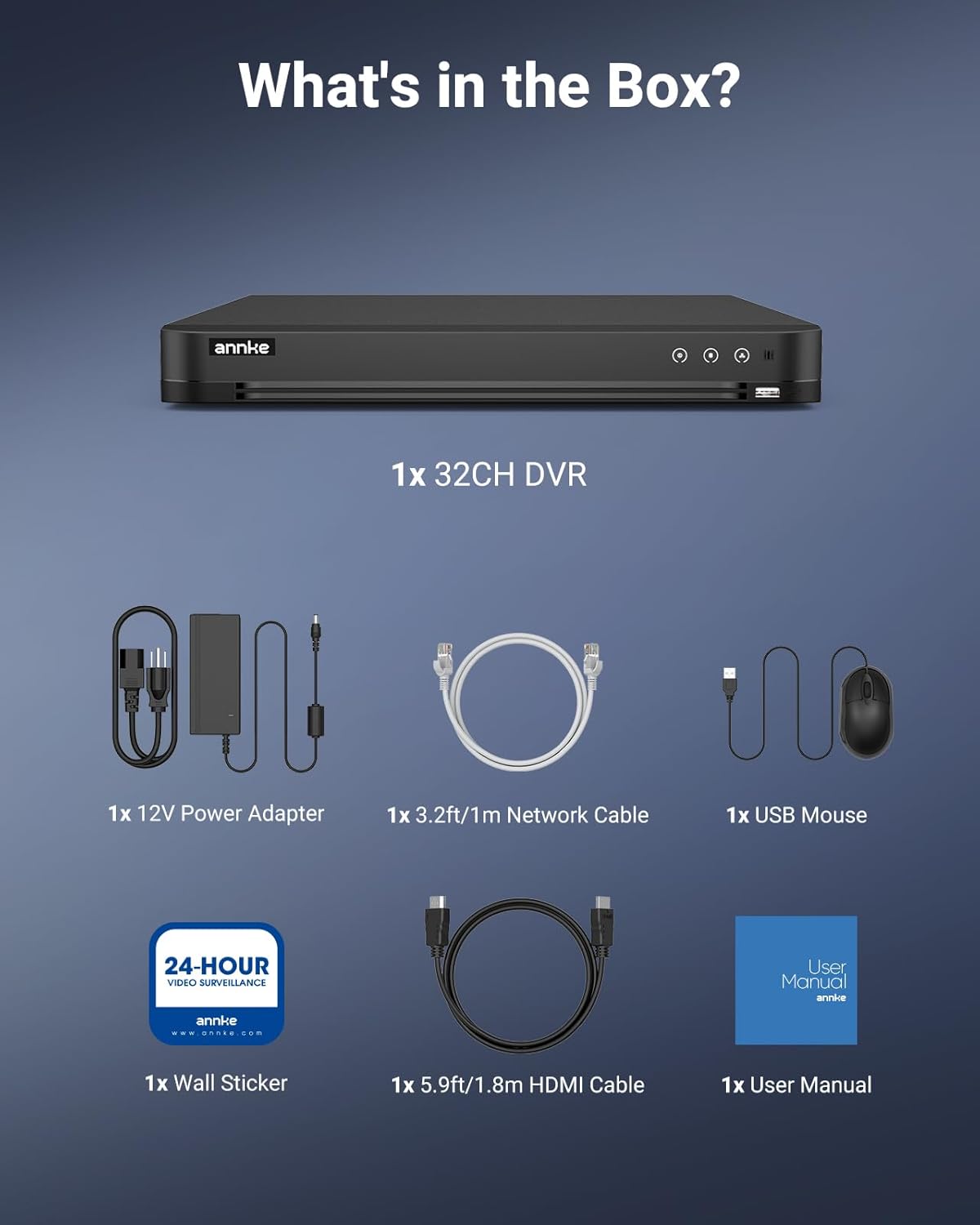
Image: A visual comparison demonstrating the storage efficiency of H.265 Pro+ versus H.264 compression.

Image: A bar chart illustrating that H.265 Pro+ saves 50% more storage space compared to H.264.
5.3 Generel pleje
To ensure the longevity and optimal performance of your DVR:
- Keep the DVR in a well-ventilated area to prevent overheating.
- Avoid exposing the DVR to extreme temperatures, humidity, or direct sunlight.
- Rengør ydersiden med en blød, tør klud. Brug ikke flydende rengøringsmidler.

Image: Diagram showing airflow through the DVR for proper cooling.
6. Fejlfinding
6.1 Fælles problemer
- Ingen videoudgang: Check HDMI/VGA cable connections, ensure the monitor is on the correct input, and verify DVR power.
- Problemer med netværksforbindelse: Ensure the network cable is securely connected. Verify router status and internet connectivity.
- Glemt kodeord: Use the email or security questions configured during initial setup to reset your password.

Image: Indicator showing successful and unsuccessful internet connections for the DVR.
6.2 Nulstilling af adgangskode
If you forget your password, you can reset it using the email or security questions you set up during the initial activation process. This ensures quick and secure access recovery.
7. Specifikationer
| Feature | Specifikation |
|---|---|
| Mærke | ANNKE |
| Modelnummer | AU-DX31NB000-V1 |
| Antal kanaler | 32 |
| Videooptagelsesopløsning | 2560x1440 (QHD or 1440p) |
| Forbindelsesteknologi | Ethernet, HDMI, USB, VGA |
| Speciel funktion | Menneskelig detektion, køretøjsdetektion |
| Video input | BNC, HDMI, VGA |
| Optagetilstand | Sammenhængende |
| Billedhastighed | Op til 15 fps |
| Supported HDD Capacity | Up to 20TB (2x10TB) |
| Operativsystem | Indlejret system |
| Emnemål L x B x H | 17.72 x 16.14 x 5.91 tommer |
| Varens vægt | 8.48 pund |
8. Garanti og support
ANNKE is committed to providing top-notch surveillance solutions and customer support. For any inquiries or assistance, please refer to the following:
- Support efter salg: Contact ANNKE customer service for post-purchase assistance.
- Livstids teknisk hjælp: Benefit from ongoing technical support for your product.
For more information, visit the official ANNKE webwebstedet eller kontakt deres supportteam direkte.

Image: ANNKE security shield logo, representing product reliability and support.


