1. Introduktion
The SKYRC MC5000 is an advanced cylindrical battery charger and analyzer designed for comprehensive battery management. This device provides precise control and analysis capabilities for a wide range of battery types and sizes, catering to both enthusiasts and professionals.
Key features include four independent charging slots, support for over 44 battery sizes and 10+ chemistries, multiple operating modes, high-precision voltage accuracy, internal resistance measurement, Bluetooth connectivity for app control, and robust safety protections.
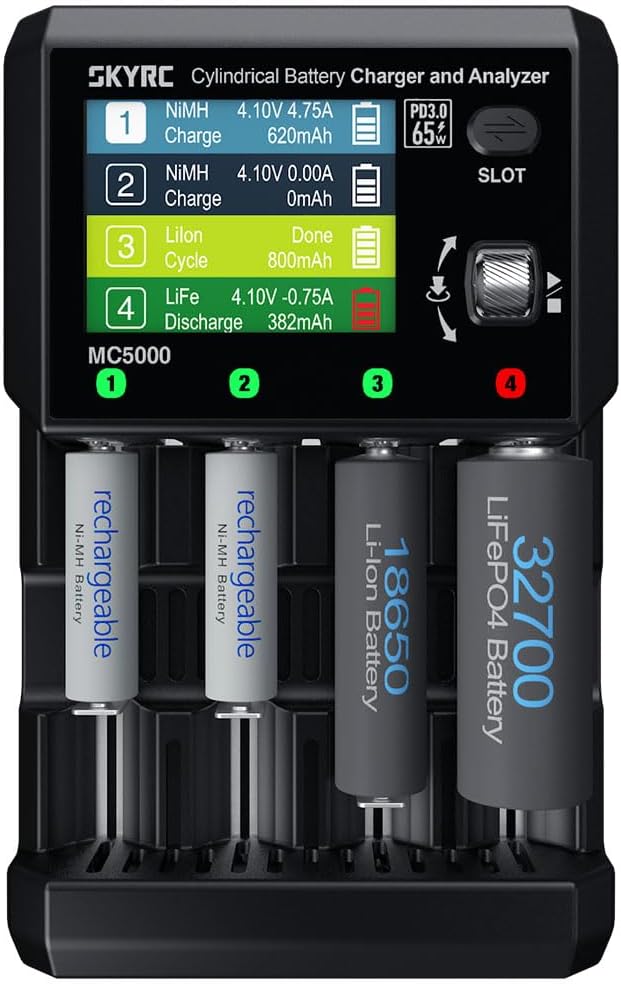
Image 1.1: The SKYRC MC5000 Cylindrical Battery Charger and Analyzer with batteries inserted, displaying operational data on its screen.
2. Sikkerhedsinstruktioner
To ensure safe operation and prevent damage to the device or batteries, please adhere to the following safety guidelines:
- Read this entire manual before using the charger.
- Use only the specified power adapter (PD 3.0 65W USB-C) to power the device.
- Ensure proper ventilation during operation. Do not cover the charger or block its cooling vents.
- Only charge battery types and sizes supported by the MC5000. Attempting to charge incompatible batteries may result in damage or injury.
- Do not short-circuit the battery slots or connect batteries with reversed polarity.
- Keep the charger away from water, moisture, and flammable materials.
- Always supervise the charging process, especially when charging new or unfamiliar battery types.
- If the charger emits smoke, unusual odors, or excessive heat, immediately disconnect it from the power source and remove batteries.
- Opbevares utilgængeligt for børn.
3. Opsætning
3.1 Udpakning og inspektion
Carefully remove the MC5000 charger and all accessories from its packaging. Inspect the device for any signs of damage. If any damage is found, do not use the charger and contact your retailer.
3.2 Tilslutning af strøm
- Connect a compatible PD 3.0 65W USB-C power adapter (not included) to the USB-C input port on the MC5000.
- Sæt strømadapteren i en passende stikkontakt.
- The charger's 2.8-inch full-color LCD display will illuminate, indicating it is powered on and ready for use.
3.3 Initial Interface Overview
The MC5000 features a 2.8-inch full-color LCD and a scroll wheel for navigation. The display shows real-time information for each of the four independent battery slots.

Billede 3.1: Detaljeret view of the MC5000's LCD screen, illustrating the charge setting menu for a Li-ion battery.
3.4 Bluetooth Connectivity and App Control
The MC5000 can be controlled and monitored via the SkyCharger app, available for Android and iOS devices.
- Download the "SkyCharger" app from your device's app store.
- Aktiver Bluetooth på din smartphone eller tablet.
- Open the SkyCharger app and follow the on-screen instructions to pair with your MC5000 charger.
- Once connected, you can monitor charging status, adjust settings, and view detailed battery data from your mobile device.
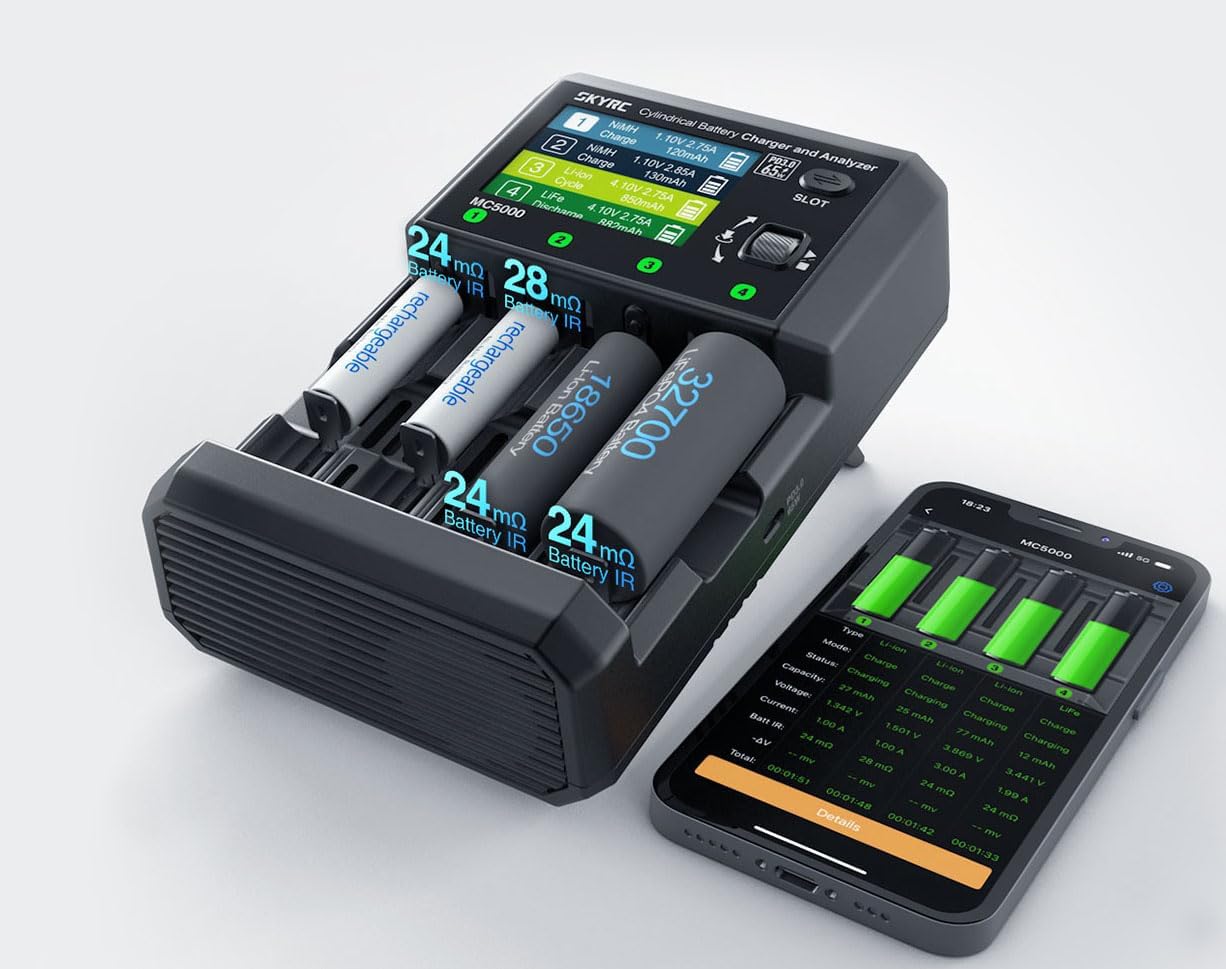
Image 3.2: The MC5000 charger shown alongside a smartphone running the SkyCharger application, demonstrating remote monitoring capabilities.
4. Driftstilstande
The MC5000 offers six distinct operating modes to manage your cylindrical batteries effectively. Use the scroll wheel on the device or the SkyCharger app to select and configure these modes for each independent slot.
- Oplade: This mode charges the battery to its full capacity. You can set the charge current and target voltage based on the battery chemistry.
- Opbevaring: Charges or discharges the battery to a specific voltage level, typically around 3.8V for Li-ion batteries, which is ideal for long-term storage to preserve battery health.
- Udledning: Discharges the battery to a user-defined voltage or until a specified capacity is removed. Useful for testing actual capacity or preparing batteries for storage.
- Cyklus: Performs a sequence of charge and discharge cycles to measure battery capacity and improve performance. You can configure the number of cycles and charge/discharge parameters.
- Opfriske: Designed to rejuvenate older NiMH/NiCd batteries by repeatedly discharging and charging them to break down memory effect and restore capacity.
- Break-in: A specialized mode for new batteries, particularly NiMH/NiCd, to condition them for optimal performance by performing a slow charge followed by a discharge and then a full charge.

Image 4.1: The MC5000 demonstrating its compatibility with multiple battery chemistries, including Li-ion, NiMH, LiFePO4, and Na-ion.

Image 4.2: The MC5000's display presenting a real-time discharge curve for a Li-ion battery, highlighting its analytical capabilities.
5. Vedligeholdelse
5.1 Rengøring
To maintain optimal performance and longevity of your MC5000 charger:
- Ensure the charger is disconnected from power before cleaning.
- Brug en blød, tør klud til at aftørre enhedens ydre.
- Brug ikke slibende rengøringsmidler, opløsningsmidler, og nedsænk ikke enheden i vand.
- Periodically check the battery slots and cooling vents for dust or debris and gently remove them using a soft brush or compressed air.
5.2 Opbevaring
When not in use, store the MC5000 in a cool, dry place, away from direct sunlight and extreme temperatures. Ensure no batteries are left in the slots during storage.
6. Fejlfinding
This section addresses common issues you might encounter with your MC5000 charger.
| Problem | Mulig årsag | Løsning |
|---|---|---|
| Opladeren tænder ikke. | No power, incorrect power adapter, faulty cable. | Ensure the PD 3.0 65W USB-C power adapter is correctly connected and functioning. Try a different USB-C cable or power source. |
| Batteriet oplades/aflades ikke. | Incorrect battery type selected, poor contact, battery fault. | Verify the battery type and settings in the chosen operating mode. Ensure the battery is properly seated in the slot. Check battery health. |
| "Capacity Limit" error during Refresh/Discharge. | Battery capacity setting is too low for the actual battery. | Increase the battery capacity setting in the charger's menu or via the app. It is often recommended to set the capacity 20% higher than the nominal capacity for certain operations. |
| Problemer med Bluetooth-forbindelse. | Bluetooth slukket, app ikke parret, interferens. | Ensure Bluetooth is enabled on your mobile device. Restart the SkyCharger app and the MC5000. Re-pair the devices if necessary. |
| Charger feels warm/fans are running. | Normal operation, high current charging/discharging. | This is normal, especially during high-current operations. The smart triple-fan cooling system is designed to manage heat. Ensure vents are not blocked. |

Image 6.1: The MC5000 and its companion app displaying the "Break-in" mode in progress for four batteries, indicating detailed status for each slot.
7. Specifikationer
| Model | MC5000 |
| Mærke | SKYRC |
| Produktdimensioner | 7.4 x 4.8 x 2.5 tommer (18.8 x 12.2 x 6.35 cm) |
| Varens vægt | 1.5 pund (0.68 kg) |
| Understøttede batterikemier | Li-ion, Li-ion HV, LiFePO4, NiMH, NiCd, NiZn, RAM, LTO, Na-ion |
| Understøttede batteristørrelser | 44+ cylindrical sizes (e.g., AAA, AA, 18650, 21700, 32650) |
| Antal slots | 4 uafhængige pladser |
| Max ladestrøm | Up to 5A per slot |
| Max afladningsstrøm | Up to 2A per slot |
| Driftstilstande | Opladning, opbevaring, afladning, cyklus, genopfriskning, indkøring |
| Voltage Nøjagtighed | ±10mV |
| Vise | 2.8-inch full-color LCD |
| Forbindelse | Bluetooth (SkyCharger app for Android and iOS) |
| Kølesystem | Smart triple-fan cooling |
| Udgangsport | PD 3.0 65W USB-C (for external devices) |
| Sikkerhedsbeskyttelse | Overcharge, Overheat, Short-circuit protection |
| Certificering | FCC |

Image 7.1: An infographic summarizing the main features of the MC5000, including 4 slots, 10+ chemistries, 44+ sizes, and high resolution.
8. Garanti og support
For information regarding warranty coverage, technical support, or service, please refer to the official SKYRC webwebstedet eller kontakt din autoriserede forhandler. Gem din købskvittering som købsbevis i tilfælde af garantikrav.


