Indledning
The Mars Gaming MSD-PRO Control Deck is an advanced, customizable control surface designed to enhance your workflows for streaming, music production, video editing, graphic design, and general productivity. Featuring 10 LCD buttons, 4 adjustable rotary knobs, an extended animated touchscreen, and an integrated USB hub, the MSD-PRO offers intuitive and dynamic control over your digital environment.
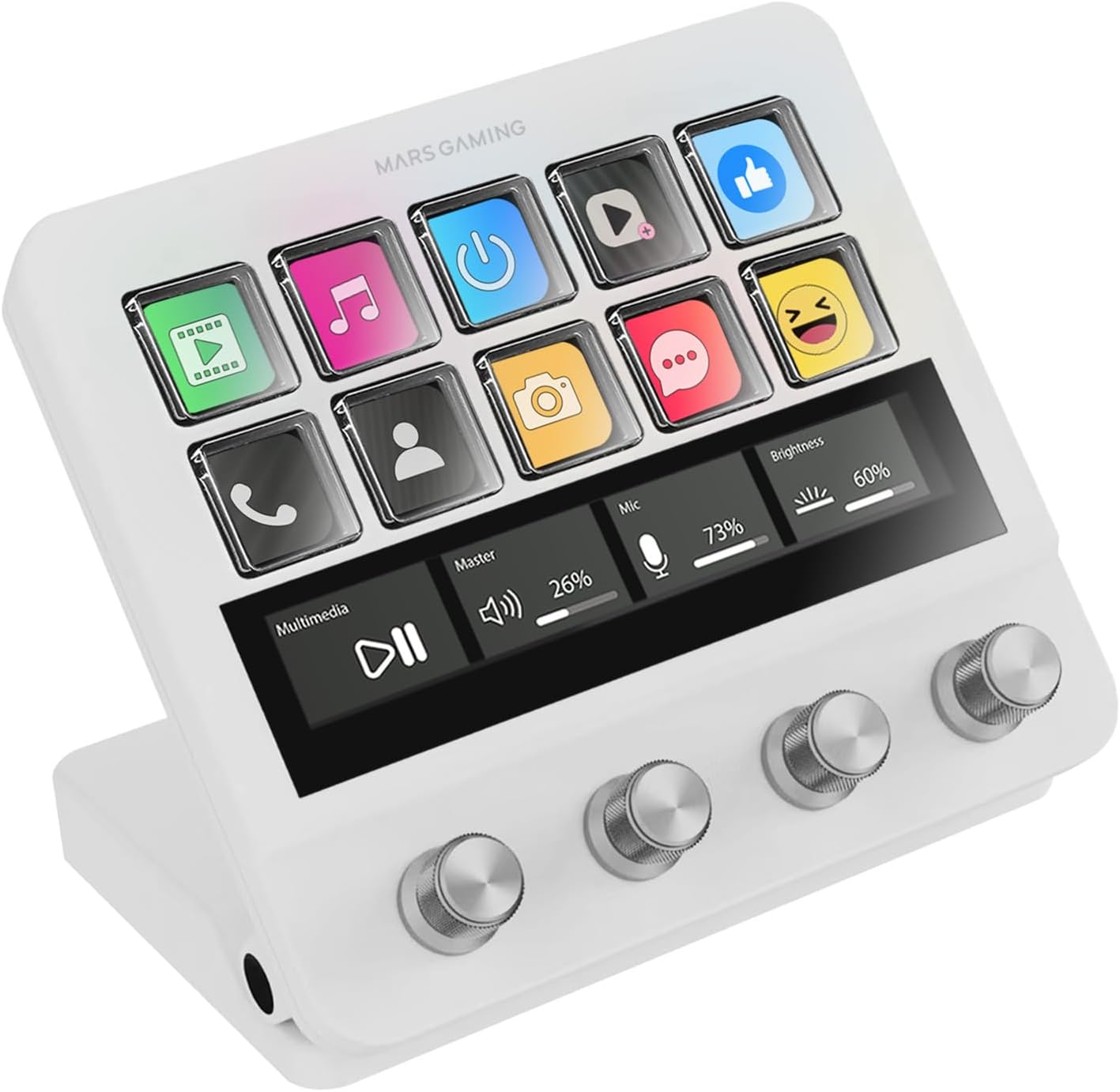
Billede: Forside view of the Mars Gaming MSD-PRO Control Deck, showcasing its 10 LCD buttons, animated touchscreen, and four rotary knobs.
1. Opsætning
Follow these steps to set up your Mars Gaming MSD-PRO Control Deck:
- Unboxing: Carefully remove the MSD-PRO Control Deck and all accessories from its packaging.
- Fysisk forbindelse: Connect the MSD-PRO to your computer using the provided USB cable. The integrated USB hub includes 2 x USB 3.0 ports and 1 x USB-C port for connecting additional peripherals. An adapter to USB-A is included for broader compatibility.
- Justerbar base: Position the adjustable stand to your preferred ergonomic angle. The non-slip rubber base ensures stability during use.
- Software installation: Download the official Mars Gaming MSD-PRO control software from the manufacturer's website. The software is compatible with both Windows and macOS operating systems. Install the software following the on-screen instructions.
- Første lancering: Launch the control software. It may require administrator privileges for full functionality, especially during initial setup or after system restarts.

Billede: Bagside view of the Mars Gaming MSD-PRO Control Deck, highlighting the integrated USB hub with 2 USB 3.0 ports and 1 USB-C port, and the adjustable stand mechanism.
2. Operating the MSD-PRO Control Deck
The MSD-PRO offers multiple interactive elements for comprehensive control:
2.1. 10 Customizable LCD Buttons
Each of the 10 LCD buttons can be programmed to perform a variety of actions. You can assign functions such as launching applications, executing scripts, controlling scenes in streaming software, or playing sound effects. Buttons support both static images and .GIF animations for visual identification.
- Tilpasning: Use the control software to drag and drop actions onto each button.
- Visuel feedback: Icons and animations on the LCD buttons provide instant visual confirmation of their assigned functions.

Billede: Nærbillede view of the Mars Gaming MSD-PRO Control Deck, emphasizing the 10 LCD keys displaying various icons and the four customizable rotary dials.
2.2. 4 Precise Rotary Controls
The four 360° rotary controls are pressable and allow for precise adjustments. They are ideal for:
- Lydkontrol: Adjusting volume levels, muting microphones, and controlling playback.
- Kreativ redigering: Fine-tuning values, zooming in/out, changing live filters, and making pixel-precise adjustments in editing software.
2.3. Extended Animated Touchscreen
The advanced touchscreen redefines control by allowing you to:
- Profile Navigation: Swipe through different profiles and layouts.
- Action Confirmation: Tap to confirm actions or trigger specific functions.
- Real-time Metrics: View system information, application data, or other relevant metrics directly on the screen.

Image: The Mars Gaming MSD-PRO Control Deck's animated extended touchscreen displaying various icons and information, demonstrating its interactive capabilities.
2.4. Kontrolsoftware
The dedicated software is the central hub for personalizing your MSD-PRO. It enables:
- Scenestyring: Create and switch between unlimited scenes for different applications or tasks.
- Automatisering af arbejdsgange: Automate complex workflows and set timers.
- Plugin Integration: Installere plugins from an extensive library to expand functionality.
- Intelligent Scenes: Synchronize scenes to automatically adapt based on the application running in the foreground.

Image: The Mars Gaming MSD-PRO Control Deck displaying a screen layout that suggests integration with its control software, showing various function icons.
3. Vedligeholdelse
To ensure the longevity and optimal performance of your MSD-PRO Control Deck, follow these maintenance guidelines:
- Rensning: Use a soft, dry, lint-free cloth to gently wipe the device. For stubborn smudges on the screen or buttons, slightly dampRengør kluden med vand eller et skærmsikkert rengøringsmiddel. Undgå slibende materialer eller barske kemikalier.
- Støvforebyggelse: Keep the device in a clean environment to prevent dust accumulation in the buttons, knobs, and ports.
- Væskeeksponering: Avoid exposing the device to liquids. In case of accidental spills, immediately disconnect the device and allow it to dry completely before reconnecting.
- Opbevaring: When not in use for extended periods, store the MSD-PRO in a cool, dry place away from direct sunlight.
4. Fejlfinding
If you encounter issues with your Mars Gaming MSD-PRO Control Deck, refer to the following common solutions:
- Enhed ikke genkendt:
- Ensure the USB cable is securely connected to both the MSD-PRO and your computer.
- Prøv at tilslutte til en anden USB-port på din computer.
- Genstart din computer.
- Verify that the latest drivers and control software are installed.
- Control Software Not Launching/Retaining Settings:
- Ensure the control software is running. It may not start automatically or retain settings if not launched with administrator privileges, especially after a PC restart.
- Right-click the software icon and select "Run as administrator."
- Check software settings for options to start with Windows or save profiles automatisk.
- Opdater softwaren til den nyeste version.
- Buttons or Knobs Unresponsive:
- Check if the device is properly connected and recognized by the software.
- Ensure the buttons/knobs are correctly assigned functions within the control software.
- Restart the control software.
- Problemer med skærmvisning:
- Restart the device by unplugging and re-plugging the USB cable.
- Check for software updates that might address display bugs.
If problems persist, consult the online support resources or contact Mars Gaming customer support.
5. Specifikationer
| Feature | Detalje |
|---|---|
| Modelnummer | MSDPROW |
| Fabrikant | Mars Gaming |
| Produktdimensioner | 13.7 x 12.4 x 5 cm |
| Vægt | 387 g |
| Forbindelse | USB (2 x USB 3.0, 1 x USB-C Hub) |
| Kontrolelementer | 10 LCD Buttons, 4 Adjustable Rotary Knobs, Extended Animated Touch Screen |
| Kompatibilitet | Windows, macOS |
6. Garanti og support
Mars Gaming products are designed for reliability and performance. For information regarding warranty coverage, please refer to the warranty card included with your product or visit the official Mars Gaming webwebsted.
For technical support, software updates, or further assistance, please visit the Mars Gaming Support Page eller kontakt deres kundeservice direkte.


