1. Introduktion
This manual provides detailed instructions for the safe and effective use of the CEM ILDM-150 Laser Distance Measure. The ILDM-150 is a precision instrument designed for accurate distance, area, and volume measurements, featuring Bluetooth connectivity for data transfer and management via the Meterbox Pro application. Please read this manual thoroughly before operating the device to ensure proper functionality and safety.

Figure 1.1: CEM ILDM-150 Laser Distance Measure and included accessories.
2. Produktfunktioner
The CEM ILDM-150 Laser Distance Measure offers a range of features designed for efficiency and accuracy:
- Høj nøjagtighed: Utilizes a Class II Laser with 1mW output, providing accuracy up to ±1/16 inch (1.5mm) over a measuring range of up to 229 feet (70 meters).
- Flere måletilstande: Supports single distance, continuous measurement, area, volume, and Pythagorean (three-point) calculations.
- Enhedsskift: Skift nemt mellem meter (M), tommer (In) og fod (Ft).
- Bluetooth 4.0-forbindelse: Seamlessly transfer measured data to a smartphone or tablet using the Meterbox Pro application for analysis and sharing.
- Datalagring: Stores up to 99 groups of measurement data, with manual deletion capability.
- LCD baggrundsbelysning: Large backlit screen for improved visibility in low-light conditions.
- Lydløs indstilling: Option to turn the measurement beep on or off for use in quiet environments.
- Holdbart design: IP54 rated for water and dust resistance, featuring a hard rubber body for enhanced grip and protection.
- Strømbesparende: Automatic shut-down after 150 seconds of inactivity to conserve battery life.
- Lavt batteri indikation: Giver brugeren besked, når batterierne skal udskiftes.

Figur 2.1: Overview of CEM ILDM-150 key features.
3. Sikkerhedsoplysninger
The CEM ILDM-150 is a Class II laser product. Adhere to the following safety guidelines:
- Stir ikke direkte ind i laserstrålen.
- Ret ikke laserstrålen mod mennesker eller dyr.
- Undgå at bruge optiske instrumenter (f.eks. kikkerter, teleskoper) til at view laserstrålen.
- Opbevar enheden utilgængeligt for børn.
- Forsøg ikke at ændre eller skille enheden ad.
- Brug kun specificerede batterier.
4. Kom godt i gang (opsætning)
4.1 Pakkens indhold
Når du åbner pakken, skal du kontrollere, at alle varer er til stede:
- CEM ILDM-150 Laser Distance Measure
- 1.5V AAA Batteries (Note: While typically included, please check the packaging upon receipt as specifications may vary.)
- Bærbar taske
- Brugermanual
- Håndstrop
- Pakkeæske
4.2 Batteriinstallation
The ILDM-150 requires 1.5V AAA batteries for operation.
- Find batteridækslet på bagsiden af enheden.
- Skub dækslet åbent i pilens retning.
- Insert the AAA batteries, ensuring correct polarity (+/-) as marked inside the compartment.
- Luk batterirummets dæksel forsvarligt.
4.3 Tænd/sluk
- For at tænde: Tryk på MÅL knappen. Displayet lyser.
- For at slukke: Tryk og hold på FARV/FRA button for approximately 2 seconds. The device will also automatically shut down after 150 seconds of inactivity.
5. Betjeningsvejledning
5.1 Grundlæggende måling
To perform a single distance measurement:
- Ret laseren mod måloverfladen.
- Tryk på MÅL tryk én gang på knappen. Laseren aktiveres.
- Tryk på MÅL Tryk på knappen igen for at foretage målingen. Resultatet vises på skærmen.
5.2 Enhedsskift
To change the measurement unit (M/In/Ft):
- Tryk på Enhed knappen gentagne gange, indtil den ønskede enhed vises.
5.3 Backlight and Mute Settings
- The backlight automatically activates when the device is in use.
- To toggle the measurement beep (mute/unmute), refer to the specific button or menu option in your device's interface, typically indicated by a speaker icon.
5.4 Avancerede måletilstande
The ILDM-150 supports various measurement functions:
- Områdemåling: Press the Area/Volume button once. Follow the on-screen prompts to measure length and width. The device will calculate and display the area.
- Volumenmåling: Press the Area/Volume button twice. Follow the on-screen prompts to measure length, width, and height. The device will calculate and display the volume.
- Pythagoræisk måling (indirekte måling): Use this mode to calculate distances indirectly (e.g., height of a building). Press the Pythagorean button. Follow the on-screen prompts to take the required measurements (e.g., hypotenuse and one leg). The device will calculate the unknown side.
- Kontinuerlig måling (sporing): Tryk på MÅL button and hold it down. The device will continuously measure and display the distance as you move it, showing real-time minimum and maximum values. Release the button to stop.
- Addition og subtraktion: After taking a measurement, use the '+' or '-' buttons to add or subtract subsequent measurements from the current total.

Figure 5.1: Multiple measurement modes supported by the ILDM-150.
5.5 Tailstock Function
The multi-functional tailstock allows for measurements from corners or edges, ensuring accuracy when the device cannot be placed flush against a surface.

Figure 5.2: Multi-functional use of the tailstock.
6. Bluetooth Connectivity & App
The ILDM-150 features Bluetooth 4.0 for seamless data transfer to your smartphone or tablet via the Meterbox Pro application.
6.1 Installing Meterbox Pro
- Søg efter "Meterbox Pro" in your device's app store (iOS App Store or Google Play Store).
- Download og installer applikationen.
6.2 Parring af enheden
- Sørg for, at Bluetooth er aktiveret på din smartphone/tablet.
- Power on the ILDM-150.
- Open the Meterbox Pro application. The app should automatically detect and connect to the ILDM-150.
- A Bluetooth icon on the ILDM-150's display will indicate a successful connection.

Figure 6.1: Bluetooth connectivity with Meterbox Pro app.
6.3 Data Transfer and Management
Once connected, measurements taken with the ILDM-150 can be transferred to the Meterbox Pro app. The app allows you to:
- View and organize measurement data.
- Create reports or charts.
- Share data via email, social media, or other applications.

Figure 6.2: Convenient data analysis and sharing via Meterbox Pro.
6.4 Data Storage on Device
The device can store up to 99 groups of historical data values.
- Genkaldelse af data: Use the memory buttons (e.g., up/down arrows) to scroll through stored measurements.
- Sletning af data: Tryk på CLR button to manually delete the currently displayed data.
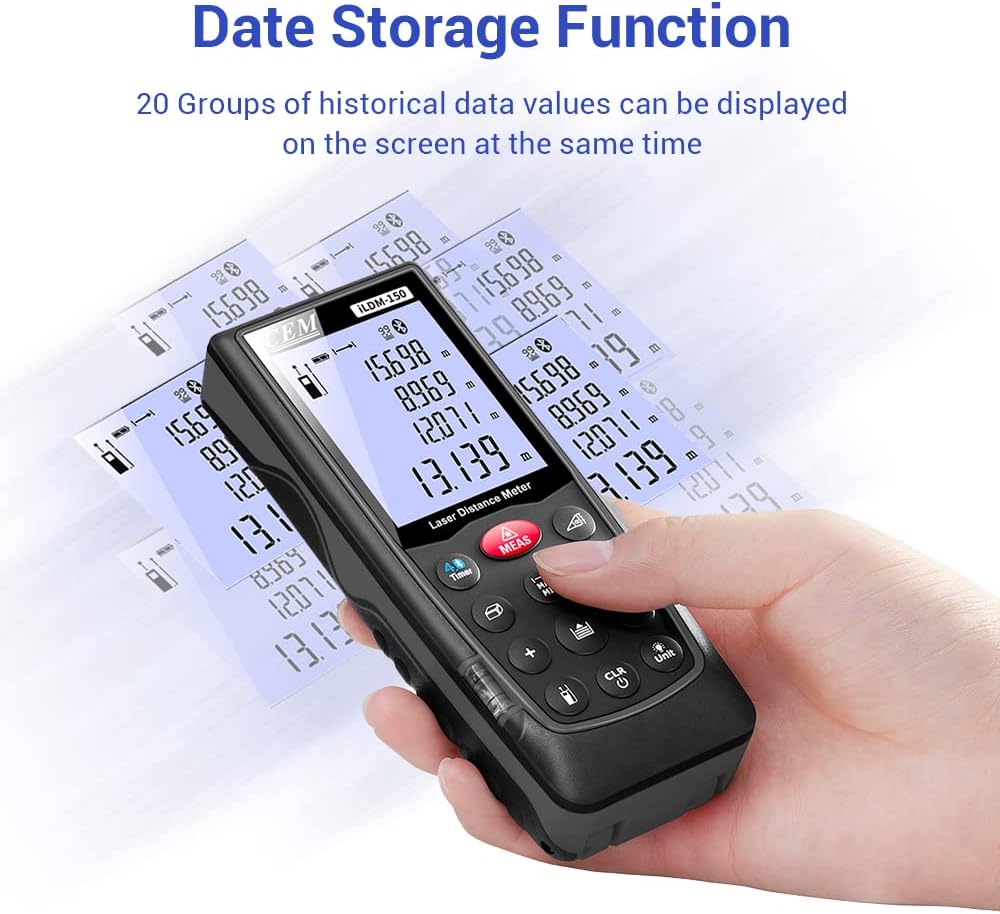
Figure 6.3: On-device data storage and display.
7. Vedligeholdelse og pleje
Proper maintenance ensures the longevity and accuracy of your ILDM-150.
- Rensning: Brug en blød, damp cloth to clean the device. Do not use abrasive cleaners or solvents. Pay special attention to the laser lens, cleaning it gently with a lens cloth if necessary.
- Opbevaring: Opbevar enheden i dens bærbare taske på et køligt og tørt sted, når den ikke er i brug. Undgå ekstreme temperaturer og direkte sollys.
- Batteripleje: Fjern batterierne, hvis enheden ikke skal bruges i længere tid, for at forhindre lækage.
- Slagbeskyttelse: Selvom enheden er holdbar, bør du undgå at tabe den eller udsætte den for hårde stød.

Figure 7.1: The ILDM-150 features IP54 water and dust protection.
8. Fejlfinding
If you encounter issues with your CEM ILDM-150, refer to the following table for common problems and solutions:
| Problem | Mulig årsag | Løsning |
|---|---|---|
| Enheden tænder ikke. | Low or dead batteries; Incorrect battery installation. | Replace batteries; Ensure correct polarity. |
| Upræcise målinger. | Laser lens dirty; Unstable measurement surface; Device not held steady; Measurement taken over reflective or transparent surfaces. | Clean laser lens; Ensure stable placement; Use a target plate for difficult surfaces. |
| Bluetooth-forbindelse mislykkes. | Bluetooth off on smartphone; Device out of range; App not running. | Enable Bluetooth; Ensure device is within 10m range; Restart Meterbox Pro app. |
| Skærmen er svag eller ulæselig. | Lavt batteri; Ekstrem temperatur. | Replace batteries; Operate within specified temperature range. |
| Enheden slukker uventet. | Auto-off feature activated; Low battery. | This is normal after 150 seconds of inactivity; Replace batteries if low battery indicator is on. |
9. Tekniske specifikationer
Detailed specifications for the CEM ILDM-150 Laser Distance Measure:
| Specifikation | Værdi |
|---|---|
| Mærke | CEM |
| Modelnavn | ILDM-150 |
| Varenummer | CEM ILDM-150 |
| Farve | sort 1 |
| Måleområde | 229 fod eller 70 meter |
| Nøjagtighed | ±1/16 tomme (1.5 mm) |
| Laser klasse | Klasse II, <1 mW |
| International Protection Rating | IP54 (Vandtæt, Støvtæt) |
| Materiale | Double Injection Molding Machine, Plastic |
| Varens vægt | 203 gram |
| Batteritype | Alkalisk (AAA) |
| Automatisk sluk | 150 sekunder (ca.) |
| Datahukommelse | 99 grupper |
| Bluetooth version | 4.0 |
| Varedimensioner (L x B x H) | 5.31 x 2.09 x 1.18 tommer |
| UPC | 887327150034 |
| Fabrikant | Shenzhen Everbest Machinery Industry Co.,Ltd. |
| Dato først tilgængelig | 9. juli 2018 |

Figure 9.1: Dimensions of the ILDM-150.
10. Garanti og support
10.1 Garantioplysninger
The CEM ILDM-150 Laser Distance Measure comes with a 12 måneders garanti from the date of purchase. This warranty covers defects in materials and workmanship under normal use. It does not cover damage caused by misuse, accidents, unauthorized modifications, or improper maintenance.
10.2 Kundesupport
For technical assistance, warranty claims, or further inquiries, please contact CEM customer support through their official website or the contact information provided with your purchase documentation. Please have your model number (ILDM-150) and purchase date ready when contacting support.