1. Introduktion
This manual provides detailed instructions for the installation, operation, and maintenance of your Hiseeu 4K PoE PTZ Security Camera System. This system is designed to provide comprehensive surveillance for both indoor and outdoor environments, featuring high-resolution video, advanced tracking capabilities, and remote access.
2. Produktet er slutview
Nøglefunktioner:
- Striking 4K 8MP HD Image: Delivers vivid images and fine details day and night, with 4K 8MP (3840x2160p) resolution, which is 4 times that of 2MP.
- 360° View & Auto Human Tracking: Pan 350 degrees and Tilt 90 degrees to capture every detail without blind spots. AI Auto Tracking function tracks suspicious human movement within the surveillance area.
- 4K 8 Ports 16 Channel Extendable NVR & 2TB HDD: The 4K 8MP 8-port PoE NVR can expand up to 16 channels (an extra PoE Switch is required to power additional cameras). Includes a pre-installed 2TB HDD for continuous recording.
- AI Technology for Human/Vehicle Detection: Set alarm rules, customize detection areas, and protect assets by identifying suspicious persons or vehicles.
- Instant Alarm Messages for 24/7 Protection: Receive instant app push notifications, activate warning lights/sounds to deter intruders, and enable NVR buzzer beeping reminders.
- 24/7 Record + Smart Playback: Supports Sync Playback (up to 4 cameras), Motion Detection Playback, and Common Playback. View playback on TV monitor, mobile app, or PC client software.
- Farve Night Vision: Three night vision modes available: Black-and-White, Color Night Mode, and Alarm Light (activates only when suspicious objects are detected).
- Works with or without Internet: Functions for local TV monitor surveillance without internet. Remote access via app or PC client software requires an internet connection to the system router.
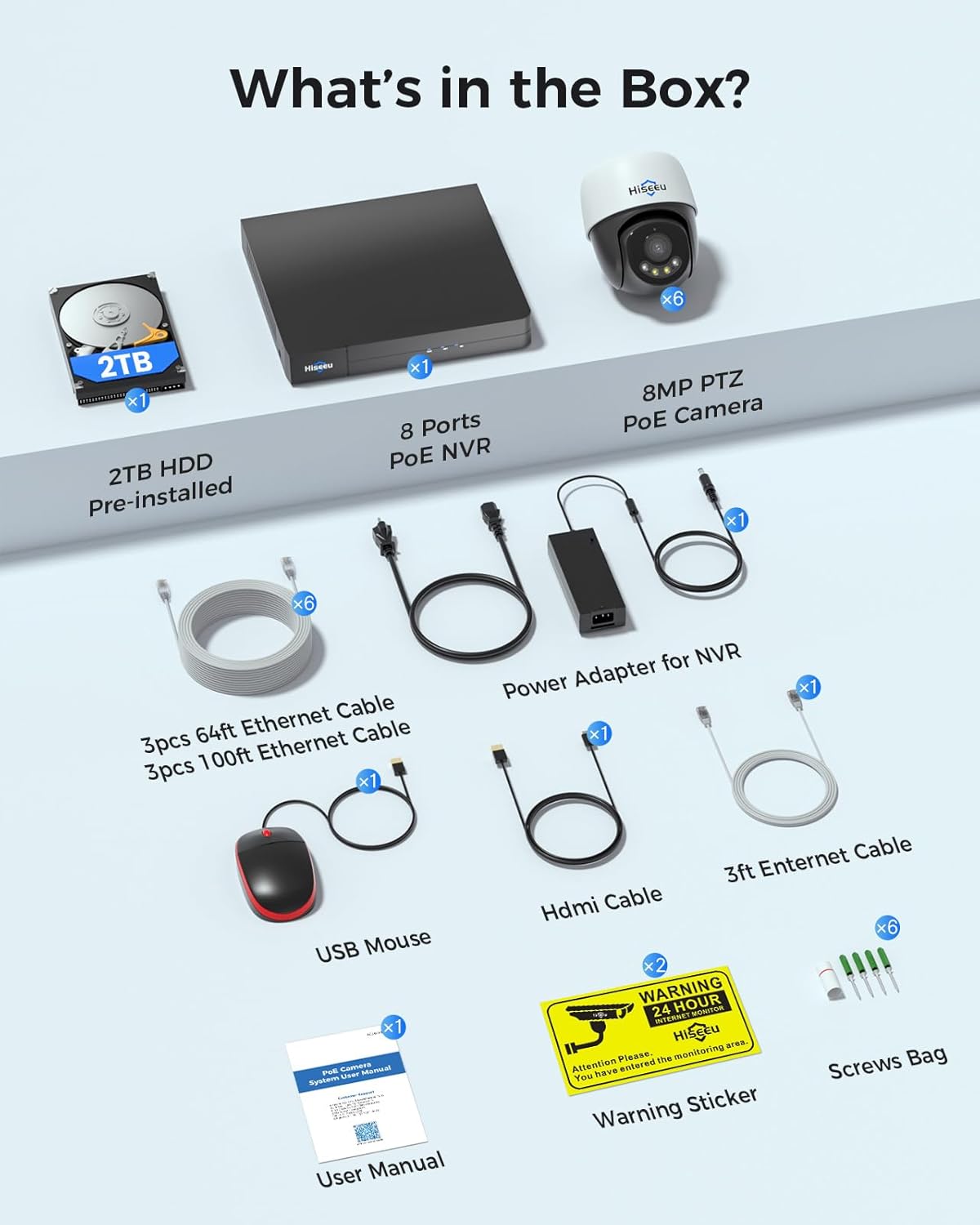
Hvad er der i æsken:
- 1x 4K NVR (with 2TB HDD pre-installed)
- 6x 4K PTZ Cameras
- 3x 20m Ethernet Cables
- 3x 30m Ethernet Cables
- Full accessories (Power Adapter for NVR, HDMI Cable, 3ft Ethernet Cable, USB Mouse, User Manual, Warning Sticker, Screws Bag)
3. Opsætning
3.1 Systemforbindelse
The Hiseeu PoE system is designed for easy plug-and-play setup. Follow these steps to connect your system:
- Connect the cameras to the NVR using the provided Ethernet cables. The Power over Ethernet (PoE) technology allows both power and video data to be transmitted through a single cable.
- Connect the NVR to a monitor (TV or PC) using an HDMI or VGA cable.
- Connect the NVR to your router using the provided Ethernet cable for internet access, enabling remote viewing.
- Plug in the NVR's power adapter to an electrical outlet.
- Ensure the NVR's WiFi antennas are positioned vertically for optimal signal reception.

3.2 Kamerainstallation
The PTZ cameras can be easily installed on ceilings or walls. Use the provided screws and mounting brackets. Ensure the camera has a clear line of sight to the area you wish to monitor.
4. Betjeningsvejledning
4.1 Fjernadgang via mobilapp
Download the Hiseeu mobile application from your device's app store. Once installed, follow the in-app instructions to add your NVR system. This will allow you to view live feeds, access recordings, and control camera functions remotely.
4.2 PTZ-styring og automatisk sporing
The PTZ (Pan, Tilt, Zoom) cameras offer a 360° viewing angle. You can manually control the camera's direction through the mobile app or NVR interface. The AI Auto Human Tracking feature automatically detects and follows human movement within the camera's field of view.

4.3 Smart Human/Vehicle Detection & Alarms
Configure specific detection zones to identify human and vehicle activity. The system can trigger instant alarms, including app push notifications, warning lights, and sounds, to deter potential threats.

4.4 Tovejslyd
The cameras are equipped with two-way audio, allowing you to communicate with individuals in the camera's vicinity through the mobile app. This feature is useful for interacting with delivery personnel or deterring unwanted visitors.
4.5 Nattesynstilstande
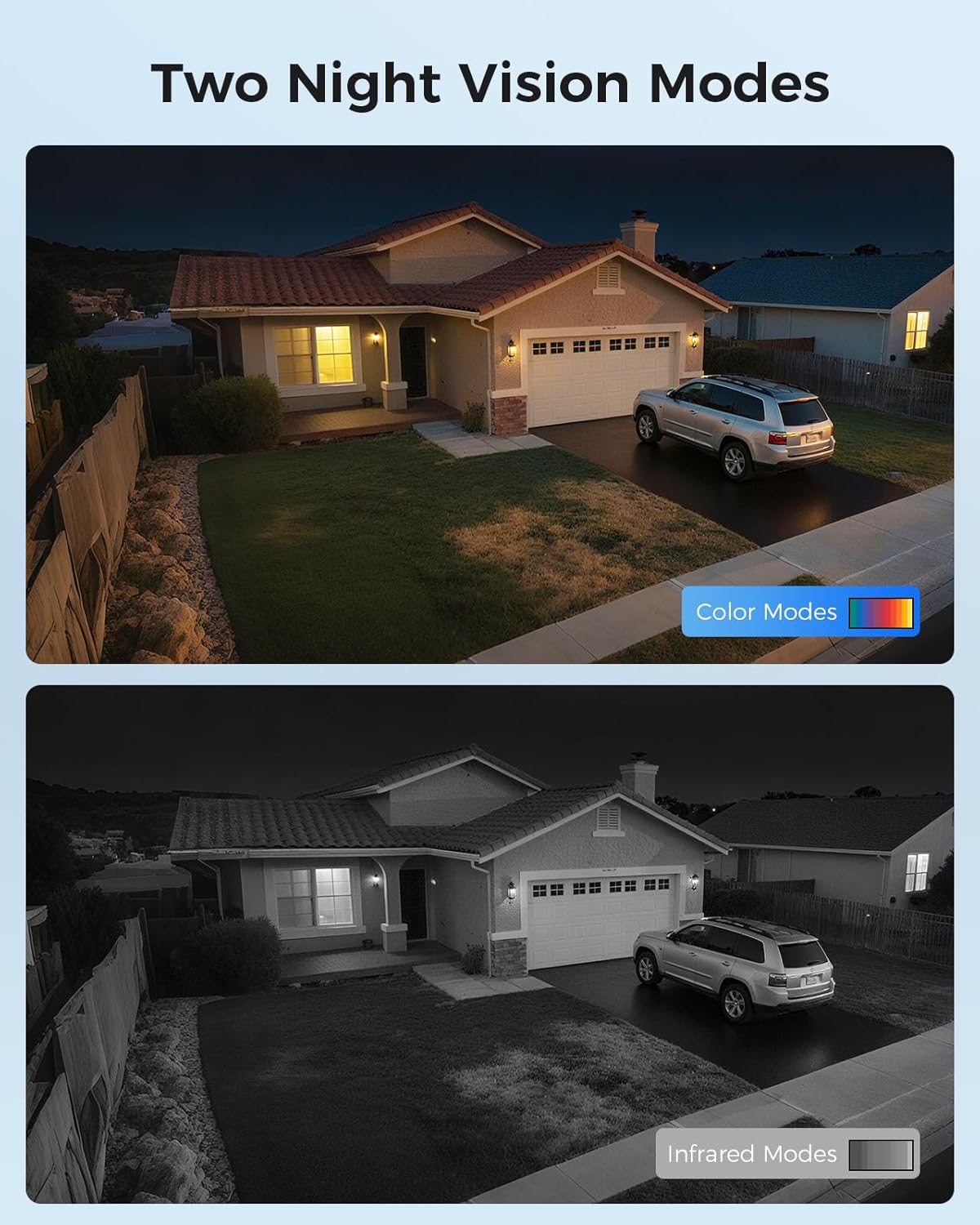
The system offers three night vision modes to adapt to different lighting conditions:
- Black-and-White: Standard infrarødt nattesyn for klare monokrome billeder i svagt lys.
- Farve Nattilstand: Utilizes built-in lights to provide full-color video even in dark environments.
- Alarm lys: Lights activate only when suspicious objects are detected, providing both deterrence and color night vision.
4.6 Afspilningsmuligheder
Review optaget footage using various playback modes:
- Synkroniser afspilning: View footage from up to 4 cameras simultaneously.
- Motion Detection Playback: Hurtigt igenview footage triggered by motion events.
- Common Playback: Standard continuous recording playback.
Access playback via your TV monitor, mobile app, or PC client software.

5. Vedligeholdelse
To ensure optimal performance and longevity of your Hiseeu Security Camera System, regular maintenance is recommended:
- Clean Camera Lenses: Periodically wipe camera lenses with a soft, damp cloth to remove dust and smudges that may affect image clarity.
- Tjek kabelforbindelser: Ensure all power and Ethernet cables are securely connected and free from damage.
- Firmwareopdateringer: Check for and install any available firmware updates for your NVR and cameras to ensure the latest features and security patches.
- Review Opbevaring: Regularly check the NVR's storage status to ensure sufficient space for recordings. The 2TB HDD provides ample storage, but managing older footage may be necessary.
6. Fejlfinding
6.1 HDD Not Found Issue
If your NVR displays an "HDD not found" error, follow these steps:
- Power off the NVR and carefully open the NVR box shell.
- Check the two cables connected to the HDD (Hard Disk Drive). Ensure they are securely connected. If loose, re-secure them firmly.
- Reinstall the NVR box shell and tighten all screws.
- Ensure you are using a 12V 2A or 12V 3A power adapter for the NVR. Incorrect power adapters can cause issues.
- Plug the power adapter into the NVR's power input port and then into a power outlet.
- Restart the NVR and check if the HDD is now recognized.
6.2 Generelle forbindelsesproblemer
- Intet videofeed: Check all cable connections (Ethernet, HDMI/VGA). Ensure cameras and NVR are powered on.
- Fejl ved fjernadgang: Verify the NVR is connected to the internet router. Check your router's internet connection. Ensure the mobile app is updated to the latest version.
- Dårligt signal: Ensure NVR antennas are vertical. Relocate cameras or NVR to improve signal strength if necessary.
7. Specifikationer
| Feature | Specifikation |
|---|---|
| Mærke | Hiseeu |
| Modelnummer | PK-6YHD98-BT |
| Forbindelsesteknologi | Ethernet (Power over Ethernet), Wired |
| Videooptagelsesopløsning | 4K (8 MP) |
| Speciel funktion | App Control, Auto Human Tracking, Human/Vehicle Detection, Color Night Vision, 2-Way Audio |
| Antal kanaler | 8 (expandable to 16 with external PoE switch) |
| Hukommelseslagringskapacitet | 2 TB harddisk (forudinstalleret) |
| Strømkilde | Elektrisk med ledning |
| Anbefalede anvendelser | Indendørs, Udendørs |
| Kompatible enheder | Cameras, Laptops, Personal Computers, Smartphones, TV |
| Night Vision Range | 100 fod |
| Billedhastighed | 20 FPS |
| Optagetilstand | Schedule, Motion Detection |
| Samlet USB-porte | 2 |
| Viewi vinkel | 360 grader (PTZ) |
| Emnemål L x B x H | 16 x 15 x 12 tommer |
| Varens vægt | 19.81 pund |
8. Garanti og support
Hiseeu is committed to providing reliable products and excellent customer service. Your purchase includes:
- Produktgaranti: Standard manufacturer's warranty applies.
- 30 dages gratis returret: Få ro i sindet med en 30-dages returret.
- Livsvarig teknisk support: Access to lifetime technical assistance for any product-related inquiries or issues.

For support, please refer to the contact information provided in your Quick Guide or visit the official Hiseeu webwebsted.
Databeskyttelse:
User's personal data is encrypted for both local use (TV monitor) and network use (remote access via app or PC client software), ensuring your privacy and security.