Indledning
Velkommen til brugermanualen til dine nye GOBOULT W60 True Wireless-ørepropper. Disse ørepropper er designet til at give en overlegen lydoplevelse med funktioner som forlænget spilletid, støjreduktion og ultralav latenstid. Denne manual vil guide dig gennem opsætning, betjening og vedligeholdelse af din enhed for at sikre optimal ydeevne.

Billede: GOBOULT W60 ægte trådløse øretelefoner i deres grønne opladningsetui, vistasinproduktets design.
Hvad er der i æsken
Din GOBOULT W60-pakke indeholder følgende:
- GOBOULT W60 Ægte Trådløse Øretelefoner
- Trådløs opladningsetui
- Ekstra par ørepropper (til tilpasset pasform)
- Type-C hurtigopladningskabel
- Brugervejledning (dette dokument)
- Garantikort
Produktegenskaber
GOBOULT W60 ørepropperne er udstyret med avancerede funktioner for en forbedret lydoplevelse:
- 60 timers spilletid: Nyd længere lyttesessioner med den kombinerede batterilevetid for ørepropperne og opladningsetuiet.
- Firedobbelt mikrofon-encoder: Støjreduktion fra omgivelserne med fire mikrofoner sikrer krystalklare opkald ved at filtrere omgivende støj fra.
- Bluetooth 5.4: Giver hurtigere parring, stabil forbindelse og energieffektiv ydeevne.
- 50ms ultralav latenstid: Ideel til spil og videostreaming, der sikrer synkronisering af lyd og video.
- Stemmeassistent aktiveret: Understøtter Google Assistant og Siri til håndfri styring.
- Type-C hurtigopladning: Hurtigopladningsfunktion, så du hurtigere kan vende tilbage til din musik.
- Kompakt og lommevenligt design: Let og nem at bære til daglig brug og rejser.
- IPX5 vandtæt: Sved- og stænksikkert design for holdbarhed under træning eller let regn.
- 10 mm dynamiske drivere: Leverer kraftfuld bas og fordybende lyd.

Billede: En overview af nøglefunktionerne i GOBOULT W60 ørepropperne, herunder 60 timers spilletid, ZEN Quad Mic ENC, lynhurtig opladning, lommevenligt design, fremstillet i Indien, Bluetooth 5.4 og 50ms ultralav latenstid.

Billede: Demonstrerer IPX5-vandtætheden, hvilket indikerer sved- og stænksikkerhed, og integrationen af stemmeassistent med exampLæser til Google Assistant og Siri.
Specifikationer
| Feature | Detalje |
|---|---|
| Modelnavn | W60 (AirBass) |
| Forbindelsesteknologi | Bluetooth 5.4, Trådløs |
| Bluetooth rækkevidde | 10 meter |
| Audio driver størrelse | 10 millimeter |
| Lydforsinkelse | 45 millisekunder (Ultralav latenstid: 50 ms) |
| Støjkontrol | Passiv støjreduktion, fire mikrofoners ENC |
| Spilletid (i alt) | Op til 60 timer (med opladningsetui) |
| Opladningstid (etui) | 10 minutter til betydelig spilletid |
| Hovedtelefonstik | Type-C hurtigopladningsstik |
| Vandmodstandsniveau | IPX5 (Vandafvisende, Svedtæt, Stænksikker) |
| Kontroltype | Touch-kontroller, Google Assistant, Siri |
| Varens vægt | 52 gram |
| Produktdimensioner | 6 x 2.7 x 5.3 cm |
| Batteritype | Lithium Polymer (inkluderet) |
| Oprindelsesland | Indien |
Opsætning
1. Opladning af øretelefoner og etuiet
Før første brug skal du sørge for, at både ørepropperne og opladningsetuiet er fuldt opladet.
- Tilslut det medfølgende Type-C-opladerkabel til opladningsporten på etuiet.
- Tilslut den anden ende af kablet til en USB-strømadapter (medfølger ikke) eller en computers USB-port.
- LED-indikatoren på etuiet viser opladningsstatus. Når den er fuldt opladet, ændres eller slukkes indikatoren.
- Placer ørepropperne i opladningsetuiet. De vil automatisk begynde at oplade.
Bemærk: En 10 minutters opladning kan give flere timers spilletid.
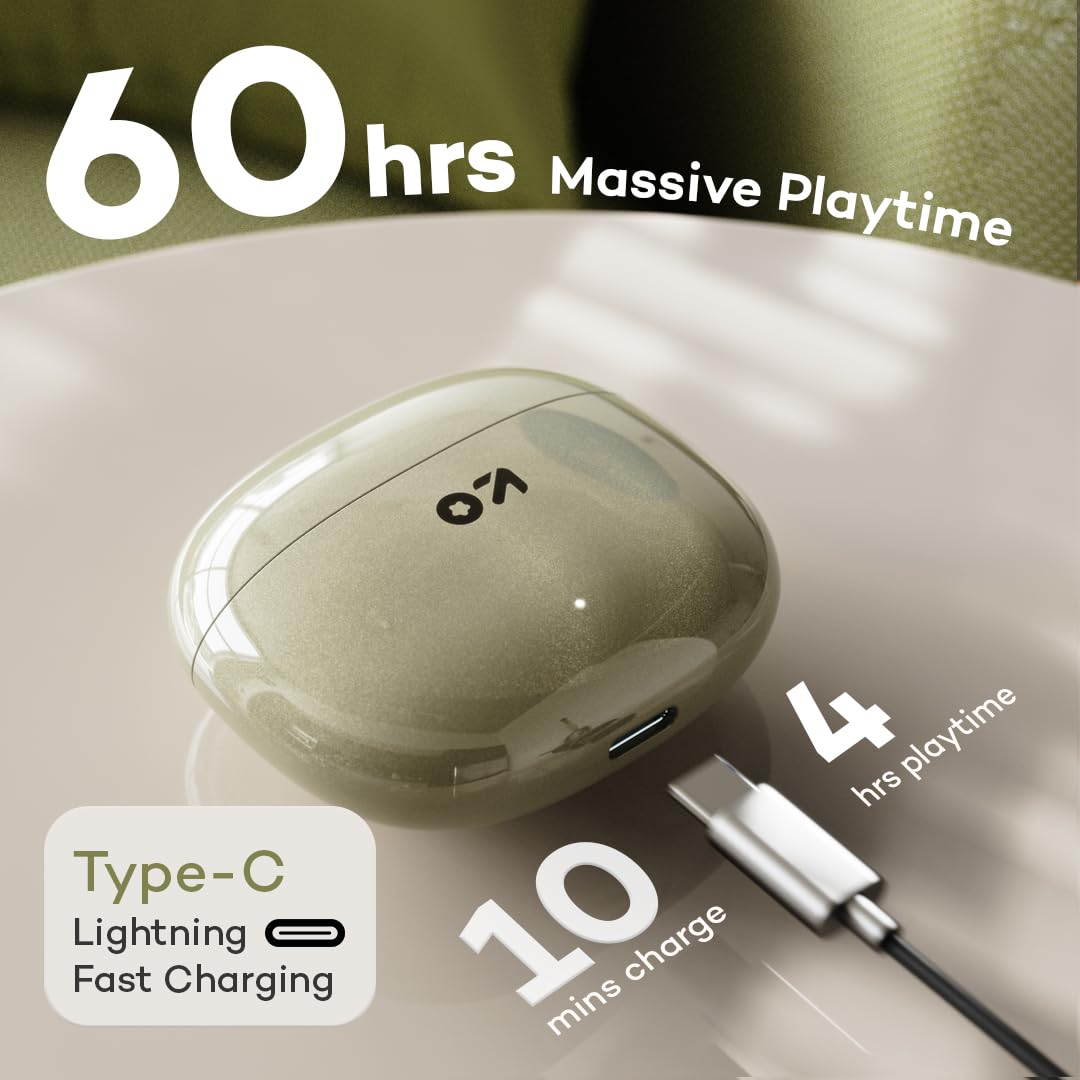
Billede: Illustrerer Type-C hurtigopladningsporten på etuiet og fremhæver de 60 timers massive spilletid, med en bemærkning om, at 10 minutters opladning giver 4 timers spilletid.
2. Parring med din enhed
- Åbn opladningsetuiet. Ørepropperne går automatisk i parringstilstand (indikeret af blinkende LED-lys på ørepropperne).
- Gå til Bluetooth-indstillinger på din smartphone eller Bluetooth-aktiverede enhed.
- Søg efter tilgængelige enheder, og vælg "GOBOULT W60" fra listen.
- Når de er tilsluttet, vil LED-indikatorerne på ørepropperne holde op med at blinke eller slukke.
- Ørepropperne genopretter automatisk forbindelse til den sidst parrede enhed, når de tages ud af etuiet, hvis Bluetooth er aktiveret på enheden.
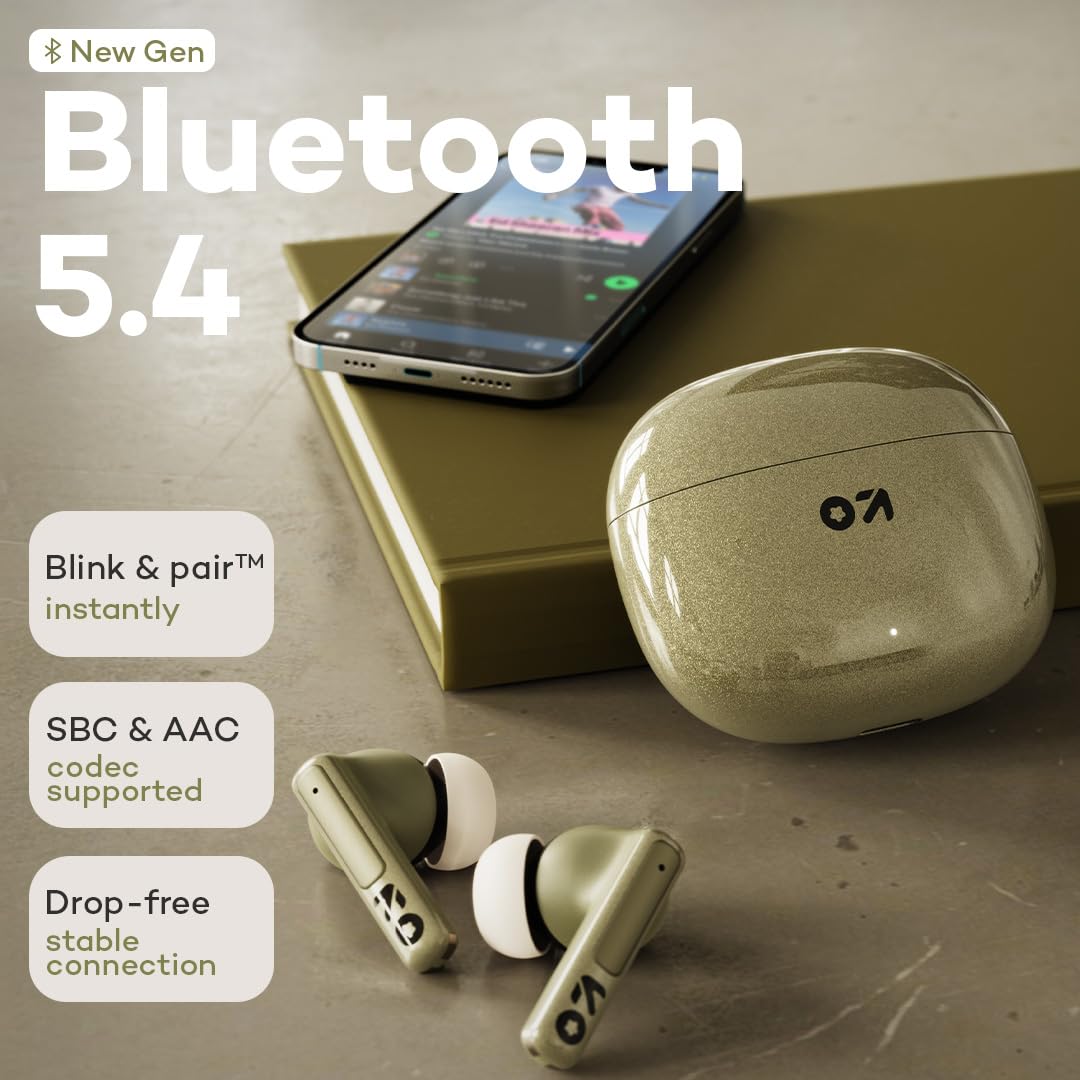
Billede: Fremhæver den nye generation af Bluetooth 5.4-teknologi med vægt på øjeblikkelig "Blink & pair"-funktionalitet, understøttelse af SBC- og AAC-codecs og en stabil forbindelse uden tab.
Betjeningsvejledning
Tryk på kontrolelementer
GOBOULT W60-ørepropperne har intuitive berøringskontroller til nem styring af musik, opkald og stemmeassistent:
| Handling | Venstre øretelefon (L) | Højre øretelefon (R) |
|---|---|---|
| Afspil/pause musik | Enkelt tryk | Enkelt tryk |
| Næste spor | Dobbelttryk | Dobbelttryk |
| Forrige spor | Tredobbelt tryk | Tredobbelt tryk |
| Besvar/afslut opkald | Enkelt tryk | Enkelt tryk |
| Afvis opkald | Langt tryk (2 sekunder) | Langt tryk (2 sekunder) |
| Aktiver Voice Assistant | Langt tryk (3 sekunder) | Langt tryk (3 sekunder) |
| Skift spiltilstand | Quad Tap | Quad Tap |

Billede: Illustrerer funktionen "Tryk for at kommando", der fremhæver brugervenlige berøringskontroller og problemfri multitasking-funktioner i ørepropperne.
Ringer
Quad Mic ENC-systemet sikrer klar kommunikation under opkald:
- Besvarelse / afslutning af opkald: Tryk enkeltvis på en af øretelefonerne.
- Afvisning af opkald: Tryk længe på en af øretelefonerne i 2 sekunder.
- Environmental Noise Cancellation (ENC) reducerer aktivt baggrundsstøj for både dig og personen i den anden ende.

Billede: Fokuserer på ZEN Quad Mic ENC-teknologien og viser de fire mikrofoner, der er designet til at filtrere støj for at give krystalklare opkald.
Spiltilstand (ultralav latenstid)
Aktiver spiltilstand for en synkroniseret audiovisuel oplevelse under spil eller videoafspilning:
- Aktivering: Tryk fire gange på en af øretelefonerne for at slå spiltilstand til/fra.
- Denne tilstand reducerer lydforsinkelsen til 50 ms, hvilket minimerer forsinkelsen mellem handling på skærmen og lyd.

Billede: Illustrerer funktionen med 50 ms ultralav latenstid, der viser dens fordel for jævn, forsinkelsesfri afspilning og præcisionsjusteret lyd til intense kampzoner i spil.
Opretholdelse
Rensning
- Rengør regelmæssigt ørepropperne og opladningsetuiet med en blød, tør og fnugfri klud.
- Fjern ørepropperne, og rengør dem med mild sæbe og vand, hvis det er nødvendigt. Sørg for, at de er helt tørre, før du sætter dem på igen.
- Brug en vatpind eller en lille, blød børste til forsigtigt at rengøre opladningskontakterne på både ørepropperne og etuiet.
- Undgå at bruge slibende materialer, alkohol eller kemiske rengøringsmidler.
Opbevaring
- Når ørepropperne ikke er i brug, skal de altid opbevares i deres opladningsetui for at beskytte dem og holde dem opladede.
- Opbevar enheden et køligt, tørt sted, væk fra ekstreme temperaturer og direkte sollys.
Fejlfinding
Hvis du støder på problemer med dine GOBOULT W60-ørepropper, kan du bruge følgende almindelige løsninger:
| Problem | Mulig løsning |
|---|---|
| Øretelefoner parrer ikke |
|
| Kun én øretelefon virker |
|
| Lav lydstyrke eller dårlig lydkvalitet |
|
| Opladningsproblemer |
|
| Stemmeassistenten svarer ikke |
|
Garanti og support
Dine GOBOULT W60 True Wireless-øretelefoner leveres med en garanti. Se venligst det medfølgende garantikort for detaljerede vilkår og betingelser, herunder garantiperiode og dækning.
For teknisk support, service eller yderligere forespørgsler, kontakt venligst Boults kundeservice via kontaktoplysningerne på dit garantikort eller den officielle Boult-side. webwebsted.
Fabrikant: Boult Audio, Exotic Mile Private Limited
Oprindelsesland: Indien
Yderligere oplysninger
GOBOULT W60 ørepropperne fås i flere farver: Grøn, sort og hvid. Vælg den farve, der bedst matcher din personlige stil.

Billede: Viser GOBOULT W60 ørepropperne og deres opladningsetuier i tre tilgængelige farver: Grøn, sort og hvid.


