1. Introduktion
This manual provides comprehensive instructions for the installation, operation, and maintenance of your XIAOMI Outdoor Camera BW500. Designed for robust outdoor surveillance, this wireless security camera offers high-resolution video, advanced night vision, and smart detection features to enhance your home security.

Image: The XIAOMI Outdoor Camera BW500, a white bullet-style camera, is shown alongside a smartphone displaying its monitoring application. The app interface indicates motion and person detection alerts, highlighting the camera's smart surveillance capabilities.
2. Hvad er der i æsken
Kontroller venligst, at alle komponenter er til stede og i god stand, når du pakker dem ud:
- XIAOMI Outdoor Camera BW500 Unit
- Vægmonteringsbeslag
- USB opladningskabel
- Monteringsskruer og vægankre
- Instruktionsmanual
3. Produktfunktioner

3.1. High-Resolution 2.5K QHD Video
Capture sharp 4 Megapixel footage with a resolution of 2.5K (1440p), ensuring clear and detailed surveillance. The camera features a large, high-quality image sensor for refined images that capture every detail with incredible precision.
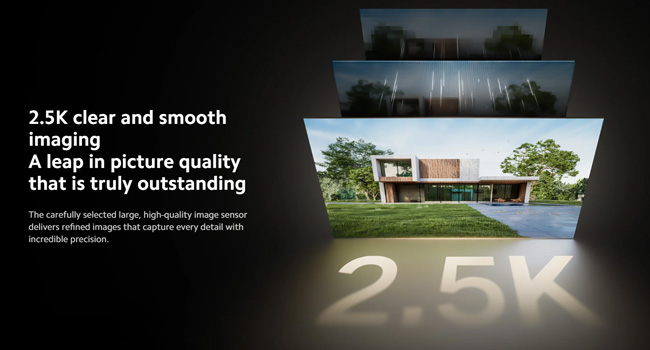
Image: A graphic illustrating the 2.5K clear and smooth imaging capability, showcasing a house with superior picture quality, emphasizing the detailed capture.

3.2. 136° Wide-Angle View & Full-Color Night Vision
The 136° wide-angle lens monitors large outdoor areas, minimizing blind spots. Advanced IR technology provides clear 10-meter night vision, capturing people and objects in full color even in darkness. The larger f/1.6 aperture allows for increased light intake, delivering detailed and clear images even in low-light environments.
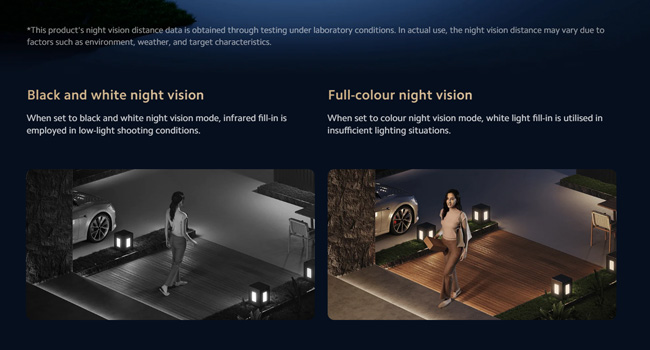
Image: A side-by-side comparison demonstrating the difference between traditional black and white night vision and the camera's full-color night vision, showing significantly more detail and color in the full-color mode.

3.3. Wireless & Long-Lasting Battery with Optional Solar Panel
The camera is completely wireless, powered by a 10000mAh battery that can last up to 6 months under typical usage conditions (≤20 daily triggers). For continuous power without frequent recharges, an optional solar panel (sold separately) can be connected.

Image: The Xiaomi Outdoor Camera BW500 is shown mounted on an exterior wall, with a solar panel positioned on the roof above it, illustrating its compatibility with solar charging for extended operation.

3.4. Built-in 8GB eMMC Storage
The camera includes 8GB of built-in eMMC storage, supporting up to 40 days of continuous playback without requiring an SD card or cloud subscription for basic monitoring. Optional cloud services are available for extended recording retention.

3.5. Smart Motion Alerts & Audio-Visual Deterrent
Receive instant app alerts when movement is detected. The integrated AI human detection reduces false alarms. When a person or vehicle enters the monitored area, an alarm sound is triggered immediately and a white light is turned on to deter potential intruders. The Xiaomi Home app will send a warning message to the owner.

3.6. IP67 vejrbestandigt design
Built for all-weather conditions, the camera boasts an IP67 rating, making it resistant to rain, snow, and dust. This ensures reliable outdoor monitoring year-round.
3.7. Two-Way Audio with Noise Cancellation
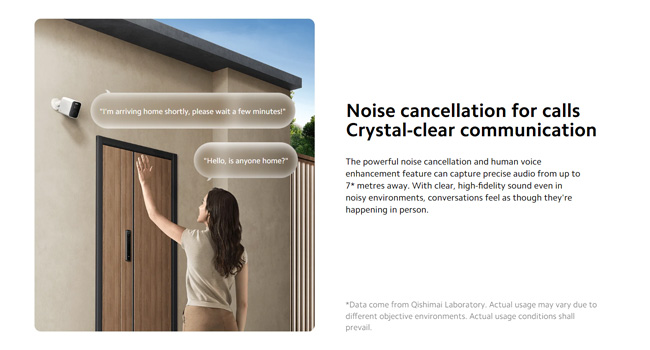
Communicate clearly with visitors or deter intruders using the built-in microphone and speaker. The powerful noise cancellation and human voice enhancement feature capture precise audio from up to 7 meters away, ensuring high-fidelity sound even in noisy environments.
3.8. Smart Home Integration
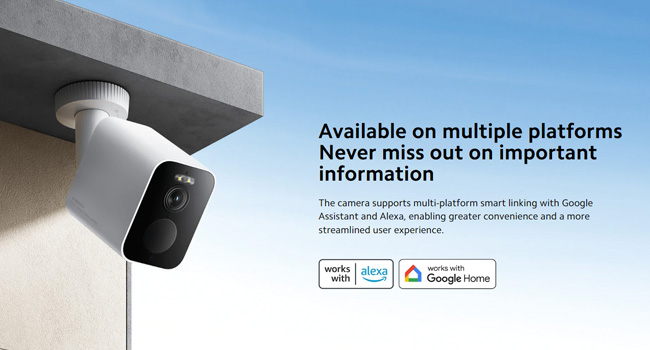
The camera supports multi-platform smart linking with Google Assistant and Alexa, enabling greater convenience and a more streamlined user experience.
4. Opsætning
4.1. Opladning af kameraet
Before initial use, fully charge the camera using the provided USB charging cable. Connect the cable to the camera's charging port and a standard USB power adapter (not included). The indicator light will show charging status.
4.2. Montering af kameraet
Kameraet er designet til vægmontering. Vælg en placering, der giver den ønskede viewmonteringsvinkel og er inden for Wi-Fi-rækkevidde. Sørg for, at monteringsfladen er robust nok til at bære kameraets vægt.
- Position the mounting bracket against the wall at the desired location.
- Mark the drill holes through the bracket.
- Bor forhuller og isæt vægankre om nødvendigt.
- Fastgør monteringsbeslaget til væggen med de medfølgende skruer.
- Attach the camera unit to the mounted bracket and adjust the angle as needed.
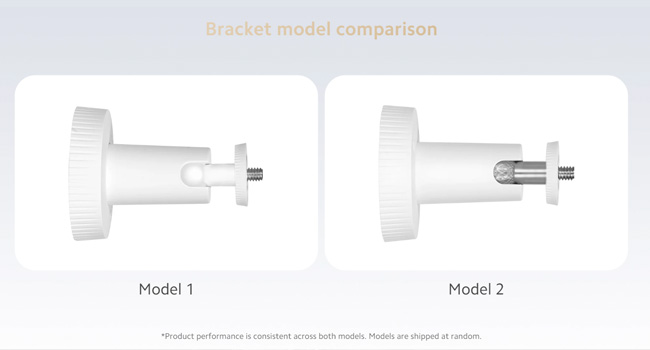
Image: A visual comparison of two possible mounting bracket designs (Model 1 and Model 2) for the camera, both offering the same functionality for installation.
4.3. Connecting to the Xiaomi Home App
To access the camera's features and live feed, you must connect it to the Xiaomi Home app:
- Download the Xiaomi Home app from your smartphone's app store (iOS or Android).
- Opret eller log ind på din Xiaomi-konto.
- Tryk på "+"-ikonet i appen for at tilføje en ny enhed.
- Follow the on-screen instructions to pair your XIAOMI Outdoor Camera BW500 with your Wi-Fi network.
- Ensure your camera is powered on and in pairing mode (refer to the camera's indicator light status).
5. Betjening
5.1. Lev View og optagelse
Open the Xiaomi Home app and select your camera from the device list to access the live video feed. From the live view interface, you can manually record video, take snapshots, and adjust camera settings. Recorded footage is automatically saved to the built-in 8GB eMMC storage.
5.2. Bevægelsesdetektion og advarsler
The camera is equipped with smart motion detection and AI human detection. When motion or a human figure is detected, the camera will:
- Automatically begin recording.
- Send an instant notification to your smartphone via the Xiaomi Home app.
- Activate the built-in siren and white light for deterrence (if enabled in settings).
You can customize motion detection sensitivity and alert preferences within the app settings.
5.3. Tovejslyd
For at bruge tovejslydfunktionen skal du trykke på mikrofonikonet i live-indgangen view interface of the Xiaomi Home app. Speak into your phone's microphone to communicate through the camera's speaker. Release the icon to listen. This feature is useful for speaking with visitors or deterring unwanted guests.
5.4. Playback and Storage Management
Access recorded events through the playback timeline in the Xiaomi Home app. The 8GB eMMC storage provides approximately 40 days of event-based recording under standard conditions. For longer retention or continuous recording, consider subscribing to Xiaomi's cloud storage service.
6. Vedligeholdelse
- Rensning: Regularly wipe the camera lens and body with a soft, dry cloth to remove dust and smudges. Avoid using harsh chemicals or abrasive materials.
- Batteristyring: Monitor the battery level via the app. Recharge the camera promptly when the battery is low to ensure continuous operation. If using a solar panel, ensure it is clean and positioned to receive maximum sunlight.
- Firmwareopdateringer: Keep the camera's firmware updated through the Xiaomi Home app. Firmware updates often include performance improvements, new features, and security enhancements.
7. Fejlfinding
| Spørgsmål | Mulig årsag | Løsning |
|---|---|---|
| Kameraet tænder ikke. | Low battery; charging cable not connected properly. | Fully charge the camera. Ensure the USB cable is securely connected. |
| Kan ikke oprette forbindelse til Wi-Fi. | Incorrect Wi-Fi password; camera too far from router; router issues. | Bekræft Wi-Fi-adgangskoden. Flyt kameraet tættere på routeren. Genstart routeren. Sørg for, at 2.4 GHz Wi-Fi bruges. |
| Dårlig videokvalitet. | Dirty lens; weak Wi-Fi signal; insufficient lighting. | Clean the camera lens. Improve Wi-Fi signal strength. Ensure adequate lighting for optimal image quality. |
| Hyppige falske alarmer. | High motion sensitivity; environmental factors (e.g., moving branches). | Adjust motion detection sensitivity in the app. Utilize AI human detection to filter out non-human movements. |
| Tovejslyd virker ikke. | Microphone/speaker muted in app; app permissions. | Check app settings to ensure audio is enabled. Grant microphone permissions to the Xiaomi Home app on your smartphone. |
8. Specifikationer
| Feature | Detalje |
|---|---|
| Modelnummer | MJSXJ06BY |
| Video opløsning | 2.5K (1440p) |
| Felt af View | 136° vidvinkel |
| Nattesyn | Full-Color, up to 10 meters |
| Batterikapacitet | 10000mAh (up to 6 months battery life) |
| Opbevaring | 8GB eMMC (local), Cloud Storage (optional) |
| Forbindelse | Wi-Fi |
| Vejrbestandighed | IP67 |
| Dimensioner (L x B x H) | 3.78 x 2.36 x 3.35 tommer |
| Vægt | 1.57 pund |
| Strømkilde | Battery Powered (compatible with 5W solar panels) |

Image: A technical drawing of the camera with its precise dimensions labeled in both millimeters and inches, providing a clear understanding of its physical size.
9. Garanti og support
XIAOMI stands behind the quality of the Outdoor Camera BW500. This product comes with dedicated customer support and product support to ensure a seamless experience. For any questions, suggestions, or assistance before, during, or after use, please do not hesitate to contact our support team. We aim to reply within 24 hours and provide the best possible assistance.
Please refer to your purchase documentation or the Xiaomi official webwebstedet for specifikke garantivilkår og kontaktoplysninger.


