1. Introduktion
This manual provides essential information for the proper setup, operation, and maintenance of your realme 14x 5G Smartphone. Please read this guide thoroughly to ensure optimal performance and longevity of your device. Keep this manual for future reference.

Billede 1.1: Forside og bagside view of the realme 14x 5G Smartphone, showcasing dens design og kameramodul.
Hvad er der i æsken
- realme 14x 5G Smartphone
- Telefon etui
- SIM-bakkeudkaster
- USB kabel
- Lynstartguide (separat dokument)
- Safety Information (separate document)
2. Kom godt i gang (opsætning)
2.1 Enhedslayout
Familiarize yourself with the physical components of your realme 14x 5G Smartphone.
- Power knap: Placeret på siden, bruges til at tænde/slukke enheden eller vække/slukke skærmen.
- Lydstyrkeknapper: Placeret på siden, bruges til at justere medie- og opkaldslydstyrke.
- USB-port: Placeret i bunden til opladning og dataoverførsel.
- SIM-kortbakke: Located on the side, for inserting SIM and microSD cards.
- Forreste kamera: Placeret øverst på displayet.
- Bagkameraer: Multiple lenses located on the back of the device.
2.2 Installation af SIM -kort
- Find SIM-kortbakken på siden af din enhed.
- Sæt SIM-kortbakkens udløserværktøj ind i det lille hul ved siden af bakken, og tryk godt ned, indtil bakken springer ud.
- Placer dit/dine Nano-SIM-kort og/eller microSD-kort i bakken med de gyldne kontakter nedad, og sørg for, at de er korrekt justeret.
- Sæt forsigtigt bakken tilbage i telefonen, indtil den klikker på plads.
2.3 Første opstart og opsætning
- Tryk og hold tænd/sluk-knappen nede, indtil realme-logoet vises.
- Følg instruktionerne på skærmen for at fuldføre den indledende opsætning, herunder valg af sprog, Wi-Fi-forbindelse og opsætning af din Google-konto.
2.4 Opladning af enheden
Connect the provided USB cable to the phone's USB port and the other end to a compatible power adapter. Plug the adapter into a wall outlet. The battery indicator on the screen will show charging status.

Image 2.1: The realme 14x 5G Smartphone connected to a charger, illustrating its 5000mAh battery and estimated usage durations for calls, Instagram og YouTube.
3. Using Your Device (Operating)
3.1 Skærmfunktioner
The realme 14x 5G features a 6.67-inch display with a 120Hz refresh rate for smooth visuals. It includes 10 visual protection modes to enhance eye comfort.

Image 3.1: The realme 14x 5G display highlighting its 120Hz refresh rate and various visual comfort settings like Black and White Display, Paper-like Display, and Scheduled Eye Comfort.
3.2 Kamerabetjening
The device is equipped with a 50MP AI Camera system. This camera enhances details in various scenes, from architecture to landscapes, providing a reliable shooting experience.

Image 3.2: Close-up of the realme 14x 5G camera module, detailing its 50MP AI Camera capabilities and AI Clear Face feature for improved portraits.
3.3 Ydeevne og lagring
The realme 14x 5G is powered by the MediaTek Dimensity 6300 5G chipset, an advanced 6nm octa-core processor with clock speeds up to 2.4GHz. It comes with 8GB of RAM and 256GB of internal storage, ensuring efficient multitasking and ampplads til dine data.

Image 3.3: Visual representation of the MediaTek Dimensity 6300 5G chipset, highlighting its 6nm process, 50% GPU performance increase, 8-core architecture, and 11% power-efficiency enhancements.

Image 3.4: Diagram illustrating the 8GB of dynamic RAM and 256GB of ROM, emphasizing the phone's capacity for fast multitasking.
3.4 Forbindelse
The device supports 5G connectivity for faster mobile data speeds. It also includes standard connectivity options:
- Wi-Fi: Opret forbindelse til trådløse netværk for at få internetadgang.
- Bluetooth: Kombiner med trådløst tilbehør som hovedtelefoner og højttalere.
- GPS: Til lokationstjenester og navigation.
- NFC: Til kontaktløs betaling og hurtig parring med kompatible enheder.

Image 3.5: Illustration of the realme 14x 5G Smartphone's 360° NFC capability, allowing multiple cards to be stored and accessed from the phone.
3.5 Operating System
The realme 14x 5G runs on Android 15 with realme UI 6.0, offering a user-friendly interface with various customization options and features.

Billede 3.6: Overview of realme UI 6.0 features, including new icon design, wallpaper depth effects, and improved notification and quick settings separation.
4. Pleje og vedligeholdelse
4.1 Physical Protection
The realme 14x 5G features ArmorShell Protection and an IP64 rating, providing resistance against dust and splashes. This enhances the device's durability for daily use.

Image 4.1: The realme 14x 5G Smartphone partially submerged in water, illustrating its IP64 water and dust resistance for daily life protection.
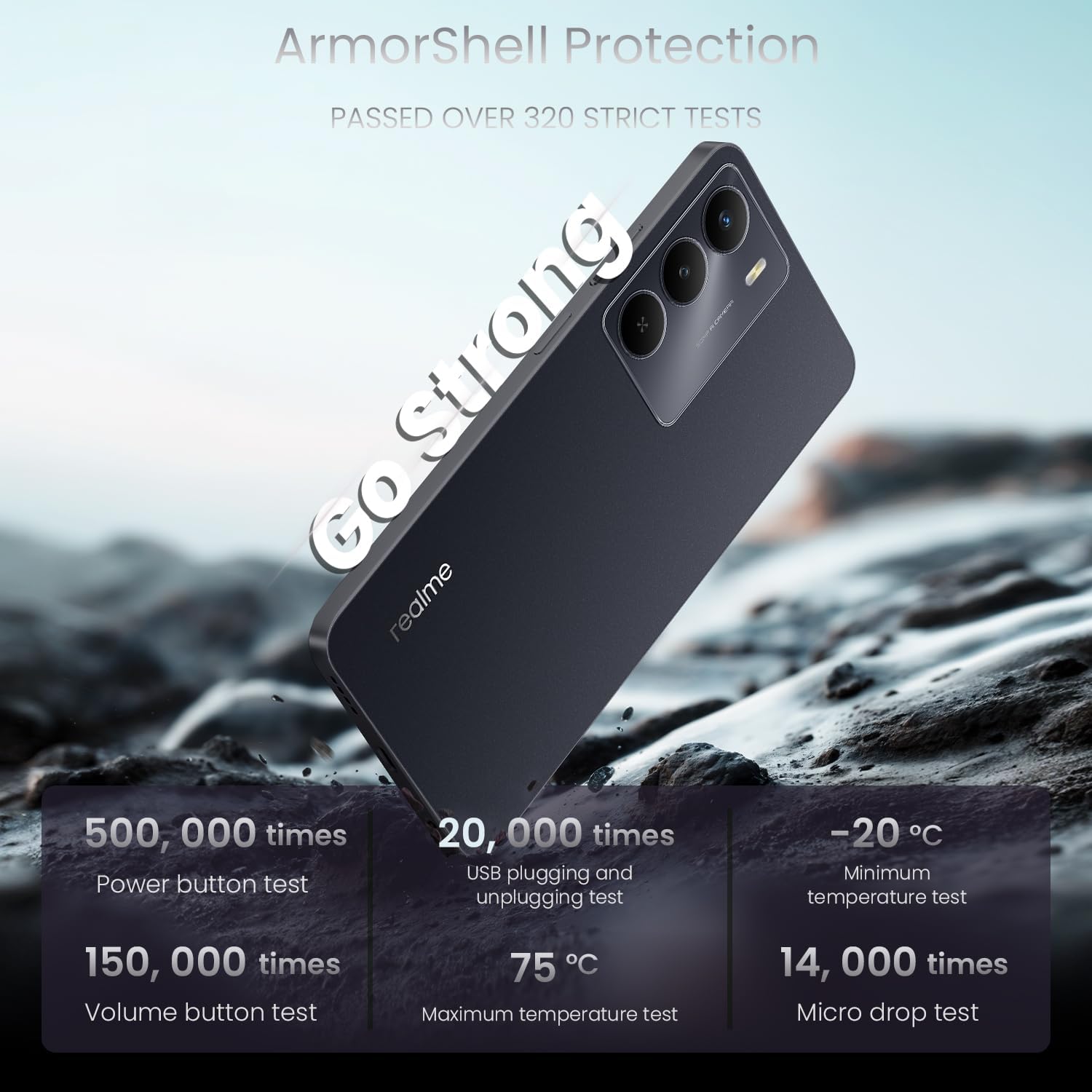
Image 4.2: The realme 14x 5G Smartphone highlighting its ArmorShell Protection, with text indicating it passed over 320 strict tests, including power button, USB plugging, volume button, temperature, and micro drop tests.
4.2 Rengøringsretningslinjer
- Brug en blød, fnugfri klud til at rengøre telefonens skærm og kabinet.
- Undgå at bruge skrappe kemikalier, slibende materialer eller aerosolspray.
- Til genstridige pletter, let dampRengør kluden med vand eller en skærmrens, der er specielt designet til elektronik.
4.3 Battery Longevity Tips
- Undgå ekstreme temperaturer, da de kan forringe batteriets levetid.
- Lad ikke telefonen oplade i længere tid, efter den har nået 100%.
- Use the original charger and cable provided with the device.
5. Fejlfinding
This section addresses common issues you might encounter with your realme 14x 5G Smartphone.
5.1 Enheden tænder ikke
- Sørg for, at batteriet er opladet. Tilslut telefonen til opladeren, og vent et par minutter, før du forsøger at tænde den igen.
- Tryk på tænd/sluk-knappen og hold den nede i mindst 10-15 sekunder for at udføre en tvungen genstart.
5.2 Skærmen reagerer ikke
- Restart the device by holding the Power button. If the screen is completely unresponsive, perform a forced restart as described above.
- Sørg for, at skærmen er ren og fri for fugt eller snavs.
5.3 App Issues (Crashing, Freezing)
- Luk og genåbn den problematiske app.
- Clear the app's cache and data through the phone's settings (Settings > Apps > [App Name] > Storage > Clear Cache/Clear Data).
- Opdater appen til den nyeste version fra Google Play Butik.
- Hvis problemet fortsætter, skal du afinstallere og geninstallere appen.
5.4 Connectivity Problems (Wi-Fi, Bluetooth, 5G)
- Toggle Wi-Fi, Bluetooth, or Mobile Data off and on again.
- Genstart din telefon.
- Genstart din router for Wi-Fi.
- For Bluetooth, ensure the device you are trying to connect to is in pairing mode and within range.
- For 5G, ensure you are in an area with 5G coverage and your plan supports 5G.
6. Specifikationer
Detailed technical specifications for the realme 14x 5G Smartphone (Model RMA2306).
| Feature | Specifikation |
|---|---|
| Modelnavn | realme 14X |
| Varemodelnummer | RMA2306 |
| Produktdimensioner | 1.28 x 0.83 x 0.81 tommer |
| Varens vægt | 1.47 ounces (41.8 gram) |
| Operativsystem | Android 15 |
| CPU model | MediaTek Dimensity 6300 (Octa-Core) |
| CPU hastighed | 2.4 GHz |
| Skærmstørrelse | 6.67 tommer |
| Opdateringshastighed | 120 Hz |
| Installeret RAM-hukommelsesstørrelse | 8 GB |
| Hukommelseslagringskapacitet | 256 GB |
| Batterikapacitet | 5000 mAh |
| Batteristyrke | 45 wattimer |
| Forbindelsesteknologier | Bluetooth, USB, Wi-Fi, 5G |
| Særlige funktioner | Water Resistant (IP64), ArmorShell Protection, GPS, NFC |
| Kamerafunktioner | 50MP AI Rear Camera, Front Camera |
| Farve | Carbon Black |
| Fabrikant | realme |
7. Garanti og support
7.1 Garantioplysninger
Your realme 14x 5G Smartphone is covered by a manufacturer's warranty. Please refer to the warranty card included in your product packaging for specific terms, conditions, and duration. Keep your proof of purchase for warranty claims.
7.2 Kundesupport
For further assistance, technical support, or service inquiries, please visit the official realme support website or contact their customer service. Contact details can typically be found on the realme official webwebstedet eller i garantidokumentationen.


