Indledning
Thank you for choosing the Mistral 42" DC Blade Free Fan. This user manual provides essential information for the safe operation, maintenance, and troubleshooting of your new fan. Please read this manual thoroughly before use and retain it for future reference.
Vigtige sikkerhedsinstruktioner
Følg altid grundlæggende sikkerhedsforanstaltninger ved brug af elektriske apparater for at reducere risikoen for brand, elektrisk stød og personskade.
- Læs alle instruktioner, før du bruger dette apparat.
- Sørg for, at strømforsyningen voltage stemmer overens med typeskiltet på apparatet.
- Betjen ikke en ventilator med en beskadiget ledning eller stik.
- Do not place the fan near heat sources or in direct sunlight.
- Hold børn og kæledyr væk fra ventilatoren under drift.
- Unplug the fan from the power outlet when not in use or before cleaning.
- Stik ikke fingre eller fremmedlegemer ind i nogen af ventilatorens åbninger.
- Dette apparat er kun til husholdningsbrug.
Pakkens indhold
Kontroller venligst indholdet af din pakke. Hvis der mangler eller er beskadigede varer, skal du kontakte kundesupport.
- Mistral 42" DC Blade Free Fan Unit
- Fjernbetjening
- AC Adapter
- Brugervejledning (dette dokument)
Opsætning
1. Montering
The Mistral 42" DC Blade Free Fan requires simple assembly.
- Fjern forsigtigt alle komponenter fra emballagen.
- Placer ventilatorbasen på en stabil, plan overflade.
- Ensure the main fan body is securely seated onto the base.
- Connect the AC adapter to the power input port on the fan, then plug it into a standard electrical outlet.

Figur 1: Forside view of the Mistral 42" DC Blade Free Fan.
2. Wi-Fi Setup (Mayer Home App)
To utilize the Wi-Fi features and voice control, download the "Mayer Home App" on your smartphone.
- Download the "Mayer Home App" from your device's app store (iOS or Android).
- Register or log in to your Mayer Home account.
- Follow the in-app instructions to add your Mistral fan. This typically involves putting the fan into pairing mode (refer to the app or fan's display for specific instructions) and connecting it to your home Wi-Fi network.
Betjeningsvejledning
Kontrolpanel og fjernbetjening
The fan can be operated using the full touch screen control panel on the unit or the included remote control.

Figure 2: Mistral Fan with Remote Control.
Grundlæggende funktioner:
- Tænd/sluk: Tryk på tænd/sluk-knappen på kontrolpanelet eller fjernbetjeningen.
- Blæserhastighed: Adjust through 12 fan speeds using the '+' and '-' buttons.
- Tilstande: Cycle through 5 modes: Fresh, Nature, Sleep, Baby, and Smart. Each mode adjusts airflow patterns for different comfort levels.
- oscillation: Activate left-right oscillation with options for 30, 60, or 120 degrees.
- Timer: Set a pre-set on/off timer for up to 12 hours.
Smart Control (Wi-Fi & Voice)
Once connected to the Mayer Home App, you can control your fan remotely and integrate with voice assistants.
- Mayer Home App: Control all fan functions from your smartphone, including power, speed, modes, oscillation, and timer settings.
- Stemmestyring: The fan works with Google Home and Amazon Alexa. Link your Mayer Home account to your voice assistant app and use voice commands to operate the fan (e.g., "Hey Google, turn on the fan," "Alexa, set fan speed to 5").
Opretholdelse
Regelmæssig rengøring og vedligeholdelse vil sikre optimal ydeevne og levetid for din ventilator.
Rengøring af blæseren
- Tag altid ventilatorens stik ud af stikkontakten inden rengøring.
- Brug en blød, damp klud til at tørre ventilatorens udvendige overflader af. Brug ikke slibende rengøringsmidler eller opløsningsmidler.
- For the Hepa 13 filter located at the sides, gently remove it and clean according to the instructions provided with the filter or by gently vacuuming. Do not wash the filter with water.
- Sørg for, at alle dele er helt tørre, før du sætter ventilatoren i stikkontakten igen.
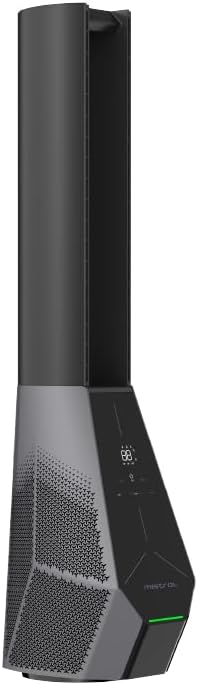
Figur 3: Side view showing the filter location.
Fejlfinding
If you encounter issues with your fan, refer to the following common problems and solutions.
| Problem | Mulig årsag | Løsning |
|---|---|---|
| Ventilatoren tænder ikke. | Ingen strømforsyning; Tænd/sluk-knappen er ikke trykket ned. | Check if the power cord is securely plugged in. Press the power button on the unit or remote. |
| Fjernbetjening virker ikke. | Batterierne er døde eller isat forkert; Blokering mellem fjernbetjening og ventilator. | Replace batteries. Ensure there is a clear line of sight to the fan's receiver. |
| Wi-Fi-forbindelsen mislykkes. | Incorrect Wi-Fi password; Fan too far from router; Router issues. | Double-check Wi-Fi password. Move fan closer to router. Restart your Wi-Fi router. Ensure you are connecting to a 2.4GHz network. |
| Ventilatoren laver usædvanlig lyd. | Obstruction in air intake/outlet; Fan not on a stable surface. | Unplug and check for any foreign objects. Place the fan on a flat, stable surface. |
Specifikationer
| Feature | Detalje |
|---|---|
| Model | MBFAP4236DRW |
| Voltage | 100-240V~ 50/60Hz |
| Wattage | 36W |
| Luftvolumen | 35 m³/min |
| Max luftgennemstrømning | 15 m/s |
| Produktdimensioner (L*B*H) | 237.5 * 300 * 1067 mm |
| Nettovægt | 5.4 kg |
| Motortype | DC børsteløs motor |
| Kontrollere | Full Touch Screen Control Panel, Remote, Wi-Fi (Mayer Home App), Voice Control (Google Home & Amazon Alexa) |
| Filtertype | Hepa 13 Filter |
| oscillation | 30/60/120 Degree Left-Right |
| Timer | 12 Hours Pre-set On/Off |
Garantioplysninger
The Mistral 42" DC Blade Free Fan (Model: MBFAP4236DRW) comes with a comprehensive warranty:
- 1 år general warranty on the appliance.
- En yderligere 3 år warranty specifically for the motor only.
Please retain your proof of purchase for warranty claims. The warranty covers manufacturing defects and malfunctions under normal use. It does not cover damage caused by misuse, accidents, unauthorized repairs, or normal wear and tear.
Kundesupport
For any inquiries, technical assistance, or warranty claims, please contact Mistral customer support.
Webwebsted: www.mistral.com.sg
E-mail: support@mistral.com.sg
When contacting support, please have your product model number (MBFAP4236DRW) and proof of purchase ready.


