1. Introduktion
Tak for købetasing the EONON X3UJ 1DIN Car Audio System. This manual provides detailed instructions for the installation, operation, and maintenance of your new device. Please read this manual thoroughly before use to ensure proper functionality and to maximize your user experience. Keep this manual for future reference.

2. Produktfunktioner
The EONON X3UJ is a versatile 1DIN car audio system designed to enhance your in-car entertainment and connectivity. Key features include:
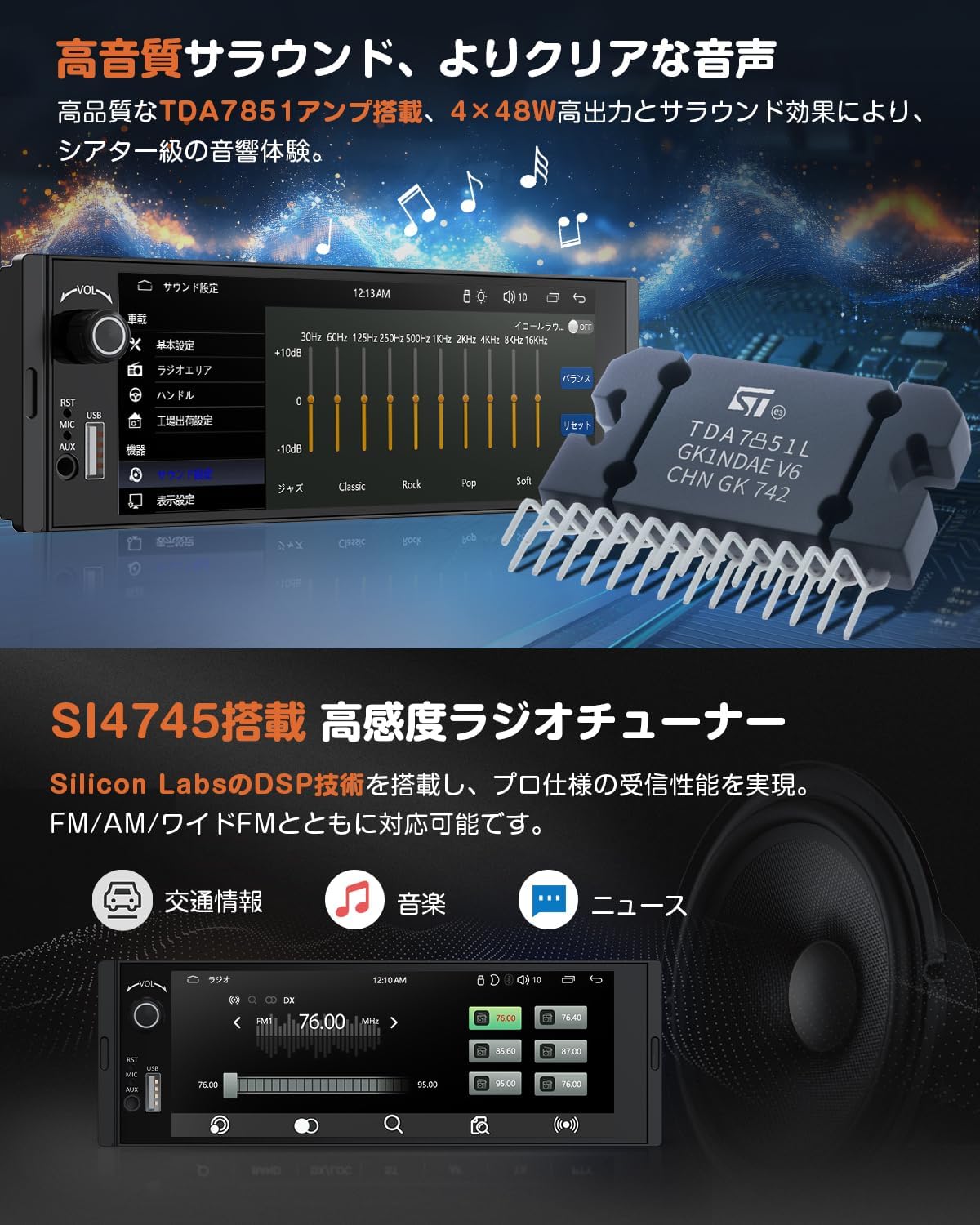
- High-Quality Audio & Radio: Equipped with a TDA7851 amplifier for 4x48W high output and surround sound effects, offering a theater-level audio experience. A 10-band EQ allows for detailed sound customization. The SI4745 high-sensitivity radio tuner ensures stable reception for FM/AM/Wide FM, providing access to traffic information, music, and news.
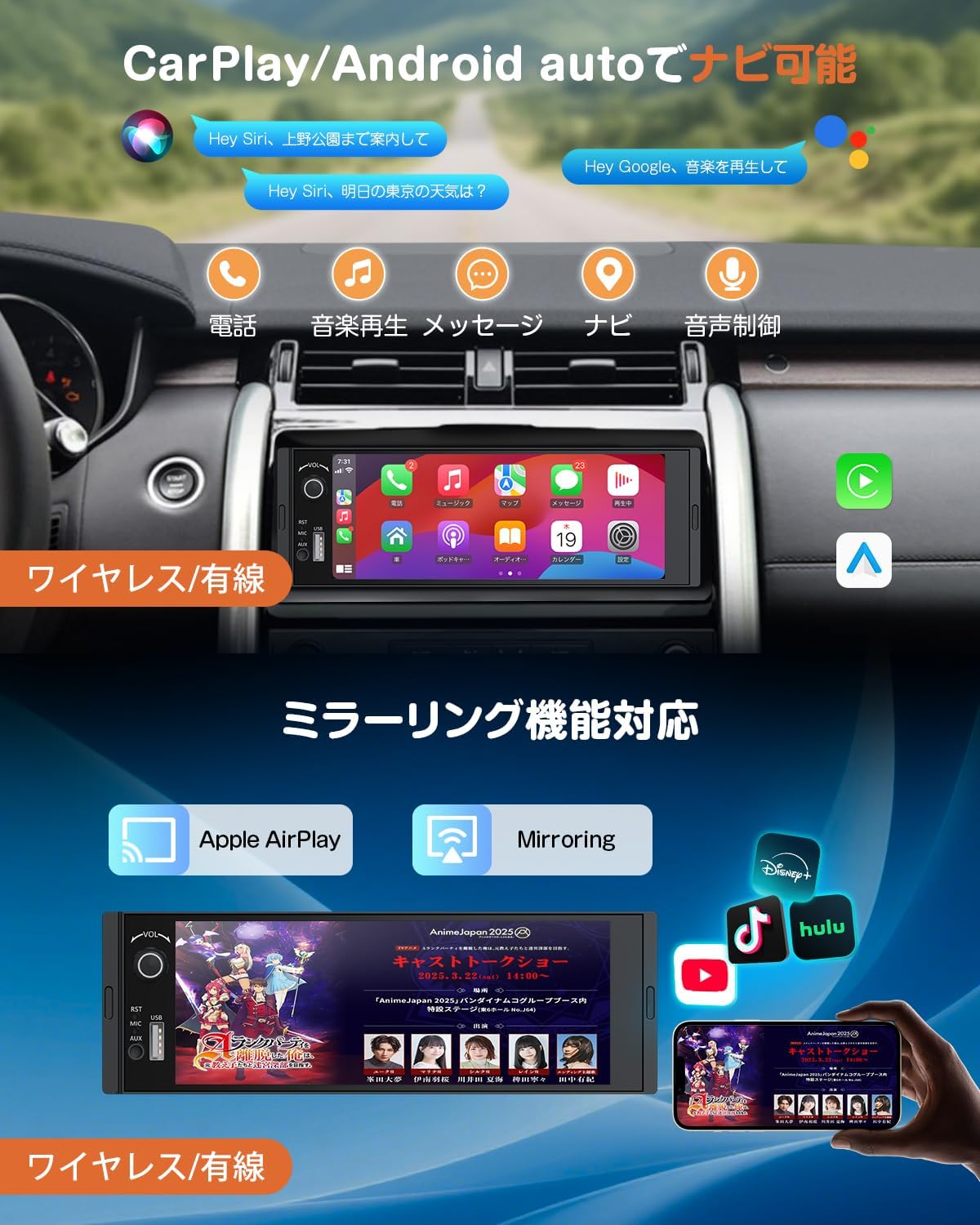
- Smart tilslutning: Supports wireless and wired CarPlay/Android Auto for seamless smartphone integration, enabling navigation, music, weather forecasts, and voice assistant access via touch panel or voice commands. Mirroring function allows displaying smartphone content (e.g., maps, videos) on the car audio screen.
- Bluetooth 5.3: Features Bluetooth 5.3 for stable music playback and phonebook synchronization. Supports hands-free calling with an external microphone for clear, noise-free conversations while driving.
- Ratstyring: Compatible with steering wheel controls, allowing safe operation of volume, track changes, and channel selection without removing hands from the steering wheel.
- Backup kamera: Includes an IP68 waterproof backup camera that automatically displays the rear view when the vehicle is in reverse gear, enhancing parking safety.
- Multifunctional USB Port: Provides a USB port for wired CarPlay/Android Auto connection, smartphone charging (not fast charging), and USB memory playback of music, videos, and images. Supports 8-128GB USB memory.
- Multi-Terminal Output: Offers 3-system output for easy connection to external displays or speakers, and 2-system input for flexible external device connections, allowing shared viewing and audio across multiple devices.
- 6.36-inch IPS Touch Panel & Physical Knob: Features a capacitive multi-touch IPS screen with 1280*480p resolution for smooth and precise operation. A physical volume knob provides convenient control.
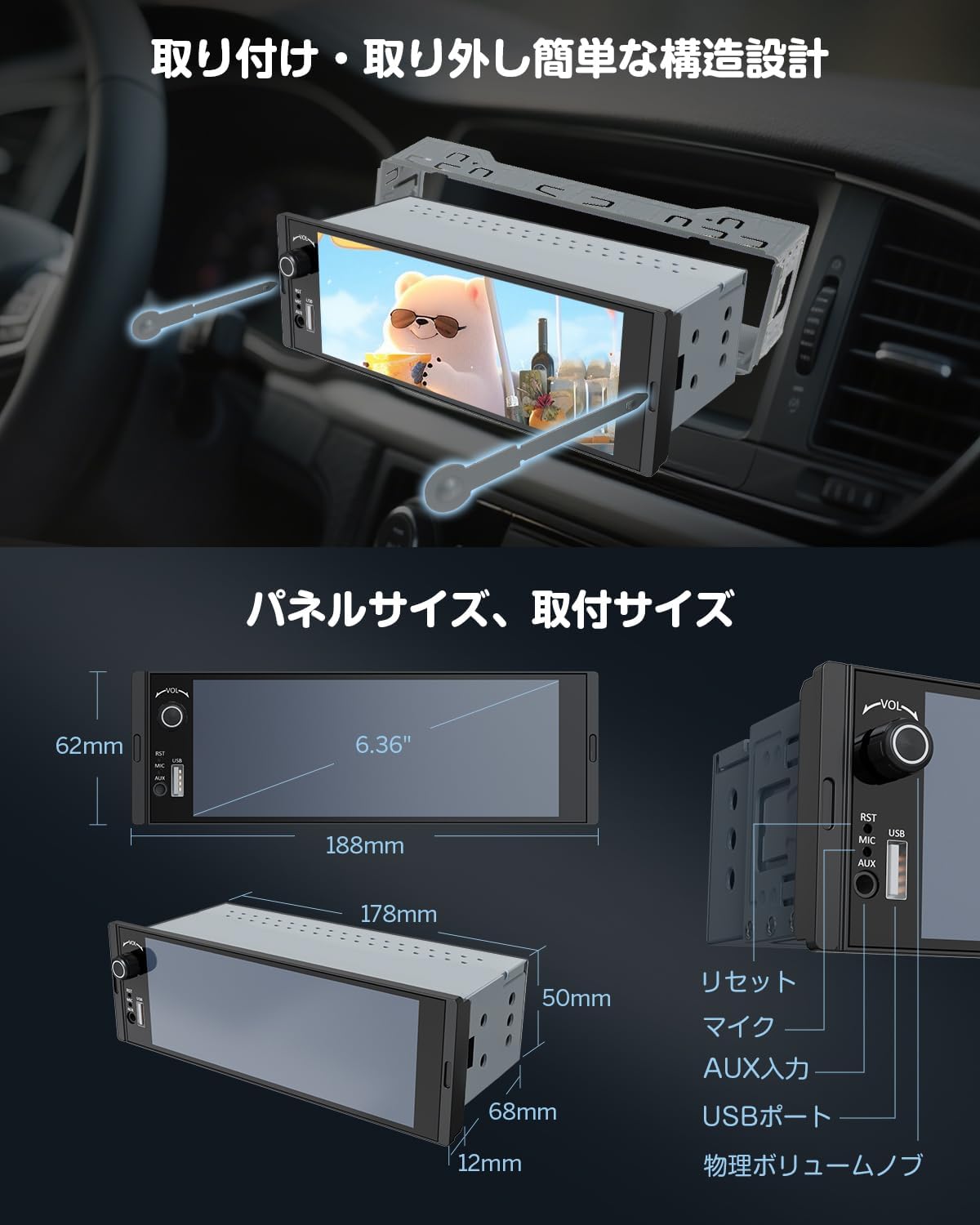
- Easy Installation Design: Designed for simple installation and removal, with two standard removal keys included.

3. Opsætning
3.1. Installation
The EONON X3UJ is designed for 1DIN car audio slots. Due to variations in vehicle models and dashboard configurations, professional installation is highly recommended. Ensure the unit fits correctly into your vehicle's 1DIN space. The unit features an easy installation/removal design using the provided keys.
- Kontrol før installation: Verify the dimensions of the unit against your car's dashboard opening.
- Montering: Secure the unit using the provided mounting screws.
- Fjernelse: Insert the two removal keys into the slots on either side of the unit until they click, then gently pull the unit out.
3.2. Ledningsdiagram
Refer to the detailed wiring diagram below for correct connections. Incorrect wiring can damage the unit or your vehicle's electrical system. If you are unsure, consult a professional installer.

3.3. Medfølgende tilbehør
The following items are included in your EONON X3UJ package:
- Strømkabel x 1
- 15A Fuse x 1
- External Microphone x 1
- Brugsanvisning x 1
- Backup Camera x 1
- Speaker Output Cable x 1
- Removal Keys x 2
- Monteringsskruer x 2

4. Betjeningsvejledning
4.1. Grundlæggende betjening
- Tænd/sluk: The unit typically powers on with the vehicle's ignition. To manually turn off, press and hold the power button (usually integrated with the volume knob).
- Lydstyrkekontrol: Use the physical volume knob on the front panel to adjust the audio level.
4.2. Radio (FM/AM/Wide FM)
Access the radio function from the main menu. Use the on-screen controls to scan for stations, save presets, and switch between FM, AM, and Wide FM bands. The SI4745 tuner provides stable reception.
4.3. Bluetooth-forbindelse
- Parring: Gå til Bluetooth-indstillingerne på enheden, og aktiver Bluetooth på din smartphone. Søg efter the EONON X3UJ device and pair them.
- Håndfri opkald: Once paired, you can make and receive calls directly through the unit. The external microphone ensures clear voice transmission.
- Bluetooth lyd: Stream music from your smartphone to the car audio system wirelessly.

4.4. CarPlay og Android Auto
Connect your smartphone to enable CarPlay or Android Auto functionalities.
- Kablet forbindelse: Connect your smartphone to the unit's USB port using a compatible USB cable.
- Trådløs forbindelse: For wireless CarPlay/Android Auto, ensure your smartphone supports 5GHz Wi-Fi and has the latest Android Auto app installed (for Android Auto).
- Funktioner: Access navigation, music, messages, and voice assistants (Siri, Google Assistant) directly from the unit's screen.
4.5. Mirroring Function
The mirroring function allows you to display your smartphone's screen on the EONON X3UJ. This can be done via wired or wireless connection.
- Anvendelse: Ideel til viewing maps, photos, or videos from your phone.
- Note: Due to copyright restrictions, some apps like Netflix may not support mirroring.
4.6. USB-medieafspilning
Insert a USB memory device (8-128GB) into the USB port to play various media files.
- Understøttede billedformater: JPEG, BMP, PNG
- Understøttede videoformater: MPG, DAT, TS, AVI, MP4, MOV, 3GP, ASF, VOB, MKV, FLV, RM, RMVB
- Understøttede lydformater: MP3, WMA, WAV, OGG, AAC, FLAC, APE

4.7. Bakkamera
When the vehicle is shifted into reverse gear, the unit will automatically switch to display the rear view from the connected backup camera. This feature enhances safety during parking maneuvers.
4.8. Ratbetjening
If your vehicle supports steering wheel controls, you can configure them to operate the EONON X3UJ. This allows you to adjust volume, change tracks/channels, and manage calls without distraction.
- Opsætning: Access the steering wheel control settings in the unit's menu. Follow the on-screen instructions to program each button.

4.9. Audio Settings (EQ)
Utilize the 10-band equalizer to fine-tune the audio output to your preference. Adjust various frequency bands to achieve your desired sound profile.
5. Vedligeholdelse
To ensure the longevity and optimal performance of your EONON X3UJ car audio system, follow these maintenance guidelines:
- Rengøring af skærmen: Brug en blød, fnugfri klud til forsigtigt at tørre berøringsskærmen af. Ved genstridige pletter, tør let afampRengør kluden med vand eller et skærmsikkert rengøringsmiddel. Undgå skrappe kemikalier eller slibende materialer.
- Generel rengøring: Hold enheden fri for støv og snavs. Brug en blød børste eller trykluft til at rengøre omkring knapper og porte.
- Temperatur: Avoid exposing the unit to extreme temperatures, both hot and cold, as this can affect its electronic components.
- Væskekontakt: Prevent any liquids from entering the unit. In case of accidental spills, immediately power off the unit and allow it to dry completely before use.
- Kabelforbindelser: Kontrollér regelmæssigt alle kabelforbindelser for at sikre, at de er fastgjorte og fri for skader.
6. Fejlfinding
If you encounter issues with your EONON X3UJ, refer to the following common problems and solutions:
| Problem | Mulig årsag | Løsning |
|---|---|---|
| Ingen strøm | Løs strømforbindelse, sprunget sikring, problem med bilbatteri. | Check power cables, inspect the 15A fuse (replace if blown), ensure vehicle battery is charged. |
| Ingen lyd | Volume too low, mute activated, incorrect audio source, loose speaker wires. | Increase volume, check mute status, select correct audio source, verify speaker connections. |
| Bluetooth forbinder ikke | Bluetooth off on unit/phone, device not in pairing mode, interference. | Ensure Bluetooth is enabled on both devices, put unit in pairing mode, try re-pairing, move closer to the unit. |
| CarPlay/Android Auto virker ikke | Incorrect USB cable, phone not compatible, app not updated, wireless connection issues. | Use original/certified USB cable, check phone compatibility, update app, ensure 5GHz Wi-Fi for wireless. |
| Bakkamera vises ikke | Loose camera connection, reverse trigger wire not connected, faulty camera. | Check camera cable, verify reverse trigger wire connection, test camera functionality. |
| Touchscreen reagerer ikke | Softwarefejl, snavset skærm, fysisk skade. | Restart the unit, clean the screen, if issue persists, contact support. |
If the problem persists after trying these solutions, please contact EONON customer support for assistance.
7. Specifikationer
| Feature | Detalje |
|---|---|
| Mærkenavn | Eonon |
| Modelnummer | X3UJ |
| Kompatible enheder | Smartphones |
| Farve | Sort |
| Batteribrug | Ingen |
| Fabrikant | EONON |
| Andre funktioner | IPS Touch Screen, Wireless/Wired Android Auto+CarPlay Compatible |
| Forbindelsesteknologi | Bluetooth, USB |
| Skærmstørrelse | 6.36 tommer |
| Produktdimensioner | 7 x 17.8 x 5 cm |
| Varens vægt | 0.5 kilo |
| Controller type | Mekanisk knap |
| Connector Type | USB Type-A |
| Lydudgangstilstand | Omgive |
8. Garanti og support
EONON products are designed for reliability and performance. For warranty information, please refer to the warranty card included with your product or visit the official EONON website. If you require technical assistance, troubleshooting, or have questions about your EONON X3UJ, please contact EONON customer support. Details can typically be found on the EONON webwebstedet eller i din købsdokumentation.


