1. Vigtige sikkerhedsoplysninger
Please read all instructions carefully before using this monitor. Keep this manual for future reference.
- Udsæt ikke skærmen for regn eller fugt for at undgå brand- eller stødfare.
- Åbn ikke skærmen casing. Der er ingen dele indeni, som brugeren kan servicere. Overlad al service til kvalificeret servicepersonale.
- Placer skærmen på en stabil, plan overflade for at forhindre den i at falde.
- Sørg for tilstrækkelig ventilation omkring skærmen. Bloker ikke ventilationsåbningerne.
- Brug kun den strømadapter, der følger med skærmen.
- Tag stikket ud af stikkontakten, hvis skærmen ikke skal bruges i længere tid.
2. Pakkens indhold
Bekræft at alle varer er til stede i din pakke:
- CRUA 34-inch Gaming Monitor
- DP kabel
- Monitor Base and Support
- Brugervejledning (dette dokument)
- Strømadapter
3. Opsætningsvejledning
3.1 Samling af stativet
- Tag forsigtigt skærmen ud af emballagen, og opbevar den beskyttet på en blød overflade.
- Attach the monitor support arm to the monitor panel.
- Secure the base to the support arm using the provided screws.
- Placer den samlede skærm på et stabilt bord.
3.2 Tilslutning af din skærm
The monitor features multiple input ports for versatile connectivity.

Image: Rear panel connectivity options.
- HDMI-forbindelse: Connect one end of an HDMI cable (not included) to your computer's HDMI output and the other end to one of the monitor's HDMI 2.0 ports.
- DisplayPort (DP)-forbindelse: Connect one end of the supplied DP cable to your computer's DP output and the other end to one of the monitor's DP 1.4 ports.
- Lydudgang: For external speakers or headphones, connect a 3.5mm audio cable (not included) from your audio device to the monitor's 3.5mm Audio Out port. Note: This monitor does not have built-in speakers.
- Strømtilslutning: Connect the power adapter to the monitor's DC input port, then plug the adapter into a power outlet.
3.3 Vægmontering
This monitor supports VESA wall mounting (100mm x 100mm) for flexible installation.

Image: VESA mount compatibility.
- Fjern stativet fra skærmen.
- Attach a VESA-compatible wall mount bracket (not included) to the monitor using appropriate screws.
- Follow the instructions provided with your wall mount for secure installation.
4. Betjeningsvejledning
4.1 Tænd/sluk
Tryk på tænd/sluk-knappen på skærmen for at tænde eller slukke den. Strømindikatorlampen lyser, når skærmen er tændt.
4.2 On-Screen Display (OSD) menu
Use the control buttons (typically located on the back or bottom of the monitor) to navigate and adjust settings in the OSD menu. Common settings include:
- Billedindstillinger: Lysstyrke, kontrast, skarphed, farvetemperatur.
- Inputkilde: Vælg mellem HDMI- og DisplayPort-indgange.
- Skærmindstillinger: Aspect Ratio, Overdrive.
- Lydindstillinger: Volume for the 3.5mm audio output.
- Spilindstillinger: FreeSync, Crosshair, Response Time.
4.3 Optimizing Display Performance
This monitor offers advanced features for an enhanced viewoplevelse:
- 120 Hz opdateringshastighed: For smooth visuals, especially in fast-paced content. Ensure your graphics card and system settings are configured to output at 120Hz.
- AMD FreeSync: Activate FreeSync in the OSD menu and your graphics card control panel to synchronize the monitor's refresh rate with your GPU's frame rate, reducing screen tearing and stuttering.
- WQHD (3440x1440P) Resolution: Provides sharp detail and expanded workspace.
- IPS Panel with Wide Color Gamut: Enjoy accurate colors with 130% sRGB and 98% DCI-P3 coverage.
- Blåt lys filter: Enable this feature in the OSD menu to reduce eye strain during long viewing sessioner.

Image: Visual representation of 120Hz refresh rate and AMD FreeSync benefits.
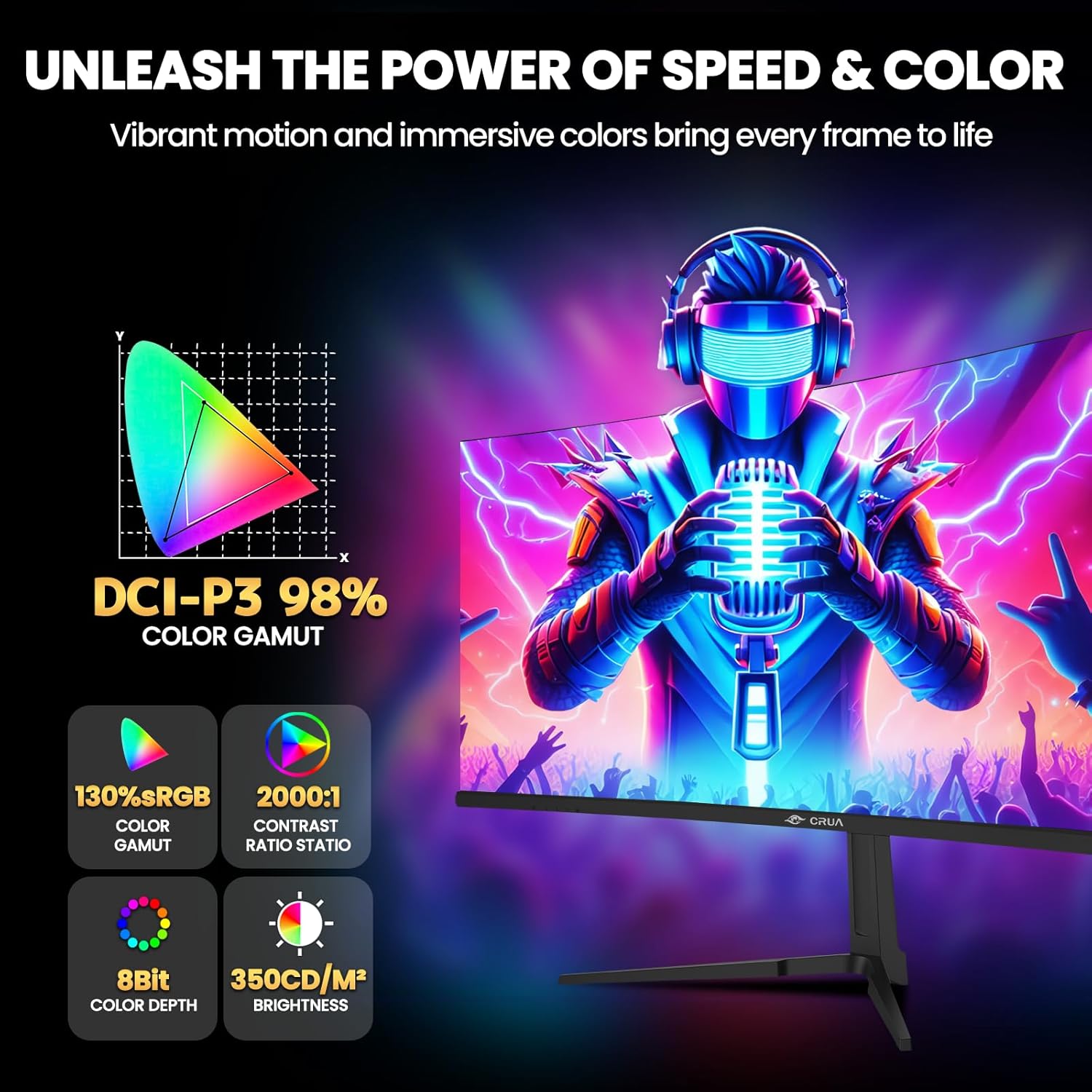
Image: Key display specifications for color and brightness.
5. Vedligeholdelse
Korrekt vedligeholdelse sikrer din skærms levetid og optimale ydeevne.
- Rengøring af skærmen: Tør forsigtigt skærmen af med en blød, fnugfri klud. Fjern genstridige mærker ved atampRengør kluden let med vand eller en skærmrens uden ammoniak og uden alkohol. Spray ikke rengøringsmiddel direkte på skærmen.
- Rengøring af Casing: Brug en blød, tør klud til at tørre skærmen afasing. Undgå at bruge slibende rengøringsmidler eller opløsningsmidler.
- Ventilation: Sørg for, at ventilationsåbningerne på skærmen er fri for støv og forhindringer for at forhindre overophedning.
- Sluk: Always turn off and unplug the monitor before cleaning or when not in use for extended periods.
6. Fejlfinding
Hvis du støder på problemer med din skærm, kan du bruge følgende almindelige løsninger:
| Problem | Mulig årsag | Løsning |
|---|---|---|
| Intet billede på skærmen | Ingen strøm; Forkert inputkilde; Løst videokabel | Check power connection; Select correct input source via OSD; Ensure video cable is securely connected. |
| Billedet er sløret eller forvrænget | Forkert opløsning; Problem med grafikdriveren | Set display resolution to 3440x1440P; Update graphics drivers. |
| Skærmen flimrer | Refresh rate mismatch; Cable issue; FreeSync not enabled/compatible | Ensure 120Hz refresh rate is set; Try a different video cable; Enable AMD FreeSync if your GPU supports it. |
| No audio from 3.5mm port | External speakers/headphones not connected; Volume too low; Audio source issue | Check external audio device connection; Adjust volume in OSD and computer; Verify audio output from source device. |
7. Specifikationer
Detailed technical specifications for the CRUA 34-inch Curved Gaming Monitor (CR340E):
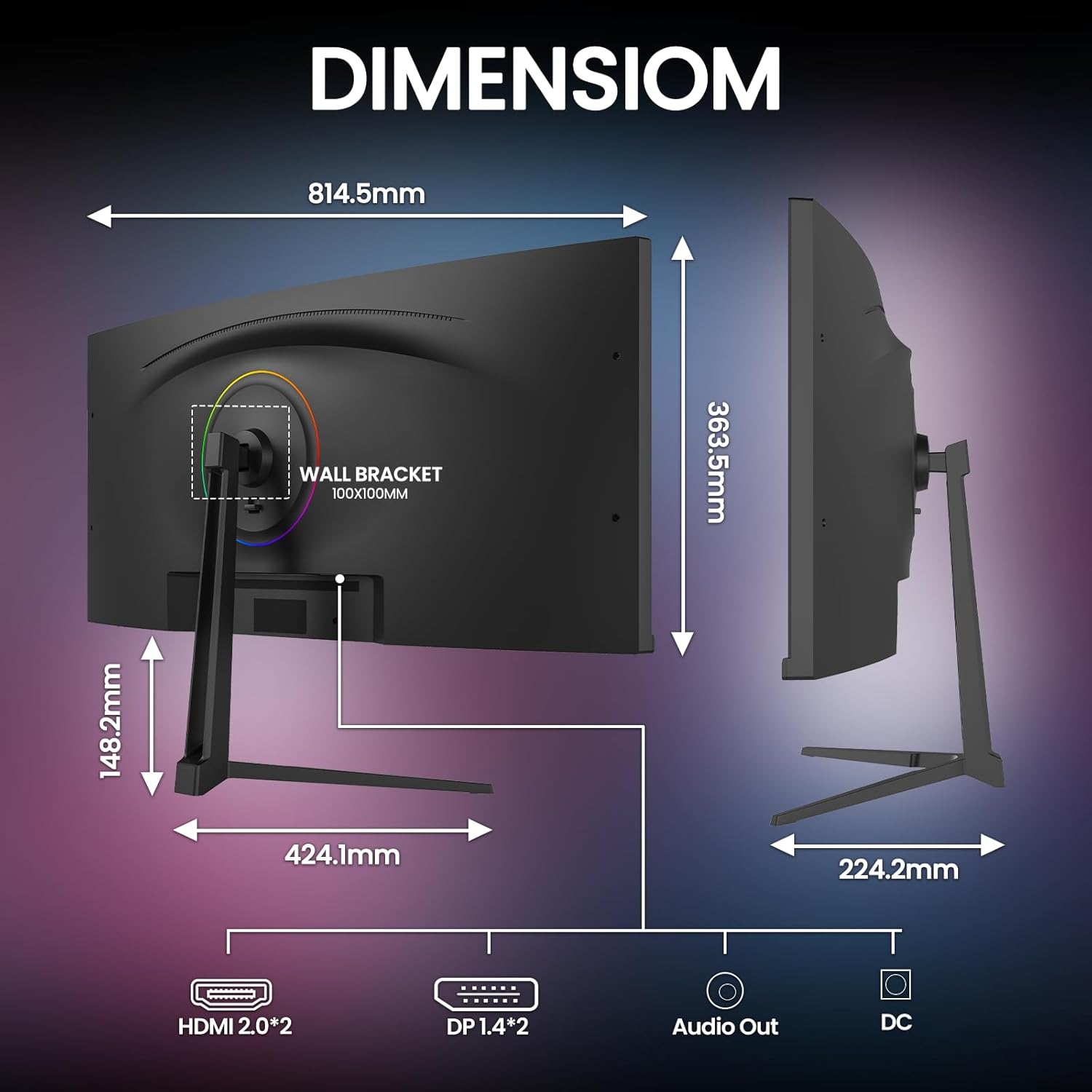
Image: Monitor dimensions.
- Modelnummer: CR340E
- Skærmstørrelse: 34 tommer
- Paneltype: IPS
- Krumning: 1900R
- Opløsning: 3440 x 1440 Pixels (WQHD Ultra Wide 1440p)
- Aspektforhold: 21:9
- Opdateringshastighed: 120 Hz
- Lysstyrke: 350 cd/m²
- Kontrastforhold: 2000:1
- Farveskala: 130 % sRGB, 98 % DCI-P3
- Forbindelse: 2 x HDMI 2.0, 2 x DisplayPort 1.4, 1 x 3.5mm Audio Out, 1 x DC Power Input
- Vægmonteringskompatibilitet: VESA 100mm x 100mm
- Produktmål (med stativ): Approximately 1 x 32 x 14 inches (W x H x D)
- Varens vægt: 18 pund
8. Garanti og support
CRUA is committed to providing high-quality computer monitors and premium services.
- Garanti: This product is covered by a manufacturer's warranty. Please refer to the warranty card included in your package or contact CRUA customer service for specific details regarding warranty duration and terms.
- Kundesupport: If you have any questions, require technical assistance, or experience any issues with your CRUA monitor, please contact our customer support team. We are available to serve you and resolve your concerns.
- Kontaktoplysninger: For support, please visit the official CRUA website or refer to the contact details provided in your product documentation.


