1. Introduktion
This manual provides essential information for the safe and efficient operation of your FASTWD Android 15 Tablet 11-inch. Please read this manual thoroughly before using the device and retain it for future reference. This tablet features an 11-inch 2K display, Android 15 operating system, Octa-Core processor, 36GB RAM, 256GB ROM (expandable up to 1TB), 4G LTE, and 5G WiFi connectivity.
2. Sikkerhedsoplysninger
- Udsæt ikke tabletten for ekstreme temperaturer, direkte sollys eller høj luftfugtighed.
- Undgå at tabe tabletten eller udsætte den for kraftige stød.
- Brug kun godkendte opladere og tilbehør for at forhindre skader og sikre sikkerheden.
- Hold tabletten væk fra vand og andre væsker.
- Forsøg ikke selv at skille tabletten ad eller reparere den. Kontakt kundesupport for at få hjælp.
- Bortskaf batteriet og enheden i henhold til lokale regler.
3. Pakkens indhold
Upon opening your FASTWD Android 15 Tablet package, please verify that all the following items are included:
- FASTWD Tablet
- Bluetooth tastatur
- Mus
- Beskyttende etui
- Stylus pen
- Type-C kabel
- Oplader
- Brugermanual

Image: The FASTWD Android 15 Tablet displayed with its full set of accessories, including the keyboard, mouse, protective case, stylus, and charging components.
4. Enhed overview
The FASTWD Android 15 Tablet features a sleek metal body with an 11-inch 2K INCell display. It is designed for both productivity and entertainment.
4.1 Fysiske egenskaber
- Vise: 11-inch 2K UHD INCell display with 120Hz refresh rate.
- Kameraer: 8MP front camera, 13MP rear camera with LED flash.
- Porte: USB Type-C-port til opladning og dataoverførsel.
- Kortplads: Dual SIM card slot, also supports MicroSD card expansion up to 1TB.
- Højttalere: Fire amplitude speakers for enhanced audio.

Image: A visual representation of the FASTWD tablet's slim design, 11-inch screen, and Type-C charging port.
5. Opsætning
5.1 Indledende tænding
- Press and hold the Power button located on the side of the tablet until the FASTWD logo appears.
- Følg vejledningen på skærmen for at vælge dit sprog og din region og oprette forbindelse til et Wi-Fi-netværk.
- Log ind med din Google-konto, eller opret en ny for at få adgang til Google Play Butik og andre tjenester.
5.2 Installation af SIM-kort og MicroSD-kort
Your tablet supports dual SIM cards for 4G LTE connectivity and a MicroSD card for expanded storage.
- Find SIM-/MicroSD-kortbakken på siden af tabletten.
- Use the provided SIM ejector tool to gently push into the small hole next to the tray until it pops out.
- Place your Nano-SIM card(s) and/or MicroSD card into the designated slots on the tray. Ensure they are correctly oriented.
- Sæt forsigtigt bakken tilbage i tabletten, indtil den klikker på plads.

Billede: En detaljeret view of the tablet's SIM card tray, showing slots for two SIM cards and one MicroSD card.
6. Betjeningsvejledning
The FASTWD tablet runs on Android 15, offering an intuitive and customizable user experience.
6.1 Grundlæggende navigation
- Stryg op: Access the app drawer.
- Stryg ned: Open the notification panel and quick settings.
- Tryk på: Vælg elementer eller åbn programmer.
- Langt tryk: Få adgang til kontekstmenuer eller flyt ikoner.
- Knib-for-at-zoome: Adjust zoom level in apps like browser or gallery.
6.2 Android 15-funktioner
Android 15 introduces several enhancements for privacy, security, and user experience:
- Improved Privacy Controls: Granular permissions for apps, allowing you to authorize access more precisely.
- AI-optimering: Intelligent AI features for improved performance and battery life.
- Gestiknavigation: New touch control gestures for a more fluid interaction.
- Global Dark Mode: System-wide dark theme for reduced eye strain and power consumption.
- Face Recognition Unlock: Lås din tablet sikkert op ved hjælp af ansigtsgenkendelse.
- Forældrekontrol: Manage screen time and app access for children.
- Opdelt skærm: Use two applications simultaneously side-by-side.
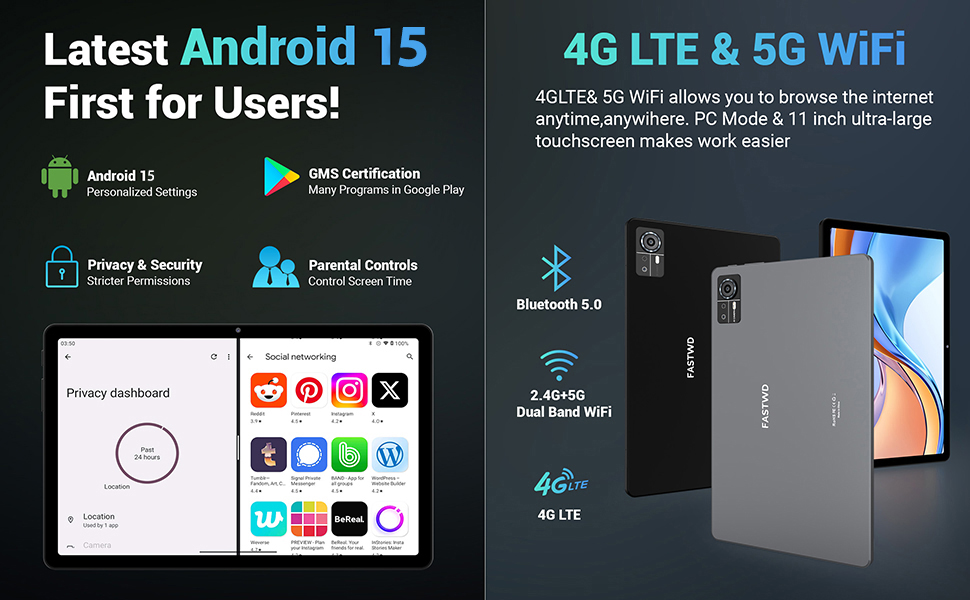
Image: A visual guide to key Android 15 features such as easy app pairing, storage management, quick Bluetooth connection, face recognition unlock, double-tap to wake, and parental control settings.
7. Forbindelse
Your FASTWD tablet offers versatile connectivity options for internet access and peripheral devices.
7.1 Wi-Fi-forbindelse
- Gå til Indstillinger > Netværk og internet > Wi-Fi.
- Slå Wi-Fi til/fra On.
- Vælg det ønskede netværk fra listen, og indtast adgangskoden, hvis du bliver bedt om det.
- The tablet supports dual-band 2.4G/5G Wi-Fi for stable and fast connections.
7.2 4G LTE Mobile Data
With a compatible SIM card installed, you can access 4G LTE mobile data.
- Ensure your SIM card is correctly installed (refer to Section 5.2).
- Gå til Indstillinger > Netværk og internet > Mobilt netværk.
- Aktiver Mobil data and configure APN settings if required by your carrier.
7.3 Bluetooth -parring
Connect Bluetooth accessories like the included keyboard and mouse.
- Gå til Indstillinger > Tilsluttede enheder > Bluetooth.
- Slå Bluetooth til/fra On.
- Sæt dit Bluetooth-tilbehør i parringstilstand.
- Select the accessory from the list of available devices and follow any on-screen prompts to complete pairing.
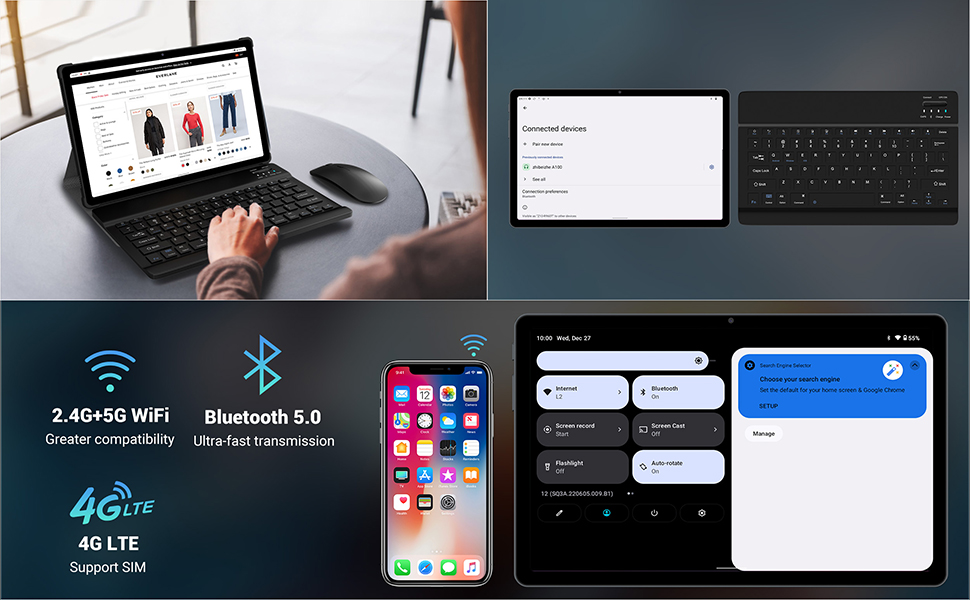
Image: The FASTWD tablet connected to its keyboard and mouse, illustrating its 2.4G+5G WiFi, Bluetooth 5.0, and 4G LTE SIM support for comprehensive connectivity.
8. Kamera
The tablet is equipped with an 8MP front camera and a 13MP rear camera for photos and video calls.
- Åbn Kamera anvendelse.
- Tryk på udløserknappen for at tage et billede.
- Skift mellem forreste og bageste kamera ved hjælp af kamera-til/fra-ikonet.
- AI post-processing technology enhances photo quality, making images more realistic.

Billede: En detaljeret view of the tablet's rear camera, highlighting its 13MP sensor and AI Camera branding.
9. Batteristyring
The tablet features a 9580mAh battery for extended usage and supports 12W fast charging.
9.1 Opladning af tabletten
- Connect the Type-C cable to the tablet's charging port.
- Sæt den anden ende af kablet i den medfølgende oplader, og derefter i en stikkontakt.
- Batteriikonet på skærmen viser opladningsstatus.
9.2 Batterioptimering
- Juster skærmens lysstyrke til et behageligt niveau.
- Luk ubrugte programmer, der kører i baggrunden.
- Aktivér batterisparetilstand i Indstillinger > Batteri.
- Deaktiver Wi-Fi, Bluetooth eller GPS, når de ikke er i brug.

Image: The FASTWD tablet connected to a Type-C charger, illustrating its 9580 mAh battery and 12W fast charging capability.
10. Opbevaring
The tablet comes with 256GB of internal storage (ROM) and supports expansion up to 1TB via a MicroSD card.
10.1 Administration af lagerplads
- For at tjekke lagerforbruget, gå til Indstillinger > Opbevaring.
- You can free up space by uninstalling unused apps, deleting old files, or moving media to a MicroSD card.
10.2 RAM Management
The tablet features 36GB RAM (12GB LPDDR4 + 24GB expandable virtual memory) for smooth multitasking.
- The system automatically manages RAM for optimal performance.
- You can activate additional virtual RAM in the settings if needed for demanding applications.
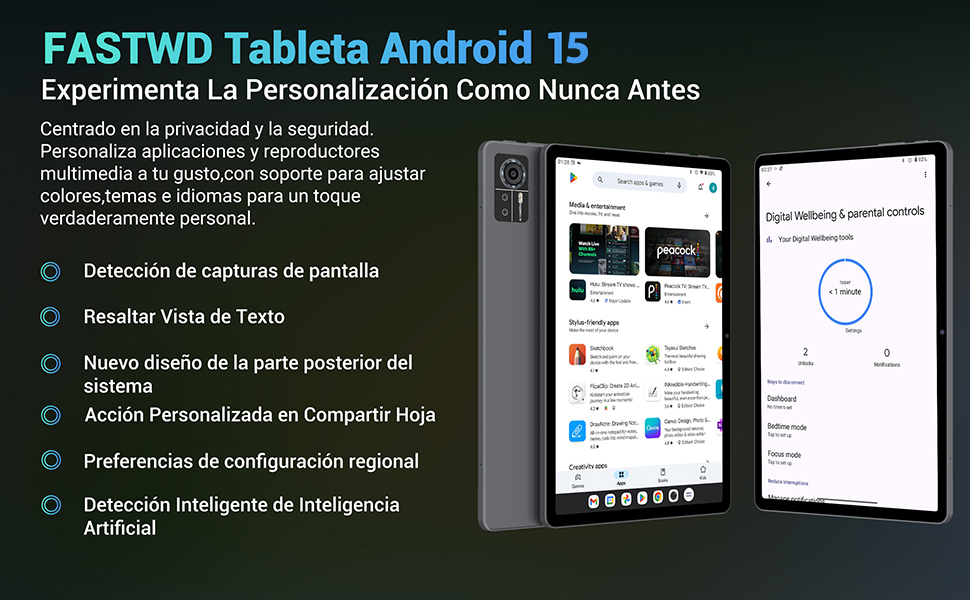
Image: An illustration highlighting the tablet's 36GB RAM (12+24GB), 256GB ROM, and 1TB MicroSD expansion capabilities, alongside its Octa-core processor.
11. Vedligeholdelse
11.1 Rengøring
- Brug en blød, fnugfri klud til at rengøre skærmen og tablettens kabinet.
- Brug ikke skrappe kemikalier eller slibende materialer.
11.2 Softwareopdateringer
- Tjek regelmæssigt for systemopdateringer i Indstillinger > System > Systemopdatering for at sikre optimal ydeevne og sikkerhed.
12. Fejlfinding
Hvis du støder på problemer med din tablet, kan du bruge følgende almindelige løsninger:
| Problem | Løsning |
|---|---|
| Tabletten tænder ikke | Sørg for, at batteriet er opladet. Tilslut opladeren, og vent et par minutter, før du forsøger at tænde den igen. Hvis den ikke reagerer, kan du udføre en tvungen genstart ved at holde tænd/sluk-knappen nede i 10-15 sekunder. |
| Applikationer går ned eller fryser | Close background applications. Clear the cache of the problematic app (Settings > Apps > [App Name] > Storage & cache > Clear cache). Restart the tablet. |
| Dårlig Wi-Fi-forbindelse | Ensure you are within range of the Wi-Fi router. Restart your router and the tablet. Forget the network and reconnect. |
| SIM-kort blev ikke fundet | Ensure the SIM card is correctly inserted into the tray. Restart the tablet. Verify the SIM card is active with your mobile carrier. |
| Batteriet aflades hurtigt | Reduce screen brightness. Disable unused connectivity features (Wi-Fi, Bluetooth, GPS). Close background apps. Check for apps consuming excessive battery in Settings > Battery. |
13. Specifikationer
Detailed technical specifications for the FASTWD Android 15 Tablet 11-inch (Model M986):
| Feature | Specifikation |
|---|---|
| Mærke | FASTWD |
| Modelnavn | FASTWD Android 15 Tablet 11 Pulgadas |
| Operativsystem | Android 15 |
| Processorhastighed | 2 GHz Octa-Core |
| VÆDDER | 36 GB (12GB LPDDR4 + 24GB expandable) |
| Internt lager (ROM) | 256 GB |
| Udvidelig opbevaring | Op til 1 TB via MicroSD-kort |
| Skærmstørrelse | 11 Pulgadas (Inches) |
| Skærmopløsning | 2560 x 1440 pixels (2K UHD INCell) |
| Opdateringshastighed | 120 Hz |
| Bagkamera | 13 MP |
| Forreste kamera | 8 MP |
| Batterikapacitet | 9580 mAh |
| Battery Life (average) | 8 timer (videoafspilning) |
| Opladning | 12W hurtigopladning, Type-C-grænseflade |
| Forbindelse | 4G LTE (Cellular), 5G Wi-Fi (802.11ac), Bluetooth 5.0 |
| Dimensioner | 29.7 x 19.6 x 4 cm |
| Vægt | 1.36 kg |
| Særlige funktioner | Gaming Tablet, Face Recognition, Parental Control, GPS (Beidou, Galileo, Glonass, GPS) |
14. Garanti og support
FASTWD offers two years of premium after-sales service and long-term technical support for your tablet.
- Garantiperiode: 2 år fra købsdatoen.
- Teknisk support: For any issues or inquiries, please contact the FASTWD after-sales team through your Amazon purchase platform.
- Vores supportteam bestræber sig på at svare inden for 24 timer.


