1. Introduktion
This manual provides essential information for the setup, operation, and maintenance of your Vibox IV-524 Gaming PC. This mid-range gaming PC offers a balance of performance and value, suitable for smooth gameplay at 1080p and 1440p resolutions. Equipped with a powerful multi-core processor and a dedicated graphics card, it efficiently runs popular games and provides room for future upgrades.
2. Sikkerhedsoplysninger
- Strømforsyning: Use only the provided power cable and connect it to a grounded outlet. Ensure the power supply voltage matches your local electrical standards.
- Ventilation: Bloker ikke ventilationsåbningerne. Sørg for tilstrækkelig luftgennemstrømning omkring pc'en for at forhindre overophedning.
- Væske og fugt: Keep the PC away from liquids and excessive moisture. Do not operate the PC with wet hands.
- Placering: Place the PC on a stable, flat surface. Avoid placing it in direct sunlight or near heat sources.
- Service: Do not attempt to open or repair the PC yourself. Refer all servicing to qualified personnel.
3. Pakkens indhold
Bekræft at alle varer er til stede i din pakke:
- Vibox IV-524 Gaming PC Tower
- Strømkabel
- 300 Mbps Wi-Fi Adapter
- Dokumentation (hurtigstartguide, garantioplysninger)
- RGB Lighting Controller (if applicable)
4. Opsætning
4.1 Udpakning
Carefully remove the PC from its packaging. Inspect for any visible damage. Retain the original packaging for future transport or servicing.

Image: The Vibox IV-524 Gaming PC Tower, showcasing its white chassis and internal components.
4.2 Tilslutning af eksterne enheder
- Overvåge: Connect your monitor to the graphics card (NVIDIA GeForce RTX 5060) using an HDMI or DisplayPort cable. Ensure the cable is securely fastened.
- Tastatur og mus: Connect your keyboard and mouse to the available USB ports on the rear or front of the PC.
- Magt: Connect the power cable to the PC's power supply unit and then to a wall outlet.
- Netværk: For wired internet, connect an Ethernet cable to the LAN port. For wireless internet, install the provided Wi-Fi adapter into an available USB port.

Image: Close-up of the Vibox IV-524 PC's front panel, highlighting USB 2.0, USB 3.0, headphone, and microphone ports, along with power and LED control buttons.
4.3 Første opstart og Windows-opsætning
- Tryk på tænd/sluk-knappen på forsiden af pc'en.
- The PC will boot into Windows 11 Home. Follow the on-screen instructions to complete the initial Windows setup, including language, region, network connection, and user account creation.
- Ensure all drivers are installed. Your system typically comes with pre-installed drivers. If any issues arise, visit the Vibox support webwebsted for de nyeste drivere.

Image: Visual representation of Windows 11 Home features, including faster loading times with DirectStorage, AutoHDR for enhanced graphics, seamless Xbox Game Pass integration, and optimized CPU performance.
5. Betjening
5.1 Tænd/sluk og genstart
- Tænd: Tryk på tænd/sluk-knappen på frontpanelet.
- Luk ned: Klik på Start-knappen i Windows, og vælg derefter Strøm > Luk ned.
- Genstart: Klik på Start-knappen i Windows, og vælg derefter Tænd/sluk > Genstart.
5.2 Tilslutning til Wi-Fi
- Ensure the Wi-Fi adapter is connected to a USB port.
- In Windows, click the Network icon in the taskbar.
- Vælg dit ønskede Wi-Fi-netværk fra listen, og klik på 'Opret forbindelse'.
- Indtast netværkssikkerhedsnøglen (adgangskoden), hvis du bliver bedt om det.
5.3 RGB-lysstyring
Your PC features customizable RGB lighting. If an RGB controller or remote was included, refer to its specific instructions for changing colors and effects. Otherwise, lighting may be controlled via pre-installed software or motherboard utilities.
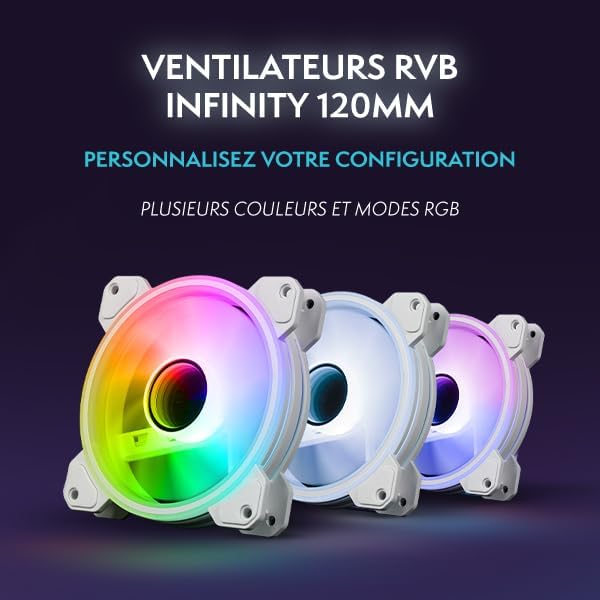
Billede: En intern view of the Vibox IV-524 PC, showcasing the illuminated RGB fans and components within the white chassis.
6. Vedligeholdelse
6.1 Rengøring
- Ydre: Brug en blød, damp klud til at rengøre de udvendige overflader. Undgå skrappe kemikalier.
- Støv: Periodically clean dust from the ventilation grilles and internal components using compressed air. Ensure the PC is powered off and unplugged before cleaning.
6.2 Softwareopdateringer
Regularly update your Windows operating system, graphics drivers, and other software to ensure optimal performance and security. Windows Update can be accessed via Settings > Windows Update.
7. Fejlfinding
- Ingen strøm: Ensure the power cable is securely connected to both the PC and the wall outlet. Check if the wall outlet is functional.
- Ingen visning: Verify that the monitor cable is correctly connected to the graphics card and the monitor is powered on and set to the correct input source.
- Ingen internetforbindelse: For Wi-Fi, ensure the adapter is installed and drivers are up to date. For wired, check the Ethernet cable connection. Restart your router/modem.
- Systemnedbremsning: Check for background applications consuming resources. Ensure sufficient free space on the SSD. Run a malware scan.
- Overophedning: Ensure ventilation openings are clear. Clean dust from inside the PC.
For further assistance, refer to the Vibox support webwebsted eller kontakt kundeservice.
8. Specifikationer
| Komponent | Detalje |
|---|---|
| Mærke | Vibox |
| Modelnummer | IV-524 |
| Processor | AMD Ryzen 7 5700X (8 Cores, Max 4.6 GHz) |
| Grafikkort | NVIDIA GeForce RTX 5060 (8 GB GDDR7, HDMI 2.1, DisplayPort) |
| VÆDDER | 16 GB DDR4 3200 MHz (Dual Channel) |
| Opbevaring | 1 TB SSD (Solid State) |
| Operativsystem | Windows 11 Home |
| Forbindelse | Wi-Fi (300 Mbps adapter included) |
| USB-porte | 3x USB 2.0, 3x USB 3.0 |
| HDMI porte | 1 |
| Dimensioner (L x B x H) | 37 x 20 x 46 cm |
| Vægt | 12 kg |

Image: Diagram illustrating the dimensions of the Vibox IV-524 PC tower: 38cm (depth), 20cm (width), and 46cm (height).
9. Garanti og support
Your Vibox IV-524 Gaming PC comes with a manufacturer's warranty. Please refer to the warranty documentation included in your package for specific terms and conditions. For technical support, driver downloads, or further assistance, please visit the official Vibox support webwebsted eller kontakt deres kundeserviceafdeling.
Vibox Support: Visit the Vibox Store on Amazon


