1. Introduktion
This manual provides detailed instructions for the installation, operation, and maintenance of your SINOVCLE 7-inch Wireless CarPlay & Android Auto Portable Car Stereo. Please read this manual thoroughly before using the device to ensure proper functionality and safety. Keep this manual for future reference.
2. Produktet er slutview
2.1 Pakkens indhold
Bekræft at alle varer er til stede i pakken:
- Car Stereo Display
- Mounting Hardware (High Freedom Stand)
- Brugermanual
- Reversing Camera (Optional, if included in your package)
- 64G TF Card (Optional, if included in your package)
- 1 USB Cigarette Lighter Power Plug
- AV IN Input Cable
- AUX kabel

Image: Contents of the SINOVCLE Portable Car Stereo package, including the main unit, mounting stand, cables, and optional accessories.
2.2 Nøglefunktioner
- 7-tommer IPS-berøringsskærm: Provides a clear display with 1024x600 resolution.
- Trådløs og kablet CarPlay/Android Auto: Problemfri integration med din smartphone til navigation, musik og kommunikation.
- Bluetooth 5.0: Supports hands-free calling and wireless audio streaming.
- GPS-navigation: Utilizes online maps from your connected smartphone for real-time navigation.
- Mirror Link: Displays your smartphone screen directly on the device.
- FM Transmitter: Transmits audio to your vehicle's FM radio for sound output through car speakers.
- AUX udgang: Connects directly to your car's AUX input for audio output.
- Backup Camera Input (AVIN): Supports connection to a reversing camera for parking assistance.
- Universal pasform: Compatible with a wide range of vehicles (12V-30V DC power supply).
- USB opladningsport: Dedicated USB port on the power plug for phone charging.

Image: The SINOVCLE 7-inch Portable Car Stereo display unit along with its suction cup mount, backup camera, AUX cable, and 64GB TF card.
3. Opsætningsvejledning
3.1 Montering af enheden
Attach the provided mounting hardware to the back of the car stereo display. Secure the mount to your dashboard or windshield using the suction cup. Adjust the screen angle for optimal viewing. The mount allows for 360-degree adjustment.
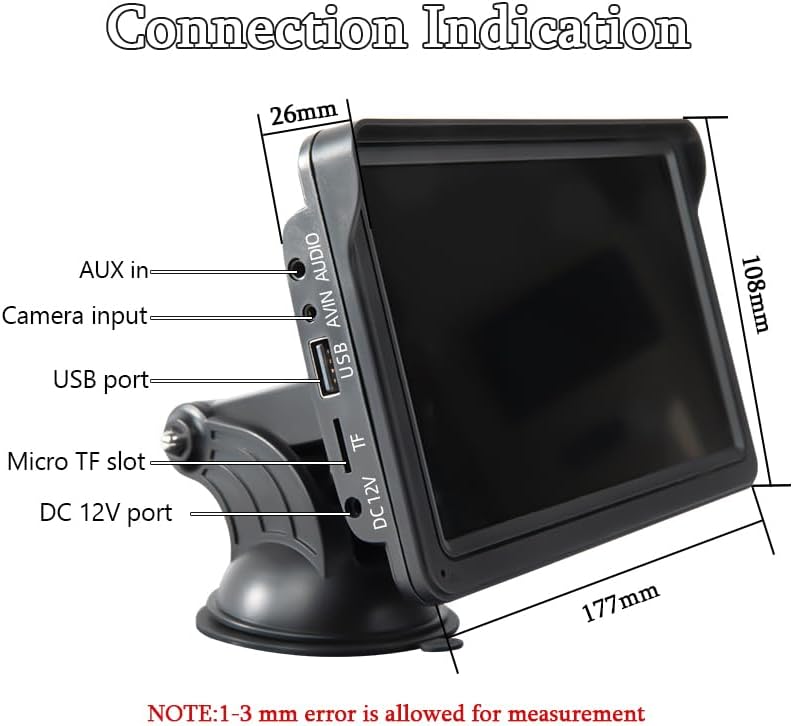
Image: Illustrations demonstrating the 360-degree adjustability of the screen mount, allowing for various viewvinkler og positioner.
3.2 Strømtilslutning
This device is powered via the cigarette lighter power plug. Insert the power plug into your vehicle's cigarette lighter socket. The device will power on automatically. The power supply voltage range is 12V to 30V DC, making it suitable for most vehicle models.

Image: The car stereo installed on a dashboard, showing the power cable connected to the cigarette lighter socket, which includes a dedicated USB port for phone charging.
3.3 Connecting a Backup Camera (Optional)
If you have a backup camera, connect its video output to the AVIN (Reversing camera input) port on the car stereo using a 2.5mm to RCA adapter cable. Ensure the camera is properly installed and powered according to its own instructions.

Image: The car stereo displaying a backup camera feed with parking guidelines, alongside a separate image of a rear-view camera unit.
4. Betjeningsvejledning
4.1 CarPlay & Android Auto Connection
Enheden understøtter både kablede og trådløse forbindelser til Apple CarPlay og Android Auto.
4.1.1 Kabelforbindelse
- Connect your smartphone to the car stereo's USB port using a USB data cable.
- The device will automatically enter the CarPlay or Android Auto interface.
4.1.2 Trådløs forbindelse
- On your smartphone, enable both Bluetooth and Wi-Fi functions.
- On the car stereo, navigate to the 'PhoneLink' or 'CarPlay/Android Auto' section.
- Søg efter and connect to the car stereo's Bluetooth device name from your phone's Bluetooth settings.
- Once Bluetooth is paired, the device will automatically initiate the CarPlay or Android Auto interface via Wi-Fi.

Image: A sequence of smartphone screenshots illustrating the steps to connect to CarPlay wirelessly, including enabling Wi-Fi and Bluetooth, selecting the device, and confirming pairing.

Image: A sequence of smartphone screenshots illustrating the steps to connect to Android Auto wirelessly, including enabling Wi-Fi and Bluetooth, selecting the device, and confirming pairing.
4.2 GPS-navigation
When connected to CarPlay or Android Auto, the device utilizes your smartphone's online map applications (e.g., Google Maps, Apple Maps) for navigation. This provides live GPS tracking, instant route adjustments for traffic, and access to up-to-date maps without manual updates. The 7-inch screen offers a larger, clearer view til navigation.

Image: The car stereo displaying a navigation route from a mapping application, with various map app icons shown alongside.
4.3 Bluetooth-funktioner
The integrated Bluetooth 5.0 allows for:
- Håndfri opkald: Make and receive calls directly from the car stereo display using the built-in microphone.
- Trådløs musikstreaming: Play audio from your smartphone through the car stereo.
- Dual-Device Pairing: Maintain connection with two devices for seamless switching between audio sources.

Image: The car stereo displaying a phone dialer interface, indicating active Bluetooth connection for hands-free calling, with a smartphone also showing a call screen.
4.4 FM Transmitting
To output audio through your vehicle's speakers via FM radio:
- On the car stereo, select the FM Transmitter function.
- Choose an unoccupied FM frequency on the car stereo.
- Tune your vehicle's FM radio to the exact same frequency.
- Audio from the car stereo will now play through your car's speakers. Avoid frequencies occupied by local FM stations to prevent interference.

Image: The car stereo displaying FM transmission settings, with a car's built-in radio also tuned to the same FM frequency, illustrating the audio transmission process.
4.5 AUX Cable Connection
If your car has an AUX input, you can connect the car stereo directly using the provided AUX cable for audio output. Plug one end into the car stereo's audio port and the other into your car's AUX input.
4.6 Spejllink
The Mirror Link function allows you to display your smartphone's screen directly on the car stereo. Connect your iPhone via USB cable for casting. For Android phones, connect via USB and follow prompts to install any necessary app software on your mobile phone.

Image: The car stereo displaying a mirrored smartphone screen, with separate images showing wired connection methods for iPhone and Android devices to enable Mirror Link.
5. Vedligeholdelse
To ensure the longevity and optimal performance of your SINOVCLE car stereo, follow these maintenance guidelines:
- Rensning: Brug en blød, tør klud til at rengøre skærmen og ydersiden. Ved genstridige pletter, tør letampRengør kluden med vand eller et skærmsikkert rengøringsmiddel. Undgå slibende materialer eller barske kemikalier.
- Temperatur: Undgå at udsætte enheden for ekstreme temperaturer, både varme og kolde, i længere perioder.
- Fugtighed: Keep the device dry. Do not expose it to water or other liquids.
- Kabelstyring: Ensure all cables are securely connected and not pinched or tangled, which can cause damage.
- Softwareopdateringer: Tjek producentens website periodically for any available firmware updates to improve performance and add features.
6. Fejlfinding
Hvis du støder på problemer med din enhed, kan du se følgende almindelige problemer og løsninger:
6.1 Ingen strøm
- Tjek strømtilslutning: Ensure the cigarette lighter power plug is fully inserted into the vehicle's socket and the vehicle's ignition is on.
- Køretøjskraft: Verify that the vehicle's cigarette lighter socket is functional (e.g., by testing with another device).
- Sikring: Check the fuse in the cigarette lighter plug or your vehicle's fuse box if applicable.
6.2 Problemer med trådløs CarPlay/Android Auto-forbindelse
- Bluetooth og Wi-Fi: Ensure both Bluetooth and Wi-Fi are enabled on your smartphone.
- Glem enhed: On your smartphone, 'forget' the car stereo from your Bluetooth and Wi-Fi settings, then attempt to pair again.
- Genstart enheder: Restart both your smartphone and the car stereo.
- Manual Discrepancy: If the on-screen display differs from the manual's instructions, prioritize the on-screen prompts or contact support.
- Wired Connection Test: Try a wired connection to confirm basic functionality of CarPlay/Android Auto.
6.3 Ingen lydudgang
- Lydstyrkeniveauer: Check the volume settings on both the car stereo and your vehicle's audio system.
- FM Transmitter: If using FM transmission, ensure the car stereo and your vehicle's radio are tuned to the exact same, unoccupied frequency.
- AUX -forbindelse: If using AUX, ensure the cable is securely connected to both the car stereo and your vehicle's AUX input, and your car's audio source is set to AUX.
- Bluetooth lyd: If using Bluetooth, ensure your phone's audio output is directed to the car stereo.
6.4 Backup Camera Not Displaying
- Kabelforbindelse: Verify the AVIN cable is securely connected to the car stereo.
- Kamerastrøm: Ensure the backup camera itself is receiving power and is functioning correctly.
- Adapterkabel: Confirm the 2.5mm to RCA adapter cable is correctly used and not damaged.
6.5 Berøringsskærmen reagerer ikke
- Genstart: Sluk og genstart enheden.
- Rens skærm: Sørg for, at skærmen er ren og fri for snavs eller fugt.
7. Specifikationer
| Feature | Specifikation |
|---|---|
| Modelnummer | XSP-207-SXT-303-12D |
| Skærmstørrelse | 7 tommer |
| Skærmopløsning | IPS 1024x600 |
| Forbindelsesteknologi | Auxiliary, Bluetooth, USB |
| Bluetooth version | 5.0 |
| Controller type | Berøringsskærm |
| Særlige funktioner | Android Auto, Built-In Bluetooth, Multi-device Support, Touchscreen, Wireless Carplay |
| Kompatible enheder | Smartphones (iOS/Android), Backup Cameras |
| Strømforsyning Voltage | 12V~30V DC |
| Lydudgangstilstand | Stereoanlæg |
| Connector Type | 3.5 mm stik, USB |
| Produktdimensioner | 2" D x 7" B x 4.5" H (5.08 x 17.78 x 11.43 cm) |
| Varens vægt | 1.59 pund (0.72 kg) |

Billede: En side view of the SINOVCLE car stereo, highlighting its slim profile and IPS 1024x600 touch screen, with comparison images showing clarity differences.
8. Sikkerhedsoplysninger
- Brug altid apparatet ansvarligt og i overensstemmelse med lokale færdselsregler.
- Forsøg ikke at installere eller servicere enheden under kørsel.
- Sørg for, at enheden er sikkert monteret og ikke blokerer din view af vejen eller forstyrre køretøjets betjening.
- Avoid prolonged exposure to direct sunlight or extreme temperatures inside the vehicle.
- Hold enheden væk fra vand og andre væsker.
9. Garanti og support
For warranty information and technical support, please refer to the documentation provided with your purchase or contact SINOVCLE customer service directly. Contact details can typically be found on the product packaging or the official SINOVCLE webwebsted.


