1. Introduktion
This manual provides comprehensive instructions for the installation, operation, and maintenance of your UNITOPSCI 10.1-inch Android Car Stereo. This unit is specifically designed for Honda Accord 9th Generation 2.0L models manufactured between 2013 and 2017. Please read this manual thoroughly before using the product to ensure proper functionality and safety.
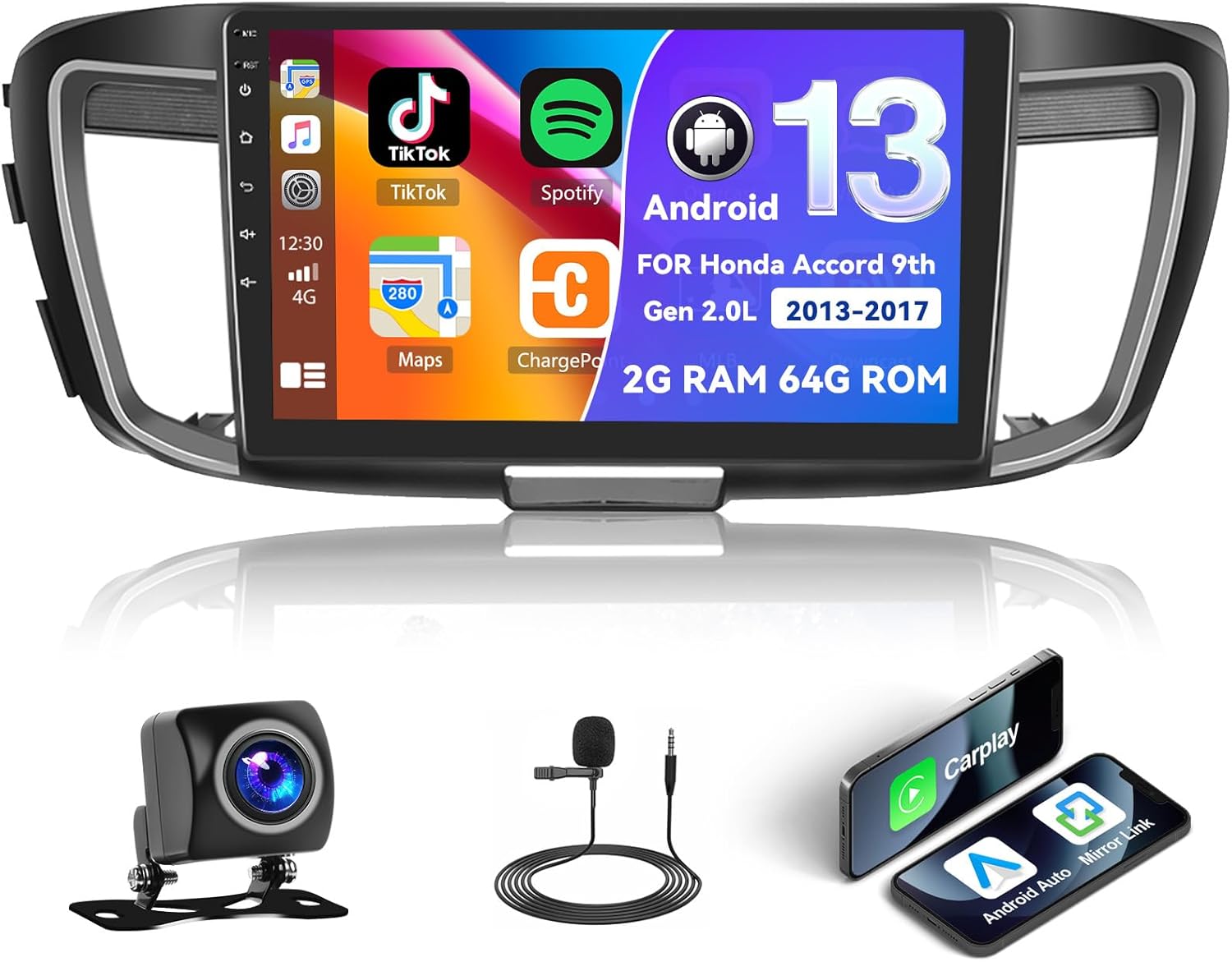
Figure 1.1: UNITOPSCI Android Car Stereo with backup camera, microphone, and smartphone mirroring icons.
2. Sikkerhedsoplysninger
- Do not operate the system in a way that distracts you from driving safely. Always prioritize road safety.
- Sørg for, at alle ledninger er korrekt tilsluttet for at forhindre kortslutninger eller skader.
- Undgå at udsætte enheden for ekstreme temperaturer, direkte sollys i længere perioder eller for høj fugtighed.
- Professionel installation anbefales for at sikre korrekt ledningsføring og funktionalitet.
- Hold lydstyrken på et niveau, der gør det muligt at høre trafiklyde udefra.
3. Produktet er slutview
3.1 Nøglefunktioner
- 10.1-inch Touchscreen Display (1024*600 resolution)
- Android Operating System (2GB RAM + 64GB ROM)
- Wireless/Wired Apple CarPlay and Android Auto
- Dual Mirror Link for Android/iOS phones
- Built-in GPS Navigation with offline map support (HERE WE GO preloaded)
- WiFi-forbindelse
- Bluetooth with A2DP/Hands-Free/Phone Book functions
- FM/RDS Radio with 18 preset stations
- Backup Camera Input with automatic display switching
- Understøttelse af ratbetjening (SWC)
- Opdelt skærmfunktionalitet
- Built-in Equalizer System
- Multiple UI Themes (26 options)
3.2 Pakkens indhold
- UNITOPSCI Android Car Stereo Unit
- Ledningssæt
- GPS antenne
- USB Cables (Double USB interface)
- Ekstern mikrofon
- Backup kamera
- Brugervejledning (dette dokument)
4. Opsætning og installation
4.1 Kompatibilitetskontrol
This car stereo is compatible with Honda Accord 9th Generation 2.0L models from 2013 to 2017 (basic version). It is not compatible with high-end versions that include a large OEM screen or navigation system. Please verify your vehicle's center console and compare it with the provided installation frame images to ensure compatibility.

Figure 4.1: Dashboard compatibility for Honda Accord 9th Gen (2013-2017) 2.0L low-end version. Note: Not suitable for models with existing OEM Navi Screen.
4.2 Installationstrin
- Forberedelse: Frakobl køretøjets batteri for at forhindre elektrisk skade.
- Remove OEM Unit: Fjern forsigtigt den eksisterende bilradio og instrumentbrætbeklædningen. Se bilens servicehåndbog for specifikke instruktioner.
- Tilslut ledninger: Connect the provided wiring harness to the car stereo and the vehicle's existing wiring. Ensure all connections are secure. Connect the GPS antenna, external microphone, and backup camera cables.
- Test funktionalitet: Before fully reassembling the dashboard, temporarily connect the battery and power on the unit to test basic functions like power, audio, and display.
- Sikker enhed: Mount the new car stereo into the dashboard opening and secure it with screws.
- Saml igen: Genmonter alle instrumentbrætbeklædningsdele.
- Endelig forbindelse: Tilslut køretøjets batteri igen.
Note: If your vehicle has an OEM Radio with a Center Navi Screen, additional wiring kits may be required. Contact customer support for assistance.
5. Betjeningsvejledning
5.1 Tænd/sluk
The unit will typically power on automatically when the vehicle's ignition is turned on. To manually power off or restart, press and hold the power button on the unit or use the software controls.
5.2 Trådløs CarPlay og Android Auto
This unit supports both wireless and wired Apple CarPlay and Android Auto. Connect your smartphone via Bluetooth/WiFi for wireless functionality or use a USB cable for a wired connection. Once connected, you can access phone calls, navigation, music, and other compatible apps directly from the stereo's touchscreen.

Figur 5.1: Trådløs CarPlay, Android Auto og Mirror Link-grænseflader.
5.3 GPS-navigation
The stereo has built-in GPS and supports both online and offline navigation. The HERE WE GO map application is preloaded. To use offline maps, download the necessary map data via a WiFi connection. For online navigation, ensure the unit is connected to WiFi or a mobile hotspot.

Figure 5.2: GPS Navigation interface and WiFi connection options.
5.4 Bluetooth og FM/RDS-radio
Bluetooth: Pair your smartphone via Bluetooth for hands-free calling, music streaming (A2DP), and automatic phone book download. This enhances safety by allowing you to manage calls without holding your phone.
FM/RDS-radio: Access FM radio stations with 18 preset options. The RDS (Radio Data System) feature displays station information where available. Use the tuner to find news, music, and sports broadcasts.

Figure 5.3: FM/RDS Radio, Bluetooth interface, and Equalizer settings.
5.5 Spejllink
The Mirror Link function allows you to display your Android or iOS phone's screen directly onto the 10.1-inch head unit. This can be achieved via a wired or wireless connection, enabling you to view videos or maps from your phone on the larger screen.
5.6 Ratbetjening (SWC)
The unit supports your vehicle's existing steering wheel controls. This allows you to adjust volume, change tracks, answer calls, and switch modes without taking your hands off the steering wheel, improving driving safety and convenience. The system includes a learning function for SWC configuration.
5.7 Indgang til bakkamera
When the vehicle is shifted into reverse gear, the stereo automatically displays the view from the connected AHD backup camera on the 10.1-inch screen. This assists with safe parking and maneuvering.

Figure 5.4: Steering Wheel Control interface and backup camera view med retningslinjer.
5.8 Opdelt skærm og brugergrænsefladetemaer
Opdelt skærm: The split-screen feature allows you to run two applications side-by-side on the display, for example, navigation på den ene side og musikafspilning på den anden.
UI-temaer: The Android radio offers 26 different user interface themes. You can customize the look of your desktop by long-pressing the main interface and selecting your preferred theme.

Figur 5.5: Opdelt skærm view og examples of different UI desktop themes.
6. Vedligeholdelse
- Rensning: Brug en blød, tør klud til at rengøre skærmen og enheden. Undgå slibende rengøringsmidler eller opløsningsmidler.
- Softwareopdateringer: Periodically check for available software updates to ensure optimal performance and access to new features.
- Temperatur: Do not leave the unit in direct sunlight for extended periods, especially in hot weather, as this can affect its lifespan.
7. Fejlfinding
| Problem | Mulig årsag | Løsning |
|---|---|---|
| Enheden tænder ikke | Forkert ledningsføring, sprunget sikring, problem med bilens batteri | Kontroller strømtilslutninger, inspicer køretøjets sikringer, og sørg for, at batteriet er opladet. |
| Ingen lyd | Lydstyrken er for lav, forkerte lydindstillinger, problem med højttalerledningerne | Increase volume, check audio output settings, verify speaker connections. |
| GPS-signal mistet eller unøjagtigt | GPS antenna obstructed or disconnected, poor satellite coverage | Sørg for, at GPS-antennen er korrekt installeret og har en klar view af himlen. Kontroller antenneforbindelsen. |
| Problemer med Bluetooth-forbindelse | Device not paired, Bluetooth off on phone or stereo | Ensure Bluetooth is enabled on both devices. Re-pair the device. |
| Touchscreen reagerer ikke | Midlertidig softwarefejl | Restart the unit. If issue persists, perform a factory reset (Factory setting keyword: 000000). |
If you encounter issues not listed here or if troubleshooting steps do not resolve the problem, please contact UNITOPSCI customer support.
8. Specifikationer
| Feature | Specifikation |
|---|---|
| System | Android |
| Chipsæt | 8227L-DEMO |
| Skærmstørrelse | 10.1 tommer |
| Hukommelse (RAM+ROM) | 2 GB RAM + 64 GB ROM |
| Skærmopløsning | 1024*600 |
| Radiochip | MT6625 |
| Strømudgang | 4*45W |
| Arbejdstemperatur | -20℃ til 75℃ (-4°F til 167°F) |
| Magt Amplifier Chip | TDA7388 |
| Radio Band | FM/RDS |
| Video output | Støtte |
| Ekstern mikrofon | Støtte |
| Split Screen | Støtte |
| Kort | Indbyggede offlinekort (kræver internetforbindelse for at downloade data) |
| WIFI | Støtte |
| USB | Dobbelt USB-interface |
| Understøttelse af lydformat | APE/FLAC/WAV/MP3/WMA osv. |
| Understøttelse af videoformat | MKV/RMVB/AVI/MP4/MDV osv. |
| Understøttelse af billedformat | PNG/JPEG/JPG/GIF/WBMP/BNP osv. |
| Fabriksindstillingsnøgleord | 000000 |
| Sprog | Kinesisk/engelsk/fransk/italiensk/koreansk/japansk/arabisk/spansk/portugisisk/russisk/tyrkisk/vietnamesisk/hebraisk/polsk/tysk |
| Varens vægt | 3.08 pund |
| Pakkedimensioner | 17.13 x 7.8 x 4.06 tommer |
9. Garanti og support
Your UNITOPSCI Android Car Stereo comes with a 12-month warranty. Replacement is available within 24 months for qualifying issues. We offer lifetime after-sales consultation and technical support.
Ved eventuelle spørgsmål, teknisk assistance eller garantikrav, bedes du kontakte os:
- E-mail: UNITOPSCI@126.com

Figure 9.1: UNITOPSCI Customer Support Contact Information.


