1. Introduktion
This manual provides comprehensive instructions for the installation, operation, and maintenance of your Eonon GMX7 Android 14 Car Stereo. Please read this manual thoroughly before using the product to ensure proper function and to maximize your user experience. Keep this manual for future reference.

Image 1.1: Eonon GMX7 Car Stereo displaying the Apple CarPlay interface.
2. Produktkompatibilitet
The Eonon GMX7 car stereo is designed for specific Chevrolet, GMC, and Buick models. Ensure your vehicle is listed below for proper fitment and functionality.
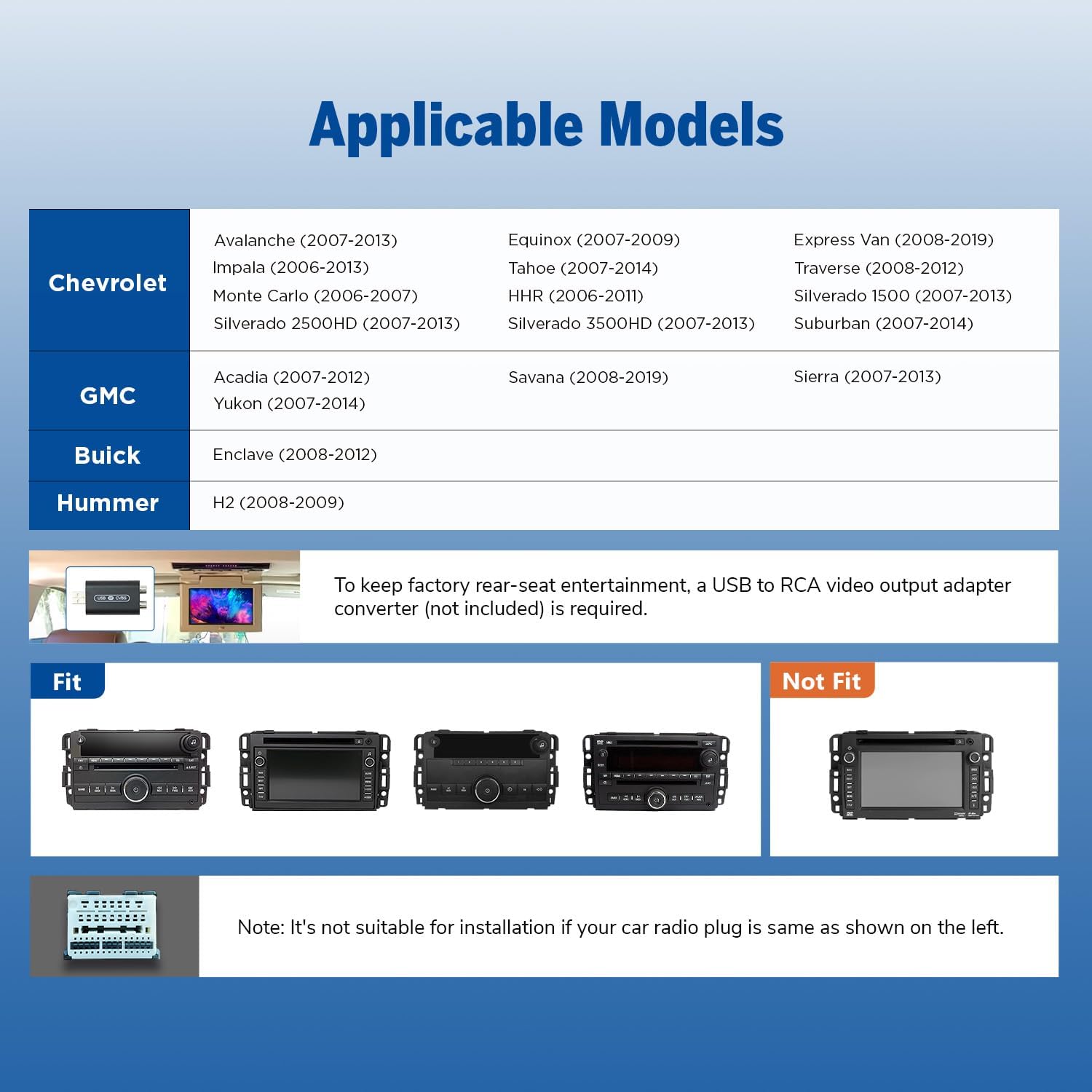
Image 2.1: Applicable vehicle models and years for the Eonon GMX7.
2.1 Kompatible modeller
- Chevrolet: Silverado/Avalanche (2007-2013), Tahoe (2007-2014), Impala (2006-2013), Traverse (2008-2012), Suburban (2007-2012), Express Van (2008-2019), Equinox (2007-2009), Monte Carlo (2006-2007), HHR (2006-2011), Silverado 1500 (2007-2013), Silverado 2500HD (2007-2013), Silverado 3500HD (2007-2013).
- GMC: Sierra (2007-2013), Yukon (2007-2014), Acadia (2007-2012), Savana (2008-2019).
- Buick: Enklave (2008-2012).
- Hummer: H2 (2008-2009).
Note: To retain the factory rear-seat entertainment system, a USB to RCA video output adapter converter (not included) may be required. Please verify your vehicle's original radio plug type. If your car radio plug matches the 'Not Fit' example shown in Image 2.2, this unit is not suitable for installation.

Billede 2.2: Eks.amples of compatible and incompatible car radio plug types.
3. Hvad er der i æsken
Verify that all components listed below are included in your package before beginning installation.

Image 3.1: Contents of the Eonon GMX7 package.
- Eonon GMX7 Head Unit
- A0125 Reversing Camera
- Strømledning
- GPS antenne
- USB-adapterkabel (x2)
- Lyd-/videoadapterkabel (x2)
- Omvendt videoindgangskabel
- 15A sikring
- Ekstern mikrofon
- CANBUS-dekoder
- Brugermanual
- Double-sided Adhesive Sticker
- Radioantenneadapter
- Højttaler
4. Opsætning og installation
The Eonon GMX7 is designed for plug-and-play installation, retaining many original vehicle features. Professional installation is recommended if you are unfamiliar with car audio systems.
4.1 Ledningsdiagram
Refer to the wiring diagram below for correct connections. Ensure all cables are properly connected to avoid issues with steering wheel controls or the backup camera.

Image 4.1: Eonon GMX7 Wiring Diagram with numbered connections.
4.2 Retained OEM Features
The CANBUS system ensures compatibility with your vehicle's original functions:
- Ratbetjening (SWC)
- Bose Audio System
- OnStar
- Dørinformationsdisplay
- Factory Reverse Camera Support

Image 4.2: Visual representation of retained factory features.
4.3 Dimensioner
Ensure the dimensions of the head unit are suitable for your vehicle's dashboard opening.

Image 4.3: Eonon GMX7 unit dimensions.
5. Betjeningsvejledning
5.1 Brugergrænseflade og display
The GMX7 features an 8-inch IPS display with 1280x720 resolution, offering a 178° viewing angle and precise capacitive touch response.

Image 5.1: Display features of the Eonon GMX7.
5.2 Android 14-system
The unit operates on the Android 14 system, providing access to various applications and features. Firmware updates are available online without requiring a USB stick.

Image 5.2: Android 14 interface and system performance details.
5.3 Trådløs CarPlay og Android Auto
Connect your smartphone wirelessly for Apple CarPlay or Android Auto functionality. Use voice commands for navigation, calls, messages, and music.

Image 5.3: Wireless CarPlay and Android Auto in operation.
5.3.1 Trådløs Apple CarPlay-forbindelse
- Klik på Zlink5-appen på bilstereoen.
- Slå Wi-Fi og Bluetooth til på din iPhone.
- Find 'EONON' in your phone's Bluetooth device list and enter '0000' to pair.
- Once connected, tap 'Use CarPlay'.
- Vent et par sekunder på, at forbindelsen er fuldført.

Billede 5.4: Trin til trådløs Apple CarPlay-forbindelse.
5.3.2 Trådløs Android Auto-forbindelse
- Klik på Zlink5-appen på bilstereoen.
- Slå Wi-Fi og Bluetooth til på din Android-telefon.
- Find 'EONON' in your phone's Bluetooth device list, enter '0000' to pair, and click 'OK'.
- Vent et par sekunder på, at forbindelsen er fuldført.

Billede 5.5: Trin til trådløs Android Auto-forbindelse.
5.4 Bluetooth-forbindelse
The built-in Bluetooth 5.4 system supports hands-free calls, contact synchronization, and music playback. An external microphone is included for clear call quality.
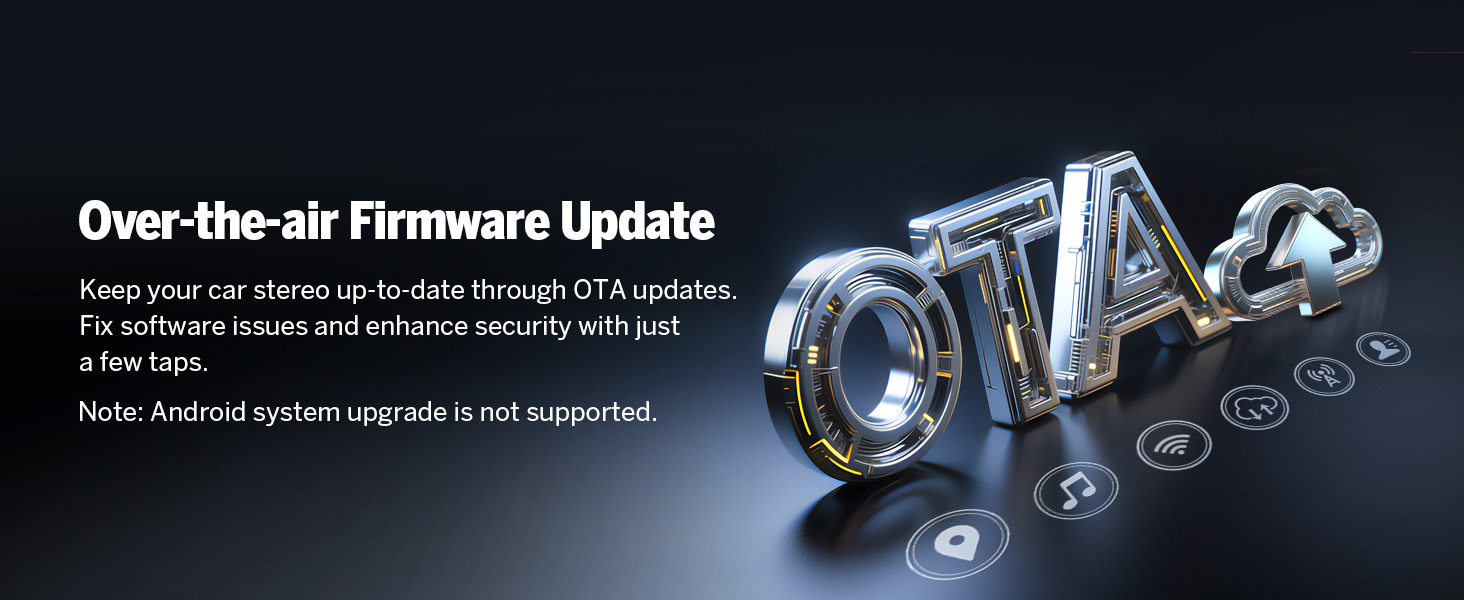
Image 5.6: Bluetooth features and benefits.
5.5 Radiodrift
The unit includes a high-quality FM/AM radio with RDS support, powered by a Silicon Labs SI4755 radio module.

Image 5.7: FM Radio interface.
5.6 Skærmspejling
Spejl din smartphones skærm på bilstereoens display.
5.6.1 Screen Mirroring for iOS
- Klik på Zlink5-appen på bilstereoen. Indstil bilstereoen til trådløs iPhone-skærmspejlingstilstand.
- Tænd for iPhone-hotspottet, og opret forbindelse til bilstereoen.
- Slå iPhone-skærmspejlingsfunktionen til, og vælg "zj-airplay".

Image 5.8: iOS Screen Mirroring connection steps.
5.6.2 Screen Mirroring for Android
- Klik på Zlink5-appen på bilstereoen. Indstil bilstereoen til trådløs Android-skærmspejlingstilstand.
- Tænd din telefons Bluetooth. Find 'EONON' på din telefons liste over Bluetooth-enheder, og indtast '0000' for at parre.
- Tænd din telefons hotspot, og opret forbindelse til bilstereoen.
- Installer Zplus-appen på din telefon. Tænd appen, og vælg "trådløs forbindelse".

Image 5.9: Android Screen Mirroring connection steps.
5.7 Digital lydprocessor (DSP)
The built-in DSP allows for precise audio adjustments, including a 36-band equalizer and 4x45W output, to optimize sound quality within your vehicle.

Image 5.10: Built-in DSP features.
5.8 Navigation
The unit supports online and offline maps, offering a full-view navigation mode. Compatible with popular navigation apps like Google Maps, Apple Maps, Waze, and Sygic.

Image 5.11: Navigation interface with various map options.
ALDRIG tilpasning
Personalize your stereo's appearance by changing the boot logo, button colors, and wallpaper.

Billede 5.12: Tilpasningsmuligheder for brugergrænsefladen.
5.10 Andre funktioner
- Hurtig opstart: 1-second quick boot-up.
- USB-porte: Three USB ports for flash drive use.
- Wi-Fi: 5GHz Wi-Fi connectivity.
- RCA-udgang: For external audio/video connections.
- Indgang for bakkamera: Supports HD 720P/1080P backup cameras. The A0125 reversing camera is included.
- Frontkameraindgang: For optional front camera connectivity (camera not included).
- OBD Scanner Connectivity: Supports OBD2 scanners for vehicle fault diagnosis and real-time status (scanner not included).

Image 5.13: Included A0125 Backup Camera features.

Image 5.14: OBD2 Scanner connectivity for vehicle diagnostics.
6. Vedligeholdelse
To ensure the longevity and optimal performance of your Eonon GMX7 car stereo, follow these maintenance guidelines:
- Rensning: Brug en blød, tør klud til at rengøre skærmen og ydersiden. Undgå slibende rengøringsmidler eller opløsningsmidler.
- Softwareopdateringer: Regularly check for and install online firmware updates provided by Eonon to ensure the system is running the latest software and security patches. Note that Android system upgrades are not supported via OTA.
- Miljøforhold: Undgå at udsætte enheden for ekstreme temperaturer, direkte sollys i længere perioder eller for høj fugtighed.
- Kabelforbindelser: Kontrollér regelmæssigt alle kabelforbindelser for at sikre, at de er fastgjorte og fri for skader.

Image 6.1: Over-the-air firmware update process.
7. Fejlfinding
If you encounter issues with your Eonon GMX7, refer to the following common troubleshooting steps:
- Ingen strøm: Check all power connections and the 15A fuse. Ensure the vehicle's ignition is on.
- Ingen lyd: Verify speaker connections, volume levels, and audio output settings. Check if the mute function is active.
- Touchskærm reagerer ikke: Perform a soft reset by pressing the RST button (if available) or power cycle the unit.
- CarPlay/Android Auto opretter ikke forbindelse: Ensure Wi-Fi and Bluetooth are enabled on your phone and the stereo. Re-pair the devices. Check the Zlink5 app settings.
- Ratbetjening virker ikke: Confirm the CANBUS decoder is correctly installed and connected.
- Bakkamera viser ikke: Check the reverse video input cable connection. Ensure the camera is powered and functioning.
- Problemer med GPS-signal: Sørg for, at GPS-antennen er korrekt installeret og har en klar view af himlen.
If problems persist after attempting these steps, contact Eonon customer support for further assistance.
8. Specifikationer
| Feature | Specifikation |
|---|---|
| Modelnavn | GMX7 |
| Operativsystem | Android 14 |
| Skærmstørrelse | 8 tommer |
| Skærmopløsning | 1280x720 IPS |
| Processor | Rockchip (8-core) |
| VÆDDER | 3 GB |
| Intern opbevaring | 32 GB |
| CarPlay/Android Auto | Trådløs/Kablet |
| Bluetooth version | 5.4 |
| Wi-Fi | 5 GHz |
| Lydudgangseffekt | 4x45W |
| Equalizer | 36-band (DSP) |
| USB-porte | 3 |
| Backup kamera input | HD 720P/1080P |
| Varens vægt | 4.4 pund |
| Pakkedimensioner | 11.34 x 6.93 x 6.46 tommer |
9. Garantioplysninger
The Eonon GMX7 car stereo comes with a 2 års garanti. For warranty claims or service, please retain your proof of purchase and contact Eonon customer support.
10. Support
For additional support, technical assistance, or inquiries, please visit the official Eonon website or contact their customer service department. Refer to the contact information provided with your product packaging or on the Eonon brand store page.


