1. Introduktion
This manual provides detailed instructions for the installation, operation, and maintenance of your VBESTLIFE B75 Micro ATX Motherboard. Please read this manual thoroughly before proceeding with installation to ensure proper setup and functionality.
Nøglefunktioner:
- Processor support: Compatible with 2nd and 3rd generation Intel Core i3/i5/i7, E3/V2 series, Celeron G series, and Pentium G series processors for LGA 1155 socket.
- Hukommelse: Two 240-pin DDR3 SDRAM slots supporting up to 16GB in dual-channel architecture at 1066/1333/1600 MHz.
- Opbevaring: High-speed M.2 interface with jumper support for NVMe and NGFF connections, alongside two ATA2.0 (3Gb/s) ports and one ATA3.0 (6Gb/s) port.
- Video output: Integrated VGA and HDMI outputs for 1080P HD video (requires CPU with integrated graphics).
- Konstruktion: 8-layer PCB, 6-phase power supply, and all solid capacitors for enhanced stability and durability.
2. Pakkens indhold
Verify that all items listed below are present in your package. If any item is missing or damaged, please contact your retailer.
- VBESTLIFE B75 Computer Motherboard
- I / O-skjold
- SATA datakabel
- Driver CD

Image: Contents of the motherboard package, showing the motherboard, driver CD, SATA cable, and I/O shield.
3. Bundkortlayout
Familiarize yourself with the various components and connectors on the VBESTLIFE B75 motherboard.

Billede: Top-down view of the VBESTLIFE B75 motherboard, showing the LGA 1155 CPU socket, two DDR3 RAM slots, PCIe slots, SATA ports, and M.2 slot.

Image: Rear I/O panel of the VBESTLIFE B75 motherboard, displaying 4x USB 2.0, 2x USB 3.0, 1x VGA, 1x HDMI, 1x RJ45 LAN, and 3x audio ports.
4. Installationsvejledning
4.1. CPU-installation
Follow these steps carefully to install your LGA 1155 processor onto the motherboard.

Image: Step-by-step guide for CPU installation. It illustrates how to open the CPU socket, align the processor using the triangle markers, gently place it, remove the protective cover, and secure it by closing the lever. Important warnings advise against touching CPU contacts or pins.
- Åbn soklen: Gently press down on the CPU socket lever and lift it to open the socket retention mechanism.
- Juster CPU: Carefully align the triangle symbol on your CPU with the corresponding triangle on the CPU socket. Ensure the CPU is oriented correctly.
- Place CPU: Gently place the CPU into the socket without forcing it. It should sit flush.
- Fjern låget: Remove the plastic protective cover from the CPU socket.
- Sikker CPU: Lower the socket lever and press it down until it locks into place, securing the CPU.
Vigtig: Avoid touching the CPU contacts or the pins within the CPU socket to prevent damage.
4.2. Installation af hukommelse (RAM)
The B75 motherboard supports DDR3 memory modules. It has two 240-pin DDR3 SDRAM slots.
- Åbne klip: Push the retention clips at both ends of the DIMM slot outwards.
- Juster modul: Juster hakket på DDR3-hukommelsesmodulet med nøglen i DIMM-stikket.
- Indsæt modul: Insert the memory module firmly into the slot until the retention clips snap into place. Ensure both clips are fully closed.
For optimal performance, install memory modules in pairs to utilize dual-channel mode.
4.3. Installation af lagerenhed
The motherboard supports M.2 NVMe/NGFF SSDs and SATA hard drives/SSDs.
M.2 SSD-installation:
- Find M.2-slot: Identificér M.2-slottet på bundkortet.
- Indsæt M.2 SSD: Indsæt forsigtigt M.2 SSD'en i slotten i en 30-graders vinkel.
- Sikker SSD: Push the SSD down and secure it with the provided screw.
- Jumper indstilling: If applicable, adjust the M.2 jumper setting to select between NVMe or NGFF (SATA3.0 6Gb/s) mode based on your SSD type. Refer to the motherboard diagram for jumper locations.
Installation af SATA-drev:
- Connect SATA Cable: Connect one end of the SATA data cable to a SATA port on the motherboard (2x SATA2.0, 1x SATA3.0).
- Connect to Drive: Tilslut den anden ende af SATA-datakablet til din harddisk eller SSD.
- Tilslut strøm: Connect a SATA power cable from your power supply unit (PSU) to the storage drive.
4.4. Installation af udvidelseskort
The motherboard features one PCI Express x16 slot and one PCI Express x1 slot.
- Open Case Slot: Remove the metal bracket cover from the desired expansion slot on your PC case.
- Indsæt kort: Align your expansion card (e.g., graphics card in PCIe x16) with the slot and press down firmly until it is fully seated.
- Sikkert kort: Secure the card to the PC case with a screw or retention clip.
5. Betjeningsvejledning
5.1. Initial Power-On and BIOS Setup
- Tilslut strøm: Ensure all power connectors (24-pin ATX and 4-pin ATX 12V) are securely connected from your PSU to the motherboard.
- Tilslut ydre enheder: Tilslut din skærm, tastatur og mus til de relevante porte på det bageste I/O-panel.
- Tænd: Tryk på tænd/sluk-knappen på dit pc-kabinet.
- Adgang til BIOS: Tryk gentagne gange på knappen under opstart. DEL or F2 key (check your screen for the exact key) to enter the BIOS/UEFI setup utility.
- Konfigurer indstillinger: In the BIOS, you can configure boot order, system time, and other hardware settings. Save changes and exit to proceed with operating system installation.
5.2. Videoudgang
The motherboard supports integrated graphics output via VGA and HDMI ports. To use these, your installed CPU must have integrated graphics capabilities.
- Connect your monitor to either the VGA or HDMI port on the motherboard's rear I/O panel.
- If a dedicated graphics card is installed, the system will typically prioritize its output. You may need to adjust BIOS settings to use integrated graphics if a dedicated card is present.
6. Vedligeholdelse og pleje
Korrekt vedligeholdelse sikrer dit bundkorts levetid og stabile drift.
- Fjernelse af støv: Fjern regelmæssigt støv fra bundkortet og andre interne komponenter med trykluft. Sørg for, at systemet er slukket og frakoblet, før rengøring.
- CMOS-batteri: The motherboard uses a CR2032 battery for CMOS settings. If you experience issues with BIOS settings resetting, the battery may need replacement.
- Miljøforhold: Operate the motherboard in a well-ventilated area, away from excessive heat, humidity, and direct sunlight.
7. Fejlfinding
Dette afsnit omhandler almindelige problemer, du kan støde på.
- Ingen strøm: Ensure all power cables (24-pin ATX, 4-pin ATX 12V) are securely connected. Check the power supply unit (PSU) and power button connections to the motherboard.
- Ingen visning: Verify that the monitor is connected to the correct video output (motherboard's integrated graphics or dedicated graphics card). Ensure the CPU has integrated graphics if using motherboard video outputs. Reseat the RAM modules.
- Systemustabilitet/nedbrud: Check for proper CPU and RAM installation. Ensure adequate cooling for the CPU. Update drivers and BIOS if necessary.
- Periferiudstyr ikke fundet: Ensure USB devices are properly connected. Check SATA cable connections for storage drives. Verify M.2 jumper settings for M.2 SSDs.
- Nulstilling af BIOS-indstillinger: This often indicates a depleted CMOS battery (CR2032). Replace the battery.
8. Specifikationer
Detailed technical specifications for the VBESTLIFE B75 Motherboard.
| Feature | Specifikation |
|---|---|
| Model | B75 |
| Materiale | PCB |
| CPU socket | LGA1155 |
| CPU support | 2nd/3rd Gen Core i3/i5/i7, E3/V2 series, Celeron G series, Pentium G series |
| Hukommelsessokler | 2 x 240-bens DDR3 SDRAM |
| Max hukommelse | 16 GB (dobbeltkanal) |
| Hukommelsesfrekvens | 1066/1333/1600 MHz |
| Lagerporte | 2 x ATA2.0 (3 Gb/s), 1 x ATA3.0 (6 Gb/s), 1 x M.2 (NVMe/NGFF) |
| Integreret LAN | Realtek 10/100 Mbps |
| Udvidelsesslots | 1 x PCI Express x16, 1 x PCI Express x1 |
| Integreret lyd | Realtek ALC 6-channel HD sound codec |
| USB-porte (bagside) | 4 x USB 2.0, 2 x USB 3.0 |
| Videoudgange | 1 x VGA, 1 x High Definition Multimedia Interface (HDMI) |
| Andet I/O | 1 x RJ45, 1 x 3-in-1 sound port |
| Strømgrænseflader | 1 x 24-bens ATX, 1 x 4-bens ATX 12V |
| Formfaktor | M-ATX (Approx. 17 x 19cm / 6.69 x 7.48in) |
| CMOS batteri | CR2032 (Indbygget) |
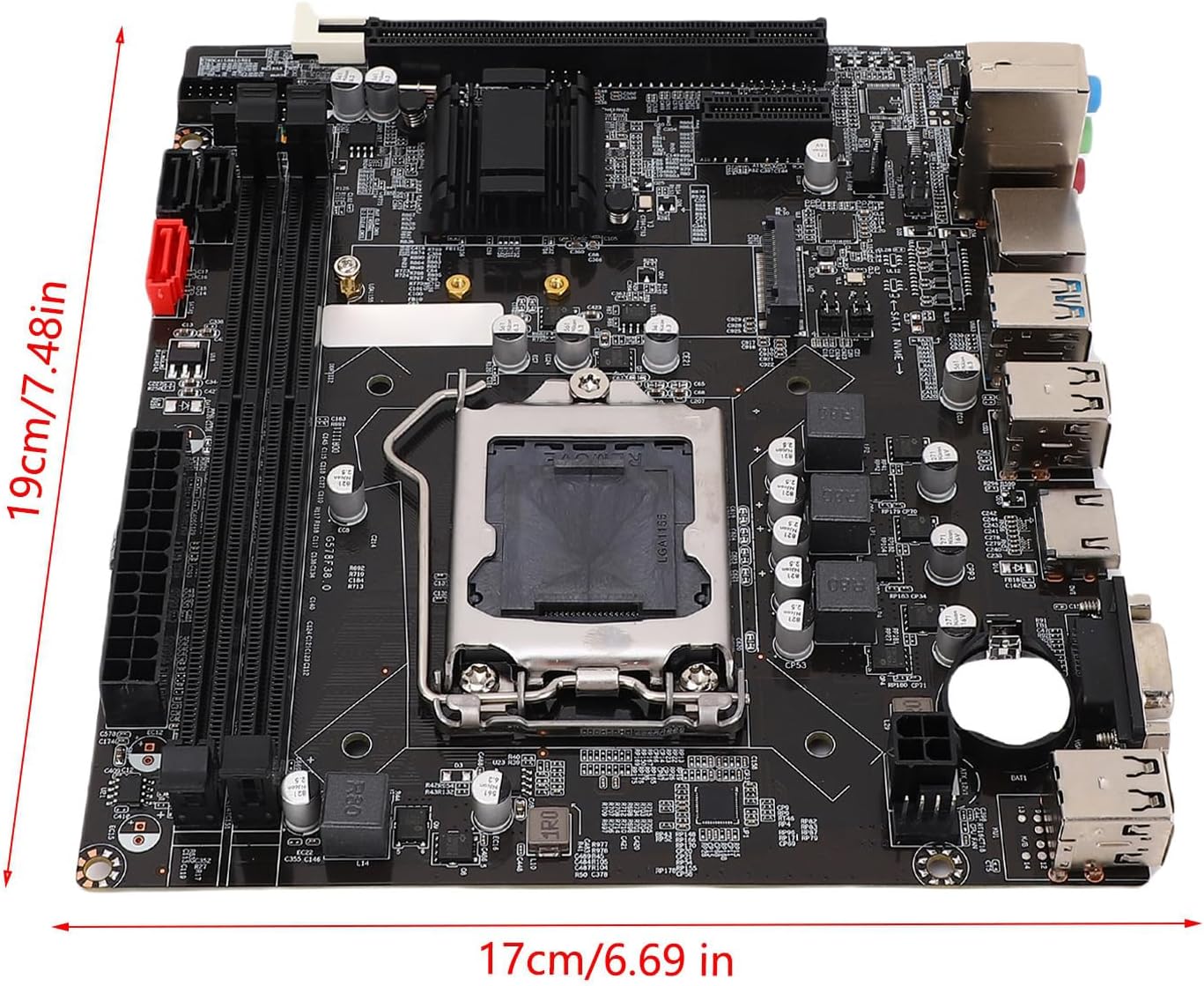
Image: Dimensions of the VBESTLIFE B75 motherboard, indicating its M-ATX form factor size.
9. Produktet er slutview Video
Se denne video for et visuelt overblikview of a similar LGA1155 motherboard, demonstrating its components and features. While the video title refers to an H61 motherboard, the general layout and installation principles are applicable to the B75 model.
Video: En overview of an LGA1155 motherboard, showcasing its physical components, ports, and general design. This video provides a helpful visual aid for understanding motherboard structure and handling.
10. Garanti og support
For garantioplysninger og teknisk support henvises til den dokumentation, der fulgte med dit køb, eller kontakt din forhandler. Gem din købsbevis til garantikrav.


