1. Introduktion
The VILCORN SF3000 is a retro handheld game console designed to provide a versatile entertainment experience. It features a 4.5-inch IPS HD screen, a dual-core processor, and a Linux operating system, offering smooth gameplay and a wide range of functions beyond gaming.
2. Hvad er der i æsken
- Håndholdt spilkonsol
- Ladekabel
- Brugermanual
3. Produktet er slutview
Familiarize yourself with the console's layout and controls.

Billede: Forside view of the VILCORN SF3000 Retro Handheld Game Console, displaying a game on its screen.

Image: Detailed diagram of the front buttons on the VILCORN SF3000, including arrow keys, rocker, select, start, and function keys.

Image: Detailed diagram of the back and top buttons and ports on the VILCORN SF3000, showing L/R buttons, expansion keys, TF socket, DC/OTG port, headphone jack, and one-piece brackets.

Image: Close-up of the console highlighting the dual-core high-performance processor, non-slip rocker, and crystal keys.
4. Opsætning
4.1 Indledende opladning
Before first use, fully charge the console using the provided charging cable. Connect the cable to the DC/OTG port on the console and a compatible USB power adapter (not included). The charging indicator will show the charging status.
4.2 Tænd/sluk
- To power on: Press and hold the power button located on the top of the console until the screen illuminates.
- To power off: Press and hold the power button until the power-off options appear, then select to shut down.
5. Betjeningsvejledning
5.1 Navigering i menuen
Use the directional pad (D-pad) or the analog rockers to navigate through the main menu and game lists. Press the 'A' button (or equivalent action button) to select an option and the 'B' button (or equivalent back button) to return to the previous screen.
5.2 At spille spil
The console comes pre-loaded with over 25,000 games across various emulators. Select an emulator from the main menu, then browse the game list. Select a game and press the 'A' button to start playing.

Image: Console displaying a menu with various retro game console logos, indicating a large library of built-in games.
5.3 Lagring og indlæsning af spilstatus
The SF3000 supports instant save functionality. During gameplay, access the in-game menu (usually by pressing a designated 'FN' or 'Menu' button) to save your progress. You can load saved states from the same menu.
5.4 Andre funktioner
The VILCORN SF3000 offers additional entertainment features:
- E-bogslæser: Access and read e-books.
- Videoafspiller: Play various video formats directly from a USB flash drive (via OTG) or internal storage.
- Nødopladning: The console can function as an emergency power bank to charge compatible mobile phones via the DC/OTG port.

Image: Console showcasing its multi-media functions including music, film, and picture playback, and e-book reading.
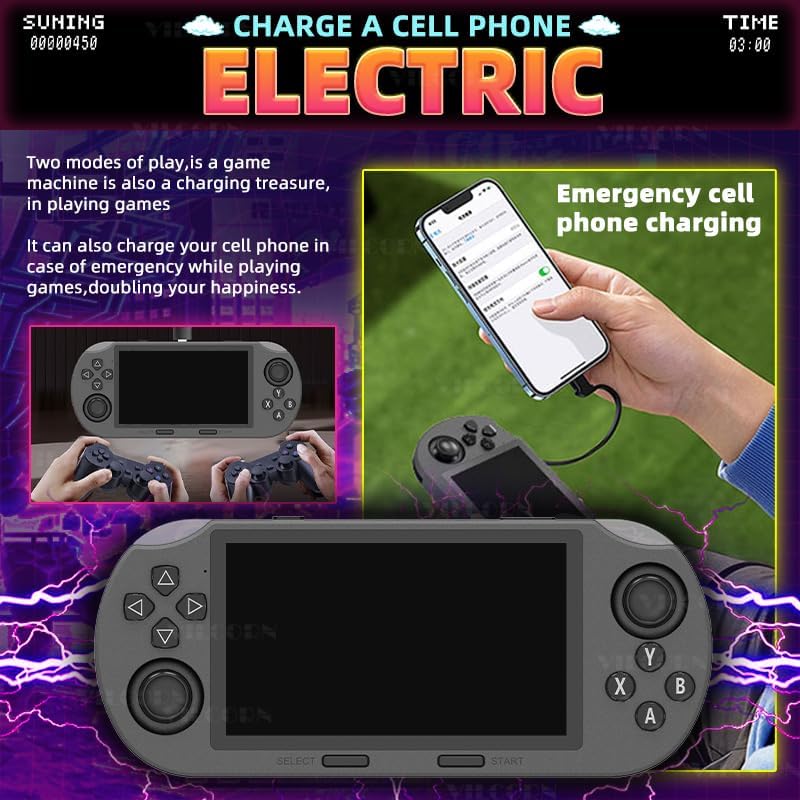
Image: Illustration of the console being used to emergency charge a mobile phone, highlighting its power bank capability.

Image: Console demonstrating direct video playback from a USB flash drive and showing its integrated stand for hands-free viewing.
6. Multi-Emulator Compatibility
The SF3000 supports a wide array of mainstream emulators, allowing you to enjoy classic games from various platforms. This includes MAME, MD, PCE, PS1, and many more. The device comes pre-loaded with a vast library of games, ensuring a rich and varied gaming experience.
7. Features & Benefits
- Designet til spil: 4.5-inch IPS HD screen and dual-core processor for smooth gameplay.
- Understøttelse af flere emulatorer: Compatible with MAME, MD, PCE, PS1, and more, with over 25,000 pre-installed games.
- Holdbart design: Robust structure for extended gaming sessions.
- Brugervenlig: Intuitive interface for easy navigation and immediate gameplay.
- Alsidig underholdning: Functions as an e-book reader, video player, and emergency phone charger.
- Optimeret spiloplevelse: Features like instant save, game search, favorite lists, and game history enhance user interaction.

Image: A person using the console for various activities like video watching, music listening, novel reading, and playing games, illustrating its multi-scenario entertainment capabilities.

Image: Close-up of the console highlighting its non-slip rocker, crystal keys, and integrated stand for improved ergonomics and gaming experience.

Image: Visual representation of optimized gaming features such as instant save, game search, favorite game lists, and game history.

Image: A person playing the console in a casual setting, emphasizing its portability and ability to play anytime, anywhere.
8. Specifikationer
| Feature | Detalje |
|---|---|
| Skærmstørrelse | 4.5 tommer |
| Display Type | IPS |
| Strømkilde | Batteridrevet |
| Batteritype | Lithium-Ion (1 Nonstandard Battery required) |
| Hukommelseslagringskapacitet | 128 GB |
| Formfaktor | Håndholdt |
| Materiale | Plast |
| Produktdimensioner | 7.87 x 3.43 x 1.5 tommer |
| Varens vægt | 9.3 ounce |
| Producent anbefalet alder | 3 år og opefter |
9. Vedligeholdelse
- Keep the console clean by wiping it with a soft, dry cloth.
- Undgå at udsætte enheden for ekstreme temperaturer eller direkte sollys.
- Opbevares på et køligt, tørt sted, når det ikke er i brug.
- Do not attempt to disassemble the console, as this will void the warranty.
10. Fejlfinding
10.1 Console Not Turning On
- Sørg for, at batteriet er fuldt opladet. Tilslut opladningskablet, og lad det oplade i mindst 30 minutter, før du forsøger at tænde det igen.
- Tryk og hold tænd/sluk-knappen nede i 5-10 sekunder for at udføre en hård nulstilling.
10.2 Games Not Loading
- Check if the TF card is properly inserted into its slot.
- Sørg for spillet files on the TF card are not corrupted.
10.3 Skærmproblemer
- If the screen is dim, adjust the brightness settings in the console's system menu.
- If the screen is unresponsive or frozen, perform a hard reset.
11. Sikkerhedsoplysninger
Prohibition of water and fire.
To ensure safe operation and prevent damage, keep the device away from water and open flames. Do not expose the console to excessive moisture or high temperatures.
12. Garanti og support
For warranty information and customer support, please refer to the documentation included with your purchase or contact VILCORN customer service directly. Keep your proof of purchase for any warranty claims.


