Indledning
Thank you for choosing the SAMVIX Kosher Rechargeable Waker Shaker Alarm. This device is designed to provide a powerful vibrating alert, ideal for heavy sleepers, dorm rooms, or anyone requiring a discreet yet effective wake-up solution. This manual provides essential information for the proper setup, operation, and maintenance of your Waker Shaker Alarm. Please read it thoroughly before use.
Produkt overview
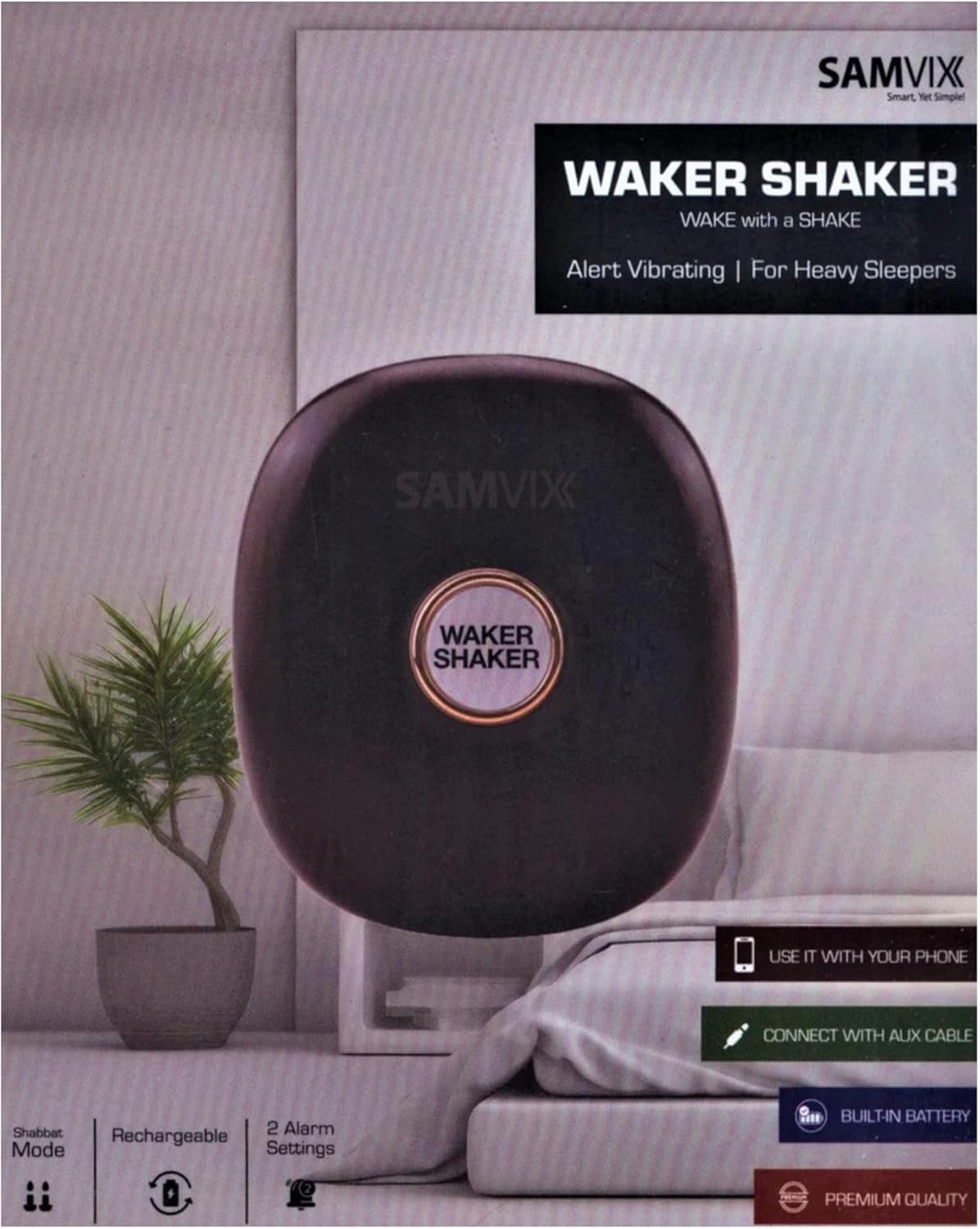
Billedbeskrivelse: A black, oval-shaped SAMVIX Waker Shaker Alarm device is prominently displayed against a light background, suggesting a bedroom setting. The device has a central circular button labeled "WAKER SHAKER". Surrounding the image are visual cues highlighting key features: "USE IT WITH YOUR PHONE", "CONNECT WITH AUX CABLE", "BUILT-IN BATTERY", "PREMIUM QUALITY", "Shabbos Mode", "Rechargeable", and "2 Alarm Settings". This image illustrates the product's design and primary functionalities.
The SAMVIX Waker Shaker Alarm is a compact, portable device featuring a powerful vibration mechanism. It is designed for ease of use and reliability.
Nøglefunktioner:
- Powerful Vibrating Alarm: Delivers strong vibrations to ensure you wake up.
- Phone-Compatible: Connects to your smartphone or device via an AUX cable for alarm synchronization.
- Rechargeable Built-in Battery: Offers convenience and eco-friendliness, eliminating the need for disposable batteries.
- Dobbelt alarmindstillinger: Allows for setting two distinct alarms to accommodate different schedules.
- Shabbos Mode: A special mode designed for Sabbath observance.
- Durable, Premium Quality: Constructed with high-quality materials for long-lasting use.
Opsætningsvejledning
1. Indledende opladning:
- Before first use, fully charge the Waker Shaker Alarm.
- Tilslut det medfølgende opladningskabel til enhedens opladningsport.
- Sæt den anden ende af kablet i en kompatibel USB-strømadapter (medfølger ikke) eller en computers USB-port.
- The charging indicator light will illuminate during charging and typically turn off or change color when fully charged. Refer to the device's specific indicator behavior.
2. Connecting to Your Phone:
- Locate the AUX input port on the Waker Shaker Alarm.
- Connect one end of the AUX cable (not included, typically comes with your phone or can be purchased separately) to the Waker Shaker Alarm.
- Connect the other end of the AUX cable to your smartphone's headphone jack. If your phone does not have a headphone jack, you may need a compatible adapter (e.g., USB-C to 3.5mm or Lightning to 3.5mm).
- Ensure your phone's volume is set appropriately for the alarm to trigger the Waker Shaker.
Note: The Waker Shaker Alarm relies on your phone's alarm sound to activate its vibration. Ensure your phone's alarm is set and active.
Betjeningsvejledning
1. Indstilling af alarmer:
- The Waker Shaker Alarm utilizes your smartphone's alarm functionality. Set your desired alarm times directly on your phone's clock or alarm application.
- For at bruge Dobbelt alarmindstillinger feature, simply configure two separate alarms within your phone's alarm application. The Waker Shaker will activate for each alarm that sounds through the AUX connection.
- Ensure your phone is connected via AUX cable and placed near the Waker Shaker for optimal performance.
2. Using the Waker Shaker:
- Once your phone's alarm is set and the device is connected, place the Waker Shaker Alarm under your pillow or mattress.
- When your phone's alarm sounds, the Waker Shaker will begin to vibrate powerfully.
- To stop the vibration, dismiss the alarm on your smartphone.
3. Shabbos Mode:
The Waker Shaker Alarm includes a dedicated Shabbos Mode. Specific instructions for activating and deactivating this mode are typically found on the device itself or in supplementary materials. Generally, this mode disables certain electronic functions to comply with Sabbath observance. Please refer to any physical buttons or indicators on your device for Shabbos Mode activation.
Pleje og vedligeholdelse
- Rensning: Tør enheden af med en blød, tør eller let fugtet kludamp klud. Brug ikke skrappe kemikalier, slibende rengøringsmidler, og nedsænk ikke enheden i vand.
- Opbevaring: Store the Waker Shaker Alarm in a cool, dry place when not in use.
- Batteripleje: To prolong battery life, avoid fully discharging the battery frequently. Recharge the device regularly, even if not in constant use.
- Undgå ekstreme forhold: Udsæt ikke enheden for ekstreme temperaturer, direkte sollys eller overdreven fugtighed.
Fejlfinding
| Problem | Mulig årsag/løsning |
|---|---|
| Device is not vibrating. |
|
| Batteriet aflades hurtigt. |
|
| Shabbos Mode not working as expected. |
|
Specifikationer
| Feature | Detalje |
|---|---|
| Mærke | SAMVIX |
| Modelnummer | B0FC5VMJ2V |
| Farve | Sort |
| Display Type | Analog (referring to the clock functionality on the connected phone) |
| Stil | Kompakt |
| Speciel funktion | Shabbos Mode |
| Strømkilde | Battery Powered (Rechargeable Built-in Battery) |
| Indendørs/Udendørs brug | Indendørs |
| Rammemateriale | Rustfrit stål |
| Er batterier inkluderet | No (refers to disposable batteries, device has built-in rechargeable) |
| Monteringstype | Tabletop (or under pillow/mattress) |
| Varens vægt | 9.1 pund |
| Vækkeur | Yes (via connected phone) |
| Antal genstande | 1 |
| Urformular | Rejse |
| Forbindelsesteknologi | AUX |
| Produktdimensioner | 9.1 x 9.1 x 9.1 tommer |
| UPC | 766162174781 |
Note: The listed item weight of 9.1 pounds and dimensions of 9.1 x 9.1 x 9.1 inches may be typographical errors in the source data. Please refer to the product packaging for the most accurate specifications.
Garanti og support
Garantioplysninger:
SAMVIX products are manufactured to high-quality standards. For specific warranty details, including coverage period and terms, please refer to the warranty card included with your product packaging or visit the official SAMVIX webwebsted. Gem din købskvittering som købsbevis i tilfælde af garantikrav.
Kundesupport:
Should you encounter any issues or have questions regarding your SAMVIX Waker Shaker Alarm, please contact SAMVIX customer support. Contact information can typically be found on the product packaging, the official SAMVIX webhjemmeside eller gennem din forhandler.
For mere information, besøg SAMVIX Store on Amazon.

