1. Introduktion
Welcome to the PAPIFEED Automatic Smart Pet Feeder user manual. This device is designed to simplify pet feeding with smart features, including scheduled feeding, remote control via an app, a built-in camera, and two-way audio communication. This manual provides detailed instructions to ensure proper setup, operation, and maintenance of your feeder.
2. Produktet er slutview
Nøglefunktioner:
- 6L kapacitet: Large food container suitable for cats and small dogs.
- 2.4G WiFi & Bluetooth Connectivity: Seamless app control for remote feeding and monitoring.
- Manual Adjustable 480P Camera: Monitor your pet's feeding activity with adjustable viewing angle (no night vision).
- Tovejs lyd: Communicate with your pet remotely.
- Tilpasset fodringsplan: Program up to 10 meals per day with 1-6 portions each.
- Dobbelt strømforsyning: DC 5V adapter with 4xAA battery backup (batteries not included) for uninterrupted feeding.
- Let at rengøre: Detachable, BPA-free food container and stainless steel bowl are dishwasher safe.
- Anti-tilstopningsdesign: Ensures smooth food dispensing.
Pakkeindhold:
- PAPIFEED Automatic Pet Feeder (Main Unit)
- Madskål i rustfrit stål
- Fødevarebeholder
- Lid with Desiccant Compartment
- DC 5V strømadapter
- USB strømkabel
- Brugermanual
- Safety Lock Strap (Velcro)
3. Opsætningsvejledning
3.1 Fysisk samling
- Attach Food Bowl: Slide the stainless steel bowl into the designated slot at the base of the feeder. Ensure it clicks securely into place.
- Install Desiccant: Open the desiccant compartment on the underside of the lid. Insert the provided desiccant packet to help keep food fresh. Close the compartment securely.
- Sikkert låg: Place the lid onto the food container, ensuring it is properly aligned and sealed.
- Apply Safety Lock (Optional): Attach the provided Velcro safety lock strap around the feeder and lid to prevent pets from opening the lid.
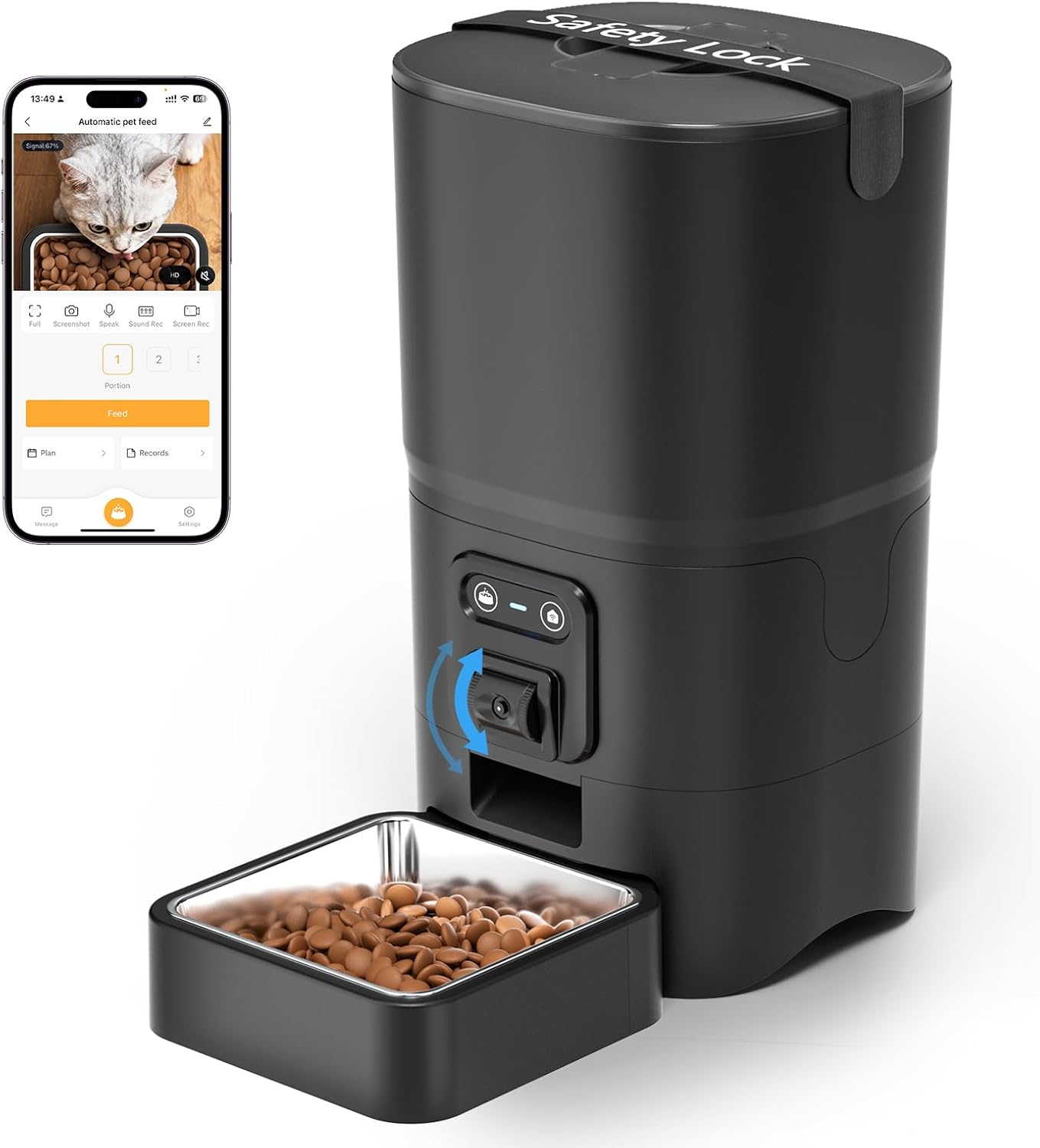
Figure 1: Assembled PAPIFEED Automatic Pet Feeder.

Figure 2: Pet feeder in use, demonstrating the live video feed on a smartphone.
3.2 Strømforsyning
- Tilslut strømadapter: Plug the USB power cable into the DC 5V power adapter, then connect the adapter to a wall outlet. Insert the other end of the cable into the power port at the bottom of the feeder.
- Install Backup Batteries (Recommended): For uafbrudt drift under strømafbrydelsetages, open the battery compartment at the bottom of the feeder. Insert 4 AA batteries (not included), ensuring correct polarity. Close the compartment securely.

Figure 3: Dual power supply setup for the feeder.
3.3 Appinstallation og -forbindelse
- Download Smartlyn App: Scan the QR code in the user manual or search for "Smartlyn" in your smartphone's app store (App Store for iOS, Google Play for Android). Download the Smartlyn App here.
- Registrer/Log ind: Open the Smartlyn app and follow the on-screen instructions to register a new account or log in if you already have one.
- Tilføj enhed:
- Ensure your phone's Bluetooth and WLAN (2.4GHz WiFi) are enabled. The feeder supports 2.4GHz WiFi only; 5GHz networks are not compatible.
- Power on the feeder. Press and hold the WiFi button on the feeder until the blue light flashes, indicating it's in network configuration mode.
- In the Smartlyn app, tap the "+" icon in the upper right corner to add a device. The app should automatically discover the "Automatic pet feeder".
- Follow the app prompts to connect the feeder to your 2.4GHz WiFi network by entering your WiFi password.
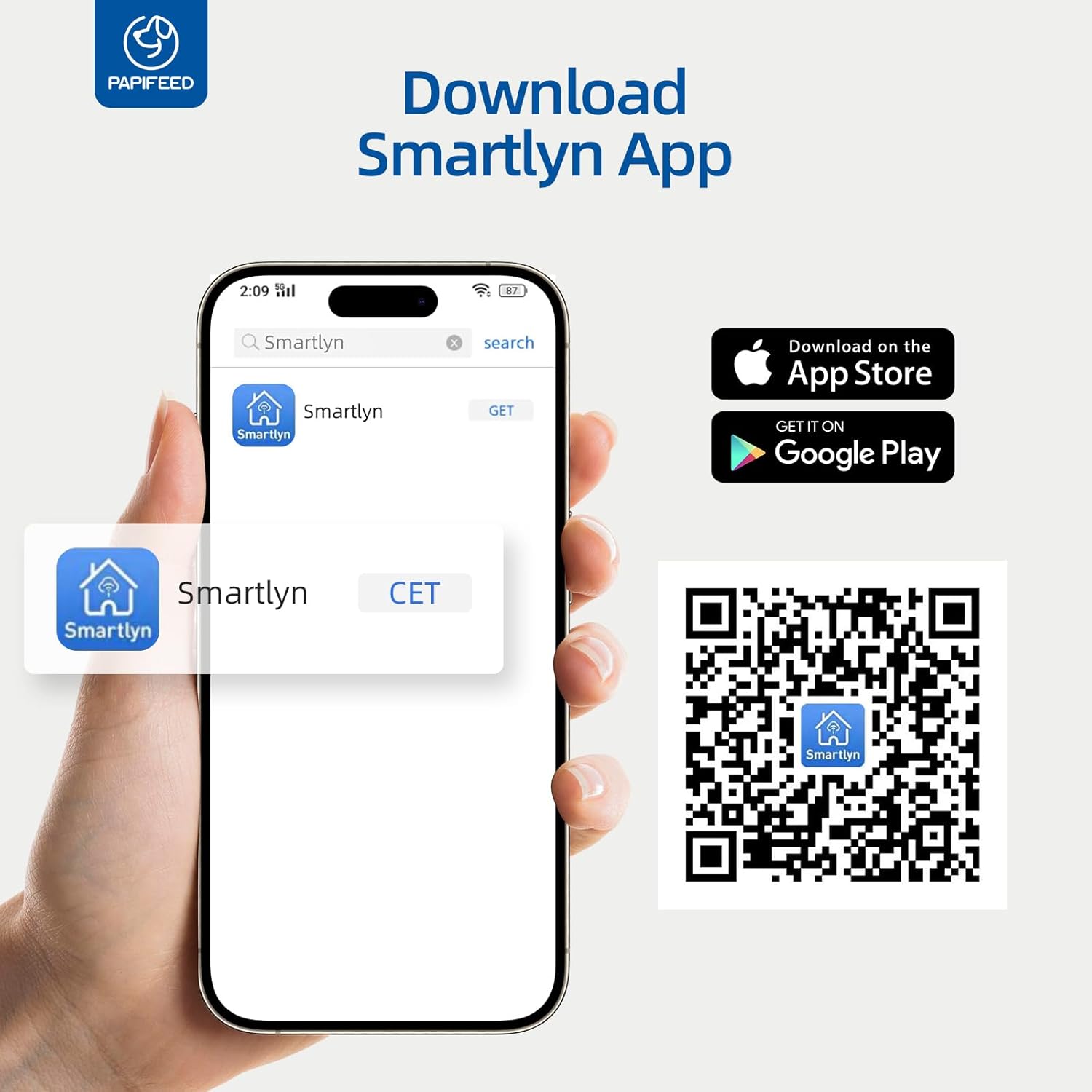
Figure 4: Smartlyn App download and installation guide.

Figure 5: Step-by-step guide for connecting the feeder to the Smartlyn app.
4. Betjeningsvejledning
4.1 App kontrol
- Planlagt fodring: In the Smartlyn app, navigate to the "Plan" section. You can set up to 10 meals per day, with each meal consisting of 1 to 6 portions (0.48 oz/portion). Select specific days of the week for repeat feeding.
- Fjernfodring: Use the "Feed" button in the app to dispense food instantly, regardless of the schedule.
- Portionskontrol: Adjust the number of portions per meal directly through the app.
- Fodringsregistreringer: The app maintains a record of all dispensed meals, allowing you to monitor your pet's consumption.
- Deling af enhed: Share control access with up to 5 family members to manage feeding tasks collaboratively.

Figure 6: Smartlyn app interface for setting feeding schedules.

Figur 7: Detaljeret view of the scientific feeding schedule options.
4.2 Kamera- og lydfunktioner
- Live videoovervågning: Access a real-time 480P video feed of your pet's feeding area through the app. The camera angle can be manually adjusted up and down on the feeder itself. Note: The camera does not have night vision.
- Tovejs lyd: Use the microphone and speaker icons in the app to listen to your pet or speak to them. The device volume can be adjusted in the app settings.
- Personalized Meal Voice: Record a custom voice message to play during feeding times to call your pet.
- Bevægelses- og lyddetektion: Enable motion and sound detection in the app settings to receive alerts when your pet approaches the feeder or makes sounds. Sensitivity can be adjusted.
- Fang øjeblikke: Take screenshots or record video directly from the live feed within the app.

Figure 8: Two-way audio communication via the Smartlyn app.

Figure 9: Live camera view with manual 85-degree adjustment.
4.3 Manuel fodring
In addition to app control, you can manually dispense a single portion of food by pressing the feed button located on the front of the feeder. This is useful for immediate treats or extra meals.
5. Vedligeholdelse
5.1 Rengøring
- Aftagelige dele: The food container and stainless steel bowl are fully detachable and dishwasher safe for easy and hygienic cleaning.
- Hovedenhed: The main unit containing electronic components is NOT washable. Wipe it clean with a damp cloth. Ensure no water enters the electronic parts.

Figure 10: Detachable and washable components of the feeder.

Figur 11: Eksploderet view highlighting detachable parts and anti-clog design.
5.2 Udskiftning af tørremiddel
Regularly check and replace the desiccant packet in the lid to maintain food freshness and prevent moisture buildup. The frequency of replacement depends on humidity levels.
6. Fejlfinding
| Spørgsmål | Mulig årsag | Løsning |
|---|---|---|
| Feeder not connecting to WiFi | Incorrect WiFi band (5GHz not supported); incorrect password; feeder not in pairing mode. | Ensure your router is broadcasting a 2.4GHz signal. Verify WiFi password. Press and hold the WiFi button on the feeder until the blue light flashes to enter pairing mode. |
| App download QR code not working | Outdated link or regional restrictions. | Søg efter "Smartlyn" directly in your device's app store (Google Play or App Store). |
| Maden udleveres ikke | Food hopper empty; food jammed; power issue. | Check food level. Ensure kibble size is within recommended range (0.2-0.47 inch). Check power connection and battery backup. Clean the dispensing mechanism if necessary. |
| Kamera view is dark/unclear at night | Camera lacks night vision. | The 480P camera does not include night vision. Ensure adequate lighting in the viewing area for clear images. |
| Pet opens the lid | Låget er ikke forsvarligt fastgjort. | Ensure the lid is twisted securely into place. Utilize the provided Velcro safety lock strap for added security. |
7. Specifikationer
- Mærke: PAPIFEED
- Modelnavn: PPATFD
- Varemodelnummer: PPATFD-001
- Farve: Sort
- Materiale: Plast, rustfrit stål
- Kapacitet: 6 liter (ca. 25 kopper)
- Anbefalet kibble størrelse: 0.2-0.47 inches (5-12mm) in diameter
- Emnedimensioner (LxBxH): 7.56 x 7.56 x 13.43 tommer
- Varens vægt: 1.68 kilo (3.7 pund)
- Strømforsyning: DC 5V (adapter included), 4xAA batteries (not included) for backup
- Forbindelse: 2.4 GHz WiFi, Bluetooth
- Kamera: Manual adjustable 480P (no night vision)
- Lyd: To-vejs lyd
- Fodringsplan: Op til 10 måltider/dag, 1-6 portioner/måltid
- Målarter: Cat, Small Dogs

Figur 12: Produktdimensioner.

Figure 13: Recommended kibble size and food types.
8. Garanti og support
The PAPIFEED Automatic Smart Pet Feeder comes with a 2 års producentgaranti. For any support inquiries, troubleshooting assistance, or warranty claims, please refer to the contact information provided in your product packaging or visit the official PAPIFEED webwebsted.


