Indledning
This manual provides detailed instructions for the assembly, operation, and maintenance of your GAOMON White 4-Drawer Dresser. Please read this manual thoroughly before beginning assembly or use to ensure proper installation and safe operation. Keep this manual for future reference.

Image: The GAOMON White 4-Drawer Dresser, featuring a modern design with gold metal handles and legs, situated in a living space.
Sikkerhedsoplysninger
For at forhindre personskade og beskadigelse af produktet skal du følge følgende sikkerhedsretningslinjer:
- Voksensamling påkrævet: Dette produkt indeholder små dele og kræver samling af en voksen.
- Anti-tip-enhed: Always install the included anti-tip device to secure the dresser to a wall. This is crucial to prevent serious injury from tipping furniture.
- Vægtgrænser: Do not exceed the recommended weight limits for the top surface or drawers. Overloading can cause instability or structural damage.
- Stabil overflade: Place the dresser on a flat, level, and stable surface.
- Børns sikkerhed: Do not allow children to climb on or play with the dresser. Keep small parts and packaging materials away from children.
- Korrekt værktøj: Use only the tools specified in the assembly instructions.
Pakkens indhold
Before assembly, verify that all components listed below are present and undamaged. If any parts are missing or damaged, contact customer support immediately.
- Dresser Panels (Top, Bottom, Sides, Back)
- Skuffefronter, sider og bund
- Gold Metal Handles
- Guld metal ben
- Drawer Slides (Left and Right)
- Assembly Hardware (Screws, dowels, cam locks, etc.)
- Anti-Tip Device Kit
- Instruktionsmanual
Opsætnings- og monteringsvejledning
Assembly typically requires two adults and takes approximately 1-2 hours. Follow the steps carefully.
Trin 1: Forbered dit arbejdsområde
Clear a spacious, clean area. Lay out all parts and hardware. Identify each component using the provided labels or diagrams in the separate assembly guide (if applicable).
Trin 2: Saml hovedrammen
Connect the side panels to the bottom panel using the specified hardware. Ensure all connections are secure. Attach the back panel sections, if provided in multiple pieces, ensuring they align correctly.
Trin 3: Installer skuffeskinner
Attach the drawer slides to the inner sides of the dresser frame. Pay close attention to the orientation (left/right) and ensure they are level and securely fastened. The review mentions: "Be sure to look closely at the pictures in the manual and make sure your drawer guides are the right way up and the right way facing--the guides are for right and left side, so they are different, and it really matters which side they go on!"
Trin 4: Saml skuffer
For each of the four drawers, connect the side panels to the front and back panels. Slide the drawer bottom into the grooves. Attach the corresponding drawer slides to the sides of each drawer. Finally, attach the gold metal handles to the drawer fronts.
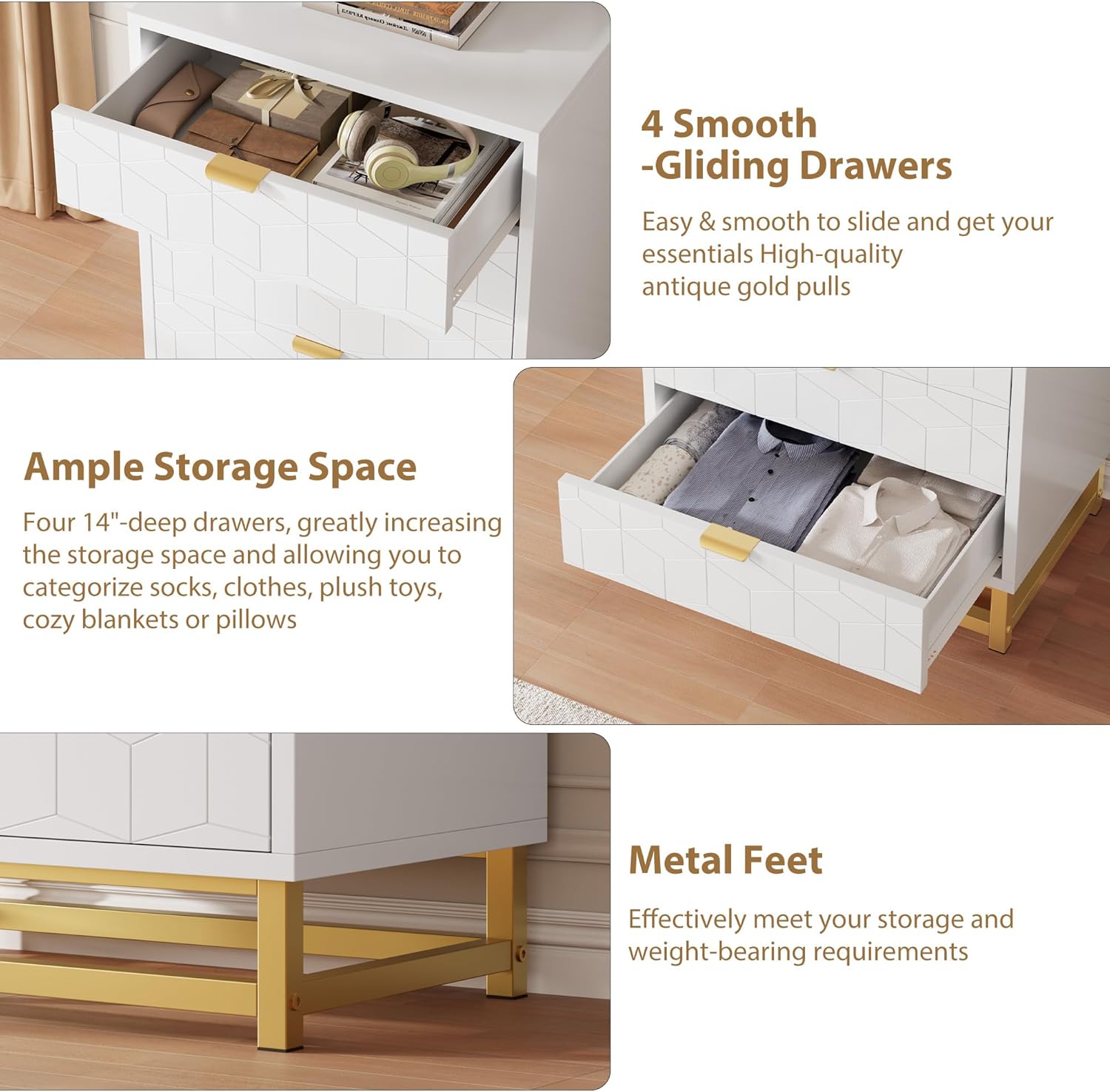
Billede: Et nærbillede view highlighting the smooth-gliding drawers and the sturdy gold metal feet of the dresser.
Trin 5: Indsæt skuffer
Carefully align the assembled drawers with the slides in the main frame and push them in until they click into place or slide smoothly. Test each drawer for proper function.
Step 6: Attach Metal Legs
Secure the gold metal legs to the bottom of the dresser frame using the provided hardware. Ensure they are firmly attached and the dresser is stable.

Image: The base of two GAOMON dressers, showcasing the gold metal leg design and how they appear when placed next to each other.
Step 7: Install Anti-Tip Device
Locate a suitable wall stud behind the dresser. Attach one end of the anti-tip strap to the back of the dresser and the other end to the wall using the provided screws and anchors. This step is critical for safety.
Betjeningsvejledning
Your GAOMON 4-Drawer Dresser is designed for organized storage in various rooms.
- Skuffebrug: Open and close drawers smoothly using the gold metal handles. Avoid forcing drawers open or shut.
- Lagerkapacitet: The four deep drawers provide ample space for clothing, accessories, and other items. Distribute weight evenly within drawers to prevent strain on the slides.
- Øverste overflade: Den øverste overflade kan bruges til dekorative genstande, f.eks.amps, or other lightweight objects. Do not place excessively heavy items on the top surface.

Image: The GAOMON 4-Drawer Dresser with two drawers partially open, illustrating its storage capacity for various items like clothes and accessories.
Opretholdelse
Regular maintenance will help preserve the appearance and functionality of your dresser.
- Rensning: Tør overflader af med en blød, damp klud. Undgå slibende rengøringsmidler eller barske kemikalier, som kan beskadige overfladen.
- Spild: Rengør spild med det samme for at forhindre pletter eller beskadigelse af det konstruerede træ.
- Hardware: Kontrollér regelmæssigt alle skruer og fastgørelseselementer for at sikre, at de forbliver stramme. Efterspænd efter behov.
- Skuffeslider: If drawers become stiff, a small amount of silicone lubricant can be applied to the slides.
Fejlfinding
| Problem | Mulig årsag | Løsning |
|---|---|---|
| Skufferne glider ikke gnidningsløst. | Misaligned drawer slides; loose hardware; debris in slides. | Check slide alignment and tighten hardware. Clean slides. Apply silicone lubricant if needed. |
| Kommoden er vaklende eller ustabil. | Loose assembly hardware; uneven floor; anti-tip device not installed. | Ensure all screws are tightened. Adjust furniture levelers if present. Install anti-tip device securely. |
| Gap in back panel. | Back panel not fully seated or connecting piece missed during assembly. | Ensure back panel sections are fully inserted into grooves and any connecting pieces are used. |
Specifikationer
| Feature | Detalje |
|---|---|
| Mærke | GAOMON |
| Modelnavn | KmfT9fsUb1jubHsmxlsxBwNzpeE |
| Produktdimensioner | 15.8" D x 23.6" B x 34.5" H |
| Farve | Hvid |
| Materiale | Konstrueret træ |
| Finish Type | Poleret |
| Antal skuffer | 4 |
| Varens vægt | 60 pund |
| Montering påkrævet | Ja |
| UPC | 199414272810 |

Image: A detailed diagram illustrating the overall dimensions of the dresser (15.8"D x 23.6"W x 34.5"H) and the internal dimensions of a single drawer (14"D x 22.2"W x 6.5"H).
Garanti og support
For warranty information or assistance with your GAOMON dresser, please refer to the warranty card included in your package or contact GAOMON customer support directly. Contact details are typically available on the manufacturer's official webwebstedet eller gennem dit købssted.
If you have questions regarding assembly or missing parts, please reach out to customer service for prompt assistance.


