MUSITREND T408 Multimediepladespiller Brugermanual
Model: T408
1. Introduktion
Thank you for choosing the MUSITREND T408 Multimedia Record Player. This device is designed to provide a versatile audio experience, combining a 3-speed turntable with a CD player, cassette player, USB and SD card playback, AM/FM radio, and Bluetooth connectivity. This manual will guide you through the setup, operation, and maintenance of your new audio system to ensure optimal performance and longevity.
Video 1: Overståetview of the MUSITREND Multimedia 9-in-1 Record Player, showcasing its various functions and design.
2. Vigtige sikkerhedsinstruktioner
- Læs alle instruktioner omhyggeligt, inden du bruger enheden.
- Gem denne vejledning til fremtidig reference.
- Udsæt ikke enheden for regn, fugt eller ekstreme temperaturer.
- Sørg for ordentlig ventilation; bloker ikke ventilationsåbninger.
- Brug kun tilbehør/tilbehør specificeret af producenten.
- Tag stikket ud af enheden under tordenvejr, eller når den ikke skal bruges i længere perioder.
- Overlad al service til kvalificeret servicepersonale.
3. Pakkens indhold
Bekræft, at alle nedenstående varer er inkluderet i din pakke:
- MUSITREND T408 Multimedia Record Player
- Fjernbetjening
- Brugermanual
- 45 RPM Adapter (for vinyl records)
- Strømadapter
4. Produktet er slutview
The MUSITREND T408 integrates multiple audio playback options into a single compact unit. Familiarize yourself with the various components and their functions.
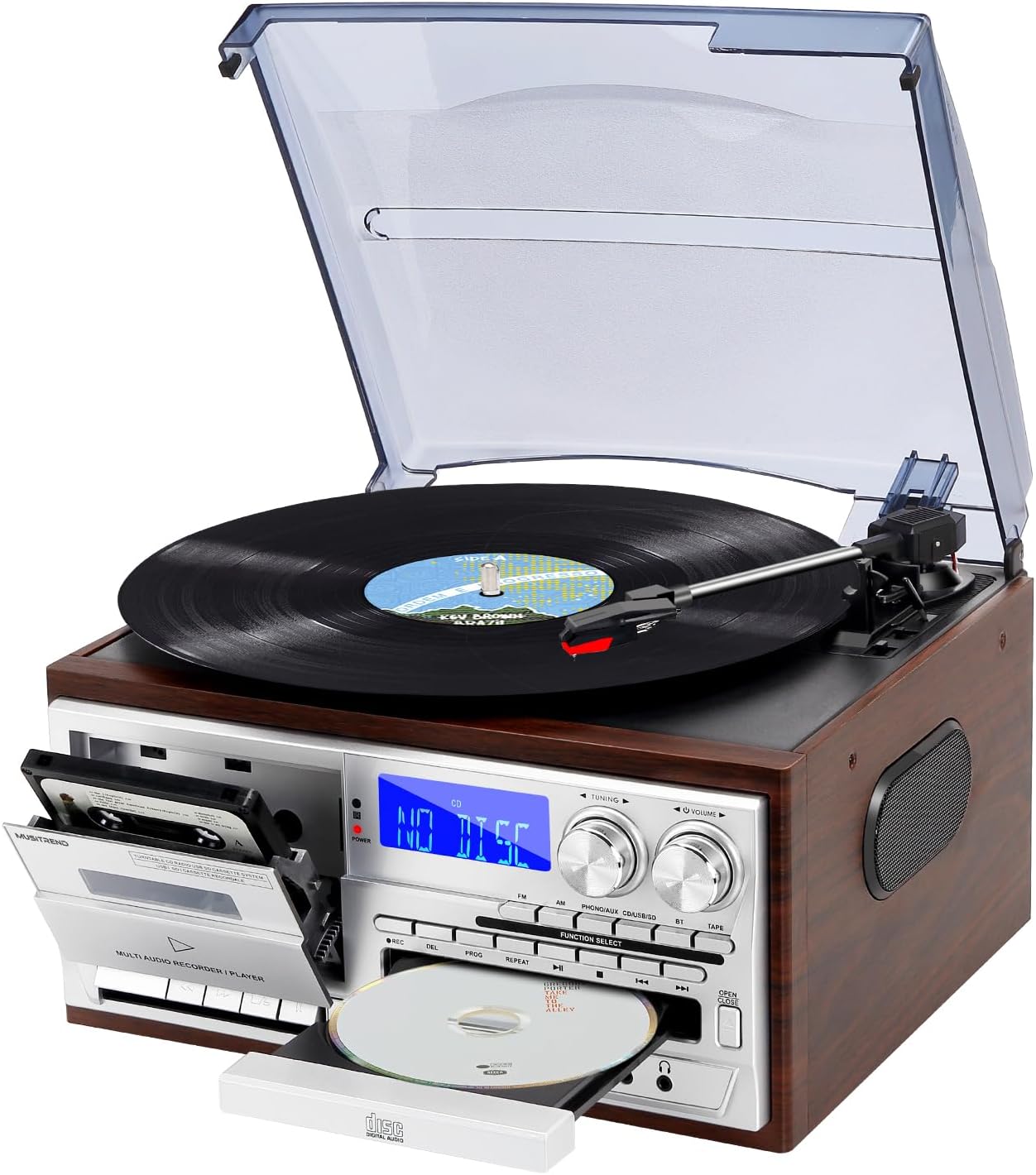
Image 1: Front-angle view of the MUSITREND T408 Multimedia Record Player, showcasing the turntable, cassette deck, CD tray, and control panel.

Image 2: Graphic illustrating the various functions of the MUSITREND T408, including Vinyl Player, SD/MMC Card, Cassette, CD Player, AM/FM Radio, USB Player, AUX in/RCA out, Bluetooth, Headphone, and Remote Control.
Kontrol på frontpanelet:
- Power knap: Tænder/slukker enheden.
- Funktionsvalg: Cycles through Phono/Aux/BT, CD, USB/SD, Tape, FM, AM modes.
- Tuning knap: Justerer radiofrekvensen.
- Lydstyrkeknap: Styrer lydudgangsniveauet.
- CD-bakke: Til isætning og udtagning af cd'er.
- Kassettedeck: Til afspilning og optagelse af kassettebånd.
- USB-port: Til afspilning og optagelse fra USB-flashdrev.
- SD/MMC-kortslot: Til afspilning og optagelse på SD/MMC-kort.
- AUX IN -stik: Tilslut eksterne lydenheder.
- Hovedtelefonstik: Til privat lytning.
Tilslutninger bagpanel:
- RCA linjeudgang (V/H): Tilslut til ekstern ampløftere eller elektriske højttalere.
- FM-antenne: For forbedret FM-radiomodtagelse.
- AC strømindgang: Tilslut strømadapteren.
5. Opsætning
- Placering: Placer enheden på en flad, stabil overflade væk fra direkte sollys, varmekilder og for meget støv eller fugt.
- Strømtilslutning: Connect the AC power adapter to the AC Power Input on the rear of the unit, then plug the adapter into a standard wall outlet.
- FM-antenne: Extend the FM antenna wire for optimal radio reception. Position it for the best signal.
- External Speakers (Optional): If using external powered speakers, connect them to the RCA Line Out (L/R) jacks on the rear panel.
6. Betjeningsvejledning
Video 2: A detailed demonstration of the MUSITREND Record Player's 9-in-1 functions, including turntable, CD, cassette, and radio playback.
6.1. Turntable (Vinyl) Operation
- Løft støvdækslet.
- Placer en vinylplade på pladespillerens pladetallerken. Hvis du afspiller en 45 RPM single, skal du placere den medfølgende 45 RPM adapter på midterakslen.
- Vælg den passende hastighed (33, 45 eller 78 o/min) ved hjælp af hastighedsvælgeren.
- Move the tonearm lock to release the tonearm.
- Løft forsigtigt tonearmen ved hjælp af cue-håndtaget, og placer den over det ønskede spor på pladen.
- Lower the cue lever to slowly drop the tonearm onto the record. Playback will begin.
- At the end of the record, the turntable may stop automatically (if auto-stop is enabled). Manually return the tonearm to its rest and secure it with the tonearm lock.

Billede 3: Nærbillede view of the turntable section, highlighting the 45 RPM adapter, auto-stop control, 3-speed record player selector, and ruby stylus.
Video 3: A demonstration focusing on the vinyl playback capabilities of the MUSITREND 9-in-1 Record Player, showing how to place a record and operate the tonearm.
6.2. Betjening af cd-afspilleren
- Tryk på Funktionsvalg knappen, indtil "CD" vises.
- Tryk på ÅBN/LUK knappen for at åbne CD-skuffen.
- Placer en cd i bakken med etiketten opad.
- Tryk på ÅBN/LUK button again to close the tray. The unit will read the CD.
- Trykke AFSPIL/PAUSE for at starte eller sætte afspilningen på pause.
- Brug SPRINGE knapper til at navigere mellem spor.
6.3. Betjening af kassettebåndoptageren
- Tryk på Funktionsvalg button until "TAPE" is displayed.
- Åbn kassettedækslet, og isæt et kassettebånd.
- Tryk på SPIL knappen for at starte afspilningen.
- Bruge REW (spol tilbage) og FF (Spol frem) knapper til at navigere på båndet.
- Trykke STOP/EJ (Stop/Eject) for at stoppe afspilningen og skubbe båndet ud.
- Trykke PAUSE for midlertidigt at stoppe afspilningen.

Billede 4: Detaljeret view of the CD player and cassette deck, showing the CD tray and cassette slot.
6.4. USB/SD-afspilning
- Sæt et USB-flashdrev i USB-porten eller et SD/MMC-kort i SD/MMC-slotten.
- Tryk på Funktionsvalg button until "USB" or "SD" is displayed.
- Enheden vil automatisk registrere og begynde at afspille kompatibel lyd. files (f.eks. MP3).
- Brug AFSPIL/PAUSE og SPRINGE knapper til at styre afspilning.
6.5. AM/FM-radiobetjening
- Tryk på Funktionsvalg knappen, indtil "FM" eller "AM" vises.
- Drej på Tuningknap for at søge efter radiostationer.
- Juster Volumenknap til dit ønskede lytteniveau.
6.6. Bluetooth-forbindelse
- Tryk på Funktionsvalg button until "BT" is displayed. The unit will enter pairing mode, indicated by a flashing Bluetooth icon on the display.
- Aktiver Bluetooth på din smartphone eller anden Bluetooth-aktiveret enhed.
- Søg efter "MUSITREND" in your device's Bluetooth settings and select it to pair.
- Once paired, the Bluetooth icon on the unit's display will stop flashing, and you can stream audio wirelessly.

Image 5: The MUSITREND T408 unit displaying 'Bluetooth' on its screen, with a smartphone nearby showing a successful Bluetooth connection to 'MUSITREND'.
6.7. Recording Function (to USB/SD)
The unit supports recording audio from the turntable, CD player, cassette player, or AUX input directly to a USB flash drive or SD card.
- Insert a USB flash drive or SD card into the appropriate slot.
- Select the desired source (Phono, CD, Tape, or AUX) using the Funktionsvalg knap.
- Begin playback of the source audio.
- Tryk på REC (rekord) button on the unit. The recording indicator will light up, and recording will begin.
- Tryk på STOP knappen for at afslutte optagelsen. Den optagede file vil blive gemt på USB-drevet eller SD-kortet.
6.8. Fjernbetjening
The included remote control allows for convenient operation of various functions from a distance.
- Magt: Tænder/slukker enheden.
- Stum: Slår lyden fra/til.
- Funktionsknapper: Directly select modes (CD, USB/SD, Tape, FM, AM, Phono/Aux/BT).
- Afspilningskontroller: Play, Pause, Stop, Skip Forward/Backward, Fast Forward/Rewind (for tape).
- Volumen +/-: Justerer lydstyrken.
- Optage: Starter optagelse til USB/SD.
7. Eksterne lydforbindelser
7.1. RCA Line Out
The RCA Line Out jacks (red for right, white for left) on the rear panel allow you to connect the T408 to an external ampeller strømforsynede højttalere for forbedret lydoutput.

Billede 6: Bagside view of the MUSITREND T408 unit, highlighting the RCA Line Out ports for connecting to external audio systems.
7.2. AUX IN
Connect external audio devices (e.g., MP3 players, smartphones) to the AUX IN jack on the front panel using a 3.5mm audio cable. Select the "Phono/Aux/BT" function and ensure the AUX input is active to play audio from the connected device.
7.3. Stik til hovedtelefoner
For private listening, plug standard 3.5mm headphones into the headphone jack on the front panel. The internal speakers will automatically mute.
8. Vedligeholdelse
8.1. Rensning
- Tag altid stikket ud af stikkontakten før rengøring.
- Use a soft, dry cloth to clean the exterior surfaces. Do not use abrasive cleaners or solvents.
- For the turntable stylus, use a soft brush and gently brush from back to front.
- Hold støvdækslet lukket, når det ikke er i brug, for at forhindre støvophobning.
8.2. Udskiftning af pen
The stylus (needle) is a consumable part and should be replaced periodically (approximately every 50 hours of playback) to maintain sound quality and prevent damage to your records. Contact MUSITREND customer support for replacement stylus information.
9. Fejlfinding
| Problem | Mulig årsag | Løsning |
|---|---|---|
| Ingen strøm | Netledningen er ikke tilsluttet; stikkontakten er ikke aktiv. | Sørg for, at netledningen er korrekt tilsluttet; test stikkontakten med en anden enhed. |
| Ingen lyd fra højttalerne | Volume too low; wrong function selected; headphones connected. | Increase volume; select correct function; disconnect headphones. |
| Pladespiller drejer ikke | Power off; belt dislodged (rare). | Ensure unit is powered on; contact support if belt issue suspected. |
| CD/USB/SD 'ERROR' | Disc/media dirty or damaged; incompatible file format. | Clean disc/media; try different media; ensure files are compatible (e.g., MP3). |
| Bluetooth ikke parring | Device too far; Bluetooth not enabled on source device. | Ensure devices are within range; enable Bluetooth on your device and retry pairing. |
10. Specifikationer
- Produktdimensioner: 12.79 x 11.41 x 7.87 tommer
- Varens vægt: 8.08 pund
- Modelnummer: T408
- Mærke: MUSITREND
- Maksimal rotationshastighed: 78 RPM
- Inkluderede komponenter: Fjernbetjening
- Særlige funktioner: Bluetooth Playback, CD and Cassette Player, USB and SD Inputs, AM/FM Radio, Remote Control, 3-Speed Playback (33/45/78 RPM)
- Kompatible enheder: Speaker, Headphone, Personal Computer, Smartphone, Tablet
- Motortype: Direct-Drive
- Signalformat: Linjeniveau
- Strømkilde: Elektrisk med ledning
11. Garanti og support
MUSITREND products are designed and manufactured to the highest quality standards. For warranty information or technical support, please refer to the warranty card included with your product or visit the official MUSITREND webwebsted. Gem venligst din købsbevis i tilfælde af garantikrav.


