Indledning
This manual provides comprehensive instructions for the installation, operation, and maintenance of your Commercial Electric 12 inch LED Flush Mount Smart Light. This fixture features CCT (Correlated Color Temperature) and RGB (Red, Green, Blue) color selection, a night light function, and smart control capabilities via the Hubspace app, Wi-Fi, or Bluetooth. It is also compatible with Alexa and Google Assistant for voice control.
Sikkerhedsoplysninger
Læs og forstå alle instruktioner, før du påbegynder installationen. Manglende overholdelse af disse instruktioner kan resultere i elektrisk stød, brand eller andre farer, der kan forårsage personskade eller materielle skader.
- ADVARSEL: Risiko for elektrisk stød. Afbryd strømmen til sikringen eller strømafbryderen før installation eller servicering.
- ADVARSEL: Risk of fire. Use only with 120V AC, 60Hz circuits.
- Do not install this fixture in wet locations. Suitable for damp steder.
- Sørg for, at alle elektriske forbindelser er sikre og overholder lokale forskrifter og bestemmelser.
- Do not attempt to disassemble or modify the fixture. There are no user-serviceable parts inside.
- Kontakt en kvalificeret elektriker, hvis du er usikker på installationsprocessen.
Pakkens indhold
Bekræft, at alle nedenstående dele er inkluderet i din pakke:
- LED Flush Mount Smart Light Fixture
- Monteringsbeslag
- Mounting Screws and Wire Nuts
- Instruktionsmanual
Opsætning og installation
Follow these steps to properly install your LED flush mount light fixture.
Forinstallation
- Sluk for strømmen: Locate the circuit breaker or fuse box and turn off the power to the light switch location.
- Forbered ledningsføring: Ensure the existing wiring from the ceiling is properly stripped and ready for connection.
Montering af armaturet
- Fastgør monteringsbeslag: Fastgør monteringsbeslaget til samledåsen i loftet med de medfølgende skruer.
- Tilslut ledninger: Connect the fixture's white wire to the supply white wire, the fixture's black wire to the supply black wire, and the fixture's ground wire to the supply ground wire using the provided wire nuts. Ensure connections are secure.
- Attach fixture: Carefully align the fixture with the mounting bracket and secure it in place.
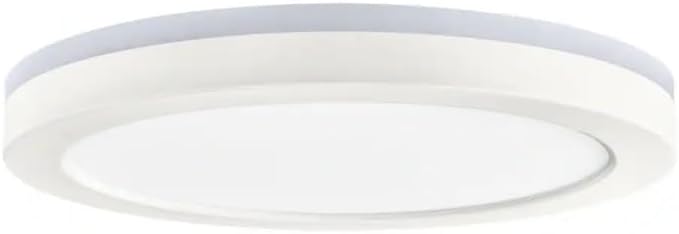
Image: Commercial Electric 12 inch LED Flush Mount Smart Light Fixture, showing its matte white finish and circular design.
Hubspace App Connection
- Download Hubspace App: Download the free Hubspace app from your device's app store.
- Opret konto: Open the app and create a Hubspace account or log in.
- Tilføj enhed: Follow the in-app instructions to add your new LED flush mount light. Ensure your Wi-Fi network is 2.4GHz.
- Tænd: Once prompted by the app, turn on the power to the light fixture at the circuit breaker. The light should begin to blink, indicating it is in pairing mode.
- Fuld parring: Follow the remaining steps in the Hubspace app to complete the pairing process.
Betjeningsvejledning
Your smart light offers various control options and features:
- Remote Control via Hubspace App: Control your light from anywhere using the Hubspace app on your smartphone or tablet.
- Trådløs drift: Connects directly to your existing Wi-Fi or Bluetooth network; no additional hub is required.
- Stemmestyring: Compatible with Amazon Alexa and Google Assistant for hands-free operation. Link your Hubspace account to your voice assistant app.
- CCT (Color Temperature) Selection: Adjust the white light color temperature from 2700K (soft white) to 6500K (daylight) using the Hubspace app.
- RGB-farvevalg: Choose from a wide spectrum of colors to match any mood or setting.
- Dæmpning: Adjust the brightness from 5% to 100% through the Hubspace app.
- Natlys funktion: Activate a low-level, warm light setting for nighttime use.
- Gruppekontrol: If you have multiple Hubspace-enabled lights, you can group them together in the app to control them simultaneously.
Opretholdelse
To maintain the appearance and performance of your LED flush mount light, follow these simple guidelines:
- Rensning: Sørg for, at strømmen er slukket, inden rengøring. Tør armaturet af med en blød, tør eller let fugtet klud.amp klud. Brug ikke slibende rengøringsmidler, opløsningsmidler eller polermidler, da de kan beskadige overfladen eller de elektriske komponenter.
- Ingen dele, der kan serviceres af brugeren: The LED components are integrated and not replaceable. Do not attempt to open the fixture.
Fejlfinding
Hvis du støder på problemer med din lampe, kan du se tabellen nedenfor for almindelige problemer og løsninger.
| Problem | Mulig årsag | Løsning |
|---|---|---|
| Lyset tændes ikke. | No power to the fixture. Loose wiring connection. | Kontroller afbryderen/sikringen. Sørg for, at alle ledningsforbindelser er sikre. |
| Lyset flimrer eller dæmpes uventet. | Loose wiring. Incompatible dimmer switch (if not using app dimming). | Check wiring connections. This smart light is dimmable via the Hubspace app only; do not use with external dimmer switches. |
| Cannot connect to Hubspace app. | Incorrect Wi-Fi password. Router is 5GHz only. Light not in pairing mode. | Verify Wi-Fi password. Ensure your router supports 2.4GHz. Power cycle the light (turn off/on at switch) to re-enter pairing mode. |
| Stemmestyring virker ikke. | Hubspace account not linked to voice assistant. Incorrect commands. | Ensure Hubspace is linked in your Alexa/Google Home app. Refer to voice assistant documentation for correct commands. |
Specifikationer
| Feature | Detalje |
|---|---|
| Modelnummer | 1010633889 |
| Mærke | Kommerciel elektrisk |
| Materiale | Akryl |
| Lysarmatur Form | Loft |
| Antal lyskilder | 1 |
| Varens vægt | 3 pund |
| Produktmål (L x B x H) | 12.13 x 12.13 x 1.25 tommer |
| Maksimal lysstyrke | 1350 lumen |
| Farvetemperatur (CCT) | 2700K (Soft White) to 6500K (Daylight) |
| Dæmpningsområde | 5% to 100% (via Hubspace app) |
| Forbindelse | Wi-Fi (2.4GHz) / Bluetooth |
| Stemmeassistentkompatibilitet | Alexa, Google Assistant |
Garanti og support
For warranty information or technical support, please refer to the documentation included with your purchase or visit the Commercial Electric website. You may also contact customer service through the Hubspace app for assistance with smart features.


