1. Introduktion
This manual provides detailed instructions for the installation, operation, and maintenance of your NGTeco NG-TC3 Cloud-Based Time Clock. The NG-TC3 is designed to streamline workforce management with multiple authentication methods including facial recognition, fingerprint scanning, RFID card, and PIN entry. It integrates with a cloud platform for real-time attendance tracking and reporting, suitable for small to medium-sized businesses.

Billede: Overview of the cloud-based control system, showing how the time clock integrates with mobile and web platforms for attendance management.
2. Pakkens indhold
Bekræft, at alle nedenstående varer er til stede i din pakke:
- NGTeco NG-TC3 Time Clock Device
- Power Adapter (USB-C cable and 5V power supply may be required, check local power requirements)
- Mounting Hardware (Screws, wall anchors)
- 10 x RFID IC Cards
- Hurtig startvejledning
- Brugervejledning (dette dokument)
3. Produktet er slutview
The NGTeco NG-TC3 features a responsive touchscreen display and multiple biometric and non-biometric authentication methods. Familiarize yourself with the device components:

Image: The NGTeco NG-TC3 device, highlighting its touchscreen interface and integration with the mobile application.
Enhedskomponenter:
- Touchscreen display: Main interface for interaction and information display.
- Facial Recognition Camera: For biometric face authentication.
- Fingeraftrykssensor: For biometric fingerprint authentication.
- RFID-kortlæser: For IC card authentication.
- USB-C-port: Til strømtilslutning.
- Nulstil knap: (Typically a small pinhole, refer to quick start guide for exact location)
4. Opsætningsvejledning
4.1 Montering af enheden
- Choose a suitable location for installation, ensuring it is within Wi-Fi range and at an appropriate height for facial recognition and fingerprint scanning.
- Use the provided mounting template (if included) to mark drill holes on the wall.
- Bor huller og indsæt vægankre.
- Fastgør enheden til væggen med de medfølgende skruer.
4.2 Tænd
- Connect the USB-C power cable to the device's power port.
- Sæt strømadapteren i en almindelig stikkontakt.
- The device will power on automatically and display the NGTeco logo.
4.3 Netværksforbindelse
- On the device's touchscreen, navigate to the Indstillinger menu.
- Vælge Wi-Fi-indstillinger.
- Choose your desired 2.4GHz or 5GHz Wi-Fi network from the list.
- Enter the Wi-Fi password and confirm. The device will connect to the internet.
4.4 Administrator Setup
- Follow the on-screen prompts to set up the initial administrator account. This typically involves registering a face, fingerprint, or setting a PIN.
- Download the NGTeco Office mobile app from your device's app store or access the web portal via www.ngteco.com.
- Register an account on the NGTeco Office platform and link your NG-TC3 device using the device ID provided on the time clock screen.
5. Betjeningsvejledning
5.1 Medarbejderregistrering
Before employees can clock in, they must be registered in the system. This can be done via the device itself or through the NGTeco Office web/mobile application.
- På enheden: Som administrator har du adgang til Brugerstyring menu. Vælge Tilføj bruger and follow the prompts to register facial data, fingerprints, RFID cards, or set a PIN for each employee.
- Via NGTeco Office-appen/Web: Log in to your administrator account. Navigate to Employee Management and add new employees, assigning them unique IDs and registering their preferred authentication methods.
5.2 Stemple ind/ud
Employees can clock in or out using any of the registered methods:
Ansigtsgenkendelse:
Stand approximately 0.3 to 2 meters (1 to 6.5 feet) in front of the device. Ensure your face is clearly visible to the camera. The device will automatically detect and verify your face within 0.3 seconds.
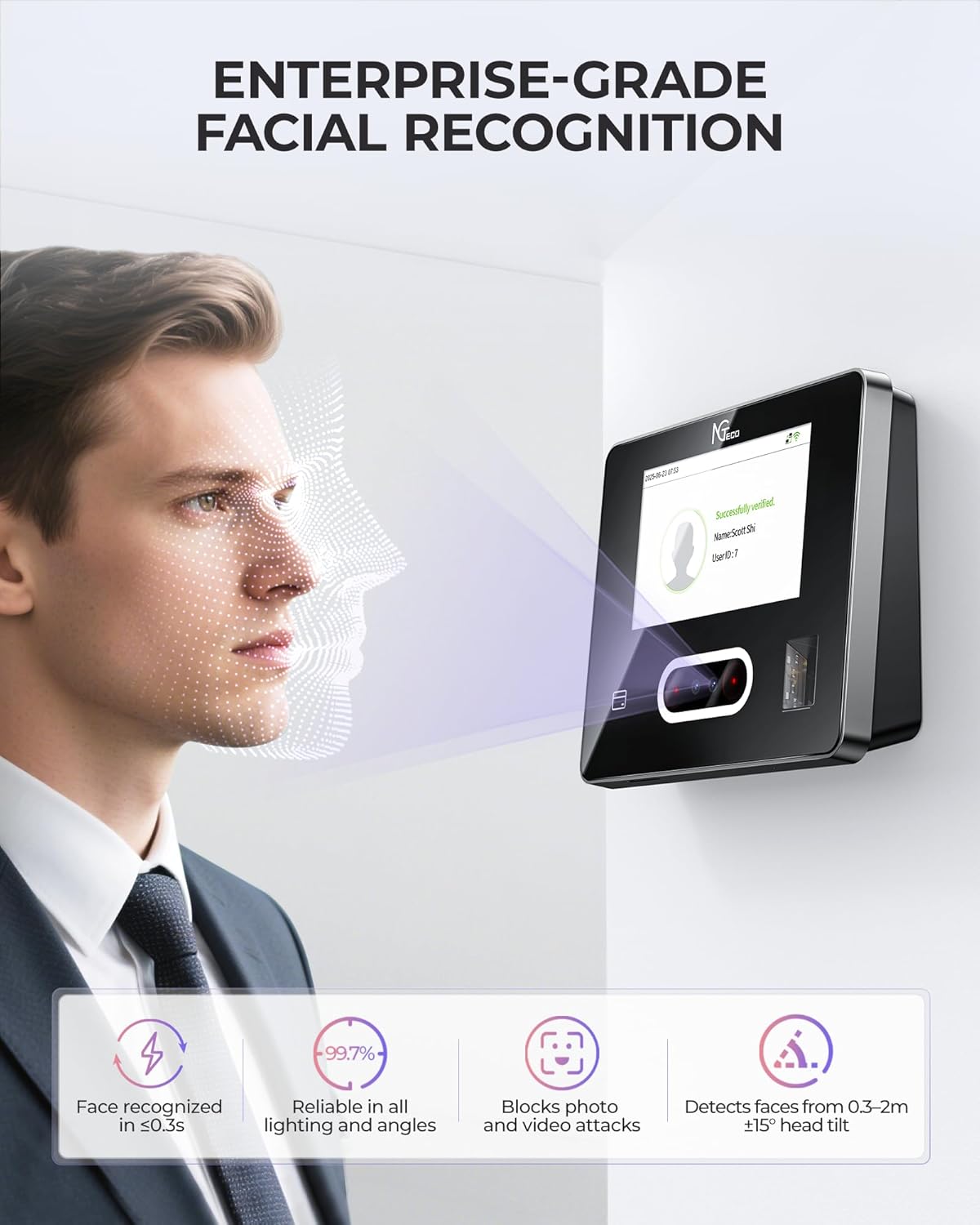
Image: Facial recognition in progress on the NGTeco NG-TC3, demonstrating its speed and accuracy.
Fingeraftryksscanning:
Place your registered finger flat on the fingerprint sensor. Hold it steady until the device confirms successful verification. The sensor works with both wet and dry fingers.
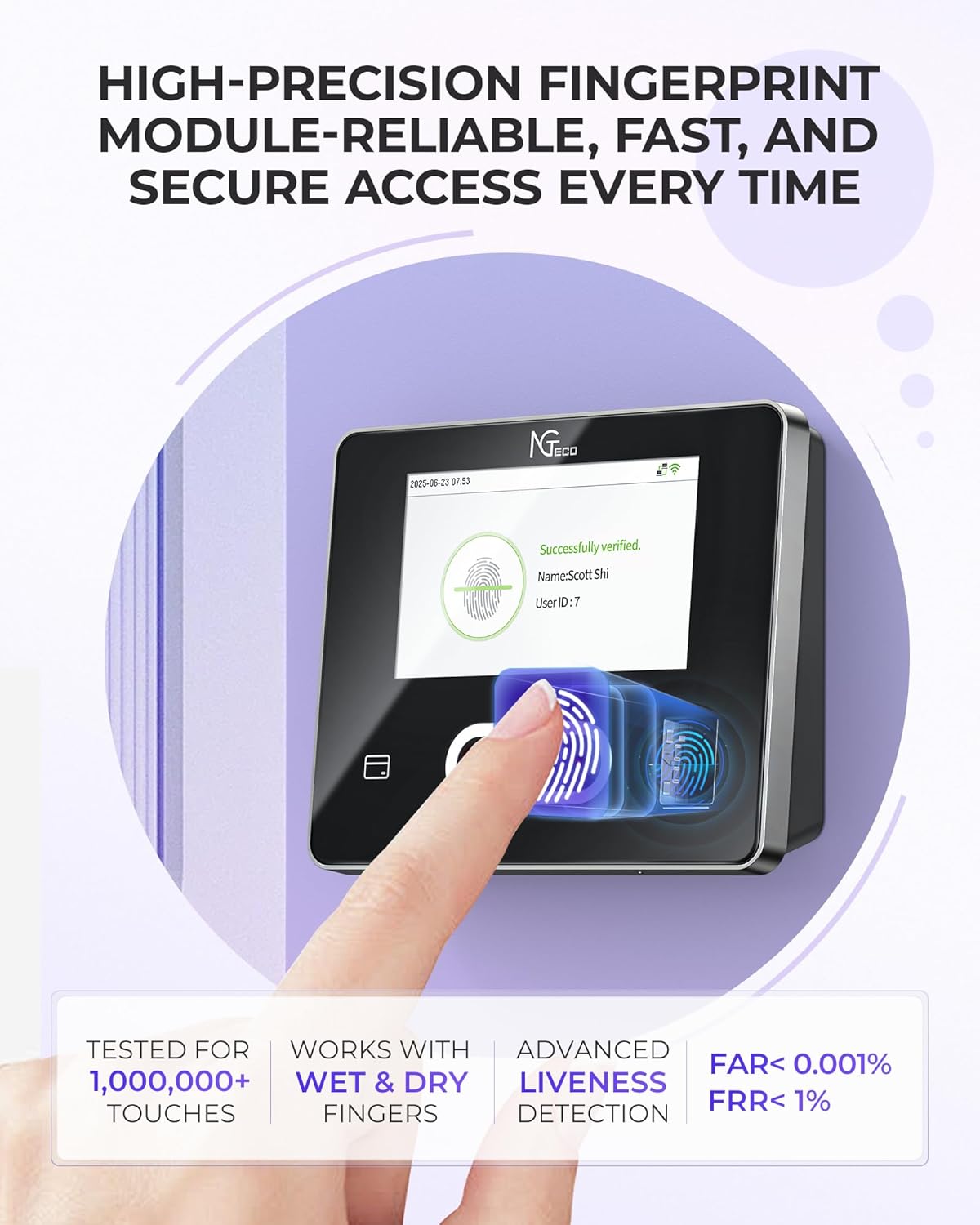
Image: Fingerprint scanning on the NGTeco NG-TC3, illustrating the high-precision module.
RFID-kort:
Hold your registered RFID IC card near the card reader area on the device until you hear a beep or see a confirmation on the screen.
PIN-indtastning:
On the device's touchscreen, select the PIN option. Enter your registered PIN using the on-screen keypad and confirm.
5.3 Using the NGTeco Office Mobile/Web App
The NGTeco Office platform provides comprehensive tools for managing attendance, schedules, and reports remotely.
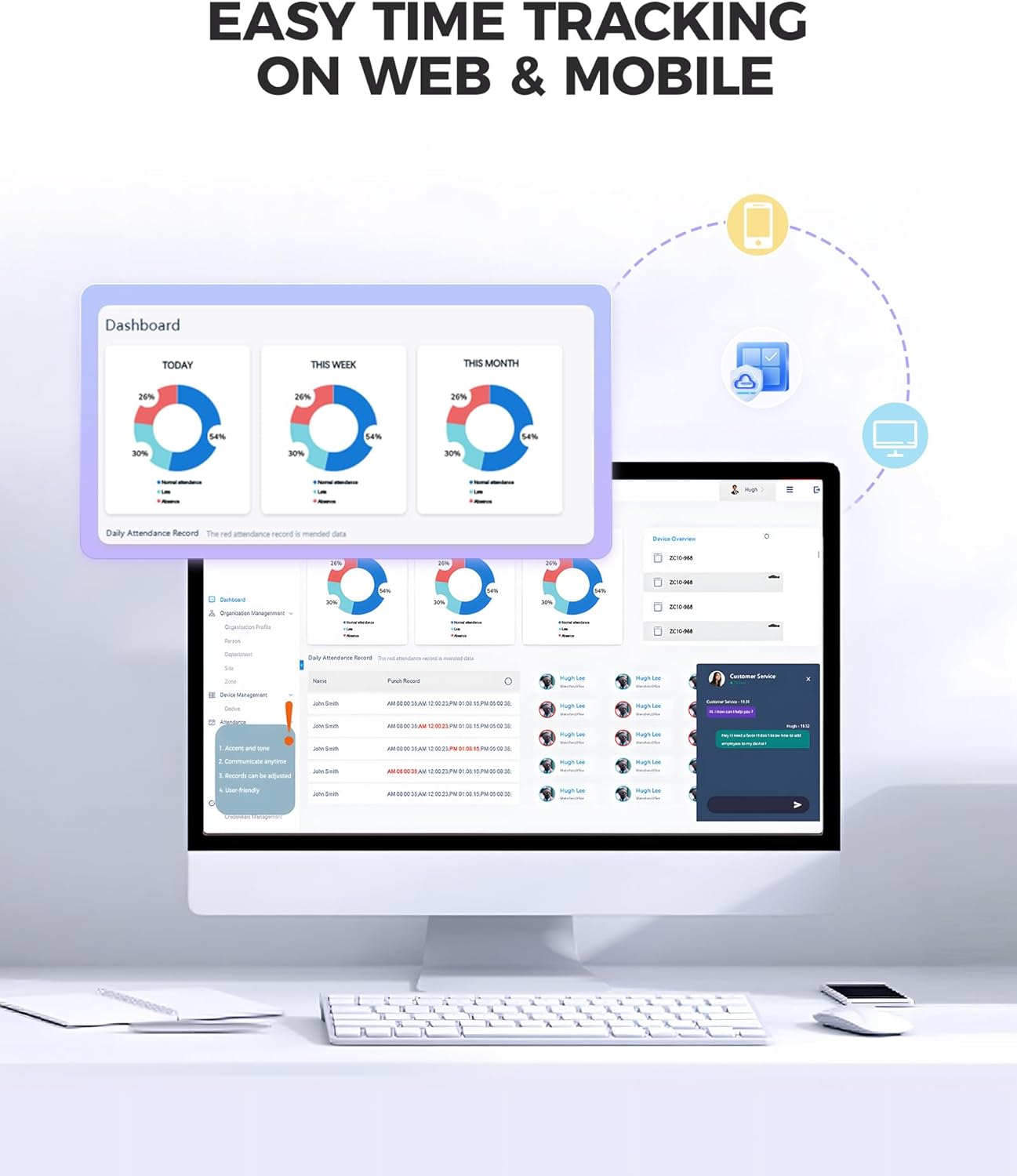
Image: The NGTeco Office dashboard accessible via web and mobile, displaying attendance records and reports.
- Dashboard: View real-time attendance data, daily, weekly, and monthly summaries.
- Medarbejderstyring: Add, edit, or remove employees; manage their authentication methods and personal information.
- Shift Scheduling: Create and assign flexible work schedules, including overnight shifts.
- Rapporter: Generate detailed attendance reports for payroll, including auto work hour calculation, lunch, and overtime tracking. Reports can be scheduled for automatic sending.
- Remote Punch-in: Employees can use the mobile app for GPS-restricted punch-in if enabled by the administrator.

Image: The NGTeco employee mobile application interface, demonstrating features like punch records and personal report access.
6. Vedligeholdelse
- Rensning: Use a soft, dry cloth to clean the touchscreen and device exterior. Avoid abrasive cleaners or solvents. For the camera lens and fingerprint sensor, use a microfiber cloth.
- Softwareopdateringer: Periodically check for firmware updates through the device settings or the NGTeco Office platform to ensure optimal performance and security. Follow on-screen instructions for updates.
- Data backup: While data is stored in the cloud, regularly export important reports and data from the NGTeco Office platform for local backup, if desired.
7. Fejlfinding
Se tabellen nedenfor for almindelige problemer og løsninger på disse:
| Problem | Mulig årsag | Løsning |
|---|---|---|
| Enheden tænder ikke. | Ingen strømforbindelse eller defekt adapter. | Ensure power cable is securely connected and adapter is plugged into a working outlet. Try a different power source. |
| Kan ikke oprette forbindelse til Wi-Fi. | Forkert adgangskode, uden for rækkevidde eller netværksproblem. | Verify Wi-Fi password. Move device closer to router. Check router status. Ensure 2.4GHz or 5GHz network is selected. |
| Ansigtsgenkendelse mislykkes. | Poor lighting, incorrect distance, or face not registered. | Ensure adequate lighting. Stand within 0.3-2m. Re-register face if necessary. Clean camera lens. |
| Fingerprint scan fails. | Finger not registered, dirty sensor, or improper placement. | Ensure finger is registered. Clean sensor. Place entire pad of finger flat on sensor. |
| RFID card not recognized. | Kortet er ikke registreret eller beskadiget. | Ensure card is registered to an employee. Try a different registered card. |
| Data not syncing to cloud. | No internet connection or cloud service issue. | Check Wi-Fi connection. Verify device is linked to NGTeco Office account. Check NGTeco service status. |
8. Specifikationer
| Feature | Detalje |
|---|---|
| Model | NG-TC3 |
| Mærke | NGteco |
| Autentificeringsmetoder | Facial Recognition, Fingerprint, RFID Card, PIN |
| Forbindelse | 2.4 GHz og 5 GHz Wi-Fi |
| Display Type | Digital berøringsskærm |
| Produktdimensioner | 20W x 24H Centimetres (approx. 20 x 3.81 x 24 cm) |
| Varens vægt | 839 g |
| Strømkilde | Battery Powered (typically via USB-C power adapter) |
| Driftstemperatur | (Not specified, typical range is 0°C to 45°C) |
| Driftsfugtighed | (Not specified, typical range is 20% to 80% non-condensing) |
9. Garanti og support
NGTeco products are designed for reliability and performance. For specific warranty details, please refer to the warranty card included with your product or visit the official NGTeco website. NGTeco offers lifetime technical support for its products.
For technical assistance, troubleshooting, or warranty claims, please contact NGTeco customer support:
- Webwebsted: www.ngteco.com
- E-mail: (Se website for current support email)
- Telefon: (Se website for current support phone number)
Please have your product model (NG-TC3) and purchase information ready when contacting support.


