1. Produktet er slutview
The GKU D700 Dash Cam is a dual-channel recording system designed to capture high-quality video footage from both the front and rear of your vehicle. It features a 3.18-inch touchscreen for easy operation, built-in GPS for route tracking, and 5.8GHz WiFi for seamless app connectivity. The system supports 4K resolution for the front camera and 1080P for the rear, ensuring clear and detailed recordings.
Pakkens indhold

Figure 1: Included components of the GKU D700 Dash Cam system.
- 1 x GKU D700 4K Dash Cam (Front Unit)
- 1 x 1080P bagkamera
- 1 x 64GB MicroSD Card (pre-installed)
- 1 x 11.5 fod strømforsyningskabel med biloplader
- 1 x 18 fod bagkamerakabel
- 2 x 3M selvklæbende monteringer
- 2 x elektrostatiske film
- 1 x brugermanual
- 1 x Pry Tool
- 5 x kabelklistermærker
2. Opsætning og installation
2.1 Forberedelse til installation
- Sørg for, at køretøjets motor er slukket.
- Clean the windshield area where the dash cam will be mounted to ensure proper adhesion.
- Insert the provided 64GB MicroSD card into the main dash cam unit.
2.2 Montering af frontkamera
- Apply one of the electrostatic films to the chosen area on your windshield. This allows for easier removal of the dash cam mount later.
- Attach the front dash cam to the electrostatic film using the pre-installed 3M adhesive on the bracket. Ensure the camera lens has a clear view af vejen.
- Connect the 11.5ft power supply cable to the Type-C port on the dash cam.
- Route the power cable neatly along the edge of the windshield and dashboard, using the provided pry tool to tuck it under trim panels. Secure the cable with the included cable stickers if necessary.
- Sæt bilopladerens ende af strømkablet i bilens 12V-strømstik (cigarettænderstik).
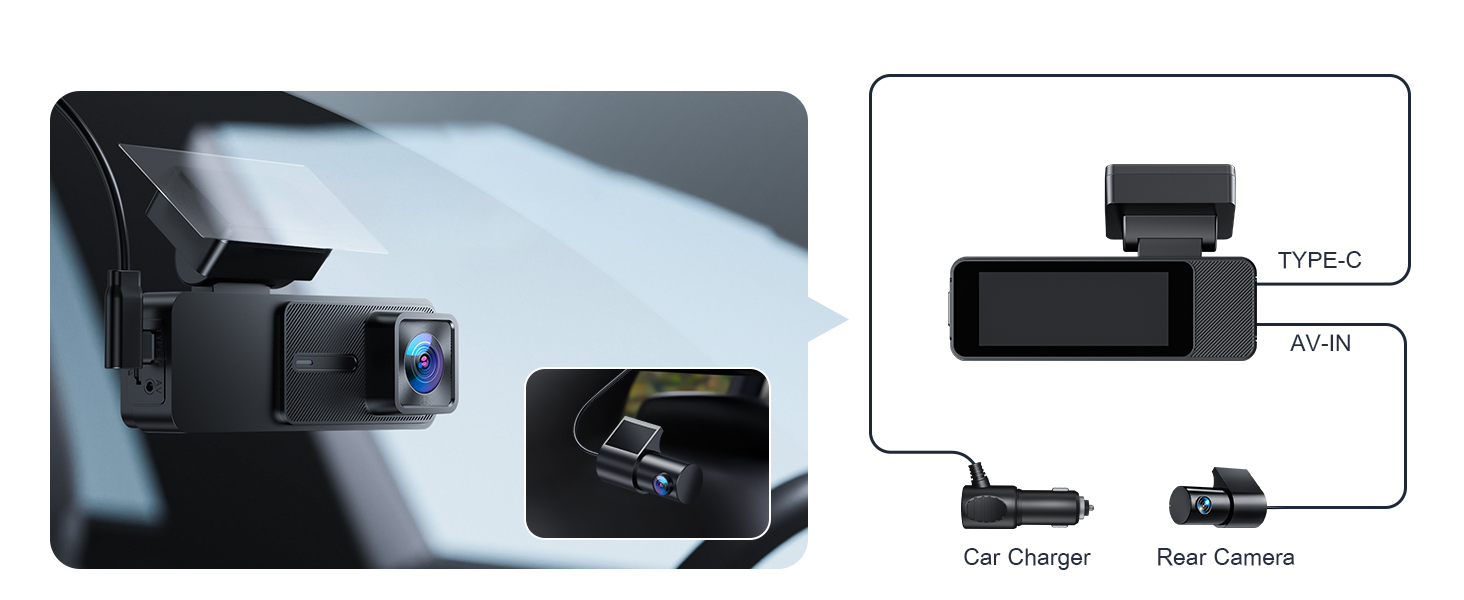
Figure 2: Connection points for the GKU D700 Dash Cam.
2.3 Installation af bagkamera
- Mount the 1080P rear camera on the inside of your rear windshield, ensuring a clear view. The rear camera is not waterproof and must be installed inside the vehicle.
- Connect the 18ft rear camera cable to the AV-IN port on the main dash cam unit.
- Route the rear camera cable from the front unit to the rear camera, carefully tucking it under the vehicle's headliner and side panels. Use the pry tool for assistance.
- Adjust the angle of the rear camera for optimal coverage. The rear camera offers 360° adjustability.

Figur 3: Anbefalet kabelføring til en ren installation.

Figure 4: Front dash cam's compact view and adjustable rear camera.
3. Betjeningsvejledning
3.1 Tænd/sluk
- Dashcam'et tænder automatisk og begynder at optage, når din bils motor starter.
- Den slukker automatisk, når motoren slukkes.
3.2 Betjening af berøringsskærmen
The GKU D700 features a 3.18-inch HD touchscreen for intuitive control. You can access recording, Wi-Fi, playback, and settings directly from the screen.

Figure 5: Navigating the dash cam's touchscreen interface.

Figure 6: The responsive 3.18-inch touchscreen for direct control.
3.3 Wi-Fi og app-styring
The dash cam features built-in 5.8GHz WiFi for faster data transfer and seamless connection to the GKU GO app on your smartphone. This allows for easy viewing, playback, and downloading of recorded footage.
- Download the "GKU GO" app from the App Store or Google Play.
- On the dash cam's touchscreen, tap the Wi-Fi icon to enable Wi-Fi.
- On your smartphone, connect to the dash cam's Wi-Fi network (SSID and password usually displayed on the dash cam screen).
- Open the GKU GO app to access live view, playback recordings, and manage settings.

Figure 7: GKU GO app interface for remote control and file ledelse.

Figure 8: Activating Wi-Fi on the dash cam for app connection.

Figure 9: Methods for accessing recorded footage.
3.4 GPS-funktionalitet
The built-in high-precision GPS records your driving route, speed, and location in real-time. You can review your journey on a map using the GKU GO app or a dedicated GPS player for Windows and Mac.

Figure 10: Visual representation of GPS tracking and route playback.

Figure 11: Detailed GPS route tracking on a map interface.
3.5 Parking Monitoring (Requires Hardwire Kit)
For 24-hour parking monitoring, a separate hardwire kit (not included) is required. Once connected, the dash cam offers two parking modes:
- G-sensor parkeringstilstand: Automatically activates recording if any impact is detected while parked, locking the footage for at forhindre overskrivning.
- Time-Lapse parkeringstilstand: Continuously records at a low frame rate (FPS), saving power and storage while providing continuous surveillance.

Figure 12: G-sensor and Time-lapse parking modes.

Figure 13: Parking monitoring features and hardwire kit requirement.

Figure 14: G-Sensor activated recording in emergencies.
3.6 Loop-optagelse
The loop recording feature ensures continuous recording by automatically overwriting the oldest footage when the memory card is full. Critical footage detected by the G-sensor is locked and protected from being overwritten.
- Adjustable segment lengths: 1-minute, 3-minute, or 5-minute.

Figure 15: Loop recording functionality and segment options.
4. Vedligeholdelse
4.1 Administration af microSD-kort
- Regularly format the MicroSD card (at least once a month) to maintain optimal performance and prevent data corruption.
- The dash cam supports up to a 512GB MicroSD card.
- Replace the MicroSD card if you experience frequent recording errors or degraded performance.
4.2 Rengøring af enheden
- Brug en blød, tør klud til at rengøre dashcam-kameraets linse og skærm.
- Undgå at bruge slibende rengøringsmidler eller opløsningsmidler, der kan beskadige enheden.
5. Fejlfinding
Almindelige problemer og løsninger:
- Dash Cam tænder ikke:
- Check the power cable connection to both the dash cam and the car's power outlet.
- Ensure the vehicle's 12V power outlet is functioning.
- Optagelsesfejl/oversprungne billeder:
- Formater MicroSD-kortet.
- Ensure the MicroSD card is a high-speed card (Class 10 or higher recommended).
- Prøv et andet MicroSD-kort.
- Problemer med Wi-Fi-forbindelse:
- Sørg for, at Wi-Fi er aktiveret på dashcam'et.
- Genstart både dashcam'et og din smartphone.
- Verify you are connecting to the correct Wi-Fi network.
- GPS sporer ikke:
- Sørg for, at dashcam'et har en klar view of the sky for satellite reception.
- Verify GPS is enabled in the dash cam settings.
- Skærmen reagerer ikke:
- Genstart dashcam'et.
- Kontakt kundesupport, hvis problemet fortsætter.
6. Specifikationer
| Feature | Detalje |
|---|---|
| Modelnavn | D700 |
| Mærke | GKU |
| Videooptagelsesopløsning | Front: 4K 2160p@30fps, Rear: 1080P@25fps |
| Skærmstørrelse | 3.18-tommer HD-touchskærm |
| Forbindelsesteknologi | 5.8GHz/2.4GHz Wi-Fi |
| Særlige funktioner | Built-in GPS, App Control, Automatic Incident Detection (G-Sensor), Compact Design, WDR, Night Vision, Loop Recording, Parking Monitor (requires hardwire kit) |
| Support til opbevaring | Includes 64GB SD card, Supports up to 512GB Max |
| Produktdimensioner | 1.18 x 4.3 x 1.96 tommer |
| Varens vægt | 1.34 pund |
| Monteringstype | Forrudemontering |
| Type køretøjstjeneste | Car, Minivan, SUV, Truck |
7. Garanti og support
The GKU D700 Dash Cam comes with a 12 måneders garanti. This guarantee can be extended to 24 måneder upon product registration within 7 days of purchase. GKU also provides lifetime technical support and 24/7 customer support.
For technical assistance or warranty claims, please contact GKU customer support at support@gkutech.com.


