1. Introduktion
Thank you for choosing BUGANI Buds True Wireless Earbuds. This manual provides detailed instructions on how to set up, operate, and maintain your earbuds to ensure optimal performance and longevity. Please read this manual thoroughly before using the product.
2. Pakkens indhold
- 1 pair of BUGANI B09 True Wireless Earbuds
- 1 USB-C ladekabel
- 3 pairs of Eartips (S, M, L)
- 3 pairs of Silicone Ear Hooks (S, M, L)
- 1 Brugervejledning
3. Produktet er slutview
Familiarize yourself with the components of your BUGANI Buds.
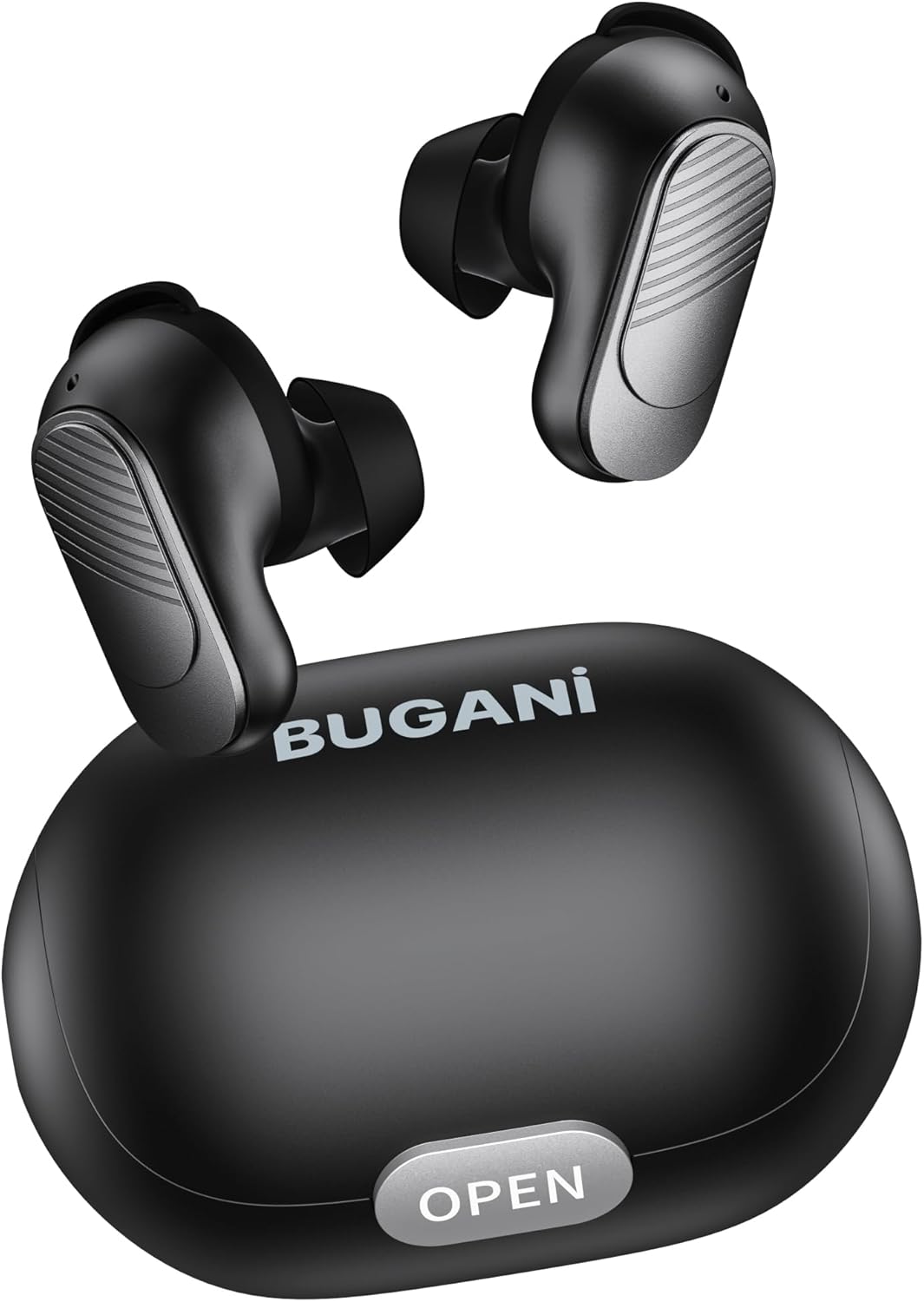
Image: BUGANI Buds True Wireless Earbuds with their charging case. The earbuds are black with silver accents, and the case is a sleek black oval shape with an "OPEN" button.

Image: An exploded diagram showing the internal components of a BUGANI Bud earbud, highlighting the driver and circuit board for enhanced sound quality.

Image: Illustration demonstrating the battery life of BUGANI Buds. It shows 6 hours of playback on a single charge and an additional 24 hours with the charging case, totaling 30 hours.

Image: A woman using BUGANI Buds during a phone call, with an inset showing the earbud and the "MIC" label, indicating the dual microphone for clear calls.

Image: A woman exercising while wearing BUGANI Buds, with an overlay showing the IPX6 water resistance icon, signifying protection against sweat and splashes.

Image: A woman wearing BUGANI Buds, with insets highlighting the lightweight design (3.9g) and the ergonomic fit with proper ear wingtips for comfort.
4. Opsætning
4.1 Indledende opladning
Before first use, fully charge the earbuds and the charging case. Connect the USB-C charging cable to the charging port on the case and a power source. The indicator lights on the case will show charging status.
4.2 Choosing the Right Eartips
Select the eartips (S, M, L) and silicone ear hooks that provide the most comfortable and secure fit for your ears. A proper seal is crucial for optimal sound quality and noise isolation.
5. Betjeningsvejledning
5.1 Tænd/sluk
- Tænd: Åbn opladningsetuiet, og øretelefonerne tænder automatisk.
- Sluk: Sæt ørepropperne tilbage i opladningsetuiet, og luk låget. De slukker automatisk og begynder at oplade.
5.2 Bluetooth -parring
- Sørg for, at ørepropperne er i opladningsetuiet, og at låget er åbent.
- Aktiver Bluetooth på din enhed (smartphone, tablet osv.).
- Søg efter "BUGANI Buds" in the list of available Bluetooth devices.
- Select "BUGANI Buds" to connect. Once connected, you will hear a confirmation tone.
- Ørepropperne genopretter automatisk forbindelse til den sidst parrede enhed, når de tages ud af etuiet, hvis Bluetooth er aktiveret på enheden.
5.3 Tryk på kontrolelementer
The BUGANI Buds feature intuitive touch controls on each earbud:
| Handling | Venstre øretelefon | Højre ørepropper |
|---|---|---|
| Afspil/pause | Enkelt tryk | Enkelt tryk |
| Næste spor | Dobbelttryk | |
| Forrige spor | Dobbelttryk | |
| Besvar/afslut opkald | Enkelt tryk | Enkelt tryk |
| Afvis opkald | Langt tryk (2 sek.) | Langt tryk (2 sek.) |
| Aktiver Voice Assistant | Tredobbelt tryk | Tredobbelt tryk |
5.4 Opladning af øretelefoner og etuiet
- høretelefoner Place the earbuds into the charging case. They will automatically charge.
- Opladningsetui: Connect the USB-C cable to the charging port on the case and a USB power adapter (not included). The indicator lights will show the charging status.
6. Vedligeholdelse
- Rengør ørepropperne og opladningsetuiet regelmæssigt med en blød, tør klud.
- Brug ikke slibende rengøringsmidler eller opløsningsmidler.
- Keep the charging contacts on both the earbuds and the case clean to ensure proper charging.
- Opbevar øretelefonerne i deres opladningsetui, når de ikke er i brug for at beskytte dem og holde dem opladet.
- Undgå at udsætte ørepropperne for ekstreme temperaturer, fugtighed eller direkte sollys.
- While IPX6 water-resistant, do not immerse the earbuds in water.
7. Fejlfinding
| Problem | Mulig løsning |
|---|---|
| Øretelefoner parrer ikke |
|
| Kun én øretelefon virker |
|
| Dårlig lydkvalitet |
|
| Øretelefoner oplader ikke |
|
8. Specifikationer
| Feature | Detalje |
|---|---|
| Modelnavn | B09 |
| Mærke | BUGANI |
| Forbindelsesteknologi | Trådløs (Bluetooth 5.3) |
| Trådløs kommunikationsteknologi | Bluetooth |
| Kontroltype | Tryk på kontrol |
| Vandmodstandsniveau | IPX6 (vandtæt) |
| Frekvensområde | 20 Hz - 20,000 Hz |
| Batterisammensætning | Lithium-ion |
| Genopladeligt batteri | Ja |
| Øreplacering | In-Ear |
| Formfaktor | In-Ear |
| Materiale | Plast |
| Farve | Sort |
| ASIN | B0FBRKTKTS |
9. Garanti og support
For warranty information and technical support, please refer to the official BUGANI webwebstedet eller kontakt deres kundeservice. Gem din købskvittering til garantikrav.
Return Policy: This product typically has a 30-day refund/replacement return policy.
Manufacturer: BUGANI


