1. Introduktion
The SMALLRIG V Mount Battery X99 is a high-capacity, intelligent power solution designed for professional camera, camcorder, monitor, and video light applications. Featuring a 99Wh / 6800mAh capacity, 100W fast charging, multiple output ports (D-TAP, USB-C, DC), APP control, and a 2.0-inch touchscreen, it offers versatile and reliable power for demanding production environments. Its robust design ensures durability and safety.
2. Sikkerhedsoplysninger
Please read all safety warnings and instructions before using this product to avoid injury or damage.
- Batteriet må ikke skilles ad eller modificeres. Unauthorized modifications can lead to fire, explosion, or other hazards.
- Undgå ekstreme temperaturer. Do not expose the battery to direct sunlight, heat sources, or temperatures above 60°C (140°F).
- Holdes væk fra vand og fugt. Although the battery has an IP54 rating for splash and dust resistance, it is not fully waterproof. Do not submerge it.
- Brug kun godkendte opladere. Charge the battery using a compatible PD 3.0 charger (100W or above) to ensure optimal performance and safety.
- Håndter med forsigtighed. Despite its robust design, avoid severe impacts or dropping the battery from excessive heights.
- Bortskaf korrekt. Do not dispose of the battery in fire or with household waste. Follow local regulations for battery recycling.
- Opbevares utilgængeligt for børn.
3. Produktet er slutview
The SMALLRIG V Mount Battery X99 features a compact yet powerful design with multiple interfaces and an intuitive display.
3.1 Komponenter
- V Mount Battery X99 Unit
- USB-C to USB-C Charging Cable (240W)
- Brugermanual
3.2 Interfaces and Display

Figur 3.2.1: Forside View with 2.0-inch Touchscreen Display
The main display provides real-time information on battery status, remaining time, temperature, and individual port voltage/power. The frosted anti-glare surface ensures visibility in various lighting conditions.

Figure 3.2.2: Top and Side Views med porte
The battery is equipped with 8 versatile ports: 2 x D-Tap, 2 x USB-C (PD 3.0 100W In/Out), 1 x BP, 1 x DC 5.5 x 2.1mm 8V, 1 x DC 5.5 x 2.5mm 12V, and 1 x USB-A (QC 3.0). These ports allow simultaneous power delivery to multiple devices.
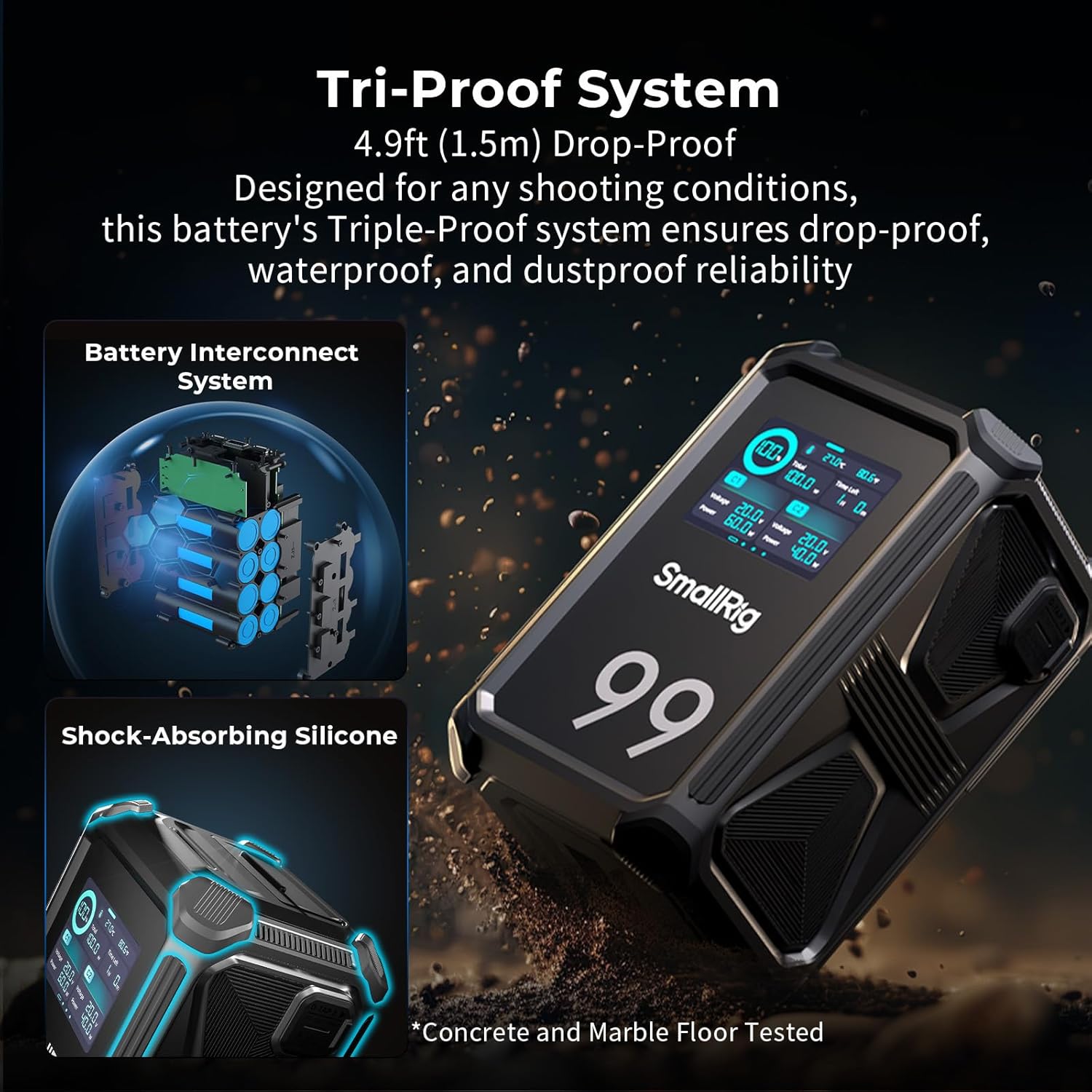
Figure 3.2.3: Tri-Proof System
The battery features a triple-proof system with a 1.5-meter (4.9-foot) anti-drop casing, silicone protection on eight corners, four reinforced edges, all-metal side plates, and reinforced internal circuits. It is IP54 rated for water splash and dust resistance.
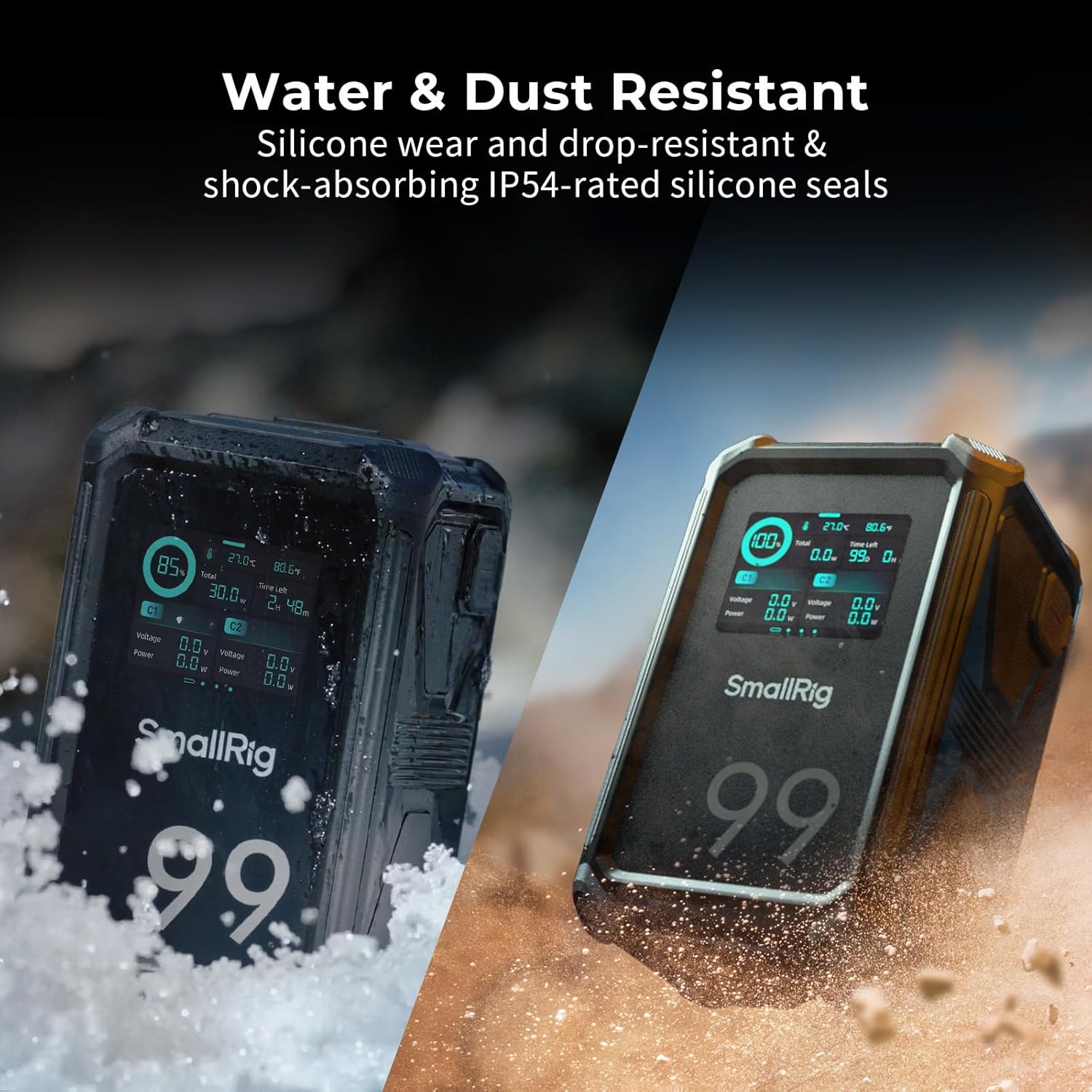
Figure 3.2.4: Water & Dust Resistant Design
Integrated rubber gaskets and shock-absorbing IP54-rated silicone seals provide reliable operation even when exposed to water splashes or dust, making it suitable for outdoor use.

Figure 3.2.5: Detailed Port Layout
A closer look at the various input/output ports, including USB-C1/C2 (PD 3.0 100W IN/OUT), QC 3.0 USB-A, 12V-OUT, 8V-OUT, BP (16.8V Max), and D-Tap1/D-Tap2 (16.8V Max).

Figure 3.2.6: Rear LED Light
A small LED light is integrated on the back of the battery to assist in low-light conditions, making it easier to find items or align with a V-mount battery plate.
4. Opsætning
4.1 Indledende opladning
Before first use, fully charge the battery. Use the provided USB-C to USB-C cable and a PD 3.0 compatible GaN charger (100W or above) for optimal charging speed.
- Connect the USB-C cable to one of the battery's USB-C ports.
- Connect the other end of the cable to a 100W (or higher) PD 3.0 charger.
- The touchscreen display will show the charging status and estimated time to full charge. A full charge typically takes approximately 2 hours.

Figur 4.1.1: Hurtigopladning via USB-C
The battery supports 100W bi-directional PD fast charging, allowing for quick replenishment of power.
4.2 Mounting and Connecting Devices
The V Mount Battery X99 can be mounted to various camera rigs or accessories using its V-mount plate. It also features 1/4"-20 and 3/8"-16 threaded holes for additional mounting options.
- Align the V-mount plate on the battery with the V-mount receiver on your device or rig.
- Slide the battery down until it clicks securely into place.
- Connect your camera, monitor, video light, or other devices to the appropriate output ports (D-Tap, USB-C, DC, USB-A) using compatible cables.

Figure 4.2.1: Battery Mounted on Camera Rig
The V-mount design allows for quick and secure attachment to compatible camera setups.
5. Betjeningsvejledning
5.1 Tænd/sluk
Press the power button located on the side of the battery to turn the unit on or off. The touchscreen will illuminate upon activation.
5.2 Betjening af berøringsskærmen
The 2.0-inch HD color touchscreen is the primary interface for monitoring and controlling the battery.
- Hoveddisplay: Viser den aktuelle opladningsprocenttage, total power output, remaining run time, and battery temperature.
- Portstatus: Stryg til venstre eller højre på skærmen for at view detailed voltage and power information for each individual port.
- Havnekontrol: Tap on a specific port icon on the touchscreen to toggle its power output on or off. This feature includes an anti-misoperation function to prevent accidental power cuts.
- Indstillingsmenu: Swipe down from the top of the screen to access settings such as screen brightness, rear LED light control, Wi-Fi activation for app control, and firmware information.
- Accidental Touch Lock: Long-press the screen to activate the accidental touch lock feature, preventing unintended changes during use.
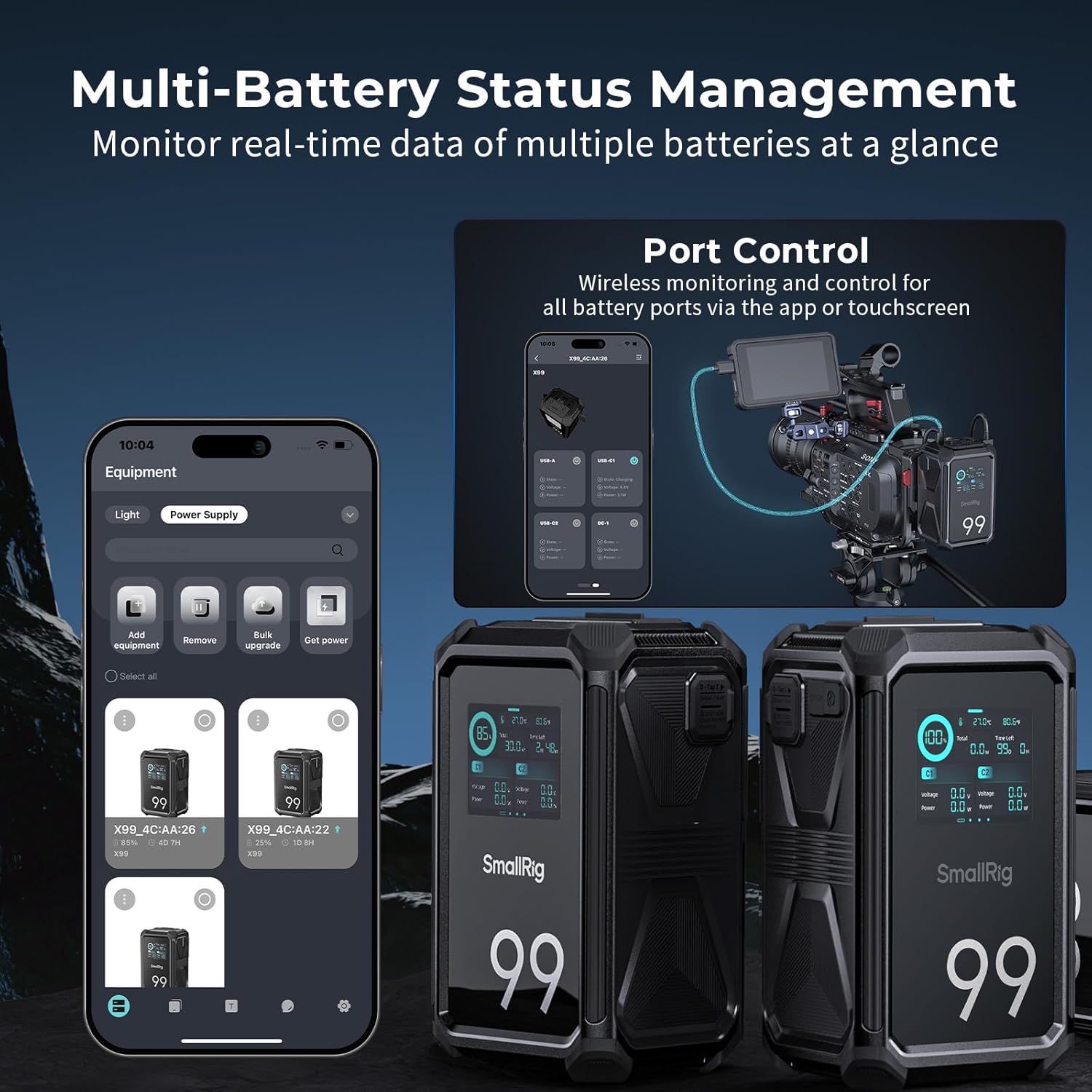
Figur 5.2.1: Touchscreen-grænseflade
The intuitive touchscreen allows for easy monitoring and control of all battery functions.
5.3 Mobile App Control (SmallGoGo App)
The dedicated SmallGoGo mobile application provides advanced remote control and monitoring capabilities for the V Mount Battery X99.
- Download the SmallGoGo app from your device's app store.
- Enable Wi-Fi on the battery via the touchscreen settings menu.
- Open the app and follow the instructions to connect to your battery(s).
- Gennem appen kan du:
- View real-time status of single or multiple connected batteries.
- Control individual port switches remotely.
- Activate battery positioning features (lights flashing, screen wake-up).
- Perform OTA (Over-The-Air) firmware updates.
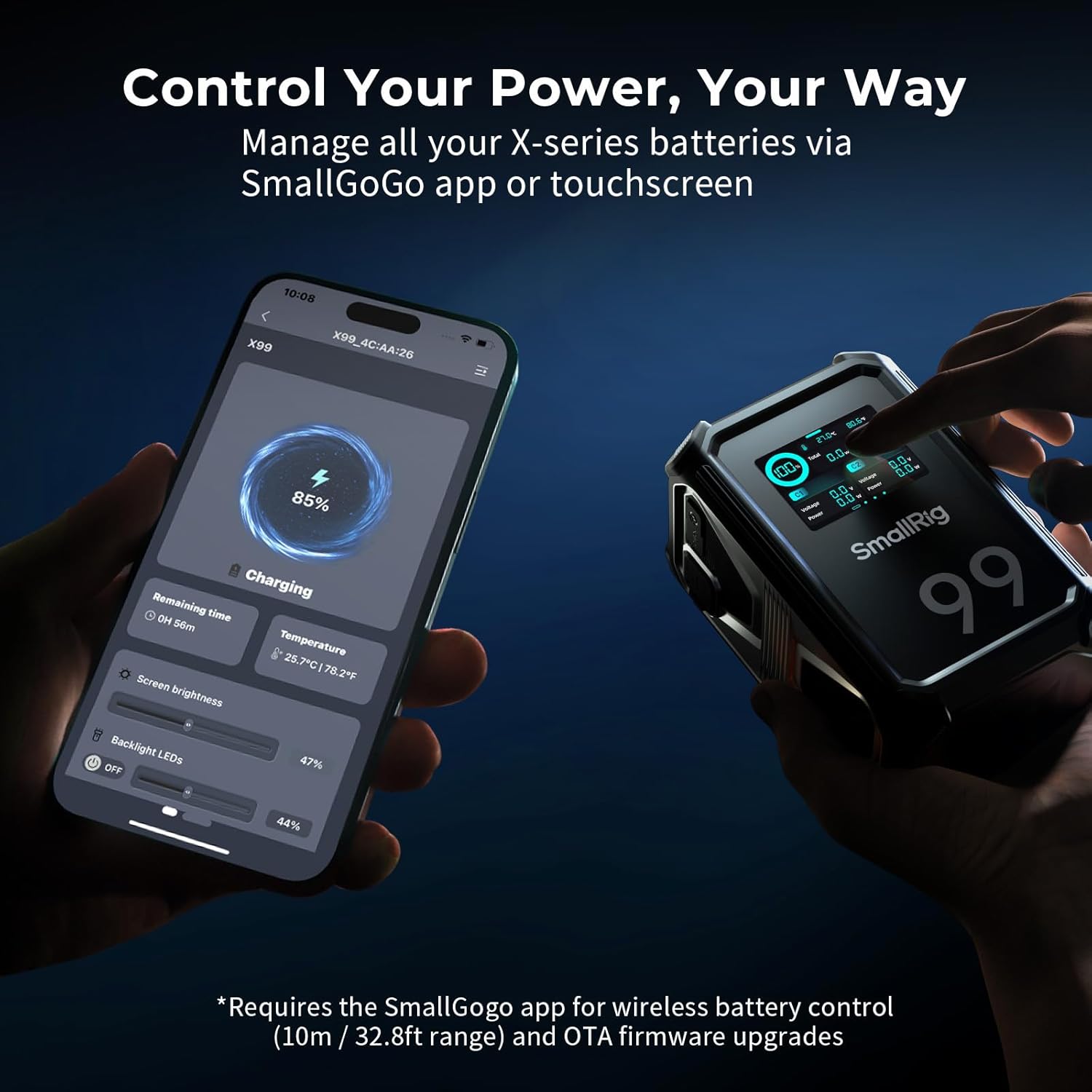
Figur 5.3.1: App-kontrolgrænseflade
Manage your battery's functions and monitor its status conveniently from your smartphone or tablet.
Figure 5.3.2: Multi-Battery Status Management
The SmallGoGo app allows monitoring of multiple batteries simultaneously, enhancing workflow efficiency.
Video 5.3.3: Produktfunktioner overview
This video demonstrates the battery's water and dust resistance, drop resistance, rear LED for low-light installation, versatile ports, 2.0-inch matte finish color display, low-temperature fast charging, and app/touchscreen control with remote-controlled port switching and multi-battery status check.
6. Vedligeholdelse
- Rensning: Use a soft, dry cloth to clean the battery surface. Do not use harsh chemicals or abrasive materials.
- Opbevaring: Store the battery in a cool, dry place away from direct sunlight and extreme temperatures. For long-term storage, charge the battery to approximately 50-60% capacity.
- Regelmæssig brug: To maintain battery health, it is recommended to fully discharge and recharge the battery at least once every three months if not in regular use.
7. Fejlfinding
| Problem | Mulig årsag | Løsning |
|---|---|---|
| Batteriet oplades ikke. | Charger not connected properly; charger not PD 3.0 compatible or insufficient wattage; defekt kabel. | Ensure cable is securely connected. Use a 100W+ PD 3.0 charger. Try a different USB-C cable. |
| Enheder modtager ikke strøm. | Port is turned off; cable not connected; device power requirements exceed port output. | Check touchscreen or app to ensure the port is active. Verify cable connections. Check device power requirements against battery specifications. |
| Touchscreen reagerer ikke. | Accidental touch lock activated; temporary software glitch. | Long-press the screen to unlock. Restart the battery by powering it off and on. |
| App not connecting to battery. | Wi-Fi not enabled on battery; app not updated; battery too far from device. | Ensure Wi-Fi is enabled on the battery. Update the SmallGoGo app. Move closer to the battery (within 10m/32.8ft range). |
8. Specifikationer
| Feature | Detalje |
|---|---|
| Model | X99 (Item model number: 4984) |
| Kapacitet | 99Wh / 6800mAh (14.54V / 6.8Ah) |
| Nominel totalydelse | 100W |
| Produktdimensioner | 125 x 79 x 68 mm (4.9 x 3.1 x 2.7 tommer) |
| Varens vægt | 880g ± 10g (31oz / 1.94 pounds) |
| Opladningstid | Approx. 2 hours (with 100W+ PD fast charging GaN charger) |
| Input (USB-C1 / USB-C2) | 100W (maks.) |
| Input (BP / D-Tap1 / D-Tap2) | 6.8A |
| Output (USB-C1 / USB-C2) | 5V/3A, 9V/3A, 12V/3A, 15V/3A, 20V/5A (100W Max) |
| Udgang (USB-A) | 5V/3A, 9V/3A, 12V/3A (30W Max) |
| Output (BP) | 11.1-16.8V / 6.8A (Rated) |
| Output (D-Tap1 / D-Tap2) | 11.1-16.8V / 6.8A (Rated) |
| Udgang (8V-UD) | 8V / 3A (maks.) |
| Udgang (12V-UD) | 12V / 3A (maks.) |
| Opladningstemperatur | 0°C til 45°C / 32°F til 113°F |
| Afladningstemperatur | -15°C til 60°C / 5°F til 140°F |
| Beskyttelse | Short circuit, over-temperature, over-voltage, over-current, over-charge, over-discharge, cell protection, low-temperature protection. |
| Holdbarhed | 1.5m (4.9ft) drop-proof, IP54 water & dust resistant. |
9. Garanti og support
SMALLRIG offers a 2-year service warranty for the V Mount Battery X99. For technical support, warranty claims, or further inquiries, please contact SMALLRIG customer service through their official webwebstedet eller de kontaktoplysninger, der følger med din produktemballage.
You can also visit the official SMALLRIG store on Amazon for product information and support: SMALLRIG Store


