1. Introduktion
Thank you for choosing the MCHOSE Mix 87 Magnetic Switch Gaming Keyboard. This manual provides detailed instructions for setting up, operating, and maintaining your keyboard to ensure optimal performance. The Mix 87 is designed for competitive gaming, featuring Hall Effect magnetic switches with rapid trigger technology and adjustable actuation.
2. Pakkens indhold
Kontroller venligst, at alle varer er til stede i din pakke:
- MCHOSE Mix 87 Gaming Keyboard
- USB-C kabel
- Keycap aftrækker
- Ekstra afbrydere (2 stk.)
- Brugervejledning (dette dokument)
3. Produktet er slutview
The MCHOSE Mix 87 is a Tenkeyless (TKL) keyboard featuring 87 keys, Hall Effect magnetic switches, and a dedicated volume knob. Its design prioritizes speed, precision, and customization for an enhanced gaming experience.

Billede 3.1: Top view of the MCHOSE Mix 87 Gaming Keyboard, showcasing its 87-key layout, dedicated function keys, and volume knob. The keyboard features RGB backlighting visible through the translucent keycaps.
Nøglefunktioner:
- Hall Effect Magnetic Switches: Offers adjustable actuation points from 0.01mm to 3.4mm.
- Rapid Trigger (RT) Mode: Allows keys to react instantly upon release, enhancing responsiveness.
- 8000 Hz Polling Rate: Minimizes input latency for competitive gaming.
- RGB-baggrundsbelysning: Customizable 16 million color options with various effects.
- Dedikeret lydstyrkeknap: For convenient audio control.
- Pakningsmonteringsstruktur: Provides a comfortable typing feel and acoustic profile.

Billede 3.2: Close-up of the MCHOSE Mix 87 keyboard highlighting its magnetic switch technology. The image emphasizes the 0.001mm precision and 0.08ms event-level delay, crucial for high-performance gaming.
4. Opsætning
4.1 Tilslutning af tastaturet
- Locate the USB-C port on the back of your MCHOSE Mix 87 keyboard.
- Tilslut den ene ende af det medfølgende USB-C-kabel til tastaturet.
- Tilslut den anden ende af USB-C-kablet til en ledig USB-port på din computer.
- Tastaturet vil automatisk blive genkendt af dit operativsystem.
4.2 Systemkompatibilitet
The MCHOSE Mix 87 keyboard is compatible with the following operating systems:
- Windows
- macOS
- iOS
- Android
5. Betjeningsvejledning
5.1 Grundlæggende nøglefunktioner
The MCHOSE Mix 87 features a standard 87-key TKL layout. All keys function as labeled. Use the Fn key in combination with other keys for secondary functions, typically indicated by icons or alternative labels on the keycaps.
5.2 Volume Knob Operation
The dedicated knob located in the upper right corner of the keyboard controls audio output.
- Roter til venstre: Sænk volumen.
- Roter til højre: Øg volumen.
- Tryk ned: Slå lyd til/fra.
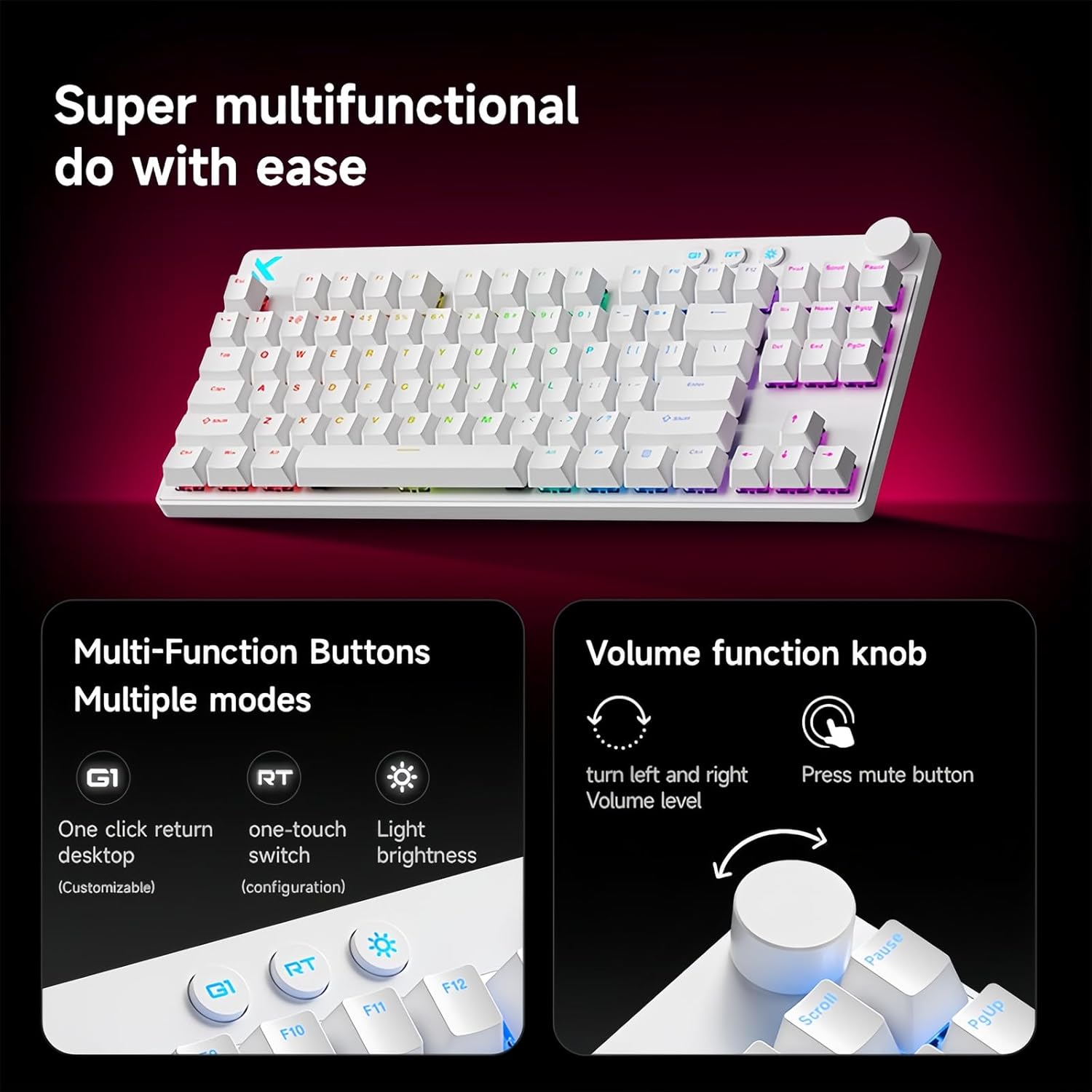
Billede 5.1: Illustration of the multi-function buttons (G1, RT, Light) and the volume knob on the MCHOSE Mix 87 keyboard. The image details the functions of the knob for volume adjustment and muting, and the customizable nature of the G1 button.
5.3 multifunktionsknapper
Above the numeric row, there are three dedicated buttons:
- G1 Button: Customizable function, typically set to return to desktop.
- RT Button: Toggles or adjusts Rapid Trigger mode.
- Lys knap: Adjusts RGB lighting brightness or cycles through lighting modes.
5.4 Rapid Trigger (RT) Mode and Adjustable Actuation
The Mix 87 features Hall Effect magnetic switches that allow for precise control over actuation and de-actuation points.
- Justerbar aktivering: The trigger point can be set from 0.01mm to 3.4mm, allowing you to customize key sensitivity. This is configured via the web chauffør.
- Hurtig udløser (RT): This mode allows a key to register a new press as soon as it begins to move upwards, without needing to return to its reset point. This significantly reduces input delay for repeated key presses. The RT Smart Mode offers 1-15 adjustable levels for fine-tuning responsiveness.
- Avancerede funktioner: Supports SOCD (Simultaneous Opposite Cardinal Directions), DKS (Dynamic Keystrokes), MT (Macro Toggle), and TGL (Toggle) functions for advanced control.

Billede 5.2: Visual representation of the MCHOSE Mix 87's performance capabilities, including 0.001mm precision, 256K ultra-high scanning rate, 0.08ms ultra-low latency, and 8K ultra-high polling rate. It also highlights the magnetic axis Algorithm 3.0, 15-level adjustable RT Smart mode, and ADC Direct Link for WASD keys.
5.5 RGB-baggrundsbelysning
The keyboard features 16 million color RGB backlighting with various effects. Use the dedicated Light button or the software driver to customize lighting:
- Cycle through preset lighting effects.
- Juster lysstyrkeniveauer.
- Customize individual key lighting.
- Enable music rhythm synchronization.
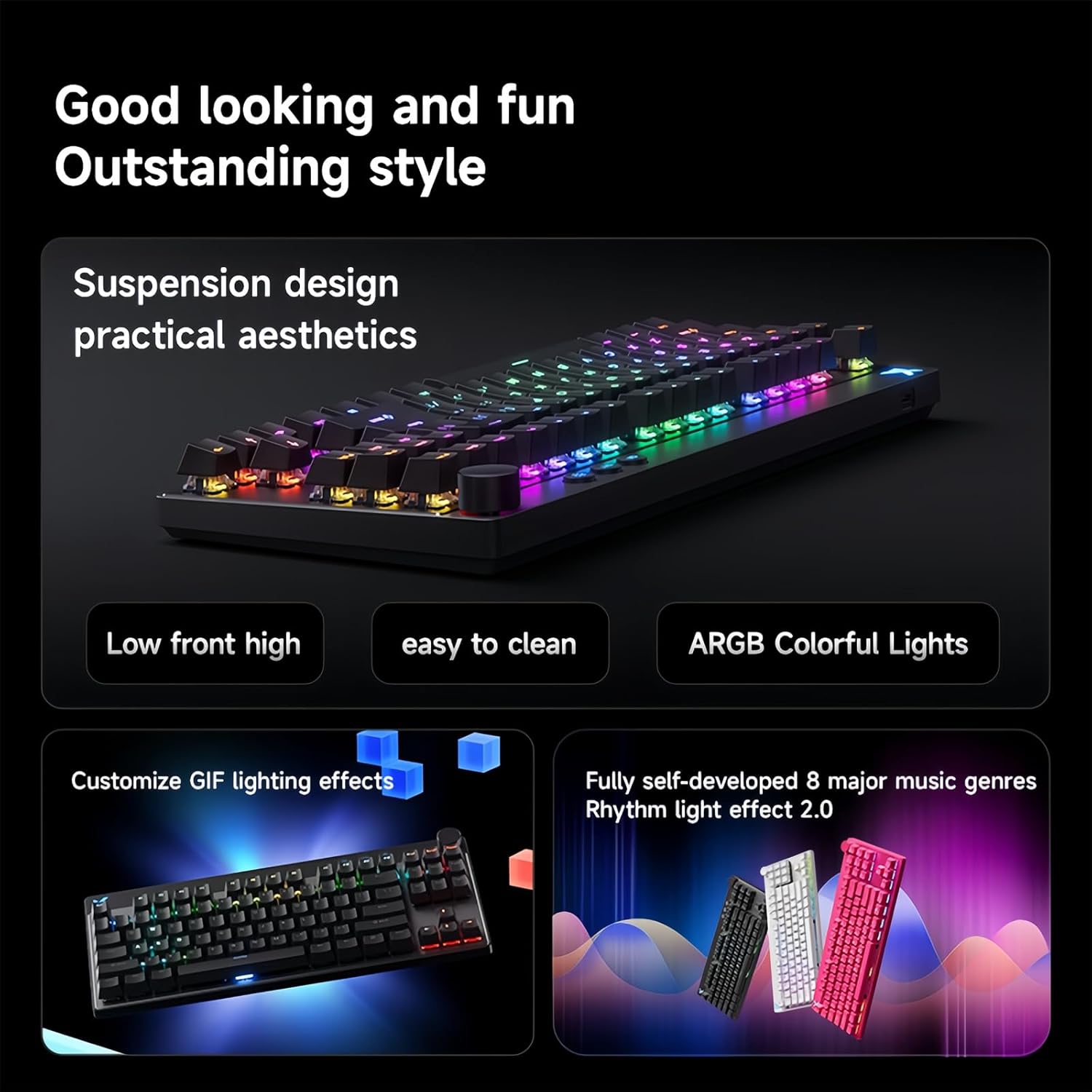
Billede 5.3: The MCHOSE Mix 87 keyboard showcasing its suspension design and ARGB colorful lighting. The image highlights the aesthetic appeal and practical features like easy cleaning and customizable GIF lighting effects, along with music rhythm light effects.
6. Software Driver
The MCHOSE Mix 87 supports a customizable web-based driver, eliminating the need for software downloads and installations. This driver provides access to advanced settings and customization options.
6.1 Adgang til Web Chauffør
For at få adgang til web driver, open your web browser and navigate to one of the following URLs:
- Official MCHOSE Web Chauffør: https://www.mchose.com.cn
- Alternative M HUB Client Driver: https://www.maicong.cn
De web driver allows you to:
- Adjust key actuation points.
- Configure Rapid Trigger (RT) levels.
- Tilpas RGB-lyseffekter og farver.
- Program macros and reassign key functions.
- Opdater firmware (hvis tilgængelig).

Billede 6.1: Screenshot illustrating the MCHOSE web-based driver interface. This driver allows users to customize keyboard settings without installing dedicated software, offering cross-platform compatibility.
7. Vedligeholdelse
7.1 Rengøring af tastaturet
Sådan bevarer du tastaturets udseende og funktionalitet:
- Frakobl tastaturet fra computeren, før du rengør det.
- Brug en blød, fnugfri klud lidt damprengøres med vand eller en mild rengøringsopløsning til at tørre tastaturerne og kabinettet af.
- For dust and debris between keycaps, use compressed air or the provided keycap puller to remove keycaps and clean underneath.
- Avoid using harsh chemicals, abrasives, or solvents, as these can damage the keyboard's finish.
7.2 Opbevaring
Når tastaturet ikke er i brug, skal det opbevares tørt og køligt, væk fra direkte sollys og ekstreme temperaturer.
8. Fejlfinding
8.1 Tastaturet reagerer ikke
- Sørg for, at USB-C-kablet er korrekt tilsluttet til både tastaturet og computeren.
- Prøv at tilslutte tastaturet til en anden USB-port på din computer.
- Test tastaturet på en anden computer for at udelukke systemspecifikke problemer.
- Genstart din computer.
8.2 RGB-belysning fungerer ikke eller er forkert
- Check the brightness settings using the dedicated Light button or the web chauffør.
- Ensure no software conflicts are present (e.g., other RGB control software).
- Reset the keyboard settings via the web driver if customization issues persist.
8.3 Actuation Issues or Inconsistent Key Presses
- Verify your actuation point settings in the web chauffør.
- Ensure Rapid Trigger (RT) mode is configured to your preference.
- Rengør omkring den berørte kontakt for at fjerne eventuelt snavs.
- If an extra switch is available, consider replacing the problematic switch.
9. Specifikationer
| Modelnavn | Mix 87 keyboard |
| Tilslutningstype | USB-C-kablet |
| Antal nøgler | 87 keys (TKL Layout) |
| Switch Type | Hall Effect Magnetic Switches (Apollo) |
| Justerbar aktivering | 0.01 mm - 3.4 mm |
| Rapid Trigger (RT) Mode | Supported, 1-15 Level Adjustable |
| Afstemningsfrekvens | 8K Hz |
| Scanningshastighed | 256K |
| Latency | 0.08 ms |
| Baggrundsbelysning | 16 millioner farver RGB |
| Struktur | Pakningsmontering |
| Keycap materiale | Gennemskinnelig |
| Produktdimensioner | 14.1 x 6 x 1.4 tommer (35.8 x 15.2 x 3.6 cm) |
| Varens vægt | 2 pund (0.91 kg) |
| Systemkompatibilitet | Windows, macOS, iOS, Android |
10. Garanti og support
For warranty information and technical support, please refer to the official MCHOSE webwebstedet eller kontakt din forhandler. Gem din købsbevis til garantikrav.


