1. Introduktion
The SAMVIX iBusiness Complete 16GB Kosher Sport MP3 Player is designed to provide a convenient and compliant way to enjoy audio content. This device is suitable for various environments, including work, exercise, and travel, offering a secure listening experience for all ages. It features built-in storage, expandable memory, Bluetooth connectivity, and a built-in speaker.
2. Pakkens indhold
Kontroller venligst, at alle nedenstående varer er inkluderet i din pakke:
- SAMVIX iBusiness Complete 16GB MP3 Player
- Høretelefoner
- USB opladningskabel
- English and Hebrew User Manuals

Image: The SAMVIX iBusiness Complete MP3 Player shown alongside the included earphones, illustrating the typical package contents.
3. Produktet er slutview
3.1 Enhedslayout
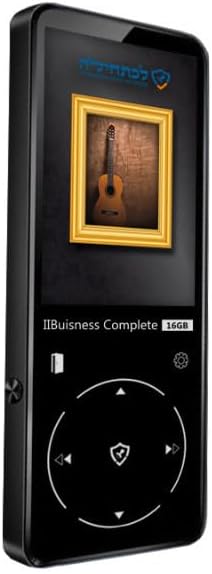
Billede: En detaljeret view of the SAMVIX iBusiness Complete MP3 Player, highlighting its sleek black design and front display.
The MP3 player features a compact design with a color display and intuitive controls. Key components include:
- Skærm: Shows menus, file lists, and playback information.
- Kontrolpanel: A circular navigation pad with central selection button for menu navigation and playback control.
- Tænd/sluk-knap: Typically located on the side for turning the device on/off and locking the screen.
- Lydstyrkeknapper: Til justering af lydudgangsniveauet.
- Hovedtelefonstik: Standard 3.5 mm lydudgang.
- USB-port: Til opladning og dataoverførsel.
- MicroSD -kortplads: Til udvidelse af lagerkapaciteten.
- Indbygget højttaler: Til lydafspilning uden hovedtelefoner.

Billede: Et nærbillede view of the MP3 player's screen and the circular control pad, showing the navigation buttons and central selection button.
4. Opsætning
4.1 Opladning af enheden
Before first use, fully charge your MP3 player. Connect the included USB cable to the device's USB port and the other end to a USB power adapter (not included) or a computer's USB port. The battery indicator on the screen will show charging status.
4.2 Tænd/sluk
- For at tænde: Tryk og hold tænd/sluk-knappen nede (normalt på siden) i et par sekunder, indtil skærmen lyser op.
- For at slukke: Tryk på tænd/sluk-knappen og hold den nede, indtil der vises en slukningsbesked, og bekræft derefter.
- Sådan låser/låser du skærmen op: Tryk kort på tænd/sluk-knappen for at låse eller oplåse skærmen under brug.
4.3 Udvidelse af lagerplads
The device supports microSD cards up to 128GB for additional storage. Locate the microSD card slot, gently insert the card until it clicks into place. Ensure the card is inserted correctly to avoid damage.
5. Betjeningsvejledning
5.1 Grundlæggende navigation
Use the circular control pad to navigate through menus and options:
- Op/Ned/Venstre/Højre knapper: Move cursor or selection.
- Midter knap: Vælg et element eller bekræft en handling.
- Tilbage/Retur-knap: Gå tilbage til den forrige menu eller skærm.
5.2 Afspilning af lyd Files
- From the main menu, select "Music" or "Audiobooks" (depending on content type).
- Naviger gennem mapper og files using the control pad.
- Vælg den ønskede lyd file for at starte afspilning.
- During playback, use the control pad for play/pause, skip track, and volume adjustment.
5.3 Bluetooth-forbindelse
Sådan opretter du forbindelse til et Bluetooth-headset eller en Bluetooth-højttaler:
- Sørg for, at din Bluetooth-lydenhed er i parringstilstand.
- On the MP3 player, go to "Settings" and then "Bluetooth".
- Turn Bluetooth "On" and select "Søg efter Devices".
- Select your Bluetooth device from the list to pair. Once paired, audio will stream wirelessly.
5.4 Overførsel Files
To add audio filetil din MP3-afspiller:
- Tilslut MP3-afspilleren til din computer ved hjælp af USB-kablet.
- Enheden vises som et flytbart diskdrev på din computer.
- Træk og slip din lyd files (e.g., MP3, WAV) into the appropriate folders on the MP3 player's internal storage or microSD card.
- Tag enheden sikkert ud af computeren, før du frakobler USB-kablet.
6. Vedligeholdelse
- Rensning: Brug en blød, tør og fnugfri klud til at rengøre enheden. Brug ikke flydende rengøringsmidler eller aerosoler.
- Opbevaring: Opbevar enheden et køligt, tørt sted væk fra direkte sollys og ekstreme temperaturer.
- Batteripleje: For at forlænge batteriets levetid, undgå at aflade batteriet helt ofte. Oplad det regelmæssigt.
- Undgå påvirkninger: Beskyt enheden mod fald og stød, som kan beskadige de interne komponenter.
7. Fejlfinding
| Problem | Mulig løsning |
|---|---|
| Enheden tændes ikke. | Ensure the battery is charged. Connect to a power source and try again. If unresponsive, perform a hard reset (refer to manual for specific reset method, usually holding power button for extended time). |
| Kan ikke høre lyd. | Check volume level. Ensure headphones are properly plugged in or Bluetooth device is connected and volume is up. Try different headphones. |
| Files not appearing on device. | Sikre files are in a supported format. Verify files were transferred correctly and safely ejected the device from the computer. Check if storage (internal or microSD) is full. |
| Problemer med Bluetooth-forbindelse. | Ensure both devices are in pairing mode and within range. Forget the device on both ends and try pairing again. Ensure Bluetooth is enabled on the MP3 player. |
8. Specifikationer
| Feature | Detalje |
|---|---|
| Intern opbevaring | 16 GB |
| Udvidelig opbevaring | Op til 128 GB via microSD-kort (medfølger ikke) |
| Forbindelse | Bluetooth 2.1, USB |
| Lydudgang | 3.5mm Headphone Jack, Built-in Speaker |
| Vise | Integrated Color Display |
| Dimensioner | 8.6 x 6.3 x 4.9 tommer |
| Varens vægt | 1 pund |
| Kosher Compliance | No FM radio, no video playback, no image display |
9. Garanti og support
SAMVIX products are manufactured with high-quality standards. For information regarding warranty coverage, technical support, or service inquiries, please refer to the warranty card included with your product or visit the official SAMVIX webwebsted. Gem venligst din købsbevis til garantikrav.
For further assistance, you may contact SAMVIX customer support directly.


