1. Introduktion
This manual provides essential information for the installation, operation, and maintenance of your Redragon RGMS-850W PRO 80+ Gold 850 Watt Non-Modular Power Supply. This power supply is designed to deliver stable and efficient power to your PC components, featuring 80 Plus Gold certification and ATX 3.1 & PCIe 5.1 readiness for modern systems.

Figure 1: Redragon RGMS-850W Non-Modular Power Supply
2. Nøglefunktioner
- 80 Plus Guld-certificering: Ensures cooler case temperatures, higher energy efficiency, and reduced noise levels.
- ATX 3.1 og PCIe 5.1 klar: Prepared for supreme performance with modern GPUs, including Nvidia RTX 40/50 Super & AMD GPU Compatible.
- 100% Japanese Capacitors: Provides enhanced reliability and durability for maximum powering stability and unwavering performance.
- 150mm Compact Size: Allows for better and wider chassis compatibility, facilitating tidy cable management.
- Mainstream LLC Resonant + DC-DC Structure: Designed to meet CPU and GPU power supply requirements (100-240Vac), supporting dual CPU P8 (4+4) for server motherboards.
- Avancerede beskyttelser: Includes OVP/OCP/OPP/OTP/UVP/SCP for comprehensive system safety.
- Upgraded PCIe 5.1 Port: Enables 200% total power excursion & 300% GPU power excursion, fully compatible with high-performance NVIDIA 4090/4080/4070Ti graphics cards. (12VHPWR Cable Included)
- 2000 RPM FDB Fan: Equipped with a fluid dynamic bearing fan to boost the cooling system while maintaining low noise levels (average 36dB).

Figur 2: Overview of key features including 80 Plus Gold, ATX 3.1, PCIe 5.1, FDB Low-Noise Fans, and Japanese Capacitors.
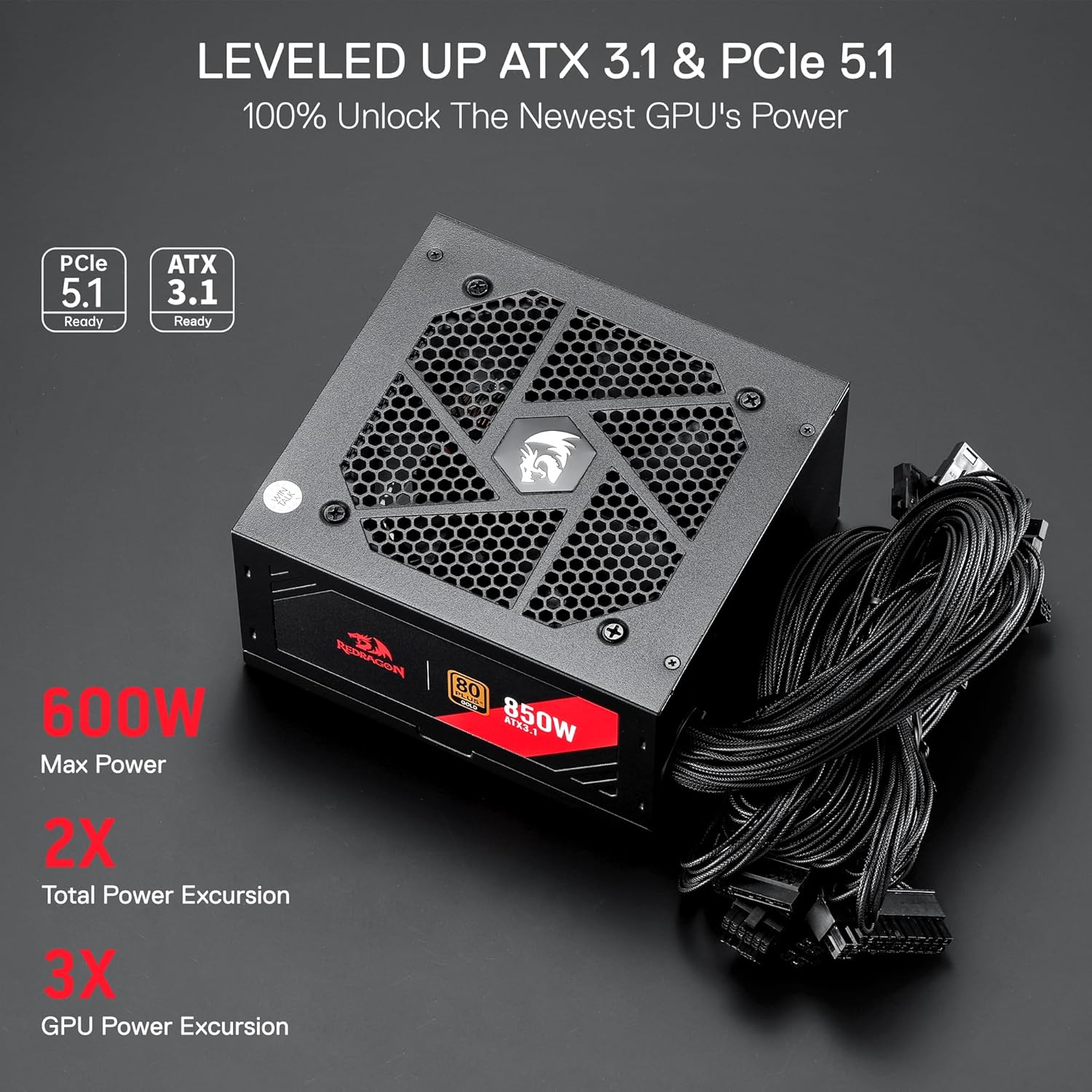
Figure 3: Illustrates ATX 3.1 and PCIe 5.1 readiness for modern GPUs.
3. Pakkens indhold
Bekræft at alle varer er til stede i pakken:
- Redragon RGMS-850W PRO 80+ Gold 850 Watt Non-Modular Power Supply
- Attached Power Cables (24-pin ATX, 4+4-pin CPU, PCIe 6+2 pin, 12VHPWR, SATA, Molex)
- AC strømledning
- Monteringsskruer
- Kabelbindere
4. Installationsvejledning
4.1 Sikkerhedsforanstaltninger
- Always disconnect the AC power cord from the wall outlet before installing or removing the power supply or any other components.
- Ensure your system is completely powered off and unplugged.
- Avoid touching internal components of the power supply. High voltages are present even after the unit is powered off.
- Wear an anti-static wrist strap or frequently touch a grounded metal object to prevent electrostatic discharge (ESD) damage.
- Do not attempt to open the power supply unit. It contains no user-serviceable parts.
4.2 Fysisk installation
- Forbered dit pc-kabinet: Open your PC case and locate the power supply mounting area, typically at the bottom or top rear.
- Monter strømforsyningen: Gently slide the Redragon RGMS-850W into the designated slot in your PC case. Ensure the fan is facing the correct direction (usually downwards if your case has a bottom vent, or upwards if not). Secure the power supply to the case using the provided mounting screws.
- Connect Main Motherboard Power: Connect the 24-pin ATX power cable from the PSU to the corresponding port on your motherboard. Ensure it clicks securely into place.
- Tilslut CPU-strøm: Connect the 4+4-pin CPU power cable(s) to the CPU power connector(s) on your motherboard. Modern motherboards may have one or two such connectors.
- Connect GPU Power: For your graphics card, connect the appropriate PCIe 6+2 pin cables or the 12VHPWR cable (if your GPU supports it and the cable is provided/attached) from the PSU to the graphics card. Ensure all pins are fully seated.
- Tilslut perifer strøm: Connect SATA power cables to your storage drives (HDDs, SSDs) and Molex cables to any other peripherals requiring them.
4.3 Kabelstyring
As this is a non-modular power supply, all cables are permanently attached. Route unused cables neatly and secure them with the provided cable ties to improve airflow and aesthetics within your PC case. Utilize cable routing channels in your case if available.
5. Betjening
5.1 Tænd/sluk
After all connections are secure, plug the AC power cord into the power supply and then into a wall outlet. Flip the main power switch on the back of the power supply to the 'ON' position. You can then power on your computer using the case's power button.
5.2 RGB-blæserstyring
The Redragon RGMS-850W features an RGB fan. A dedicated button on the back of the power supply allows you to control the lighting:
- Kort tryk: Cycles through approximately 27 different RGB lighting modes, including static colors and dynamic effects.
- Langt tryk: Turns the RGB lighting on or off.

Figure 4: The Redragon RGMS-850W Power Supply featuring its RGB fan.

Figure 5: Detail of the 120mm Fluid Dynamic Bearing (FDB) silent fan.
6. Vedligeholdelse
6.1 Rengøring
Regularly clean your power supply to ensure optimal performance and longevity. Use compressed air to gently remove dust from the fan grille and internal components. Ensure the power supply is completely disconnected from power before cleaning.
6.2 Opbevaring
If storing the power supply, ensure it is disconnected from all components and stored in a dry, cool environment, preferably in its original packaging to protect it from dust and physical damage.
7. Fejlfinding
7.1 Ingen strøm
- Check if the AC power cord is securely plugged into both the power supply and the wall outlet.
- Ensure the main power switch on the back of the power supply is in the 'ON' position.
- Verify all power cables (24-pin ATX, CPU, GPU, etc.) are correctly and firmly connected to their respective components.
- Test stikkontakten med en anden enhed for at sikre, at den fungerer.
7.2 Systemustabilitet eller nedbrud
- Ensure your system's total power consumption does not exceed the 850W capacity of the power supply.
- Check all power connections for looseness or improper seating.
- Overvåg systemtemperaturerne for at sikre, at komponenterne ikke overopheder.
7.3 Fan Noise
- Ensure the power supply fan grille is free from dust and obstructions.
- If the fan is constantly running at high speed, verify that your system components are not generating excessive heat.
8. Tekniske specifikationer
| Specifikation | Detalje |
|---|---|
| Mærke | Redragon |
| Modelnavn | RGMS-850W |
| Formfaktor | ATX12V |
| Wattage | 850 watt |
| Output Wattage | 850 |
| Effektivitetscertificering | 80 plus guld |
| Connector Type | ATX 3.1 |
| Kompatible enheder | PC |
| Afkølingsmetode | Luft (120 mm FDB-blæser) |
| Produktmål (L x B x H) | 5.91 x 3.35 x 5.51 tommer |
| Varens vægt | 5.28 pund (2.4 kilo) |
| Kondensatorer | 100% japanske kondensatorer |
9. Garanti og support
For warranty information, technical support, or service inquiries regarding your Redragon RGMS-850W PRO 80+ Gold 850 Watt Non-Modular Power Supply, please refer to the official Redragon webwebstedet eller kontakt deres kundesupport direkte. Gem dit købsbevis til eventuelle garantikrav.


