1. Introduktion
This manual provides essential information for the installation, operation, and maintenance of your maxsun GeForce RTX 3050 6GB Graphics Card. Designed for optimal performance in gaming PCs, including mini and small form factor (SFF) systems, this graphics card leverages the NVIDIA Ampere architecture to deliver enhanced visual experiences. Please read this manual thoroughly before installation and use.

Image 1.1: maxsun GeForce RTX 3050 SLP Graphics Card.
2. Sikkerhedsoplysninger
- Afbryd altid strømmen til din computer, før du installerer eller fjerner komponenter.
- Wear an anti-static wrist strap or frequently touch a grounded metal object to prevent electrostatic discharge (ESD) damage to the graphics card and other components.
- Hold grafikkortet i kanterne for at undgå at berøre følsomme komponenter.
- Sørg for ordentlig ventilation i dit pc-kabinet for at forhindre overophedning.
- Hold grafikkortet væk fra fugt og ekstreme temperaturer.
3. Pakkens indhold
Bekræft at alle varer er til stede i pakken:
- 1x maxsun GeForce RTX 3050 6GB Graphics Card
- 1x Standard Height I/O Bracket (pre-installed or separate)
- 1x Low Profile I/O Bracket (for SFF systems)

Image 3.1: The maxsun GeForce RTX 3050 graphics card and its retail packaging.
4. Produktet er slutview
The maxsun GeForce RTX 3050 is a compact graphics card designed for performance and compatibility with various PC builds, including small form factor cases. It features a single fan cooling solution and multiple display outputs.
4.1 Nøglefunktioner
- NVIDIA Ampere Architecture: Provides advanced graphics performance.
- NVIDIA DLSS: AI-powered rendering for increased frame rates with uncompromised image quality.
- 6 GB GDDR6-hukommelse: High-speed memory for demanding applications and games.
- Lav Profile Design: Compact dimensions (6.65 x 2.71 inches) suitable for Mini-ITX and SFF PC cases.
- PCI Express 4.0 x8 Interface: Ensures high bandwidth connectivity.
- Display udgange: Includes HDMI 2.1 and DisplayPort 1.4a, supporting up to 8K resolution and multi-monitor setups.
4.2 Card Layout and Ports

Billede 4.1: Top view of the graphics card, showing the single cooling fan.

Image 4.2: The standard and low-profile I/O brackets, illustrating the display output options (HDMI and DisplayPort).
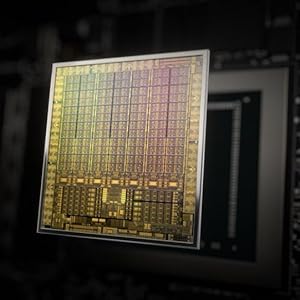
Image 4.3: Diagram illustrating the NVIDIA Ampere GPU architecture, which powers the RTX 3050.
5. Opsætning og installation
Follow these steps to install your maxsun GeForce RTX 3050 graphics card into your computer system.
5.1 Klargøring af dit system
- Power down your computer completely and unplug the power cable from the wall outlet.
- Open your computer case. Refer to your computer's manual for specific instructions on how to open the case.
- Find et ledigt PCI Express x16-slot på dit bundkort.
- Remove any existing graphics card or the metal slot cover from the PCI Express slot.
5.2 Installing the Graphics Card
- If your PC case requires a low-profile bracket, carefully remove the pre-installed standard bracket from the graphics card and attach the included low-profile beslag.
- Align the graphics card with the PCI Express x16 slot.
- Gently but firmly press the card straight down into the slot until it is fully seated. You should hear a click as the retention clip engages.
- Secure the graphics card to the PC case with the screw(s) from the slot cover.

Image 5.1: Diagram showing the process of inserting a graphics card into a PCI Express slot within a computer case.
5.3 Tilslutning af skærme
- Connect your monitor(s) to the DisplayPort or HDMI outputs on the graphics card.
- Luk computerens kabinet, og tilslut strømkablet igen.
- Tænd din computer.
6. Betjeningsvejledning
6.1 Driverinstallation
After physical installation, you must install the appropriate drivers for your graphics card to function correctly and achieve optimal performance.
- Boot your computer. The operating system may detect new hardware and install a basic driver, or display a low-resolution image.
- Besøg den officielle NVIDIA webwebsted (www.nvidia.com/drivers) to download the latest drivers for the GeForce RTX 3050.
- Følg instruktionerne på skærmen for at fuldføre driverinstallationen. Det kan være nødvendigt at genstarte systemet.

Image 6.1: Icon representing the download and installation of graphics drivers.
6.2 Opsætning af flere skærme
The maxsun RTX 3050 supports multiple displays. Once drivers are installed, you can configure your display settings through your operating system's display settings or the NVIDIA Control Panel.

Image 6.2: Illustration of a multi-monitor setup connected via DisplayPort and HDMI outputs.
7. Vedligeholdelse
Proper maintenance ensures the longevity and performance of your graphics card.
- Fjernelse af støv: Periodically clean dust from the fan and heatsink using compressed air. Ensure the fan is held stationary during cleaning to prevent damage.
- Temperaturovervågning: Use monitoring software to keep track of your GPU temperatures, especially during heavy loads. Ensure temperatures remain within safe operating limits.
- Driver opdateringer: Regularly update your graphics drivers from the NVIDIA website to benefit from performance improvements and bug fixes.
8. Fejlfinding
Hvis du støder på problemer med dit grafikkort, kan du se følgende almindelige fejlfindingstrin:
- Ingen skærmoutput:
- Sørg for, at skærmkablet er korrekt tilsluttet til både grafikkortet og skærmen.
- Verify that the graphics card is fully seated in the PCI Express slot.
- Check if your monitor is set to the correct input source.
- Test med et andet skærmkabel eller en anden skærm, hvis det er muligt.
- Problemer med driverinstallation:
- Uninstall any previous graphics drivers using a utility like Display Driver Uninstaller (DDU) in Safe Mode, then attempt a fresh installation of the latest NVIDIA drivers.
- Sørg for, at dit operativsystem er opdateret.
- Overophedning/høj ventilatorstøj:
- Clean dust from the graphics card fan and heatsink.
- Ensure adequate airflow within your PC case. Consider adding or improving case fans.
- Monitor GPU temperatures during load. If temperatures are consistently high, reduce graphics settings in games or applications.
- Systemustabilitet/nedbrud:
- Sørg for, at din strømforsyning (PSU) opfylder minimumskravene for watttage requirements for your system, including the new graphics card.
- Check for any conflicts with other hardware components.
- Run system diagnostics to identify other potential hardware issues.
9. Specifikationer
Detailed technical specifications for the maxsun GeForce RTX 3050 6GB Graphics Card:
| Feature | Specifikation |
|---|---|
| Grafik coprocessor | NVIDIA GeForce RTX 3050 |
| Grafik RAM-størrelse | 6 GB GDDR6 |
| Hukommelsesgrænseflade | 96-bit |
| Hukommelses urhastighed | 14000 MHz |
| GPU Core Clock | 1042 MHz |
| Boost Clock Speed | 1470 MHz |
| Video Output Interface | 1x HDMI 2.1, 1x DisplayPort 1.4a |
| PCI Express | PCI-E X8 4.0 |
| Produktdimensioner | 16.9 x 6.9 cm (6.65 x 2.71 x 0.04 tommer) |
| Varens vægt | 8.5 ounce |
| Fabrikant | MAXSUN |
| Modelnummer | RTX 3050 |

Billede 9.1: Bagside view of the product packaging, detailing key features and specifications.
10. Garanti og support
10.1 Begrænset garanti
The maxsun GeForce RTX 3050 Graphics Card comes with a 3 års begrænset garanti. This warranty covers defects in materials and workmanship under normal use. For specific terms and conditions, please refer to the warranty information provided with your product or contact maxsun customer support.
10.2 Kundesupport
For technical assistance, warranty claims, or general inquiries, please contact maxsun customer support through their official webwebstedet eller kontaktoplysningerne i din produktdokumentation.


