1. Introduktion
This manual provides instructions for the proper setup, operation, and maintenance of your A4TECH KR-3330S USB Keyboard and Mouse combo. This product is designed for general-purpose computing tasks, offering a reliable and ergonomic input solution for personal computers and laptops.
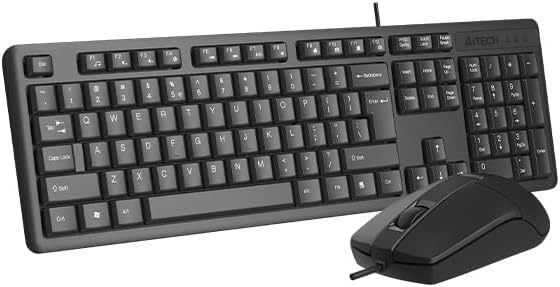
Image 1.1: The A4TECH KR-3330S USB Keyboard and Mouse combo. This image displays the full-size keyboard with a numeric keypad and the accompanying wired mouse, both in black.
2. Opsætningsvejledning
The A4TECH KR-3330S keyboard and mouse are designed for simple plug-and-play installation. No additional drivers are typically required for basic functionality.
- Pak enhederne ud: Tag forsigtigt tastaturet og musen ud af emballagen.
- Tilslut tastaturet: Locate an available USB port on your computer (desktop PC or laptop). Insert the USB connector of the keyboard firmly into the USB port.
- Tilslut musen: Locate another available USB port on your computer. Insert the USB connector of the mouse firmly into the USB port.
- Systemgenkendelse: Dit operativsystem burde automatisk registrere og installere de nødvendige drivere. Denne proces kan tage et par øjeblikke.
- Test funktionalitet: Once installed, test the keyboard by typing in a text editor and test the mouse by moving the cursor and clicking.

Image 2.1: The A4TECH KR-3330S keyboard and mouse, showcasing their wired USB connectivity. Both devices are black and feature a standard layout.
3. Betjeningsvejledning
3.1 Brug af tastatur
- Standardskrivning: Brug de alfanumeriske taster til tekstindtastning.
- Funktionstaster (F1-F12): Disse taster udfører forskellige funktioner afhængigt af applikationen eller operativsystemet.
- Numerisk tastatur: The dedicated numeric keypad on the right provides efficient data entry. Ensure "Num Lock" is active.
- Genvejstaster: The keyboard features 10 hot keys for quick access to common functions. Refer to your operating system or application documentation for specific hot key assignments.
- Ergonomisk design: The keyboard is designed for comfortable use during extended periods. Adjust your seating and desk height for optimal posture.
3.2 Brug af mus
- Bevægelse: Move the mouse across a flat surface to control the cursor on your screen. The optical sensor provides precise tracking.
- Venstre klik: Bruges til at vælge elementer, åbne files, og aktivering af funktioner.
- Højreklik: Åbner kontekstafhængige menuer.
- Scrollhjul: Rul op eller ned gennem dokumenter og web sider. Scrollhjulet kan også fungere som en midterste klikknap.
- Lydløst klik: The mouse features silent click buttons, reducing audible click noise during use.
- DPI: The mouse operates at 1200 DPI (Dots Per Inch), providing a balance of speed and precision for general use.
4. Vedligeholdelse
Proper maintenance ensures the longevity and optimal performance of your A4TECH KR-3330S keyboard and mouse.
- Rengøring af tastaturet:
- Frakobl tastaturet fra computeren, før du rengør det.
- Brug en blød, fnugfri klud lidt damprengøres med vand eller en mild rengøringsopløsning til at tørre tasterne og overfladen af.
- Undgå at sprøjte væsker direkte på tastaturet.
- Brug trykluft til at fjerne støv og snavs mellem tasterne.
- Rengøring af musen:
- Frakobl musen fra computeren, før du rengør den.
- Wipe the surface of the mouse with a soft, lint-free cloth.
- Ensure the optical sensor on the underside of the mouse is clean and free of obstructions for accurate tracking.
- Opbevaring: When not in use for extended periods, store the devices in a clean, dry environment away from extreme temperatures.
5. Fejlfinding
If you encounter issues with your A4TECH KR-3330S keyboard and mouse, refer to the following common troubleshooting steps:
- Enhed ikke genkendt:
- Sørg for, at USB-kablerne er korrekt tilsluttet computerens USB-porte.
- Try connecting the devices to different USB ports on your computer.
- Genstart din computer.
- Test the devices on another computer to determine if the issue is with the devices or your computer's ports.
- Taster reagerer ikke / Musen bevæger sig ikke:
- Check for any physical obstructions under the keys or around the mouse sensor.
- Sørg for, at tastaturet og musen er korrekt tilsluttet USB-portene.
- Genstart din computer.
- For the mouse, ensure the optical sensor is clean and not obstructed.
- Intermitterende funktionalitet:
- Ensure USB connections are stable and not loose.
- Avoid using the devices on uneven or highly reflective surfaces (for the mouse).
6. Specifikationer
| Feature | Detalje |
|---|---|
| Mærke | A4TECH (also listed as Generic) |
| Modelnummer | KR-3330S (also referred to as KK-3330) |
| Forbindelsesteknologi | USB kablet |
| Farve | Sort |
| Tastaturbeskrivelse | Wired keyboard with soft touch keys, 10 hot keys, ergonomic design. |
| Detektion af musebevægelse | Optisk |
| Mus DPI | 1200 dpi |
| Særlige funktioner | Ergonomic design, Silent Click Mouse |
| Kompatible enheder | Bærbar, personlig computer |
| Varens vægt | 0.7 kilo |
| Pakkedimensioner | 53.3 x 15.8 x 4.5 cm |
| Batterier påkrævet | Ingen |
| Oprindelsesland | Kina |
7. Garanti og support
For garantioplysninger og teknisk support henvises til den dokumentation, der fulgte med dit køb, eller kontakt forhandleren/producenten direkte. Gem din købsbevis til garantikrav.


