Vigtige sikkerhedsinstruktioner
Læs og forstå venligst alle sikkerhedsinstruktioner, før du bruger dette produkt. Gem denne manual til senere brug.
- Ventilation: Sørg for tilstrækkelig ventilation. Bloker ikke ventilationsåbninger.
- Vand og fugt: Udsæt ikke dette apparat for regn eller fugt. Placer ikke genstande fyldt med væsker, såsom vaser, oven på apparatet.
- Varmekilder: Må ikke installeres i nærheden af varmekilder såsom radiatorer, varmeapparater, komfurer eller andre apparater (inklusive ampløftere), der producerer varme.
- Strømkilder: Use only power supplies specified by the manufacturer. Ensure the power cord is protected from being walked on or pinched.
- Rensning: Rengør kun med en tør klud.
- Service: Forsøg ikke selv at servicere dette produkt. Overlad al service til kvalificeret servicepersonale.
Pakkens indhold
Bekræft, at alle nedenstående varer er inkluderet i din pakke:
- Kuephom CD-X2A Boombox
- AC strømledning
- Brugermanual (dette dokument)
- Fjernbetjening
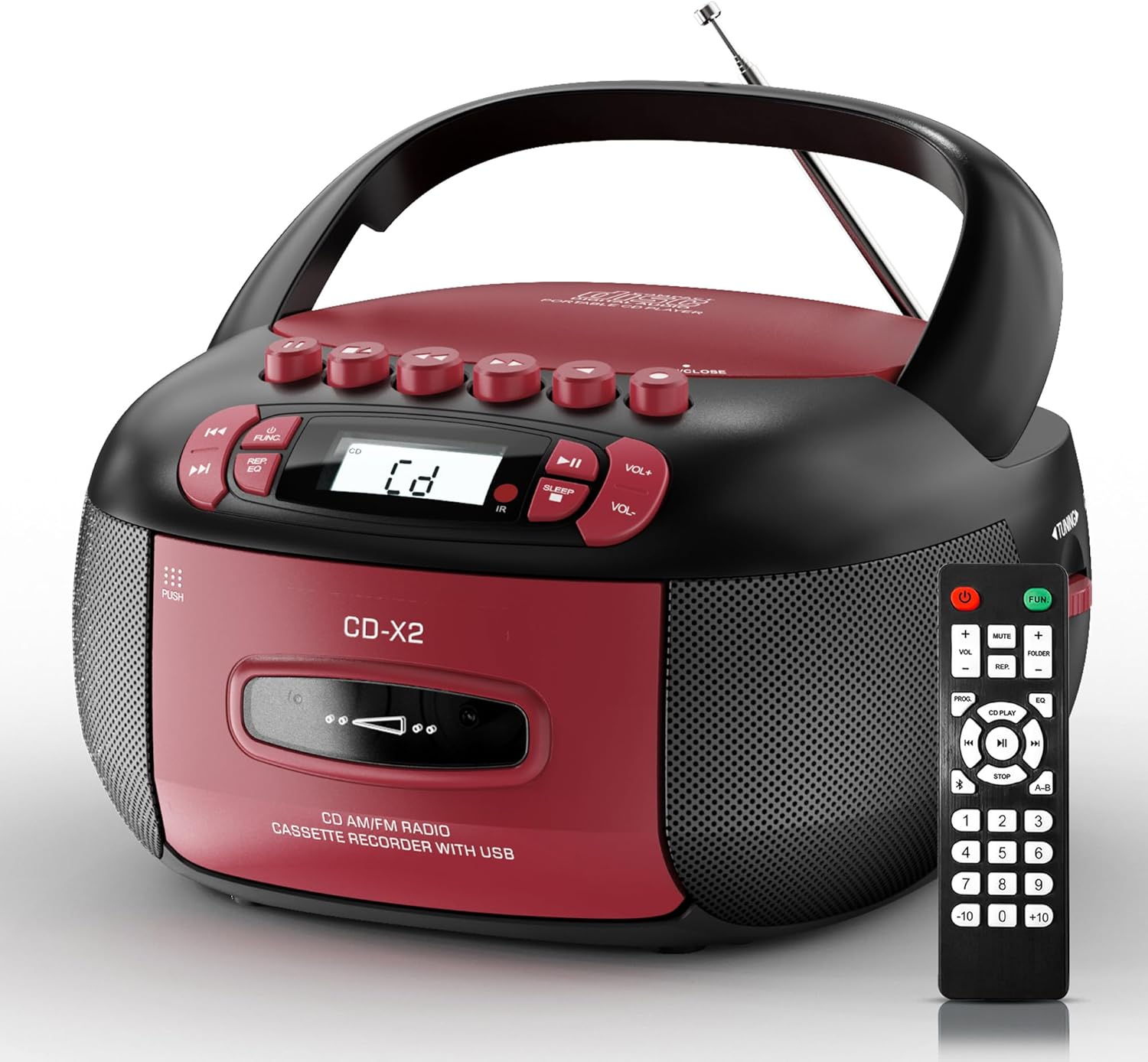
Image: The Kuephom CD-X2A Boombox with its included remote control, showcasing its compact design and red/black color scheme.
Produkt overview
Familiarize yourself with the various components and controls of your Kuephom CD-X2A Boombox.
Kontrol på frontpanelet
- Tænd/sluk-/funktionsknap: Press and hold to power on/off. Press to cycle through modes (CD, USB, Bluetooth, Radio, AUX, Tape).
- Lydstyrke +/- knapper: Juster afspilningslydstyrken.
- Afspil/pause knap: Start or pause playback for CD, USB, Bluetooth, or Tape.
- Stop-knap: Stop afspilning.
- Spring over/søg-knapper: Navigate between tracks on CD/USB or fast forward/rewind on tape.
- EQ knap: Vælg equalizer-forudindstillinger.
- Sleep Timer Button: Indstil sleep-timeren.
Betjening af sidepanel
- Tuning knap: Manually tune AM/FM radio stations.
- Hovedtelefonstik: Tilslut hovedtelefoner for privat lytning.
- AUX-indgangsport: Tilslut eksterne lydenheder.
- USB-port: Insert USB drives for MP3/WMA playback.
Toppanelfunktioner
- CD-rum: Top-loading compartment for CDs.
- Kassetterum: Front-loading compartment for cassette tapes.
- Teleskopantenne: Forlæng for forbedret radiomodtagelse.

Image: The boombox highlighting its multiple functions including CD/MP3, Bluetooth, Type I/II tape, USB, FM/AM Radios, Sleep timer, Remote, Phone jack, AUX, and Tape recording.

Billede: Nærbillede views of the boombox's phone jack, top-loading CD player, telescopic antenna, and tape play/record buttons.
Opsætning
Strøm til Ghettoblasteren
AC strøm
- Connect the supplied AC power cord to the AC IN jack on the back of the boombox.
- Sæt den anden ende af netledningen i en almindelig stikkontakt (120V~60Hz).
Batteristrøm
- Open the battery compartment cover located on the bottom of the boombox.
- Insert 6 x 'C' size batteries (not included), ensuring correct polarity (+/-).
- Luk batterirummets dæksel forsvarligt.
- When operating on battery power, disconnect the AC power cord.

Image: The boombox demonstrating both AC power connection and the use of 6 C-size batteries for portable operation.
Fjernbetjening
- Insert 2 x 'AAA' batteries (not included) into the remote control, observing polarity.
- Point the remote control towards the boombox's IR sensor for optimal operation.

Image: An individual comfortably operating the boombox using the remote control from a distance.
Betjeningsvejledning
Generel drift
- Tænd/sluk: Press and hold the Power/Function button to turn the unit on or off.
- Funktionsvalg: Press the Power/Function button repeatedly to switch between CD, USB, Bluetooth, Radio (AM/FM), AUX, and Tape modes.
CD-afspilning
- Åbn dækslet til cd-rummet.
- Place a CD (CD, CD-R, MP3, WMA compatible) onto the spindle with the label side facing up.
- Luk dækslet til cd-rummet.
- Press the Power/Function button to select 'CD' mode.
- Tryk på knappen Afspil/Pause for at starte afspilningen.
- Brug knapperne Spring over/søg til at navigere i numre.
- Press the Repeat button to repeat a single track, folder, or all tracks.
- Press the Program button to program a custom playback sequence.

Image: The boombox's display showing 'CD' mode, with icons indicating compatibility with CD, CD-R, CD-RW, WMA, and MP3 formats, along with single cycle, repeat folder, repeat all, random play, and play in order options.
Cassette Playback and Recording
- Press the 'OPEN/CLOSE' button on the cassette compartment to open it.
- Indsæt et kassettebånd.
- Luk kassetterummet.
- Press the Power/Function button to select 'TAPE' mode.
- Tryk på knappen Afspil for at starte afspilningen.
- Use the Fast Forward/Rewind buttons to navigate the tape.
- Indspilning: In TAPE mode, select the desired source (CD, Bluetooth, USB, or AM/FM radio). Press the Record button to begin recording onto the cassette. The unit features an auto-stop function when the tape reaches its end.

Image: A hand inserting a cassette tape into the boombox's front-loading compartment, with controls for tape operation visible.
AM/FM radio
- Press the Power/Function button to select 'RADIO' mode. Press again to switch between AM and FM bands.
- Extend the telescopic antenna for better FM reception. For AM, rotate the unit for best reception.
- Use the Tuning knob on the side to manually tune to your desired station. The frequency will be displayed on the screen.

Image: A man relaxing on a couch with the boombox, which displays various FM/AM radio frequencies, indicating good reception.
Bluetooth-forbindelse
- Press the Power/Function button to select 'BT' (Bluetooth) mode. The display will show 'BT' and flash, indicating it's in pairing mode.
- On your mobile device, enable Bluetooth and search for 'CD-X2A'.
- Select 'CD-X2A' to pair. Once paired, the 'BT' indicator will stop flashing.
- You can now stream audio wirelessly from your device to the boombox.

Image: A woman in a living room wirelessly streaming audio from her smartphone to the boombox via Bluetooth 5.1, indicating a stable connection.
USB-afspilning
- Insert a USB flash drive into the USB port on the side of the boombox.
- Press the Power/Function button to select 'USB' mode.
- The boombox will automatically detect and play compatible MP3/WMA files.
- Use the Play/Pause, Stop, and Skip/Search buttons to control playback.
AUX-indgang
- Connect an external audio device (e.g., smartphone, MP3 player) to the AUX-in port using a 3.5mm audio cable (not included).
- Press the Power/Function button to select 'AUX' mode.
- Styr afspilningen direkte fra din tilsluttede eksterne enhed.
Sleep Timer
- While the unit is playing, press the Sleep Timer button.
- Repeatedly press the button to cycle through available sleep timer durations (e.g., 15, 30, 60, 90 minutes).
- Enheden slukker automatisk efter det valgte tidsrum.

Image: A man sleeping in bed with the boombox on his nightstand, illustrating the sleep timer feature which allows the device to turn off automatically.
Opretholdelse
- Rensning: Use a soft, dry cloth to clean the exterior of the boombox. Do not use abrasive cleaners or solvents.
- CD-pleje: Hold cd'er i kanterne. Rengør snavsede cd'er med en blød, fnugfri klud, og tør af fra midten og udad.
- Kassettepleje: Keep cassette tapes away from direct sunlight and heat. Periodically clean the tape heads with a specialized cassette head cleaner.
- Opbevaring: Når enheden ikke er i brug i længere perioder, skal du tage netledningen ud og fjerne batterierne. Opbevar den et køligt og tørt sted.
Fejlfinding
Hvis du støder på problemer, kan du se tabellen nedenfor for almindelige problemer og løsninger.
| Problem | Mulig årsag | Løsning |
|---|---|---|
| Ingen strøm | Netledningen er ikke tilsluttet; Batterierne er opbrugt eller er isat forkert. | Check AC connection; Replace or correctly insert batteries. |
| Ingen lyd | Lydstyrken er for lav; Forkert funktionstilstand valgt; Hovedtelefoner tilsluttet. | Increase volume; Select correct mode; Disconnect headphones. |
| CD'en springer over eller afspiller ikke | CD dirty or scratched; CD inserted incorrectly; Incompatible CD format. | Clean or replace CD; Insert CD correctly; Ensure CD is compatible (CD, CD-R, MP3, WMA). |
| Radio static/poor reception | Antennen ikke strakt ud/placeret; Svagt signal. | Extend and adjust telescopic antenna; Try repositioning the unit. |
| Bluetooth ikke parring | Ghettoblasteren er ikke i parringstilstand; Enhedens Bluetooth er slået fra; Enheden er for langt væk. | Ensure boombox is in 'BT' mode and flashing; Enable Bluetooth on device; Move device closer. |
| Kassettebåndet afspiller/optager ikke | Tape inserted incorrectly; Tape heads dirty; Auto-stop engaged. | Insert tape correctly; Clean tape heads; Check tape end. |
Specifikationer
| Feature | Detalje |
|---|---|
| Modelnummer | CD-X2A |
| Produktmål (L x B x H) | 8.39 x 4.8 x 8.54 tommer |
| Varens vægt | 3.45 pund |
| Strømkilde | AC 120V~60Hz or 6 x 'C' size batteries |
| Forbindelsesteknologi | Auxiliary, Bluetooth, USB |
| Højttaler type | Stereo (2W+2W output) |
| Understøttede diskformater | CD, CD-R, MP3, WMA |
| Supported Tape Types | Type I/II Cassette |
| Radio bands | AM/FM |
| Særlige funktioner | Tape Recording, Sleep Timer, Earphone Jack, Remote Control |
Garanti og support
Kuephom products are designed for reliability and performance. This product comes with a standard manufacturer's warranty against defects in materials and workmanship under normal use.
For warranty claims, technical assistance, or any questions regarding your Kuephom CD-X2A Boombox, please contact Kuephom customer support. Refer to the contact information provided with your purchase documentation or visit the official Kuephom webwebsted for supportdetaljer.
We are committed to providing lifetime service support and 7/24 customer assistance for our products.


