1. Introduktion
Thank you for choosing the SMSL DS200 Headphone Amp DAC. This device is designed to provide high-fidelity audio playback and amplification for a variety of audio sources and headphones. Please read this manual thoroughly to ensure proper setup and optimal performance.

Figur 1: Forside view of the SMSL DS200 Headphone Amp DAC.
2. Produktet er slutview og nøglefunktioner
The SMSL DS200 combines a high-performance Digital-to-Analog Converter (DAC) with a powerful headphone amplifier, offering versatile connectivity and exceptional audio quality. Key features include:
- Dual CS43131 Chips: Equipped with two Cirrus Logic CS43131 audio decoding chips, achieving ultra-low distortion of 0.00019% (-114dB) for accurate sound reproduction.
- New Third-Generation XMOS XU-316: Features the latest XMOS XU-316 USB audio processing chip, supporting PCM up to 32bit/768kHz and DSD up to DSD256 for high-resolution audio.
- MQA/MQA-CD Support: Full MQA decoding capabilities for studio-grade master quality audio playback, including MQA-CD.
- Bluetooth 5.1-forbindelse: Provides stable and high-resolution wireless audio transmission with extended range.
- Balanced and Single-Ended Headphone Outputs: Includes 3.5mm single-ended and 4.4mm balanced headphone outputs.
- High and Low Gain Adjustment: Supports high and low gain modes to accommodate various headphone impedances and sensitivities.
- Flere inputmuligheder: Offers USB, Optical, Coaxial, and Bluetooth inputs for broad compatibility with different audio sources.

Figur 2: Overview of DS200 key features.

Figure 3: Dual CS43131 decoding chips for extreme distortion control.

Figure 4: New third-generation XMOS XU-316 USB audio processing chip.
3. Pakkens indhold
The SMSL DS200 package includes the following items:
- SMSL DS200 Hovedtelefon Amp DAC
- Bluetooth antenne
- USB kabel
- Brugermanual
- Servicekort

Figure 5: Multiple connection methods for the DS200.
4. Kontrol og grænseflader
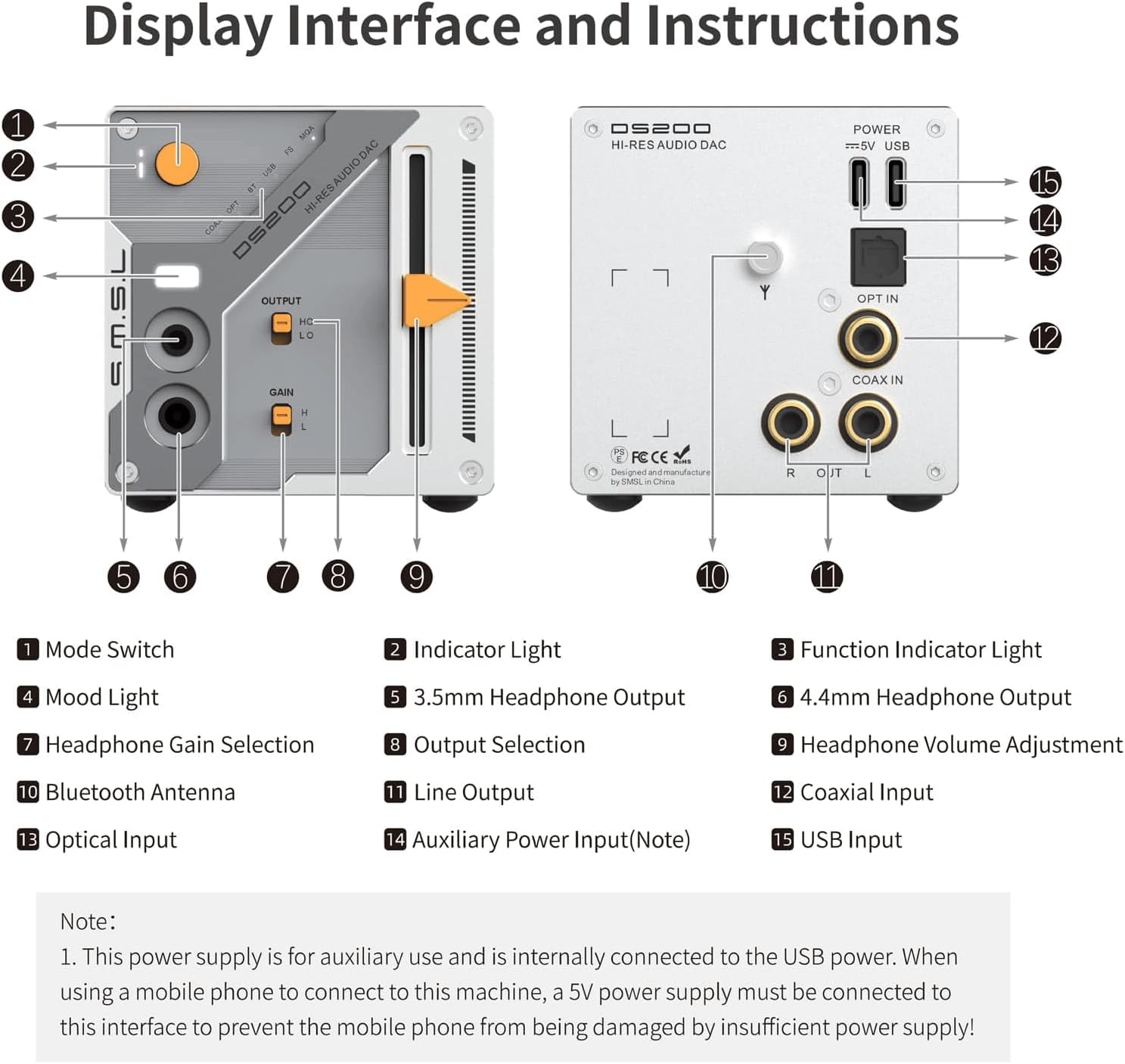
Figure 6: DS200 Display Interface and Instructions.
Frontpanel
- Mode Switch: Vælger inputkilden.
- Indikatorlys: Viser den aktuelle driftsstatus.
- Funktionsindikatorlys: Indicates specific functions or modes.
- Stemningslys: Aesthetic lighting feature.
- 3.5 mm hovedtelefonudgang: Single-ended headphone jack.
- 4.4 mm hovedtelefonudgang: Balanceret hovedtelefonstik.
- Headphone Gain Selection: Toggles between high (H) and low (L) gain for headphones.
- Outputvalg: Selects between headphone output (HO) and line output (LO).
- Justering af hovedtelefonlydstyrke: Slider control for headphone volume.
Bagpanel
- Linjeoutput: RCA-udgange til tilslutning af eksternt ampløftere eller aktive højttalere.
- Koaksial indgang: Digital lydindgang.
- Optisk indgang: Digital lydindgang.
- Bluetooth-antenne: Tilslutningspunkt til Bluetooth-antennen.
- Auxiliary Power Input (Note): This power supply is for auxiliary use and is internally connected to the USB power. When using a mobile phone to connect to this machine, a 5V power supply must be connected to this interface to prevent the mobile phone from being damaged by insufficient power supply!
- USB-indgang: USB-C port for connecting to a computer or other USB audio source.
5. Opsætning
5.1 Tilslutning af strøm
- Connect the provided USB cable to the USB Input (15) on the rear panel of the DS200.
- Connect the other end of the USB cable to a power source (e.g., a computer USB port or a 5V USB power adapter).
- If connecting a mobile phone, ensure a dedicated 5V power supply is connected to the Auxiliary Power Input (14) to prevent damage to the phone.
5.2 Tilslutning af lydkilder
- USB-indgang: Connect a USB cable from your computer or digital player to the USB Input (15).
- Optisk indgang: Connect an optical cable from your audio source to the Optical Input (13).
- Koaksial indgang: Connect a coaxial cable from your audio source to the Coaxial Input (12).
- Bluetooth-indgang: Screw the Bluetooth antenna (11) onto its connector on the rear panel.
5.3 Tilslutning af lydudgange
- Hovedtelefoner: Connect your headphones to either the 3.5mm Headphone Output (5) or the 4.4mm Headphone Output (6) on the front panel.
- Linjeoutput: Use RCA cables to connect the Line Output (10) to an external amplifier eller aktive højttalere.
6. Betjeningsvejledning
6.1 Tænd/sluk
The DS200 powers on automatically when connected to a power source. To turn off, disconnect the power cable.
6.2 Indgangsvalg
Press the Mode Switch (1) on the front panel to cycle through available input sources: USB, Optical, Coaxial, and Bluetooth. The selected input will be indicated by the Indicator Light (2) and Function Indicator Light (3).
6.3 Lydstyrkekontrol
Adjust the Headphone Volume Adjustment (9) slider on the front panel to control the output volume for connected headphones.
6.4 Justering af hovedtelefonforstærkning
When the Output Selection (8) is set to 'HO' (Headphone Output), use the Headphone Gain Selection (7) switch to choose between 'H' (High Gain) for high-impedance headphones or 'L' (Low Gain) for low-sensitivity earplugs.

Figure 7: Headphone High and Low Gain Modes.
6.5 MQA/MQA-CD Playback
The DS200 supports MQA and MQA-CD decoding. When playing MQA content, the device will automatically detect and process the MQA stream, indicated by the Function Indicator Light (3).

Figure 8: MQA CD Support.
6.6 Bluetooth -parring
- Ensure the Bluetooth antenna (11) is securely attached.
- Select Bluetooth as the input source using the Mode Switch (1).
- On your mobile device, search for available Bluetooth devices and select 'SMSL DS200' to pair.
- The Function Indicator Light (3) will confirm successful pairing.

Figure 9: Bluetooth 5.1 Digital Audio Input.
7. Specifikationer
| Feature | Specifikation |
|---|---|
| Produktdimensioner | 6.3 x 3.94 x 3.94 tommer |
| Varens vægt | 1.21 pund |
| Varemodelnummer | DS200 |
| Indgange | USB/Optical/Coaxial/Bluetooth |
| Udgange | 3.5mm headphone/4.4mm headphone/Line |
| Udgangsniveau | 2.0 Vrms |
| THD+N (Unweighted) | 0.00019 % (-114dB) |
| Dynamic Range (Unweighted) | 127dB |
| SNR (Unweighted) | 127dB |
| Bluetooth-specifikationer | BT 5.1 (Supports SBC) |
| USB-tilstand | Asynkron |
| Strømforbrug | 3W |
| Standby strøm | <0.1W |
| Størrelse (BxHxD) | 70x70x113 mm |
| Vægt | 346 g |
| USB-kompatibilitet | Windows 7 / 8.1 / 10 / 11, Android, iOS, Mac OSX, Linux |
| USB Sampling Rate | PCM 44.1-768kHz, DSD 2.8224-11.2896MHz |
| Optisk/koaksial Sampling Rate | PCM 44.1-192kHz, DSD64(DoP) |
| USB Bit Depth | 1-bit, 16-32-bit |
| Optical/Coaxial Bit Depth | 16-24 bit |
Figure 10: Detailed specifications of the SMSL DS200.
8. Fejlfinding
- Ingen lyd:
- Sørg for, at strømkablet er korrekt tilsluttet.
- Verify the correct input source is selected on the DS200.
- Kontroller alle lydkabelforbindelser.
- Adjust the volume slider to an audible level.
- Confirm your headphones or speakers are properly connected and functioning.
- Forvrænget lyd:
- Kontrollér lydkilden for forvrængning.
- Sørg for, at lydkablerne ikke er beskadigede eller løst forbundet.
- Reduce the volume level on both the DS200 and your audio source.
- Verify the correct gain setting (High/Low) for your headphones.
- Problemer med Bluetooth-forbindelse:
- Ensure the Bluetooth antenna is properly installed.
- Confirm Bluetooth input is selected on the DS200.
- Delete previous pairing records on your mobile device and re-pair.
- Ensure your mobile device is within range of the DS200.
9. Vedligeholdelse
- Keep the device away from heat sources, direct sunlight, and moisture.
- Rengør enheden med en blød, tør klud. Brug ikke flydende rengøringsmidler eller aerosoler.
- Undgå at tabe eller udsætte enheden for kraftige stød.
- Sørg for korrekt ventilation omkring enheden for at forhindre overophedning.
10. Garanti og support
The SMSL DS200 comes with a 1-year warranty from the date of purchase. For technical support, warranty claims, or any inquiries, please refer to the contact information provided on the Service Card included in your package or visit the official S.M.S.L webwebsted.


