1. Introduktion
This manual provides instructions for the safe and effective operation of your SJCAM C300 Pocket Travel Action Camera. Please read this manual thoroughly before using the device and retain it for future reference.
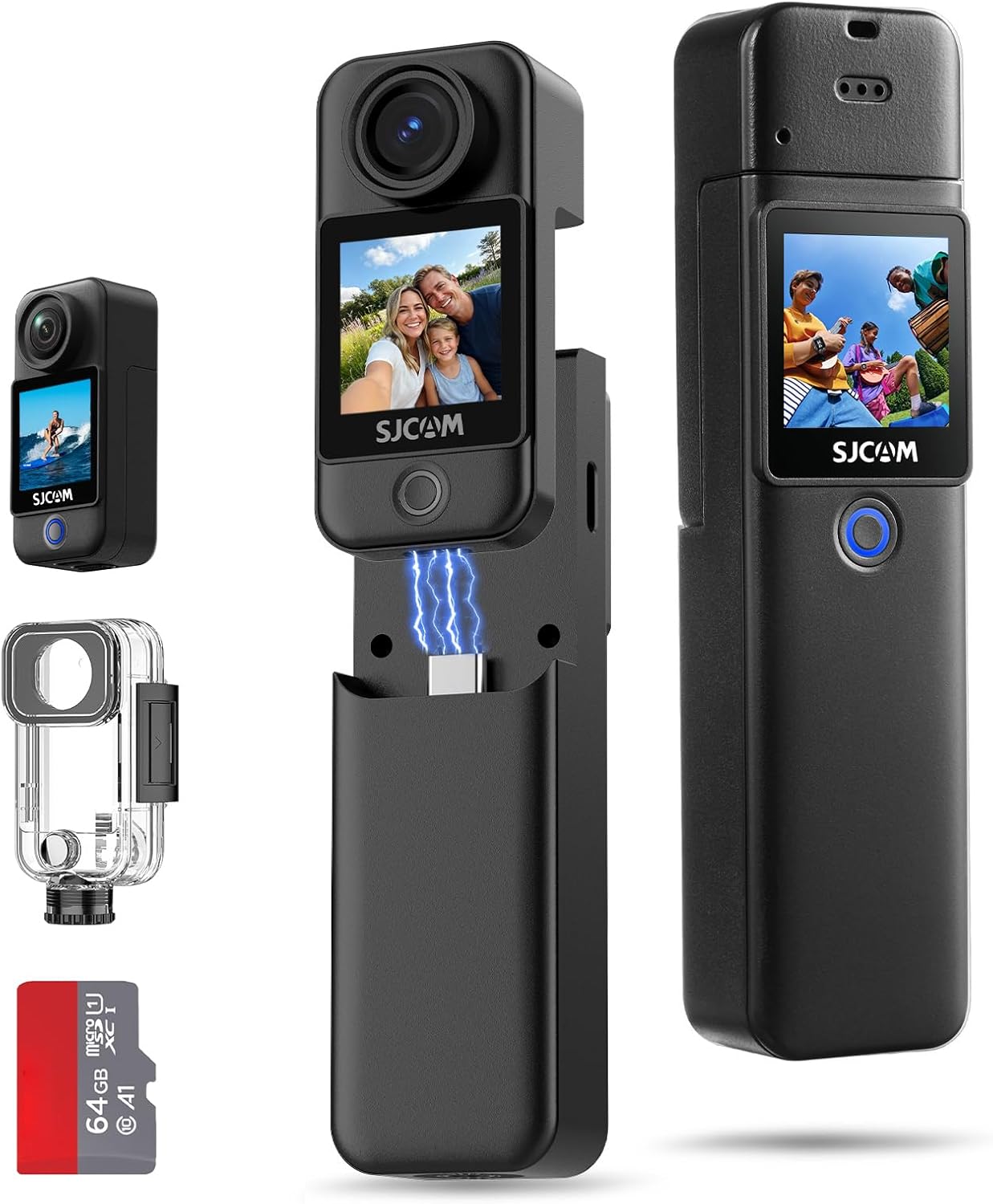
Image: The SJCAM C300 camera shown with its detachable battery handle, waterproof housing, and a 64GB microSD card.
2. Produktet er slutview
2.1 Komponenter
- Kameraenhed: Main body with lens, front and rear touchscreens.
- Batterihåndtag: Detachable unit providing extended power and grip.
- Vandtæt etui: Provides protection for underwater use up to 30 meters.
- MicroSD -kortplads: For storage of recorded media.
- USB Type-C-port: Til opladning, dataoverførsel og webcam funktionalitet.
2.2 Kontroller og indikatorer
- Tænd/sluk-knap: Powers the device on/off and switches between modes.
- Lukker/optageknap: Starter foto- eller videooptagelse.
- Touchskærme: Front and rear screens for preview, afspilning og menunavigation.
- Indikatorlys: Display power status, charging status, and recording status.

Billede: En overview of the SJCAM C300's key features, including 4K/30fps video, 1.33" dual touchscreens, 6-axis gyro stabilization, and 7-hour battery life.
3. Opsætning
3.1 Opladning af batteriet
The C300 camera utilizes a dual-battery design. Ensure both the camera unit and the battery handle are charged before use. Connect the camera to a USB power source using the provided USB Type-C cable. The indicator light will show charging status and turn off when fully charged.
3.2 Indsættelse af et MicroSD-kort
A MicroSD card (up to 128GB, Class 10 or higher recommended) is required for storing photos and videos. Locate the MicroSD card slot on the camera unit. Insert the card with the contacts facing the correct direction until it clicks into place. To remove, gently press the card until it springs out.
3.3 Samling af kameraet
- Attaching Battery Handle: Align the camera unit with the battery handle and slide it into place until securely connected.
- Using the Waterproof Case: For underwater activities, place the camera unit inside the waterproof case and ensure all latches are securely closed. Test the case for leaks without the camera before first use.
- Monteringstilbehør: Utilize the various included brackets and mounts (e.g., helmet base, flat bottom bracket) to attach the camera to desired surfaces or gear.
4. Grundlæggende betjening
4.1 Tænd/sluk
- Tænd: Tryk og hold tænd/sluk-/tilstandsknappen nede i et par sekunder, indtil skærmen lyser.
- Sluk: Tryk og hold tænd/sluk-/tilstandsknappen nede i et par sekunder, indtil skærmen slukker.
4.2 Optagelse af video
- Tænd for kameraet.
- Select video mode using the Power/Mode button or touchscreen.
- Press the Shutter/Record button to start recording. A red indicator light will flash.
- Press the Shutter/Record button again to stop recording. The indicator light will stop flashing.
4.3 Optagelse af billeder
- Tænd for kameraet.
- Select photo mode using the Power/Mode button or touchscreen.
- Komponer dit billede ved hjælp af skærmen.
- Press the Shutter/Record button to capture a photo.
4.4 Navigering i menuer
The C300 features dual 1.33-inch touchscreens for intuitive navigation. Swipe left/right or up/down on the screen to access different modes and settings. Tap on icons to select options and adjust parameters such as resolution, frame rate, and exposure.

Image: A user demonstrating the front and rear 1.33" HD dual touchscreens of the SJCAM C300 camera.
5. Avancerede funktioner
5.1 6-Axis Gyro Stabilization
The integrated 6-axis gyroscope actively counteracts motion, providing continuously smooth and stable footage. This feature is designed to reduce image shake during dynamic activities.

Image: A visual comparison illustrating the effect of stabilization on footage, showing a dog running with and without stabilization.
5.2 5G WiFi Connectivity
Connect the C300 to your smartphone via 5G WiFi for fast file transfers and remote control through the dedicated SJCAM app. This allows for quick sharing of high-resolution videos and photos.
5.3 8X Digital Zoom
The camera supports 8X digital zoom, allowing you to magnify subjects for closer shots. This feature is accessible through the camera's touchscreen interface.
5.4 F2.0 Large Aperture and Low Light Performance
The F2.0 large aperture enhances brightness and clarity in low-light conditions, improving image quality in dimly lit environments.

Image: Two individuals using the SJCAM C300 for a selfie, illustrating the F2.0 large aperture for enhanced brightness.
5.5 Special Shooting Modes
The C300 offers various shooting modes to enhance your creative possibilities:
- 8X slowmotion: Captures fast-paced action in slow motion.
- Foroptagelse: Records a short period of video before the shutter button is pressed.
- Burst-billede: Tager flere billeder i hurtig rækkefølge.
- Timelapse: Tager en serie af billeder over tid for at oprette en timelapse-video.
- Forsinkelse-optagelse: Starts recording after a set delay.
- Biltilstand: Functions as a dashcam, automatically recording when the vehicle starts.

Image: A collage demonstrating different shooting modes available on the SJCAM C300, including slow motion, pre-record, burst photo, time lapse, delay-record, and car mode.
5.6 4K Wi-Fi Live Streaming & Webcam
The C300 supports 4K Wi-Fi live streaming, allowing you to broadcast your content directly. It can also function as a webcam when connected to a computer, providing smooth and stable video for online meetings or streaming.

Image: Illustrations of the SJCAM C300 being used for 4K Wi-Fi live streaming with a smartphone and as a webkamera tilsluttet en bærbar computer.
5.7 Versatile Type-C Port
The Type-C port offers three operational modes when connected to a computer:
- USB-stik: Access stored files direkte.
- PC-kamera: Use the camera as a webcam.
- Kun opladning: For battery charging without data transfer.

Image: The SJCAM C300 connected via its Type-C port, displaying menu options for Mass Storage, PC Camera, and Charge Only.
6. Vandtæt brug
The SJCAM C300 is waterproof up to 30 meters (100 feet) when enclosed in its IP68-rated waterproof housing. Ensure the housing is properly sealed before any underwater use. This allows for capturing footage during diving, swimming, and other water sports.

Image: An individual using the SJCAM C300 in its waterproof housing while diving underwater, demonstrating its capability for capturing aquatic scenes.
7. Vedligeholdelse
- Keep the lens clean using a soft, lint-free cloth.
- Undgå at udsætte kameraet for ekstreme temperaturer eller direkte sollys i længere perioder.
- After using the waterproof case in saltwater, rinse it with fresh water and allow it to air dry.
- Store the camera and accessories in a dry, cool place.
8. Fejlfinding
8.1 Kameraet tænder ikke
- Sørg for, at batteriet er fuldt opladet.
- Check if the battery handle is securely attached.
8.2 Optagelsesproblemer
- Verify that a MicroSD card is inserted and has sufficient free space.
- Sørg for, at MicroSD-kortet er formateret korrekt (FAT32 eller exFAT).
- Use a high-speed MicroSD card (Class 10 or UHS-I/UHS-3 recommended) for 4K recording.
8.3 Dårlig billed-/videokvalitet
- Rengør kameralinsen.
- Sørg for tilstrækkelige lysforhold.
- Check camera settings for resolution and stabilization.
9. Specifikationer
| Feature | Detalje |
|---|---|
| Video opløsning | Op til 4K |
| Foto opløsning | 20 MP |
| Felt af View (FOV) | 154° bred |
| Stabilisering | 6-akset gyro-stabilisering |
| Skærme | Dual 1.33-inch Touchscreens |
| Batterilevetid | Up to 7 hours (420 minutes) with dual batteries |
| Vandtæt dybde | 30 meters (100 feet) with waterproof housing |
| Forbindelse | 5G WiFi, USB Type-C |
| Opbevaring | MicroSD Card (up to 128GB, not included unless specified) |
| Blænde | F2.0 Stor blænde |
| Weight (Camera Unit) | Ca. 1.94 oz |
| Weight (with Battery Handle) | Ca. 3.77 oz |
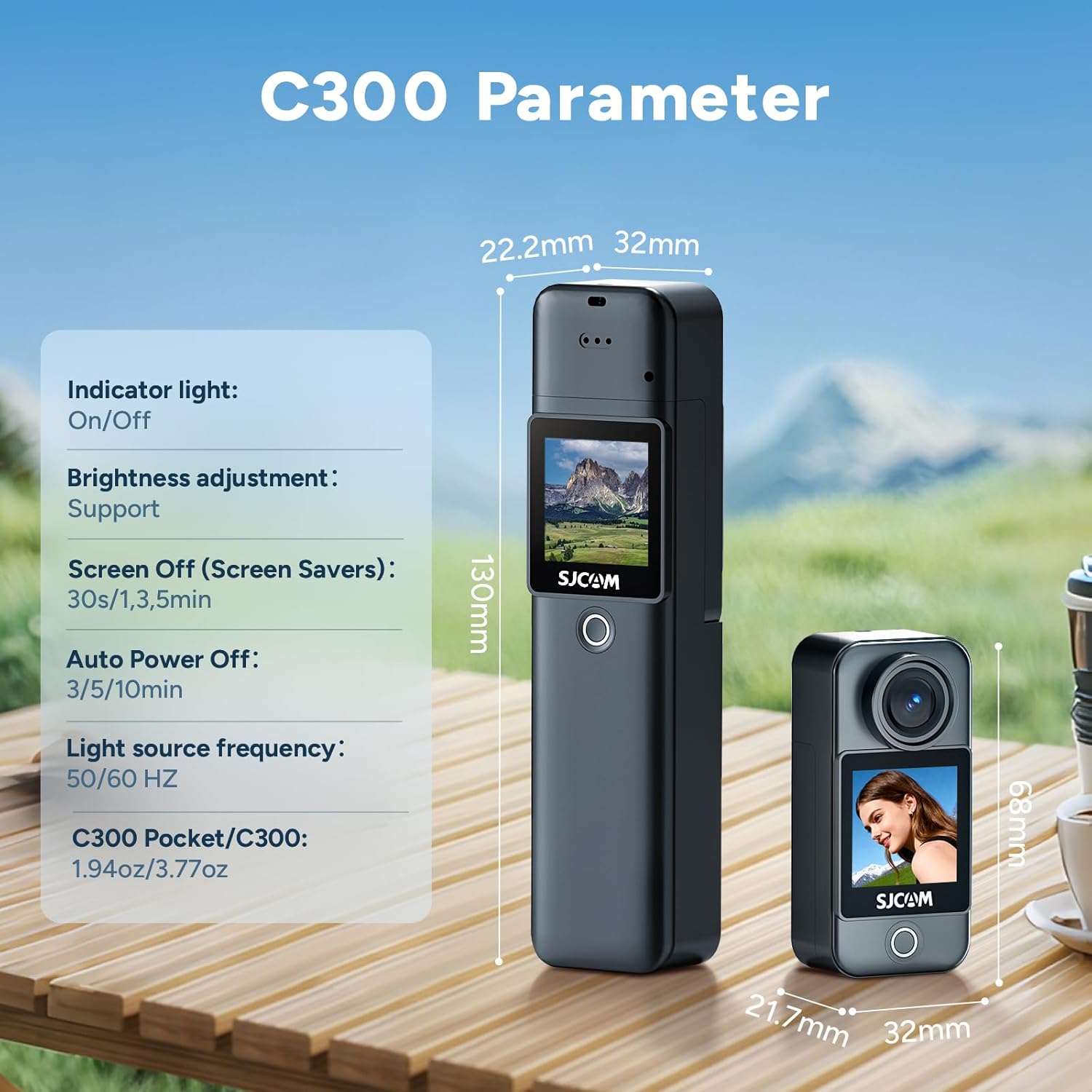
Image: A diagram illustrating the physical dimensions and some internal parameters of the SJCAM C300 camera.
10. Hvad er der i æsken
The standard package for the SJCAM C300 includes the following items:
- C300 Camera Unit (x1)
- Battery Handle (x1)
- Frame Mount (x1)
- Waterproof Case (x1)
- USB -kabel (x1)
- Nøglebånd (x1)
- Beslag (x1)
- Bagklips (x1)
- Flat Bottom Bracket (x1)
- Helmet Base (x2)
- Micro SD Card (64GB) (x1)
- Wiping Cloth (x1)

Image: A visual representation of all items included in the SJCAM C300 product package.
11. Garanti og support
SJCAM products are covered by a manufacturer's warranty. For specific warranty terms, technical support, or service inquiries, please refer to the official SJCAM webwebstedet eller kontakt deres kundesupport direkte. Gem din købsbevis til garantikrav.


