
1. Introduktion
Tak, fordi du har valgt Novodesk AZ5130 6-i-1 automatisk vakuumpakker. Denne manual indeholder vigtige oplysninger til sikker og effektiv betjening, vedligeholdelse og fejlfinding af dit nye apparat. Læs venligst disse instruktioner grundigt inden første brug, og gem dem til senere brug.

Billede 1.1: Novodesk AZ5130 vakuumforsegleren i drift, hvor den forsegler fødevarer til konservering.
2. Vigtige sikkerhedsinstruktioner
Ved brug af elektriske apparater skal grundlæggende sikkerhedsforanstaltninger altid følges for at reducere risikoen for brand, elektrisk stød og personskade, herunder følgende:
- Læs alle instruktioner, før du bruger dette apparat.
- Brug ikke apparatet med en beskadiget netledning eller et beskadiget stik. Hvis ledningen eller stikket er beskadiget, skal du kontakte kundesupport for at få hjælp.
- Apparatet, netledningen eller stikket må ikke nedsænkes i vand eller andre væsker.
- Dette apparat er ikke beregnet til brug af personer (inklusive børn) med nedsatte fysiske, sensoriske eller mentale evner, eller mangel på erfaring og viden, medmindre de er blevet under opsyn eller instruktion i brugen af apparatet af en person, der er ansvarlig for deres sikkerhed. .
- Tæt opsyn er nødvendigt, når et apparat bruges af eller i nærheden af børn.
- Træk stikket ud af stikkontakten, når det ikke er i brug, og før rengøring. Lad det køle af, før du sætter dele på eller af, og før du rengør apparatet.
- Brug ikke tilbehør, der ikke er anbefalet af producenten.
- Må ikke bruges udendørs.
- Må ikke placeres på eller i nærheden af en varm gas- eller elektrisk brænder eller i en opvarmet ovn.
- Sørg altid for, at låget er korrekt lukket, inden betjening.
- Brug kun vakuumposer, der er beregnet til vakuumforsegling.
3. Pakkens indhold
Pak forsigtigt din Novodesk AZ5130 vakuumpakker ud, og kontroller, at alle dele er til stede og i god stand. Hvis der mangler eller er beskadigede dele, bedes du kontakte kundesupport.
- 1 x Novodesk AZ5130 vakuumpakker
- 1 x strømkabel
- 1 x Støvsugerslange (til ekstern støvsugning)
- 2 x Forseglingsskumpakninger (udskiftning)
- 6 x præskårne vakuumposer (3.9 x 7.8 cm)
- 6 x præskårne vakuumposer (7.8 x 11.8 cm)

Billede 3.1: Alle komponenter inkluderet i Novodesk AZ5130 vakuumforseglerpakken.
4. Produktet er slutview
Gør dig bekendt med de forskellige dele og funktioner i din vakuumpakker.

Billede 4.1: Kontrolpanel og funktionsknapper på vakuumforsegleren.
Kontrolpanelets funktioner:
- Procesindikatorlampe: Lyser for at vise driftsstatus.
- Tør tilstand: Til vakuumforsegling af tørre fødevarer som nødder og korn.
- Fugtig tilstand: Til vakuumforsegling af fødevarer med en lille mængde væske.
- Puls funktion: Tillader manuel kontrol af vakuumprocessen, ideel til skrøbelige fødevarer.
- Forseglingsfunktion: Forsegler poser uden støvsugning.
- Stop-knap: Stopper den aktuelle handling.
Billede 4.2: Vakuumforseglerens indvendige komponenter.
Nøglekomponenter:
- Vakuumkammer: Område hvor luften fjernes fra posen.
- Silikonestrimmel: Hjælper med at skabe en tæt forsegling.
- Tætningsliste: Varmer op for at skabe poseforseglingen (4 mm bred).
- Skumforseglingsring: Sikrer korrekt vakuum.
- Dækklapper: Forhindrer, at vakuumposen kommer ud af vakuumkammeret.
- Udvendig glideskærer: Integreret skærer til brugerdefinerede posestørrelser.
- Ekstern VAC-port: Til tilslutning af støvsugerslangen til glas og beholdere.
5. Opsætning
Sørg for, at apparatet er rent og tørt, inden det tages i brug første gang. Placer vakuumforsegleren på en flad, stabil overflade.
Indledende opsætningstrin:
- Tilslut netledningen til apparatet og derefter til en passende stikkontakt.
- Klargør din vakuumpose med madvarer, og sørg for, at den åbne ende er ren og tør. Der skal være mindst 2-3 cm mellem madvarerne og toppen af posen.
6. Betjeningsvejledning
6.1. Grundlæggende vakuumforsegling (tør og fugtig tilstand)
Følg disse trin for standard vakuumforsegling af fødevareposer:
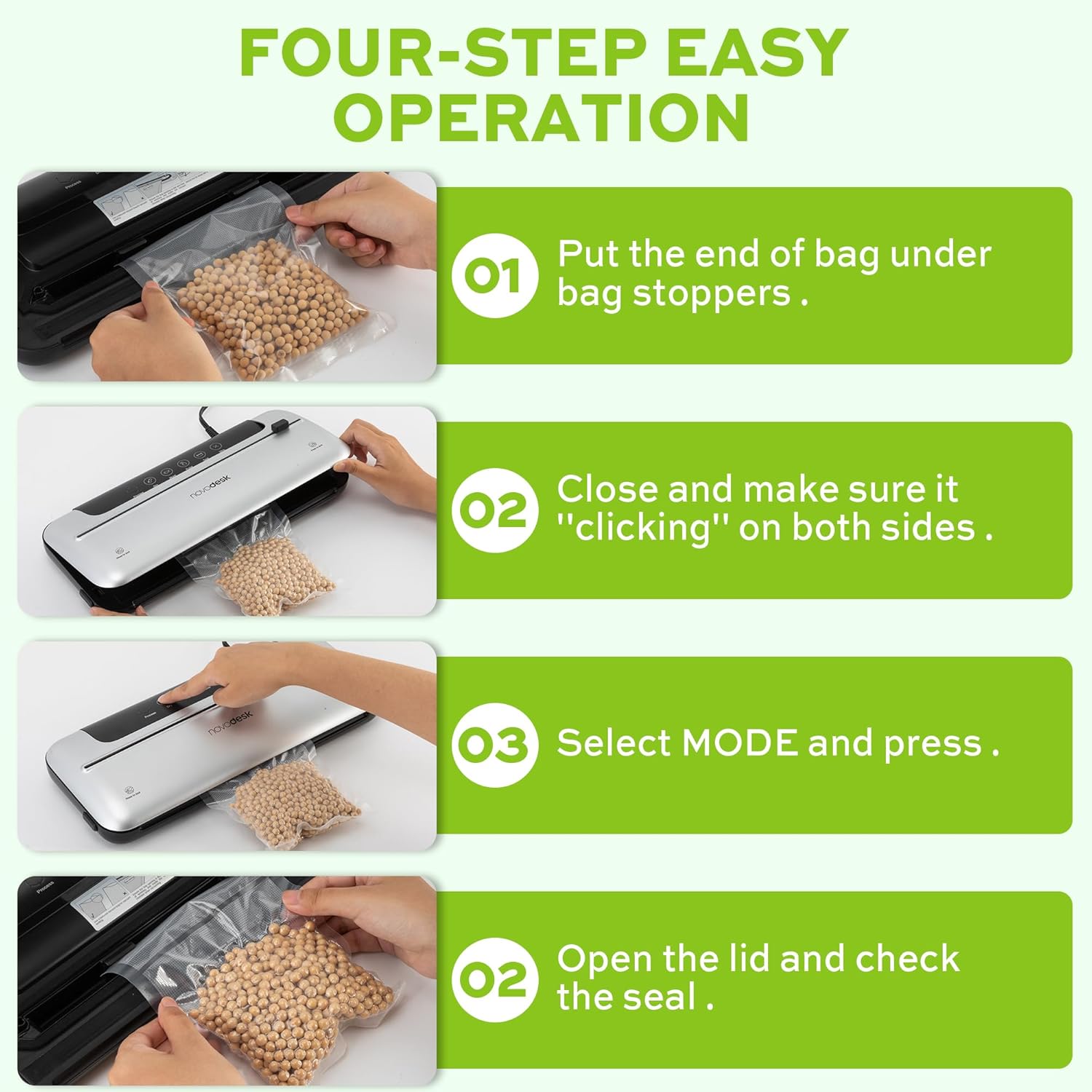
Billede 6.1: Nem betjening af vakuumforsegling i fire trin.
- Forbered posen: Placer den åbne ende af vakuumposen under posestopperne, og sørg for, at den er flad og centreret i vakuumkammeret.
- Luk låget: Luk låget på vakuumforsegleren godt. Tryk ned på begge sider, indtil du hører en "klikkende" lyd, der indikerer, at låget er sikkert lukket.
- Vælg tilstand: Vælg den passende tilstand til din mad:
- Tryk på Tørre knap til tørre fødevarer.
- Tryk på Fugtig knap til fugtige fødevarer.
- Tjek forseglingen: Når processen er færdig, og indikatorlampen slukker, skal du åbne låget og fjerne den forseglede pose. Kontroller forseglingen for at sikre, at den er lufttæt.
6.2. Pulsfunktion
Pulsfunktionen giver manuel kontrol over vakuumprocessen, hvilket er ideelt til sarte eller skrøbelige fødevarer, der kan knuses af fuldt vakuumtryk.
- Følg trin 1 og 2 fra "6.1. Grundlæggende vakuumforsegling".
- Tryk og hold på Puls knappen. Maskinen vil begynde at støvsuge.
- Slip Puls knappen, når det ønskede vakuumniveau er nået.
- Tryk på Forsegle knappen til at forsegle posen.
- Åbn låget og fjern den forseglede pose.
6.3. Kun tætningsfunktion
Brug forseglingsfunktionen til at forsegle uden vakuum, hvilket er praktisk til at lave poser i specialstørrelser fra en rulle eller til at genlukke snackposer.
- Placer den åbne ende af posen på forseglingsstrimlen.
- Luk låget godt, indtil det klikker.
- Tryk på Forsegle knappen. Maskinen vil opvarme og forsegle posen.
- Når forseglingsprocessen er færdig, åbnes låget og den forseglede pose fjernes.
6.4. Ekstern vakuumfunktion (til glas/beholdere)
Din vakuumforsegler inkluderer en ekstern vakuumslange til brug med kompatible vakuumforseglbare glas, beholdere og vinpropper.

Billede 6.2: Brug af det eksterne vakuumsystem med forskellige beholdere.
- Klargør din vakuumforseglbare krukke eller beholder med mad. Sørg for, at låget er korrekt påsat.
- Sæt den ene ende af vakuumslangen i den eksterne VAC-port på vakuumforsegleren.
- Sæt den anden ende af vakuumslangen i porten på din vakuumforseglbare krukke eller beholder.
- Luk låget på vakuumforsegleren (pose er ikke nødvendig indeni).
- Tryk på Ekstern VAC knappen (hvis tilgængelig, ellers brug Tør/Fugt-tilstand til at aktivere vakuumpumpen). Maskinen vil begynde at fjerne luft fra beholderen.
- Når vakuumprocessen er færdig, skal du fjerne slangen. Beholderen skulle nu være forseglet.
6.5. Brug af den udvendige glideskærer
Den integrerede glideskærer giver dig mulighed for at lave poser i specialstørrelser ud af en rulle vakuumforseglermateriale.
- Placer vakuumposerullen på tværs af skæreområdet.
- Skub skærebladet hen over posematerialet for at opnå den ønskede længde.
7. Vedligeholdelse og rengøring
Regelmæssig rengøring og vedligeholdelse vil sikre din vakuumpakkers levetid og optimale ydeevne.
Rengøringsvejledning:
- Tag altid stikket ud af stikkontakten før rengøring.
- Tør maskinens ydre af med en blød, damp klæde. Brug ikke slibende rengøringsmidler eller opløsningsmidler.
- Rengør vakuumkammeret og området omkring tætningslisten med enamp Sørg for, at der ikke er madrester eller væsker tilbage.
- Skumtætningsringene kan fjernes for rengøring om nødvendigt. Vask med mild sæbe og vand, skyl grundigt, og lad dem lufttørre helt, før de sættes i igen.
- Sørg for, at alle dele er helt tørre, før du opbevarer eller bruger apparatet igen.
Opbevaring:
Opbevar vakuumforsegleren et rent og tørt sted. For at opnå de bedste resultater, opbevar den med låget ulåst for at forhindre kompression af skumforseglingsringene, hvilket kan påvirke forseglingens ydeevne over tid.
8. Fejlfinding
Hvis du støder på problemer med din vakuumpakker, kan du se følgende almindelige problemer og løsninger:
| Problem | Mulig årsag | Løsning |
|---|---|---|
| Maskinen tænder ikke. | Ingen strømforsyning. | Kontroller, om netledningen er korrekt tilsluttet stikkontakten og maskinen. Test stikkontakten med et andet apparat. |
| Maskinen støvsuger, men forsegler ikke. | Tætningslisten eller skumpakningen er snavset/beskadiget. Posen er ikke placeret korrekt. | Rengør tætningslisten og skumpakningerne. Sørg for, at posen er flad og centreret over tætningslisten. Udskift pakningerne, hvis de er beskadigede. |
| Maskinen forsegler, men støvsuger ikke. | Låget er ikke lukket ordentligt. Skumpakningerne er snavsede eller slidte. Posen har huller eller er ikke egnet. | Sørg for, at låget er forsvarligt lukket og låst på begge sider. Rengør eller udskift skumpakninger. Brug passende vakuumposer, og kontroller for skader. |
| Vakuumet er svagt eller ujævnt. | Skumpakningerne er snavsede eller slidte. For meget væske i posen (til tørtilstand). | Rengør eller udskift skumpakninger. Brug fugtig tilstand til fødevarer med væske, eller forfrys væsker. |
| Posen smelter under forsegling. | Forseglingstid for lang (usandsynligt for automatiske modeller). | Sørg for at bruge passende vakuumposer. Hvis problemet fortsætter, skal du kontakte kundesupport. |
Hvis problemet fortsætter efter at have forsøgt disse løsninger, bedes du kontakte Novodesk kundesupport for yderligere assistance.
9. Specifikationer
| Mærke | Novodesk |
| Modelnummer | AZ5130 |
| Strøm / Wattage | 120 watt |
| Voltage | 120V |
| Materiale | Acrylonitril Butadien Styren (ABS) |
| Varens vægt | 980 g (2.16 pund) |
| Farve | Sølvfarvet |
| Driftstilstand | Automatisk |
| Max sugekraft | 75KPa |
| Tætningsstrimmelbredde | 4 mm |
10. Garanti og support
Novodesk-produkter er fremstillet efter høje kvalitetsstandarder. For information om garantidækning, produktsupport eller køb af reservedele, se venligst garantikortet, der følger med dit produkt, eller besøg den officielle Novodesk-side. webHvis du har spørgsmål eller har brug for hjælp, bedes du kontakte Novodesk kundeservice.