1. Introduktion
The SmallRig CT25 Horizontal Overhead Tripod is a versatile support system designed for various photography and videography applications, including overhead shots, product photography, and live streaming. Its robust aluminum construction and adjustable features provide stability and flexibility for both cameras and smartphones.
2. Pakkens indhold
Bekræft, at alle nedenstående varer er inkluderet i din pakke:
- Stativ x 1
- Bærepose x 1
- unbrakonøgle x 3
- Overhead Shooting Adapter x 1
- Krog x 1
- Smartphone holder x 1

Figure 2.1: Illustration of the SmallRig CT25 tripod and its included accessories.
3. Produktfunktioner
- Horizontal Overhead Shooting: The CT25 tripod features a horizontal arm that extends to a maximum height of 64.5 inches (164 cm), enabling stable overhead shots and horizontal camera setups. This design is suitable for product photography and live streaming applications.
- Dual-Device Compatibility: The tripod supports simultaneous mounting of cameras and smartphones. It includes a universal horizontal tripod mount and a phone holder, accommodating devices up to 22 lbs (10 kg) for dual-camera setups or live streaming.
- Stable and Lightweight Construction: Constructed with thickened aluminum legs, the tripod ensures stability. Anti-slip feet and a 360° ball head contribute to shake-free positioning on various surfaces. The tripod weighs 3.5 lbs (1.6 kg).
- Quick-Adjust Height: The 5-section legs are collapsible and extend to a maximum height of 64.5 inches (164 cm). The 360° rotation and tilt capabilities of the ball head offer flexible angles for diverse compositions.
- Bærbart design: Weighing 3.5 lbs (1.6 kg), the tripod is designed for portability and includes a carrying bag. A hook is provided for attaching counterweights up to 2.2 lbs (1 kg) to enhance stability during overhead shooting.
- 360° Panoramic Shooting: The integrated ball head allows for smooth 360° panoramic rotation, facilitating wide-angle and sweeping shots.
- Detachable Monopod: One of the tripod legs can be detached and combined with the central column and ball head to form a monopod. The monopod working height ranges from 16.7 inches (42.6 cm) to 51.5 inches (130.8 cm).
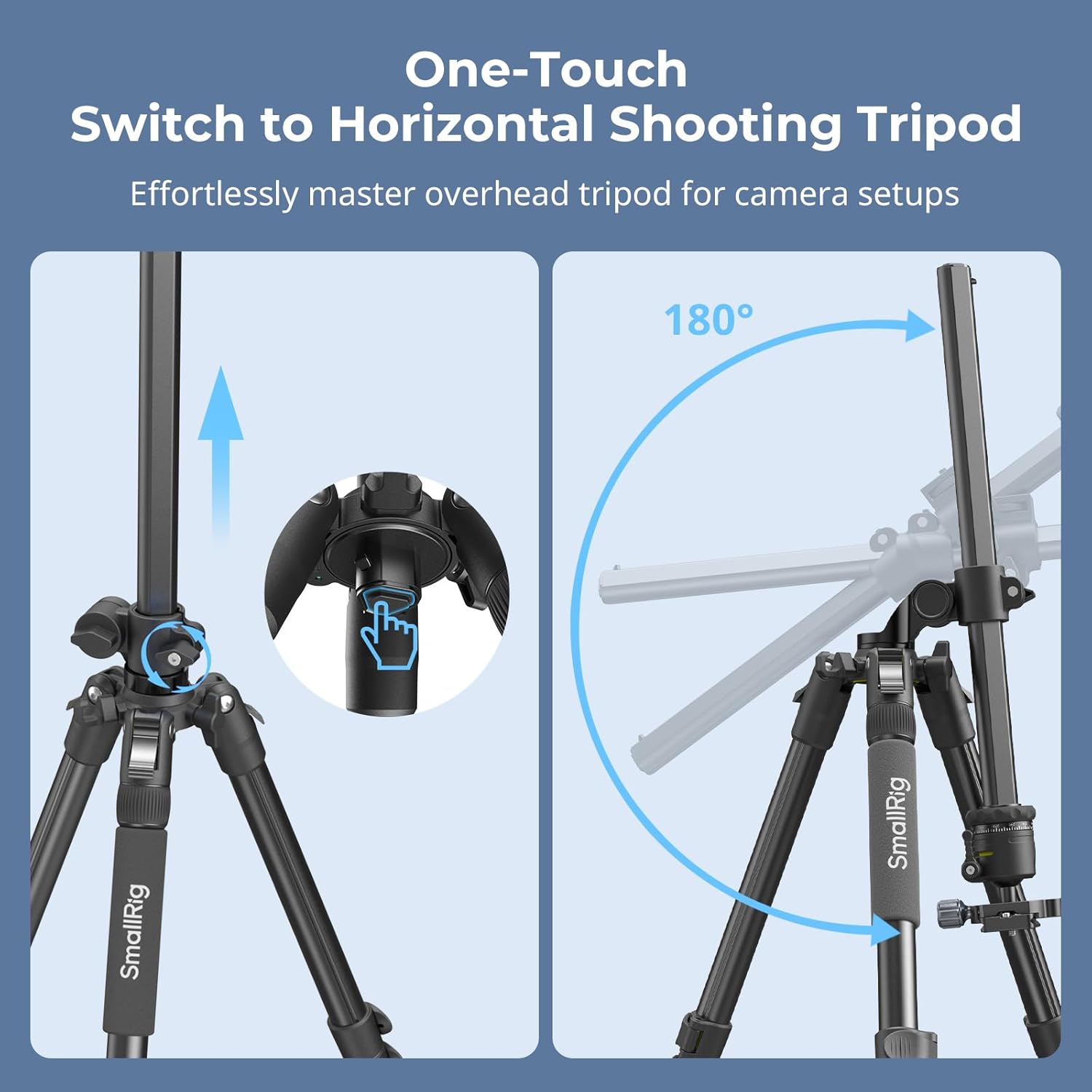
Figure 3.1: The tripod's central column can be quickly adjusted to a horizontal position for overhead shooting.

Figure 3.2: The horizontal arm allows for mounting two devices simultaneously, such as a camera and a smartphone.
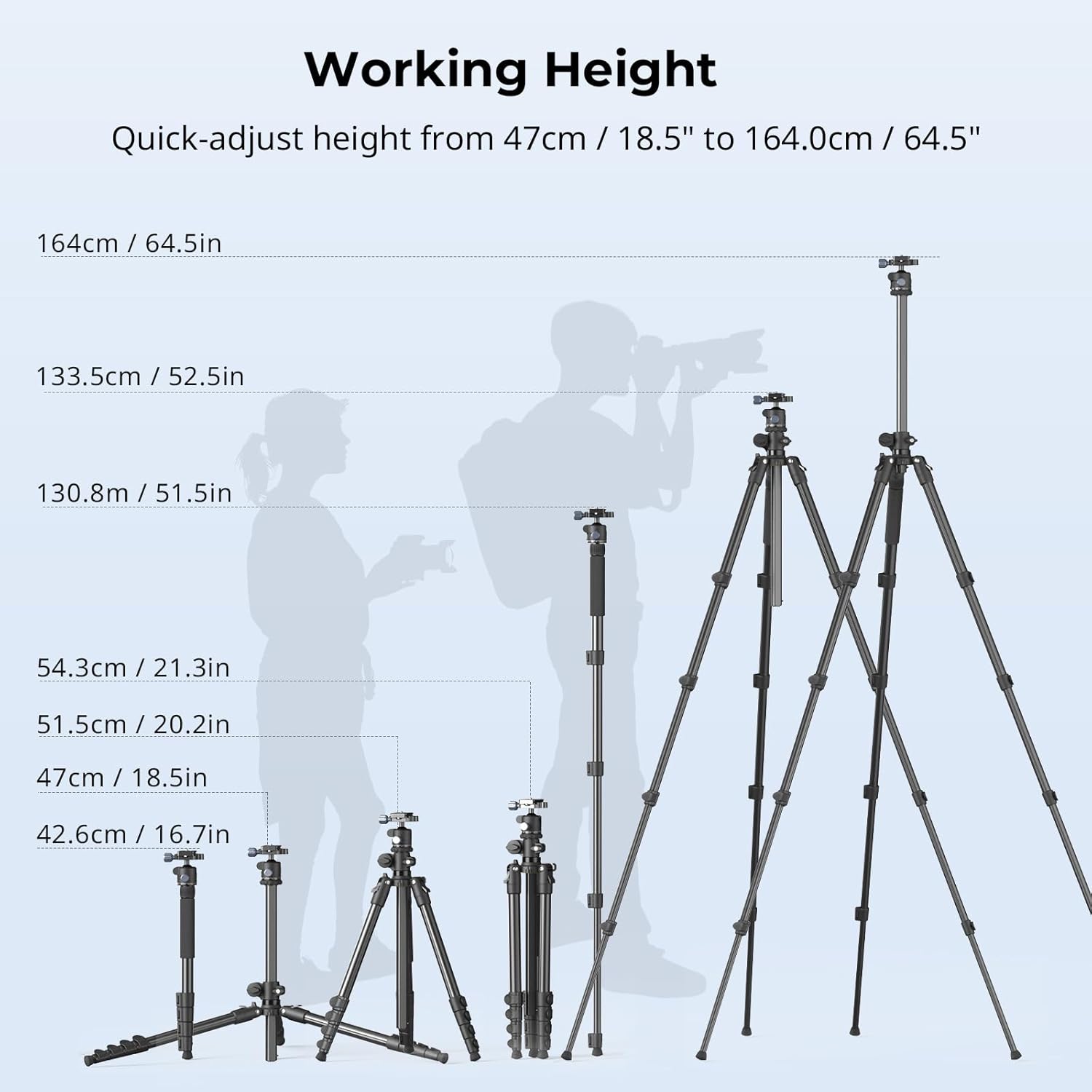
Figure 3.3: The tripod's height can be adjusted from 18.5 inches (47 cm) to 64.5 inches (164 cm).

Figure 3.4: The ball head enables 360° panoramic adjustments for comprehensive scene capture.

Figure 3.5: Conversion of a tripod leg into a monopod for increased versatility.
4. Opsætningsvejledning
- Udfoldning af stativet: Gently spread the tripod legs until they are fully extended and locked into position. Adjust the leg angles as needed for stability on uneven surfaces.
- Justering af benhøjde: Unlock the leg sections by twisting the locking collars. Extend each leg section to the desired height and twist the collars back to lock them securely. Ensure all leg sections are firmly locked before mounting equipment.
- Mounting a Camera: Attach your camera to the quick-release plate on the ball head. Ensure the camera is securely fastened to prevent accidental detachment.
- Montering af en smartphone: If using a smartphone, attach the provided smartphone holder to the quick-release plate or directly to the horizontal arm using the 1/4"-20 screw. Insert your smartphone into the holder, ensuring it is centered and secure.
- Switching to Horizontal Mode: To convert to horizontal shooting, locate the central column release mechanism. Engage the mechanism to allow the central column to pivot 180 degrees, positioning it horizontally. Lock the column in place once the desired angle is achieved.
- Using the Counterweight Hook: For enhanced stability, especially in horizontal or overhead configurations, attach a counterweight (e.g., a sandbag) to the hook located at the bottom of the central column. The maximum load capacity for the hook is 2.2 lbs (1 kg).

Figure 4.1: The SmallRig CT25 tripod configured for horizontal overhead shooting.
5. Betjeningsvejledning
- Adjusting Camera Angle (Ball Head): Loosen the main knob on the ball head to adjust the camera's tilt and pan. Once the desired angle is set, tighten the knob firmly to secure the position.
- Panoramic Rotation: The ball head features a separate knob for 360° panoramic rotation. Loosen this knob to rotate the camera horizontally without affecting the tilt, then tighten to lock.
- Monopodkonvertering: To convert to a monopod, unscrew one of the tripod legs (typically the one with the foam grip). Detach the ball head from the central column and attach it to the top of the detached leg. Extend the monopod sections to the desired height and lock them.
- Belastningskapacitet: The maximum load capacity for the tripod legs is 22 lbs (10 kg). When operating in normal mode (vertical central column), the recommended maximum load is 11 lbs (5 kg). In overhead mode (horizontal central column), the recommended maximum load is 6.6 lbs (3 kg). Adhering to these limits ensures stability and prevents damage.
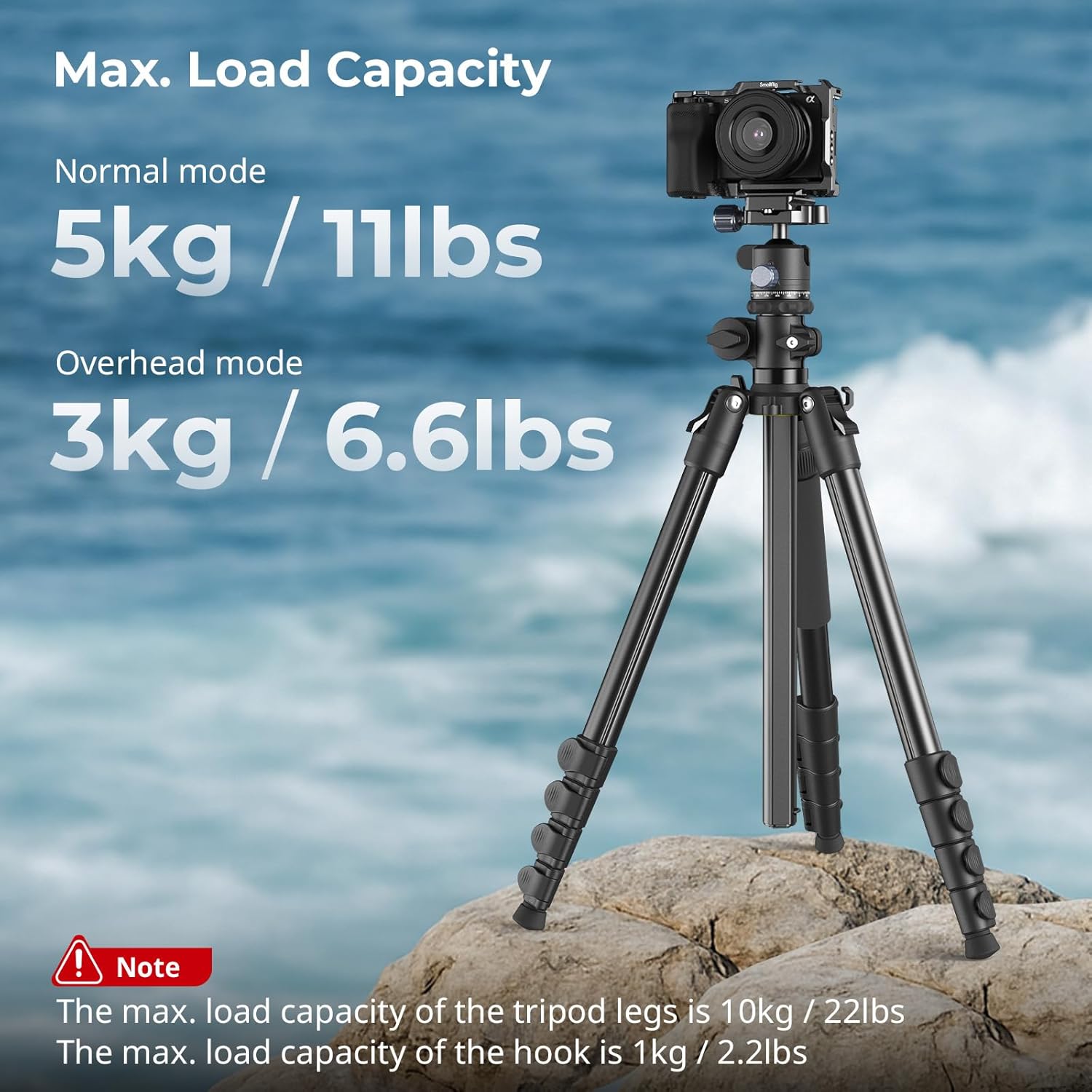
Figure 5.1: Maximum load capacities for the tripod in normal and overhead configurations.
6. Vedligeholdelse
- Rensning: Tør stativet af med en blød, tør klud efter hver brug for at fjerne støv og snavs. Brug en let tør klud til genstridigt snavs.amp en klud og en mild sæbe, og tør derefter grundigt. Undgå skrappe kemikalier eller slibende rengøringsmidler.
- Smøring: Periodically check the leg locks and central column mechanism for smooth operation. If they become stiff, apply a small amount of silicone-based lubricant.
- Opbevaring: Opbevar stativet i dets bæretaske på et køligt, tørt sted væk fra direkte sollys og ekstreme temperaturer.
- Inspektion: Regularly inspect all screws, knobs, and leg locks to ensure they are tight and functioning correctly. Tighten any loose components using the provided Allen wrenches.
7. Fejlfinding
- Stativustabilitet:
- Ensure all leg sections are fully extended and securely locked.
- Verify that the leg angles are set appropriately for the surface.
- Use the counterweight hook with a sandbag or other weight, especially in overhead mode or on uneven terrain.
- Check that the camera or device is within the specified load capacity.
- Stiff Leg Locks/Central Column:
- Clean any accumulated dirt or debris from the locking mechanisms.
- Påfør en lille mængde silikone-smøremiddel på de bevægelige dele.
- Enheden er ikke sikker:
- Ensure the quick-release plate is properly seated and locked into the ball head.
- Tighten all mounting screws firmly.
- For smartphones, confirm the holder grips the device securely.
8. Specifikationer
| Feature | Specifikation |
|---|---|
| Modelnavn | CT25 |
| Varemodelnummer | 12768 |
| Produktdimensioner | 3.94 x 3.94 x 5.91 cm (foldet) |
| Varens vægt | 3.5 lbs (1.6 kg) |
| Materiale | Aluminum Alloy, ABS |
| Maksimal arbejdshøjde | 64.5 tommer (164 cm) |
| Minimum arbejdshøjde | 18.5 tommer (47 cm) |
| Ben sektioner | 5 |
| Max. Leg Diameter | 1.02 tommer (26.0 mm) |
| Min. Leg Diameter | 0.55 tommer (14.0 mm) |
| Normal Mode Max. Load Capacity | 11 lbs (5 kg) |
| Overhead Mode Max. Load Capacity | 6.6 lbs (3 kg) |
| Hook Max. Load Capacity | 2.2 lbs (1 kg) |
| Type stativhoved | Kuglehoved |
| Kompatible enheder | Kamera, Smartphone |
9. Sikkerhedsoplysninger
- Always ensure all locking mechanisms are securely fastened before leaving the tripod unattended.
- Do not exceed the specified maximum load capacities for normal and overhead modes.
- When using in overhead mode, always use a counterweight on the hook to prevent tipping.
- Be cautious when adjusting the tripod on uneven or slippery surfaces.
- Hold hænder og fingre væk fra bevægelige dele under justering for at undgå klemning.
- Do not expose the tripod to extreme weather conditions (e.g., heavy rain, strong winds) without adequate protection.
10. Garanti og support
For garantioplysninger eller teknisk support henvises til den officielle SmallRig-side. webwebstedet eller kontakt deres kundeserviceafdeling. Behold din købskvittering som købsbevis.


