Indledning
This manual provides essential information for the proper use, setup, and maintenance of your The G-Lab K-Pad Helium WL Wireless PC Controller. Please read this manual thoroughly before using the product to ensure optimal performance and longevity.
Pakkens indhold
Bekræft at alle varer er til stede i pakken:
- The G-Lab K-Pad Helium WL Wireless PC Controller
- USB 2.4 GHz Receiver Dongle
- USB-C til USB-A opladerkabel
- Brugervejledning (dette dokument)

Image: The retail packaging for the K-Pad Helium WL Wireless PC Controller, showing the controller and its accessories.
Produkt overview
The K-Pad Helium WL features an ergonomic design with 12 buttons and 4 triggers, including 2 customizable rear triggers, designed for comfortable and precise control during gaming sessions.
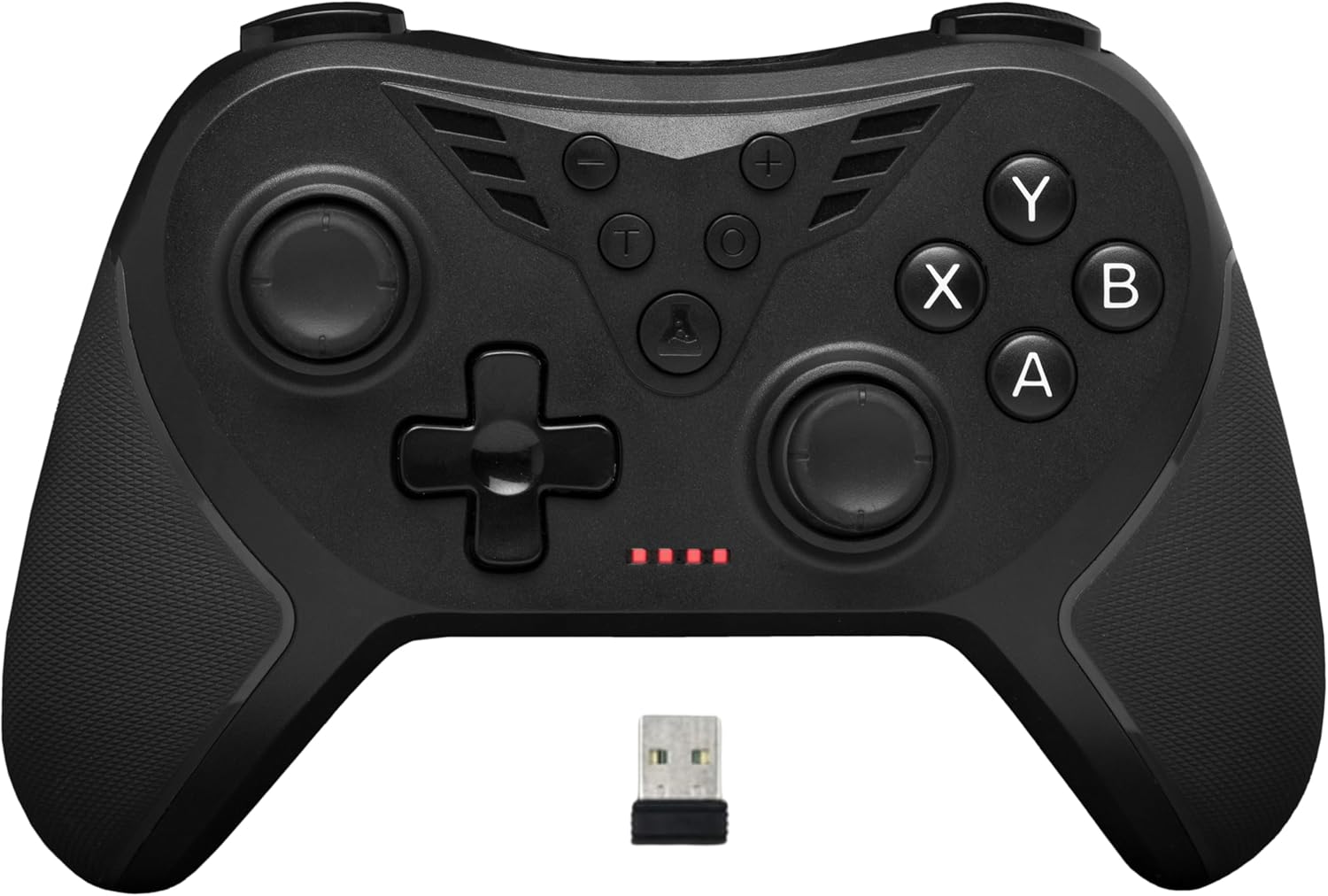
Billede: Forside view of the K-Pad Helium WL controller, displaying its buttons, joysticks, D-pad, and the included USB 2.4 GHz receiver dongle.
Knaplayout:
- Venstre analoge pind: Til bevægelse og kamerastyring.
- Højre analoge pind: Til kamerastyring og sigtning.
- D-Pad: Retningsbestemt input.
- Handlingsknapper (A, B, X, Y): Primære spilhandlinger.
- Skulderknapper (L1, R1): Topudløsere.
- Udløsere (L2, R2): Analoge triggere til præcis input.
- Customizable Rear Triggers (LM, RM): Two additional buttons on the back for custom assignments.
- Start/Menu-knap: Access in-game menus.
- Vælge/View Knap: Additional game functions.
- Hjemknappen: Returns to system menu.
- Turbo-knap (T): Aktiverer Turbo-tilstand.
- Makro knap: For programming custom macros.

Billede: Bagside view of the K-Pad Helium WL controller, highlighting the two customizable triggers (LM and RM) located on the back.
Opsætning
1. Charging the Controller:
Before first use, fully charge the controller. Connect the USB-C end of the charging cable to the controller and the USB-A end to a powered USB port (e.g., PC, USB wall adapter). The charging indicator lights will show the charging status. A full charge takes approximately 2 hours and provides 8 to 10 hours of playtime.

Image: Illustration showing the controller's charging via USB-C cable and indicating battery life.
2. Connecting to a Device (Plug and Play):
The K-Pad Helium WL uses a 2.4 GHz wireless connection via a dedicated USB receiver.
- Insert the USB 2.4 GHz receiver dongle into an available USB port on your PC (Windows 10, 11) or PS3 console.
- Turn on the controller. It will automatically connect to the receiver. The indicator lights on the controller will confirm a successful connection.
- No additional drivers are typically required for Windows 10/11 or PS3 due to its Dual Mode (Direct-Input + X-Input) compatibility.

Image: The K-Pad Helium WL controller shown with its USB 2.4 GHz receiver, illustrating the wireless connection for stable and fast gameplay.
Betjeningsvejledning
Vibrationsfeedback:
The controller features integrated vibration motors for enhanced immersion. The intensity of vibrations can be adjusted or disabled. Refer to your game's settings for specific vibration options, or the controller's manual for hardware-level adjustments if available.

Image: The K-Pad Helium WL controller with an overlay illustrating four levels of vibration intensity: 0%, 30%, 70%, and 100%.
Customizable Rear Triggers (LM, RM):
The two rear triggers (LM and RM) can be programmed to replicate other button inputs, allowing for personalized control schemes.
Turbo tilstand:
The Turbo function allows a button to be pressed repeatedly as long as it is held down, which can be useful in certain games.
- For at aktivere Turbo: Tryk og hold på Turbo (T) button, then press the desired action button (e.g., A, B, X, Y, L1, R1, L2, R2). The button will now have Turbo functionality.
- To deactivate Turbo for a specific button: Gentag aktiveringstrinnet.
- To clear all Turbo settings: Tryk på Turbo (T) knap to gange.
Makro programmering:
Macros allow you to record a sequence of button presses and assign them to a single button (LM or RM), executing complex actions with one press.
- To program a Macro: Tryk på og hold samtidigt nede Makro button and either the LM or RM button for 3 seconds. The indicator light will flash to indicate recording mode.
- Perform the desired sequence of button presses.
- Tryk på LM or RM knappen igen for at gemme makroen. Indikatorlampen vil holde op med at blinke.
- Sådan sletter du en makro: Tryk på Makro knappen tre gange.
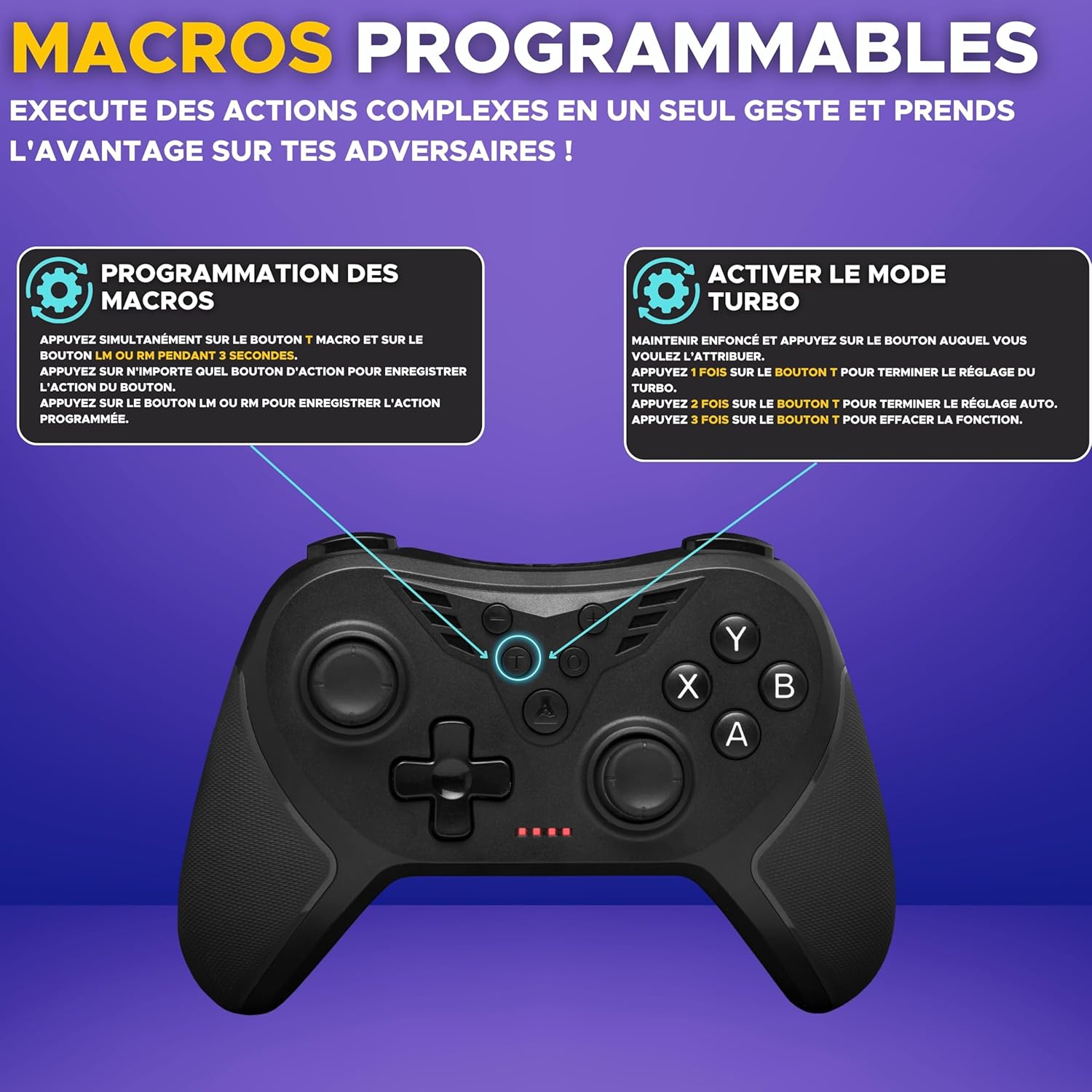
Image: Diagram showing instructions for programming macros and activating Turbo mode on the K-Pad Helium WL controller.
Kompatibilitet
The G-Lab K-Pad Helium WL Wireless PC Controller is compatible with the following platforms:
- Windows 10
- Windows 11
- PlayStation 3 (PS3)
- Android (Smartphones/Tablets with OTG support)
Note: Denne controller er ikke kompatibel with Xbox consoles, PlayStation 4 (PS4), PlayStation 5 (PS5), Mac OS, or iOS devices.
Opretholdelse
Rensning:
Brug en blød, tør klud til at rengøre controlleren. Ved genstridigt snavs, tør letampen the cloth with water. Do not use harsh chemicals, solvents, or abrasive cleaners, as these can damage the surface and internal components.
Opbevaring:
Opbevar controlleren et køligt, tørt sted væk fra direkte sollys og ekstreme temperaturer. Undgå at placere tunge genstande på controlleren for at forhindre skader.
Fejlfinding
- Controlleren forbinder ikke:
- Sørg for, at USB-modtageren er korrekt tilsluttet en fungerende USB-port.
- Sørg for, at controlleren er opladet.
- Try restarting your PC or console.
- Ensure no other 2.4 GHz wireless devices are causing interference.
- Input lag or dropped connection:
- Flyt tættere på USB-modtageren.
- Ensure there are no large metallic objects or other wireless devices between the controller and the receiver.
- Check for battery level; low battery can affect wireless performance.
- Vibration virker ikke:
- Tjek indstillingerne i spillet for at sikre, at vibrationsfeedback er aktiveret.
- Nogle spil understøtter muligvis ikke vibration.
- Knapper reagerer ikke:
- Sørg for, at controlleren er korrekt tilsluttet.
- Test controlleren på en anden kompatibel enhed, hvis det er muligt.
- If a specific button is not working, it might indicate a hardware issue.
Specifikationer
| Mærke | G-LAB |
| Modelnavn | K-PAD-HELIUM-WL |
| Forbindelse | 2.4 GHz trådløs (USB-modtager) |
| Kompatibilitet | Windows 10, Windows 11, PS3, Android (with OTG) |
| Antal knapper | 12 |
| Number of Triggers | 4 (2 customizable rear triggers) |
| Særlige funktioner | Adjustable Vibrations, Turbo Mode, Macro Programming |
| Strømkilde | Batteridrevet (genopladeligt) |
| Opladningstid | Ca. 2 timer |
| Batterilevetid | Ca. 8-10 timer |
| Dimensioner (L x B x H) | 15.5 x 10 x 6.1 cm |
| Vægt | 220 gram |
| Farve | Sort |
Garanti og support
Garanti:
Dette produkt leveres med en 2 års garanti fra købsdatoen. Denne garanti dækker fabrikationsfejl og materialefejl ved normal brug. Den dækker ikke skader forårsaget af misbrug, ulykker, uautoriserede ændringer eller normal slitage.
Kundesupport:
For technical assistance, warranty claims, or any questions regarding your The G-Lab K-Pad Helium WL Wireless PC Controller, please contact The G-Lab customer support. Support is available 7 days a week and aims to respond within 24 hours.
Please refer to the official The G-Lab webwebsted for kontaktoplysninger: www.the-g-lab.tech


