Indledning
Welcome to your Angrox Universal Replacement Remote Control. This manual provides detailed instructions for setting up and operating your new remote, designed for seamless compatibility with various Philips Smart 4K UHD Android TVs. Please read this manual thoroughly to ensure optimal performance and longevity of your remote control.
1. Opsætning
1.1 Batteriinstallation
Fjernbetjeningen kræver to AAA alkaline-batterier (medfølger ikke).
- Find batterirummets dæksel på bagsiden af fjernbetjeningen.
- Press down on the tab and slide the cover downwards to open.
- Isæt to AAA-batterier, og sørg for, at de positive (+) og negative (-) poler er justeret korrekt med markeringerne inde i batterirummet.
- Skub batteridækslet tilbage på plads, indtil det klikker sikkert.
1.2 Første tilslutning
This Angrox replacement remote control is designed for immediate use with compatible Philips Smart TVs. No programming or pairing is required. Simply insert the batteries, and the remote is ready to operate your television.
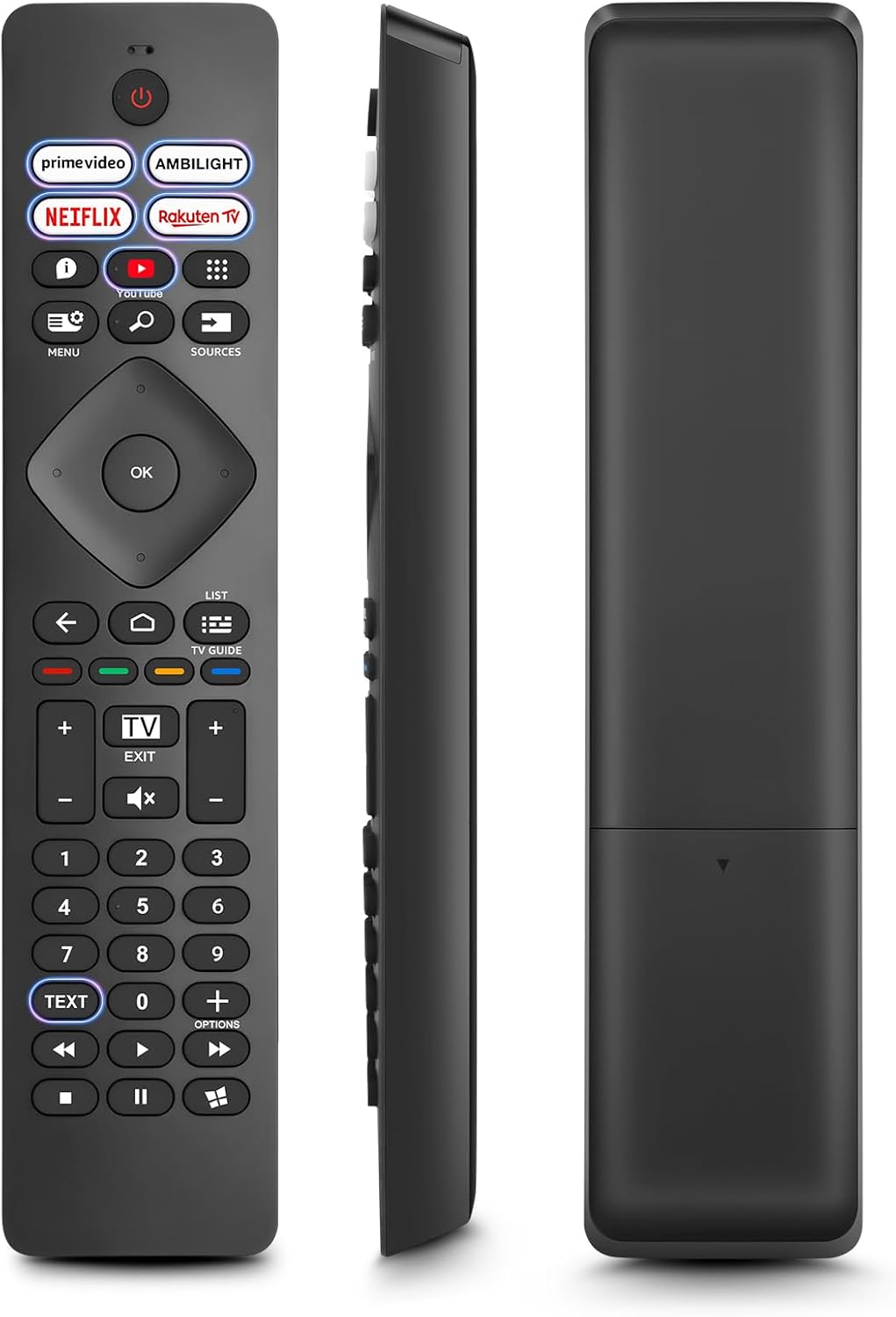
Billede: Forside, side og bagside views of the Angrox Universal Replacement Remote Control. This image illustrates the physical design and battery compartment location.
2. Betjeningsvejledning
2.1 Knapfunktioner ovenforview
Familiarize yourself with the remote control's buttons and their primary functions.
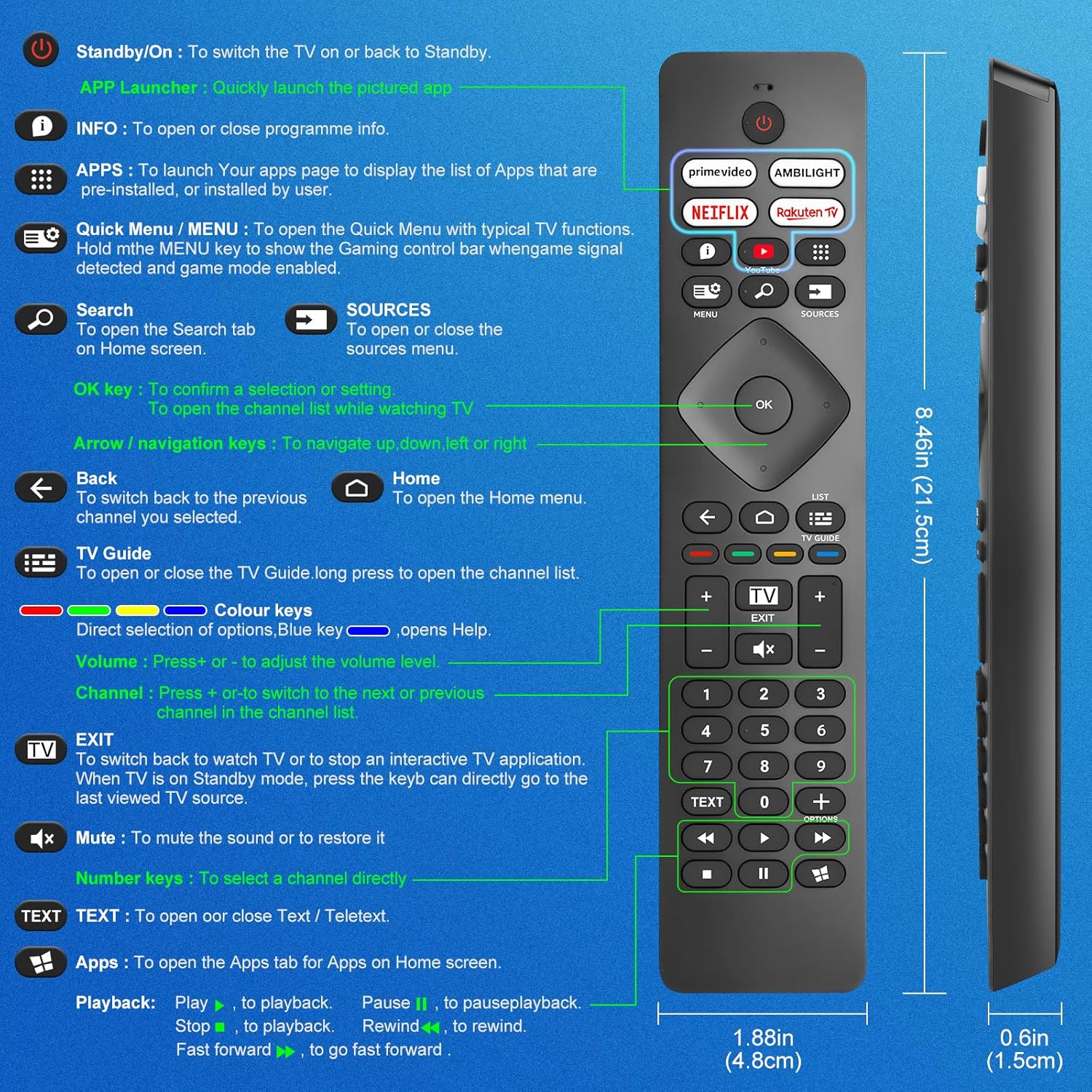
Image: A detailed diagram illustrating each button on the Angrox remote control and its corresponding function.
Detailed Button Descriptions:
- Standby/On (Power Button): For at tænde for tv'et eller tilbage til standby.
- APP Launcher: Quickly launch the pictured app.
- INFO: To open or close programme info.
- APPS: To launch your apps page to display the list of apps that are pre-installed or installed by the user.
- Quick Menu / MENU: To open the Quick Menu with typical TV functions. Hold the MENU key to show the Gaming control bar when game signal detected and game mode enabled.
- Søge: To open the Search tab on Home screen.
- KILDER: To open or close the sources menu.
- OK-tast: To confirm a selection or setting. To open the channel list while watching TV.
- Arrow/Navigation keys: For at navigere op, ned, til venstre eller højre.
- Tilbage: For at skifte tilbage til den forrige kanal, du valgte.
- Hjem: To open the Home menu.
- TV Guide: To open or close the TV Guide. Long press to open the channel list.
- Colour keys (Red, Green, Yellow, Blue): Direct selection of options. Blue key opens Help.
- Volumen +/-: For at justere lydstyrken.
- Kanal +/-: For at skifte til næste eller forrige kanal på kanallisten.
- AFSLUT: To switch back to watch TV or to stop an interactive TV application. When TV is on Standby mode, press the key to directly go to the last viewed TV source.
- Stum: For at slå lyden fra eller for at gendanne den.
- Nummertaster (0-9): For at vælge en kanal direkte.
- TEKST: To open or close Text / Teletext.
- Apps (Netflix, Prime Video, Rakuten TV, YouTube): Quick access to dedicated streaming applications.
- Afspilningskontroller (Afspil, Pause, Stop, Spol tilbage, Spol frem): Til medieafspilning.
2.2 Genvejsknapper
The remote features dedicated shortcut buttons for popular streaming services and Ambilight control.

Image: The Angrox remote control with highlighted shortcut buttons for Prime Video, Ambilight, Netflix, Rakuten TV, and YouTube.
- Prime Video: Direct access to Amazon Prime Video.
- Ambilight: Control Philips Ambilight features.
- Netflix: Direkte adgang til Netflix.
- Rakuten TV: Direct access to Rakuten TV.
- YouTube: Direkte adgang til YouTube.
3. Kompatibilitet
This Angrox replacement remote control is universally compatible with a wide range of Philips Smart TVs, including:

Image: Visual representation of the Angrox remote's compatibility with Philips 4K Ambilight TV, 4K Ultra HD TV, LED 4K TV, and OLED 4K TV.
- 4K Ambilight TV
- 4K Ultra HD -tv
- LED 4K TV
- OLED 4K TV
It is designed to function with all Philips Smart TV models that utilize an infrared remote control.
4. Ydelsesfunktioner

Image: Graphics indicating a 0.2-second fast response and a 10-meter transmitting distance for the remote control.
- Hurtigt svar: Enjoy a quick response time of approximately 0.2 seconds for button presses.
- Sendeafstand: Effective operating range up to 10 meters (approximately 33 feet).
5. Vedligeholdelse
- Rensning: Brug en blød, tør klud til at rengøre fjernbetjeningen. Undgå at bruge flydende rengøringsmidler eller slibende materialer.
- Batteripleje: If the remote will not be used for an extended period, remove the batteries to prevent leakage and potential damage. Replace batteries when the remote's response becomes sluggish or inconsistent.
- Opbevaring: Opbevar fjernbetjeningen et køligt, tørt sted væk fra direkte sollys og ekstreme temperaturer.
6. Fejlfinding
6.1 Fjernbetjeningen svarer ikke
- Tjek batterier: Ensure batteries are inserted correctly with the correct polarity (+/-). Replace old or depleted batteries with new AAA alkaline batteries.
- Synslinje: Sørg for, at der er frit udsyn mellem fjernbetjeningen og tv'ets infrarøde sensor. Forhindringer kan blokere signalet.
- Fjernbetjening: Ensure the TV's infrared sensor is not blocked or dirty.
6.2 Begrænset funktionalitet
- While this remote is broadly compatible, some specific advanced functions unique to certain original Philips remote models might not be replicated. Verify the button functions against the provided diagram.
6.3 Ambilight Functionality
Nogle brugereviews indicate that Ambilight functionality might vary. If your Ambilight button does not work as expected, ensure your TV's Ambilight feature is enabled and configured correctly in your TV settings.
7. Specifikationer
| Feature | Detalje |
|---|---|
| Mærke | Angrox |
| Model | pour Philips TV |
| Kompatible enheder | Philips Smart TV (4K Ambilight, 4K UHD, LED 4K, OLED 4K) |
| Speciel funktion | Universel |
| Connector Type | Infrarød |
| Batteritype | 2 x AAA Alkaline (medfølger ikke) |
| Emnedimensioner | 22.7 x 6.2 x 2.4 cm |
| Varens vægt | 60 g |
| Farve | Sort |
Bemærk: Specifikationerne kan ændres uden forudgående varsel.
8. Garanti og support
For product support or warranty inquiries, please contact your retailer or the manufacturer, Angrox, directly. Please refer to your purchase documentation for specific warranty terms and contact information.
Fabrikant: Angrox
ASIN: B0F83X2FQG


