1. Introduktion
This manual provides essential information for the safe and efficient use of your DOOGEE Blade 20 Pro Rugged Phone. Designed for durability and high performance, this device features an 11800mAh battery, a 125dB speaker, a 50MP main camera, and runs on Android 15. Please read this manual thoroughly before operating your device.

Billede: Forside og bagside view of the DOOGEE Blade 20 Pro, showcasing its robust design and key specifications.
2. Opsætning
2.1 Udpakning og pakkeindhold
Carefully unpack your DOOGEE Blade 20 Pro. The package should contain the following items:
- 1 x Blade 20 Pro Rugged Smartphone
- 1 x Type-C USB-kabel
- 1 x 18W oplader
- 1 x Serigrafitrykt beskyttelsesfilm (forudpåsat)
- 1 x SIM-kortudtagningsnål
- 1 x brugermanual
- 1 x garantikort

Image: All items included in the DOOGEE Blade 20 Pro retail package.
2.2 SIM-kort og lagerudvidelse
The DOOGEE Blade 20 Pro supports dual 4G SIM cards and expandable storage up to 2TB via a TF card (purchased separately). To install:
- Find SIM-kortbakken på siden af enheden.
- Sæt nålen til fjernelse af SIM-kortet ind i det lille hul ved siden af bakken for at skubbe det ud.
- Place your Nano-SIM cards and/or TF card into the designated slots on the tray. Ensure correct orientation.
- Sæt forsigtigt bakken tilbage i telefonen, indtil den klikker på plads.
Vigtig bemærkning:
- This device does not support Verizon or AT&T networks.
- Verify compatibility with your local carrier's frequency bands before use. Supported bands include: GSM: B2/B3/B5/B8, WCDMA: B1/B2/B4/B5/B8, FDD: B1/2/3/4/5/7/8/18/19/20/25/26/28AB/66, TDD-LTE: B34/B38/B39/B40/B41.
2.3 Første opladning og tænding
Before first use, fully charge your device. Connect the Type-C USB cable to the phone and the 18W charger to a power outlet. The 11800mAh battery provides extended usage. Once charged, press and hold the power button on the side of the phone to turn it on.

Image: Visual representation of the phone's large battery capacity and fast charging feature.
3. Betjening af din enhed
3.1 Basic Functions and Android 15
The DOOGEE Blade 20 Pro runs on Android 15, offering a fast interface, enhanced privacy features, and efficient app management. Navigate using the touchscreen, and utilize the physical power and volume buttons for basic controls.
3.2 Display
The device features a 6.6-inch HD+ IPS punch-hole screen with a 90Hz refresh rate for smooth visuals. With 380 nits brightness, the display remains readable in various lighting conditions.
3.3 Kamerafunktioner
Indfang øjeblikke med det alsidige kamerasystem:
- 50MP AI-hovedkamera: For crisp and vibrant photos in daylight.
- 20MP Infrared Night Vision Camera: Allows capturing images in low-light or complete darkness.
- 8MP frontkamera: Til selfies og videoopkald.
The phone supports Widevine L1 certification for high-definition streaming. Various camera modes are available, including Night Mode, EIS Anti-shake, AI Recognition, Multi-frame Noise Reduction, Anti-flicker, Pro Mode, Panoramic Mode, Burst Mode, Beauty Mode, Portrait Mode, and HDR.
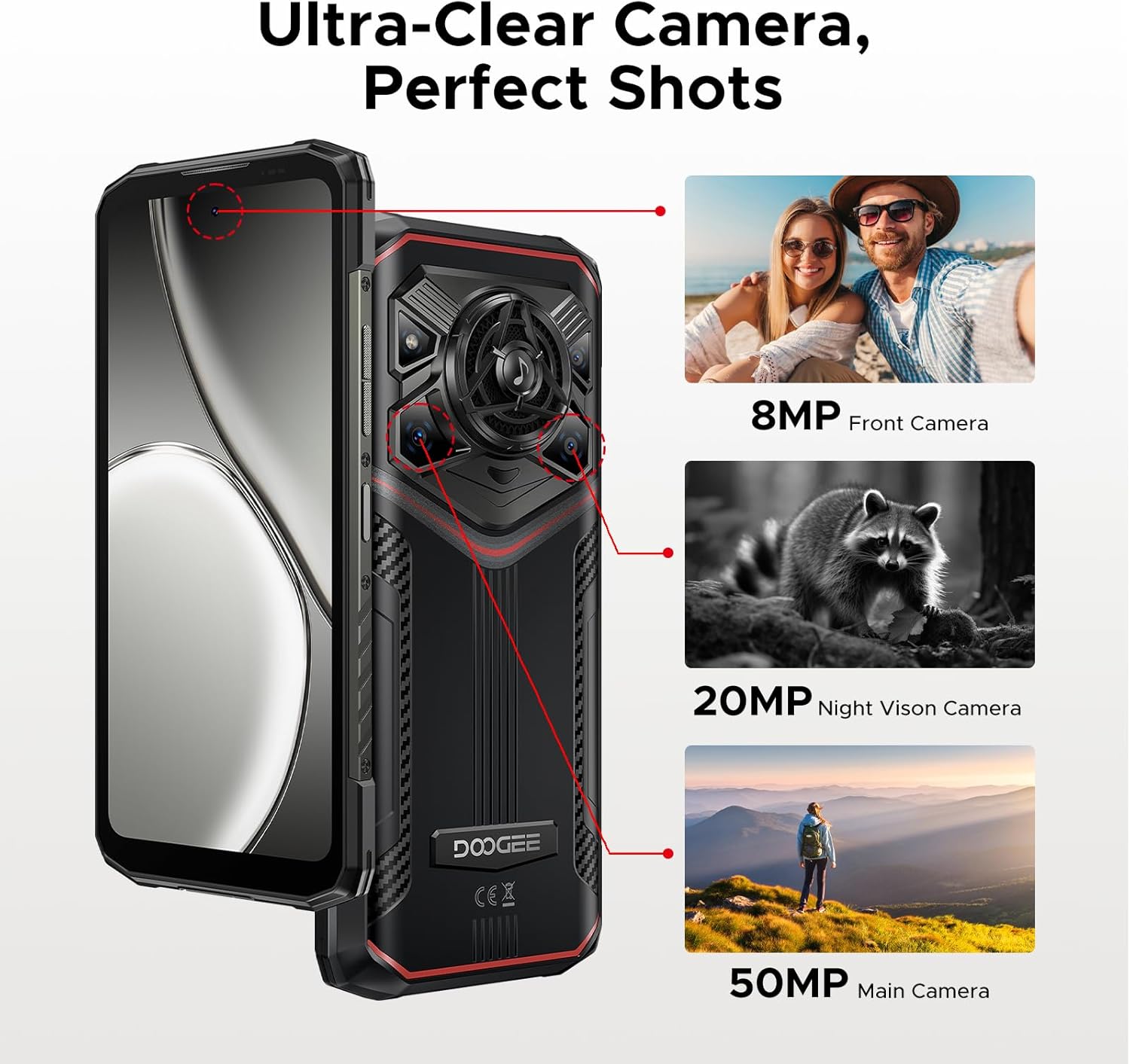
Billede: Overview of the DOOGEE Blade 20 Pro's camera system.
3.4 Lydsystem
Experience powerful audio with the 125dB speaker, featuring a 36mm giant driver and 3.5W high power output. This ensures clear sound even in noisy environments.

Billede: Detaljeret view of the phone's high-power speaker components.
3.5 Forbindelse og navigation
The device supports Wi-Fi 6 for fast internet access and NFC for convenient contactless payments and data transfer. For navigation, it includes built-in GPS, Glonass, Galileo, and Beidou systems.
3.6 Sikkerhedsfunktioner
Unlock your phone securely using Face ID or the integrated fingerprint sensor for quick and convenient access.
3.7 Gemini AI-integration
The DOOGEE Blade 20 Pro includes Gemini AI features to assist with various tasks, including content creation, image analysis, code development, language learning, and smart assistant functions.

Billede: Overview of the Gemini AI capabilities integrated into the device.
4. Vedligeholdelse og holdbarhed
4.1 Rugged Standards
The DOOGEE Blade 20 Pro is built to withstand harsh environments, meeting IP68, IP69K, and MIL-STD-810H standards. This means it is waterproof, dustproof, and shockproof, designed to endure drops, rain, mud, and extreme temperatures.
4.2 Pleje af batterier
The 11800mAh battery is designed for longevity. To maximize battery life, avoid exposing the device to extreme temperatures for prolonged periods. The battery is rated to maintain over 80% health after 1000 charge and discharge cycles, and can survive extreme temperatures from -40°C to 70°C.
5. Fejlfinding
If you encounter issues with your DOOGEE Blade 20 Pro, consider the following common solutions:
- Netværksforbindelse: Ensure your SIM card is correctly inserted and your carrier's frequency bands are supported by the device. Restarting the phone can often resolve temporary network issues.
- Batteridræning: Close unused applications running in the background. Reduce screen brightness and disable features like Wi-Fi, Bluetooth, or GPS when not in use.
- Ydelsesproblemer: Clear cache from apps, uninstall unnecessary applications, or perform a factory reset (back up your data first) if the device becomes consistently slow.
- Højttalervolumen: Ensure the volume is turned up and there is no obstruction to the speaker grille.
Ved vedvarende problemer henvises til den officielle DOOGEE-support webwebsted eller kontakt kundeservice.
6. Specifikationer
Key technical specifications for the DOOGEE Blade 20 Pro:
| Feature | Specifikation |
|---|---|
| Modelnavn | Blade20Pro |
| Operativsystem | Android 15 |
| Processor | Unisoc T7200 Octa-Core (12nm) |
| VÆDDER | 24 GB (6GB Basic + 18GB Virtual) |
| Internt lager (ROM) | 256 GB (Kan udvides op til 2 TB med TF-kort) |
| Batterikapacitet | 11800 mAh Lithium Polymer |
| Opladning | 18W hurtigopladning, 5W OTG omvendt opladning |
| Skærmstørrelse | 6.6 Inches HD+ IPS |
| Opløsning | 720 x 1612 |
| Opdateringshastighed | 90 Hz |
| Hovedkamera | 50 MP AI-kamera |
| Night Vision Camera | 20 MP Infrared |
| Forreste kamera | 8 MP |
| Højttaler | 125 dB, 3.5W Output, 36mm Driver |
| Holdbarhedsvurderinger | IP68, IP69K, MIL-STD-810H |
| Forbindelse | 4G, Wi-Fi 6, Bluetooth, NFC, GPS (Glonass, Galileo, Beidou) |
| Sikkerhed | Ansigts-ID, fingeraftrykssensor |
| Dimensioner | 3.2 x 0.62 x 6.85 tommer |
| Varens vægt | 1.37 pund |

Image: Visual representation of the Unisoc T7200 Octa-core Processor.
7. Garanti og support
7.1 Garantioplysninger
For detailed warranty terms and conditions, please refer to the Warranty Card included in your product package. Keep your proof of purchase for warranty claims.
7.2 Kundesupport
If you require further assistance, technical support, or have questions not covered in this manual, please contact DOOGEE customer support through their official website or the contact information provided on the Warranty Card.


