1. Produktet er slutview
The Mobvoi Treadmill Plus is a versatile and compact fitness device designed for walking, workstation use, and running. It features a foldable design for easy storage, an LED display, remote control, and smart app connectivity.
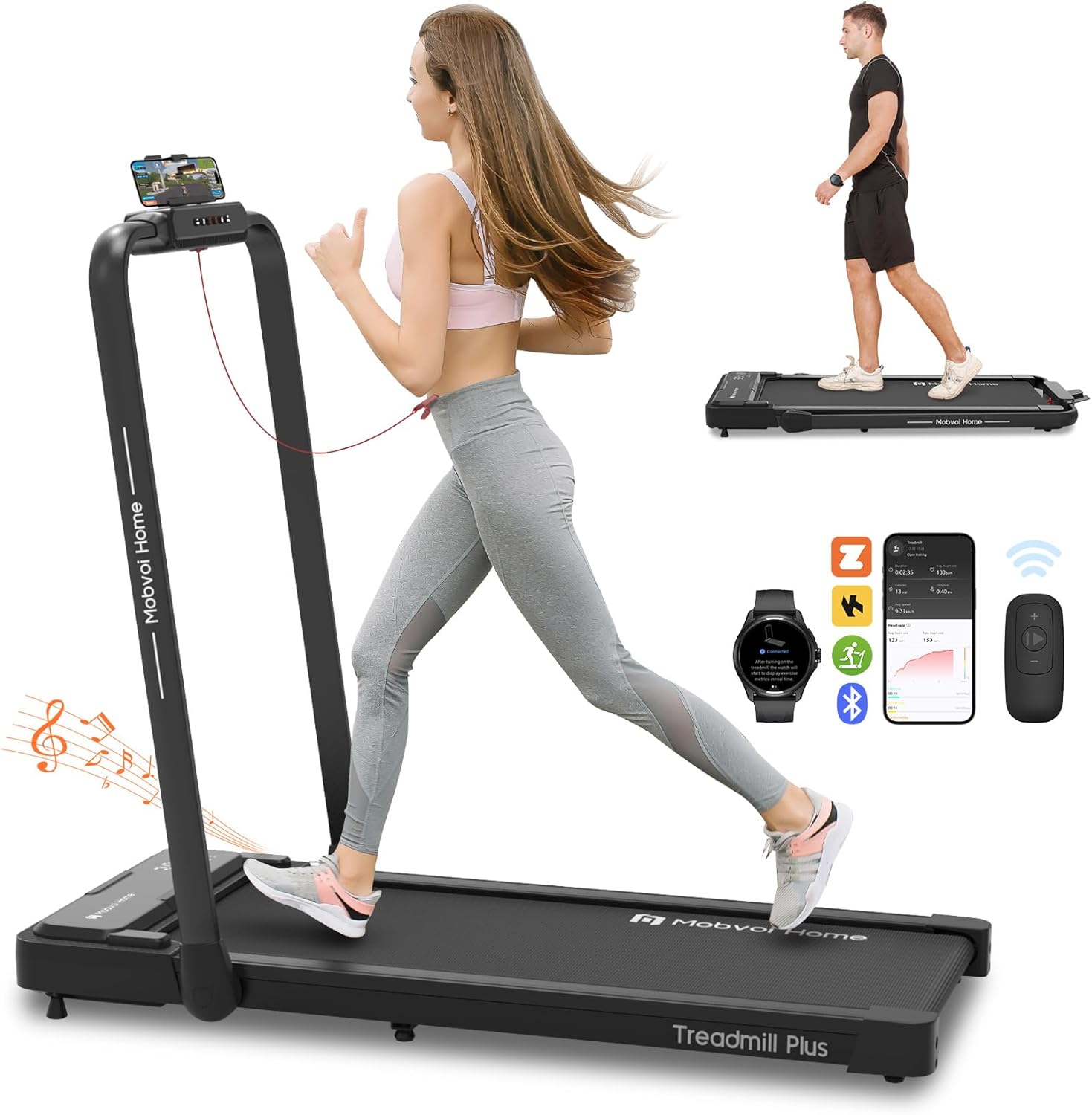
Figure 1: Mobvoi Treadmill Plus in running and walking configurations.
2. Pakkens indhold
Før montering skal du kontrollere, at alle komponenter er til stede i pakken:
- Brugsanvisning x1
- Phone Mount x1
- Safety Key x1
- Fjernbetjening x1
- Åbn skruenøgle x1
- 5mm & 6mm L-shaped Wrench Set x1
- Socket Wrench x1
- Justerbar fod x2
- 4.2 x 16mm Screw x2
- Lubricant Oil x1
- 1.8 m Power Cord x1

Figure 2: All components included in the Mobvoi Treadmill Plus package.
3. Opsætning og montering
The Mobvoi Treadmill Plus is designed for minimal assembly. Follow these steps to prepare your treadmill for use:
- Pak løbebåndet ud: Fjern forsigtigt alle komponenter fra emballagen.
- Monter justerbare fødder: Screw the two adjustable feet into the designated slots at the bottom of the treadmill.
- Install Phone Mount: Secure the phone mount onto the handle using the provided screws and wrenches.
- Raise the Handlebar: Lift the handlebar into the upright position until it locks securely. Ensure the fixed lock design is engaged.
- Tilslut strøm: Plug the 1.8m power cord into the treadmill and then into a suitable power outlet.
- Placering: Position the treadmill on a flat, stable surface. Avoid placing the treadmill on a carpet, as this may reduce ventilation and cooling efficiency, potentially leading to motor burnout.

Figure 3: Folding and unfolding the treadmill for setup and storage.
4. Betjeningsvejledning
4.1 sikkerhedsnøgle
The safety key is a critical safety feature. Always attach the magnetic safety key to the designated area on the treadmill console and clip the other end to your clothing before starting any exercise. If the safety key is detached, the treadmill will stop immediately.
4.2 Tænd/sluk
To power on the treadmill, ensure the power cord is connected and press the power button located on the front of the unit. To power off, press the power button again or detach the safety key for an emergency stop.
4.3 Træningstilstande
The Mobvoi Treadmill Plus offers three distinct exercise modes:
- Gåtilstand: Speed range from 1 to 6 km/h. Ideal for light activity or walking while working.
- Arbejdsstationstilstand: Speed range from 1 to 6 km/h. Designed for use with a standing desk.
- Løbstilstand: Speed range from 1 to 12 km/h. For jogging and running exercises.

Figure 4: The three operational modes of the Mobvoi Treadmill Plus.
4.4 Hastighedsjustering
Speed can be adjusted using two methods:
- Konsolknapper: Use the '+' and '-' buttons on the treadmill's console to increase or decrease speed. Shortcut buttons '3' and '6' allow instant adjustment to 3 km/h and 6 km/h respectively.
- Fjernbetjening: The included remote control provides convenient adjustment of speed and start/stop functions.

Figure 5: LED display and control options (console buttons and remote control).
4.5 LED-display
The integrated LED display cycles through key exercise data every 5 seconds, including speed, duration, distance, and calories burned. This allows for real-time tracking of your workout progress.
4.6 Bluetooth højttaler
The treadmill features a built-in Bluetooth speaker. To use it, connect your smartphone or other audio device via Bluetooth. This allows you to play music or other audio during your workout.
4.7 Smart-app-forbindelse
Enhance your workout experience by connecting the treadmill to various fitness applications:
- TicSports App: This AI-powered app provides personalized daily plans, real-time metrics, and instant AI coaching feedback. It syncs live with your treadmill to help you train effectively.
- Virtual Training (Zwift & Kinomap): Seamlessly connect to platforms like Zwift and Kinomap via your device for immersive virtual racing and scenic trail experiences.
- Smartwatch-forbindelse: Connect your smartwatch (compatible with the Mobvoi Treadmill app from Google Play Store) to the treadmill for a unified fitness hub, tracking your data comprehensively.
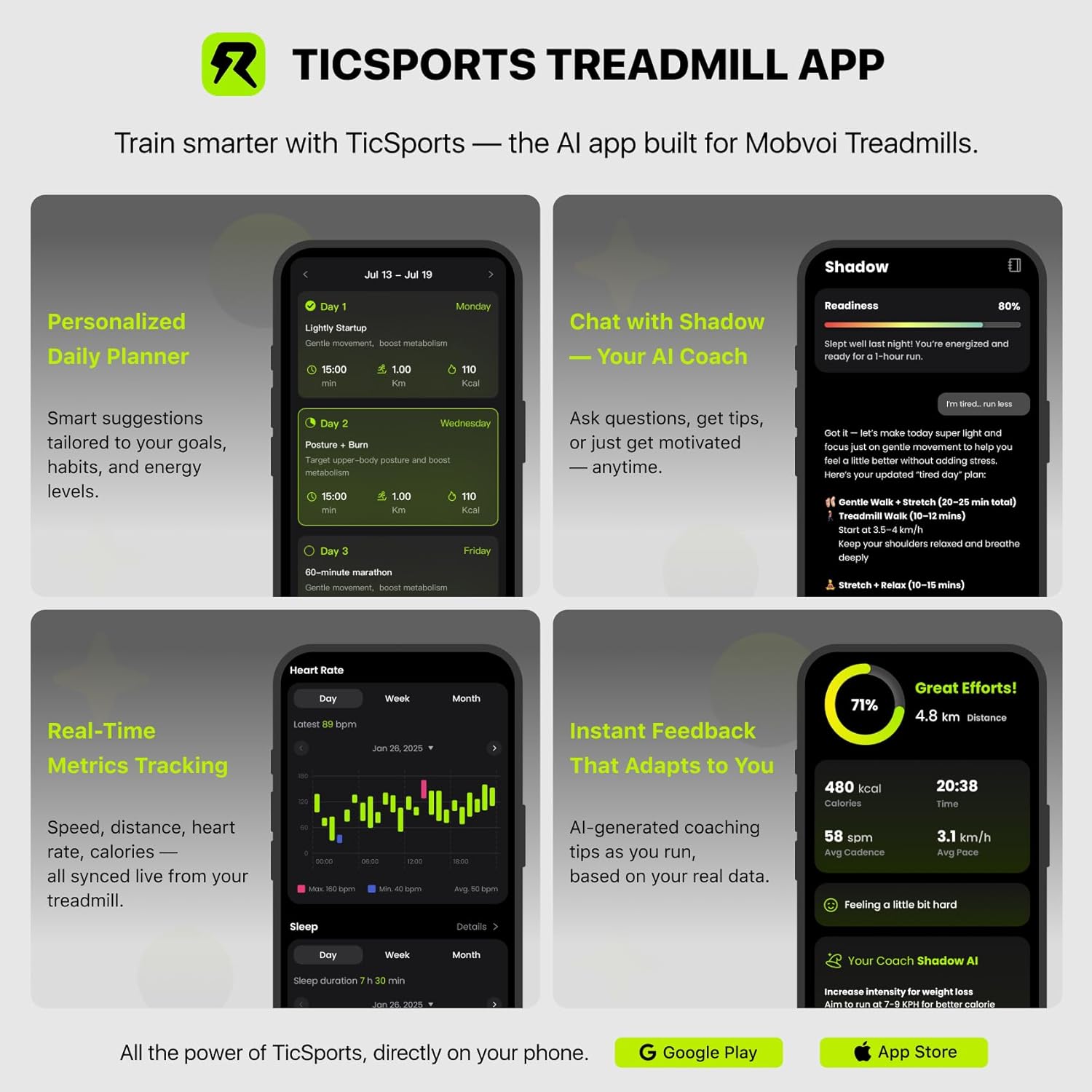
Figure 6: Features of the TicSports AI-powered treadmill app.

Figure 7: Smartwatch connectivity and virtual training experience.
5. Vedligeholdelse
5.1 Smøring
Regular lubrication of the running belt is essential for optimal performance and longevity. Use the provided lubricant oil as instructed in the detailed user manual (separate document) to apply to the running belt. The frequency of lubrication depends on usage.
5.2 Rengøring
Tør løbebåndet af med reklameamp cloth after each use to remove sweat and dust. Avoid using abrasive cleaners or solvents that could damage the surfaces.
5.3 Justering af løbebånd
Periodically check the running belt for proper alignment and tension. If the belt is off-center or slipping, refer to the detailed user manual for instructions on how to adjust it using the provided tools.
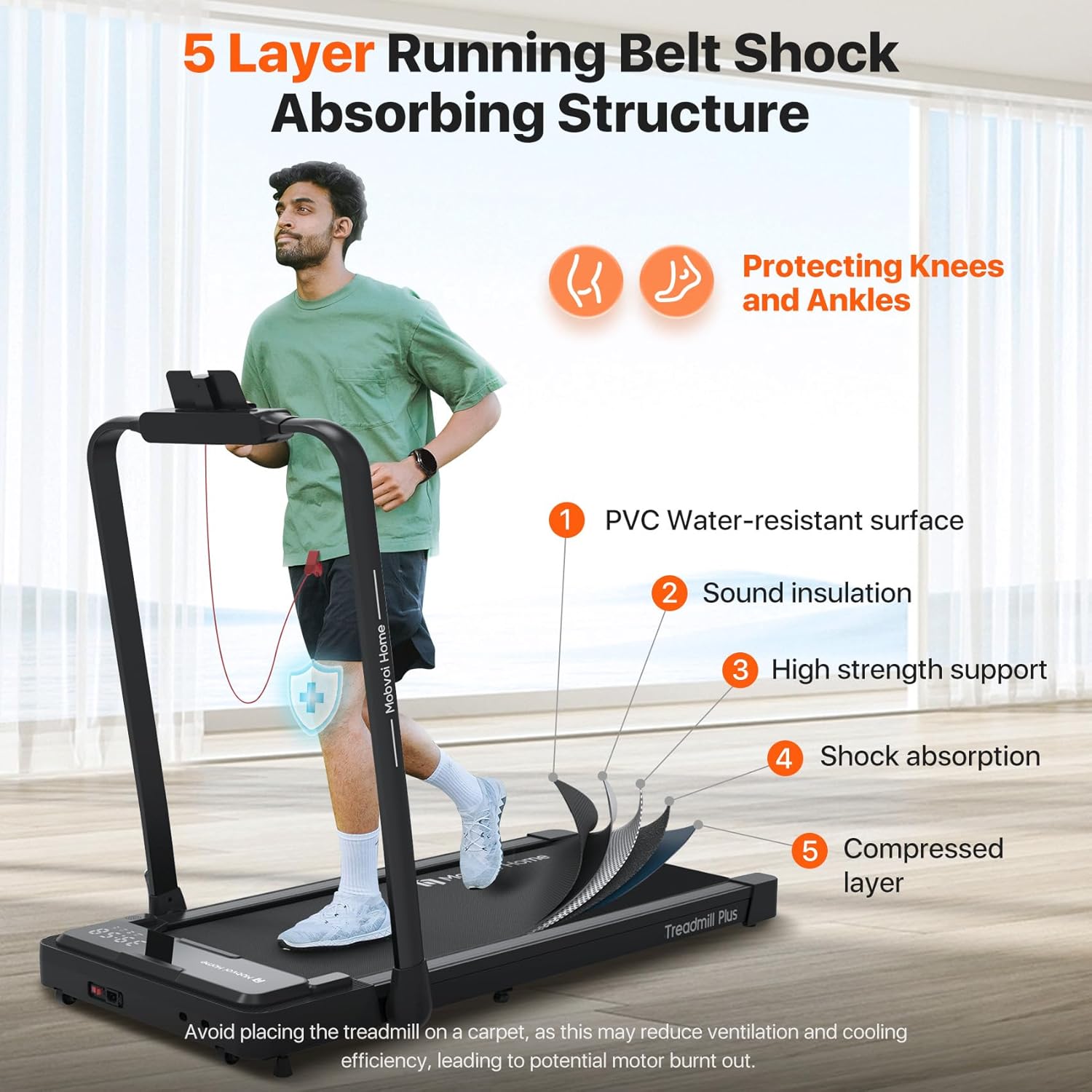
Figure 8: The 5-layer shock-absorbing running belt structure.
6. Fejlfinding
6.1 Treadmill Not Starting
- Check Safety Key: Ensure the magnetic safety key is correctly attached to the console. The treadmill will not operate without it.
- Strømtilslutning: Verify that the power cord is securely plugged into both the treadmill and the wall outlet.
- Afbryderen: Confirm the main power switch on the treadmill is in the 'ON' position.
6.2 Usædvanlige lyde
- Smøring: A dry running belt can cause friction and noise. Refer to the maintenance section for lubrication instructions.
- Bæltejustering: An improperly aligned belt can rub against the side rails. Adjust the belt as per the maintenance guidelines.
- Løse dele: Tjek for eventuelle løse skruer eller komponenter, og spænd dem om nødvendigt.
6.3 Unøjagtige aflæsninger
- Genkalibrering: If speed or distance readings appear inaccurate, consult the detailed user manual for potential recalibration procedures.
- App Sync: Ensure your TicSports app or other connected apps are properly synced and updated.
7. Specifikationer
| Feature | Specifikation |
|---|---|
| Modelnummer | Løbebånd Plus |
| Mærke | Mobvoi |
| Motor hestekræfter | 2.5 HK |
| Maksimal hastighed | 12 km/t |
| Maksimal vægtkapacitet | 120 kilo |
| Running Area (L x W) | 102 cm x 42 cm |
| Produktdimensioner (udfoldet) | 113 x 64.2 x 124 cm |
| Produktdimensioner (foldet) | 138 x 64.2 x 12 cm |
| Varens vægt | 25 kilo |
| Støjniveau | <60 dB |
| Display Type | LED (Speed, Distance, Calories Burned) |
| Rammemateriale | Kulstofstål |
| Strømkilde | Elektrisk med ledning |
| Særlige funktioner | Built-In Speaker, Compact Design, Foldable, Portable, Wheeled |
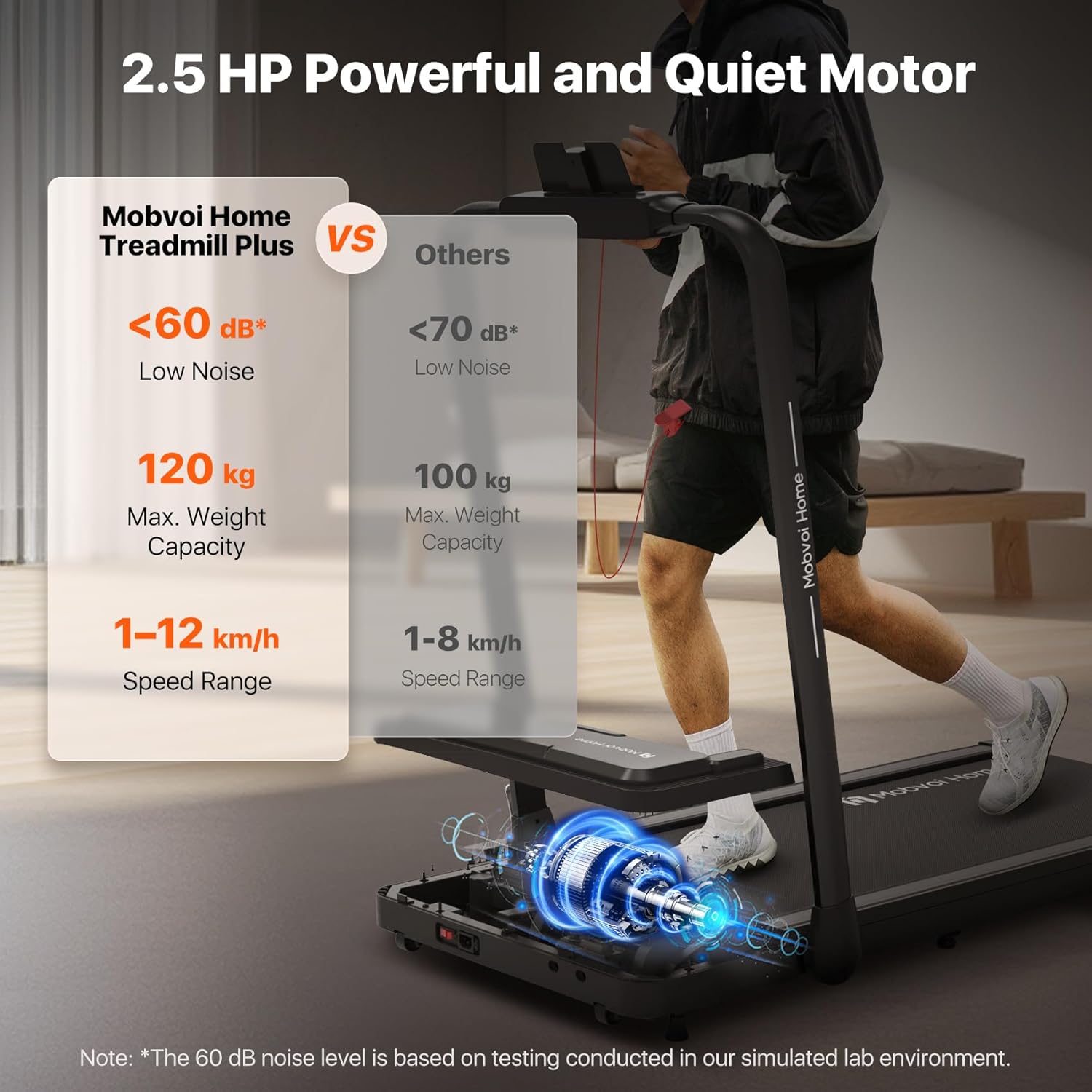
Figure 9: Key performance specifications of the Mobvoi Treadmill Plus.

Figure 10: Expanded running area dimensions.
8. Garanti og support
8.1 Kundesupport
For any inquiries, technical assistance, or support regarding your Mobvoi Treadmill Plus, please contact Mobvoi's specialized customer support. Refer to the contact information provided in your product registration or on the official Mobvoi webwebsted.
8.2 Returneringer
This item is returnable. Please refer to the retailer's return policy for specific terms and conditions regarding returns and exchanges.


