1. Introduktion
Thank you for choosing the FLEXISPOT Q4 One-Piece Standing Desk. This manual provides essential information for the safe assembly, operation, and maintenance of your new adjustable height desk. Please read these instructions carefully before use and retain them for future reference.
Sikkerhedsoplysninger
- Sørg for, at alle komponenter er til stede og ubeskadigede før montering.
- Hold børn og kæledyr væk fra skrivebordet under drift.
- Do not overload the desk. Refer to specifications for maximum weight capacity.
- Undgå at placere væsker direkte på kontrolpanelet eller i nærheden af elektriske komponenter.
- Afbryd strømmen før rengøring eller vedligeholdelse.
- Dette skrivebord er kun designet til indendørs brug.
2. Pakkens indhold og komponenter
The FLEXISPOT Q4 Standing Desk is shipped in two separate packages. Please verify all parts are included before beginning assembly.
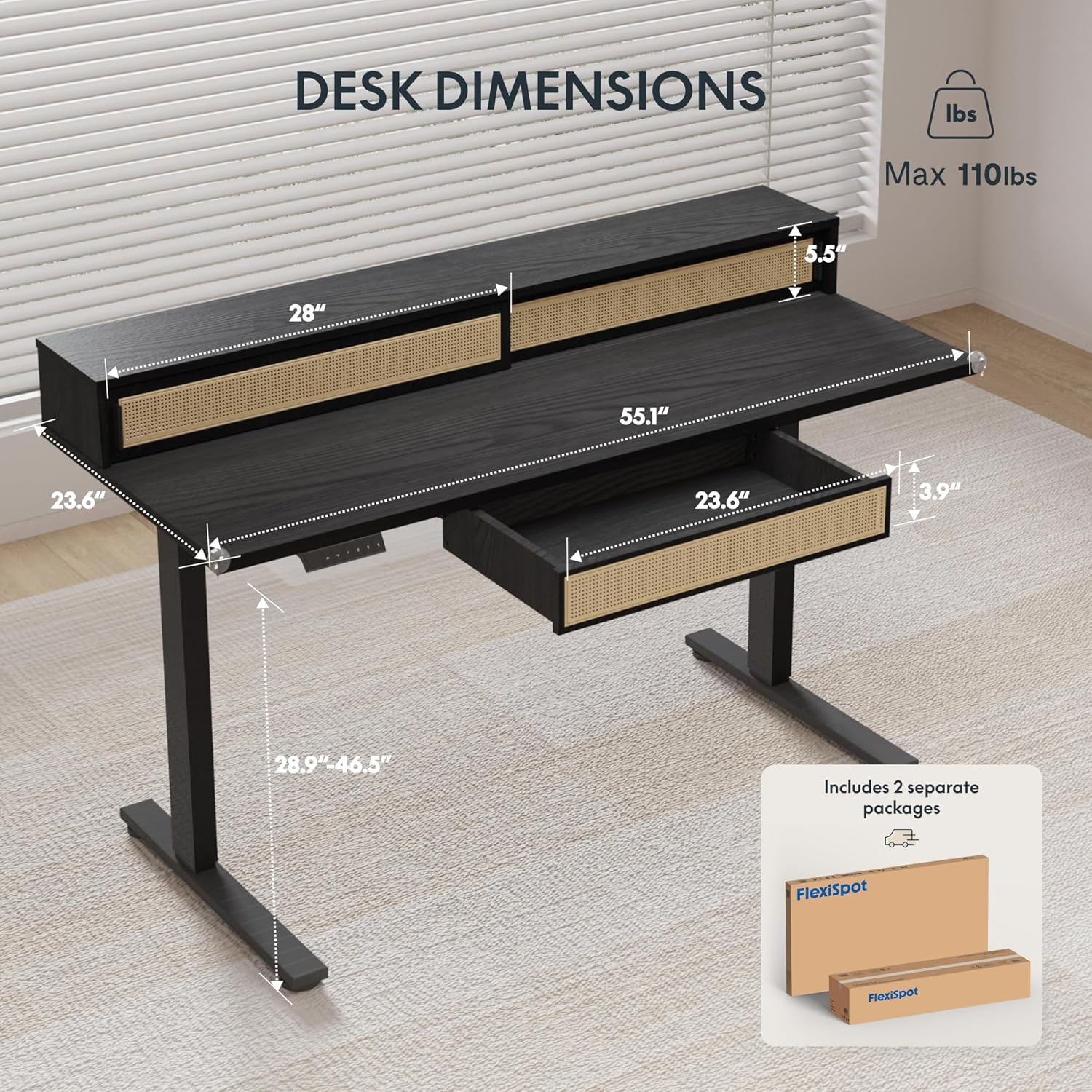
Figure 2.1: Desk dimensions and indication of two separate packages for shipping.
Hovedkomponenter:
- Desktop with integrated monitor shelf and sliding compartments
- Under-desk drawer
- Desk legs (2)
- Fodpuder (2)
- Kontrolpanel
- Strømadapter og kabler
- Monteringsudstyr (skruer, bolte, værktøj)
3. Monteringsvejledning
Assembly typically requires two people due to the size and weight of the desk components. Follow the steps below carefully.
Trin-for-trin samling:
- Udpak komponenter: Tag forsigtigt alle dele ud af emballagen. Placer dem på en blød, ren overflade for at undgå ridser.
- Fastgør skrivebordsben: Secure the desk legs to the desktop frame using the provided hardware. Ensure all connections are tight and stable.
- Installer fodpuder: Attach the foot pads to the bottom of the desk legs.
- Monter kontrolpanel: Secure the control panel to the underside of the desktop in the designated area.
- Tilslut kabler: Connect the motor cables from the legs to the control box, and then connect the control panel cable to the control box. Finally, connect the power adapter to the control box and plug it into a power outlet.
- Install Under-Desk Drawer: Slide the under-desk drawer into its designated slot beneath the desktop.
- Kabelstyring: Utilize the integrated cable management features to organize power and data cables for a tidy workspace.

Figure 3.1: Fully assembled FLEXISPOT Q4 Standing Desk, showcasindens design og funktionalitet.

Figur 3.2: Nærbillede view of the stable desk frame, highlighting the reinforced structure and junction zone.
4. Betjeningsvejledning
The FLEXISPOT Q4 desk features an electric height adjustment system with a smart control panel.
Kontrolpanelets funktioner:

Figure 4.1: The smart control panel, illustrating buttons for up/down movement and height memory presets.
- Op/ned-pile (▲ / ▼): Press and hold to adjust the desk height upwards or downwards. Release the button to stop at the desired height.
- Memory Presets (1, 2, T, Person Icon): The desk allows you to save preferred heights for quick adjustments.
- To save a height: Adjust the desk to your desired height, then press and hold one of the preset buttons (1, 2, T, or Person Icon) until you hear a beep or see a confirmation on the display (if available).
- To use a saved height: Simply press the corresponding preset button once, and the desk will automatically move to the saved height.
Højdejusteringsområde:
The desk smoothly transitions between a minimum height of 28.9 inches and a maximum height of 46.5 inches.

Figure 4.2: Visual representation of the desk's adjustable height range, from minimum to maximum settings.
5. Nøglefunktioner
Spacious Storage System
The desk integrates a comprehensive storage system, including sliding-door desktop compartments (55.1"×8.7"×5.5") and a dedicated under-desk drawer (23.6"×11.8"×3.9"). These dual storage solutions are designed to keep your essentials accessible and maximize workspace organization.
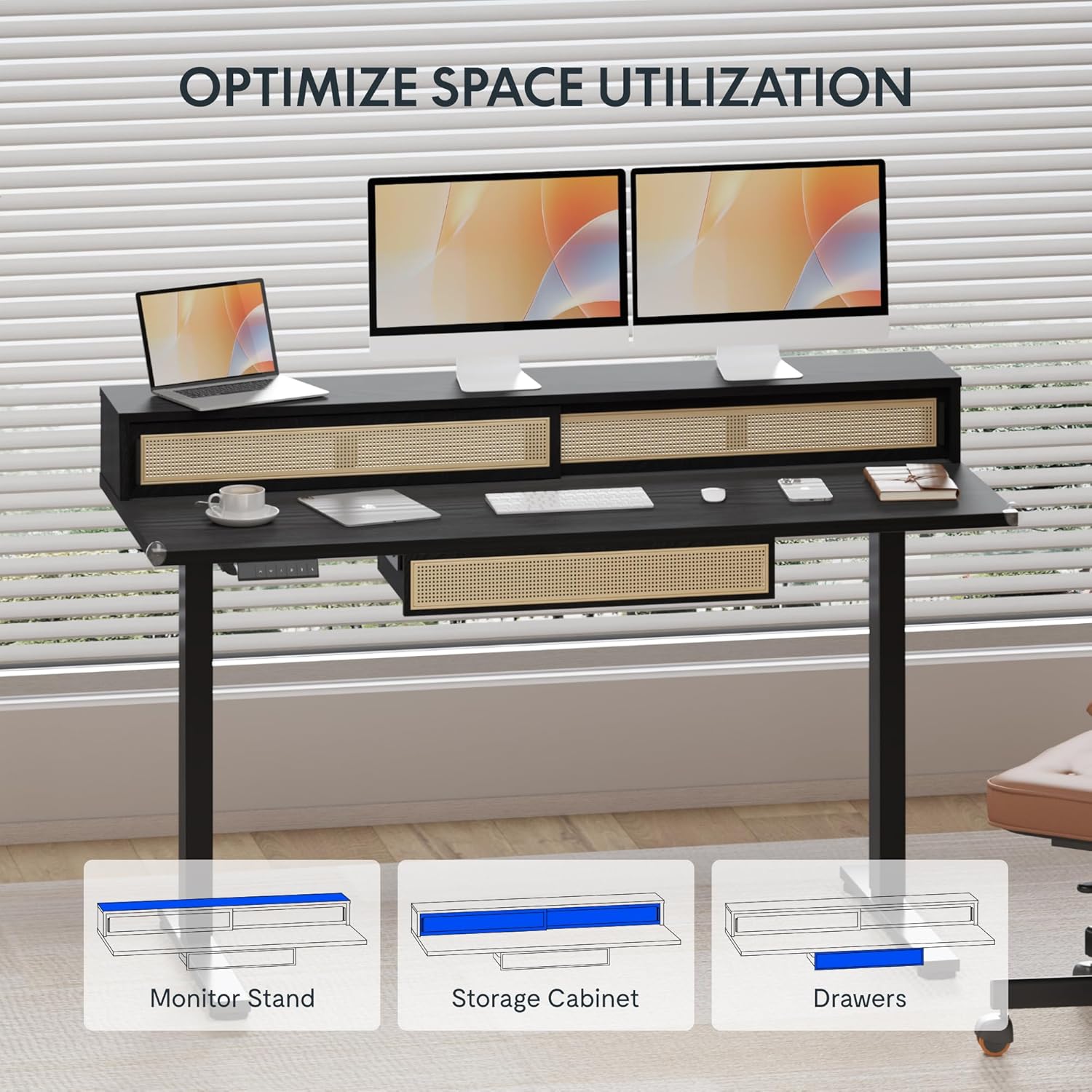
Figure 5.1: Illustration of the desk's integrated storage options, including the monitor stand, storage cabinet, and drawers.
Elegant Rattan Design
The desk features a premium woven rattan texture that enhances interior aesthetics. The seamless desktop design eliminates weak joints, and the scratch-resistant surface is designed to resist daily wear, warping, and stains, maintaining its appearance over time.

Figur 5.2: Detaljeret view of the desk's rattan design, metal handles, and corner protectors.
Integrated Monitor Shelf
An ergonomically designed monitor shelf elevates screens to eye level, which can help reduce neck strain and back discomfort. This feature promotes proper posture alignment during extended work sessions, whether sitting or standing.
Quiet Electric Height Adjustment
The desk is equipped with a silent motor system (operating at less than 50dB) for smooth transitions between sitting and standing positions. Programmable presets allow for quick adjustments, accommodating multiple users or varying work scenarios.
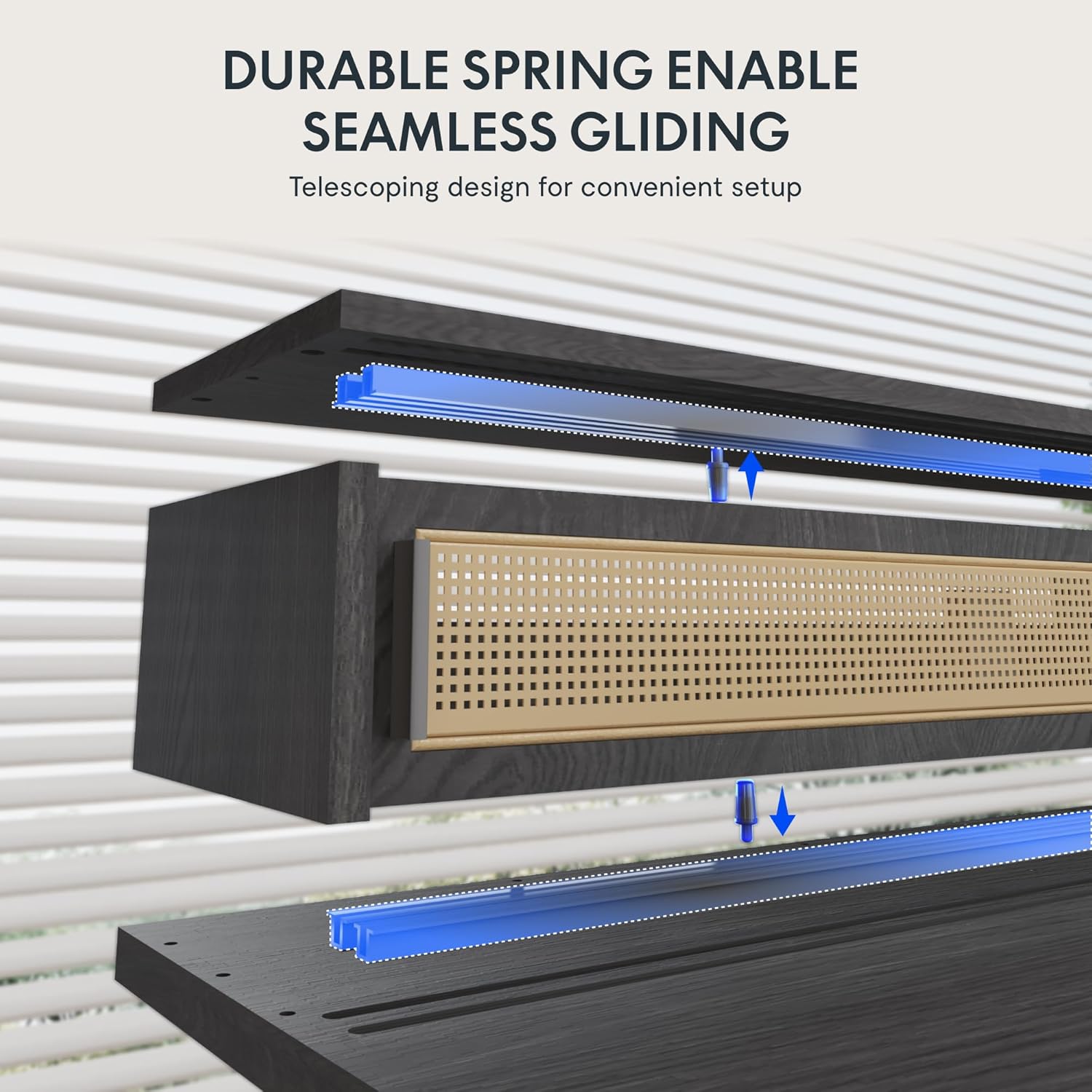
Figure 5.3: Illustration of the durable spring mechanism enabling seamless gliding of desk components.
6. Vedligeholdelse
Regular maintenance ensures the longevity and optimal performance of your FLEXISPOT Q4 Standing Desk.
- Rensning: Tør skrivebordet og rammen af med en blød kludamp klæde. Undgå slibende rengøringsmidler eller skrappe kemikalier, der kan beskadige finishen.
- Kabelstyring: Kontroller og omorganiser kablerne med jævne mellemrum for at forhindre sammenfiltringer og sikre problemfri drift.
- Fastgørelseskontrol: Occasionally inspect all screws and bolts to ensure they remain tight. Retighten if necessary.
- Motorpleje: The electric motor system is designed for maintenance-free operation. Do not attempt to open or lubricate motor components.
7. Fejlfinding
If you encounter issues with your FLEXISPOT Q4 Standing Desk, refer to the following common solutions:
| Problem | Mulig årsag | Løsning |
|---|---|---|
| Skrivebordet bevæger sig ikke | Strømkabel frakoblet, motorkabel løst, overbelastning. | Check all cable connections. Ensure the desk is plugged into a working outlet. Reduce weight on the desk. |
| Ujævn højdejustering | Obstruktion, ujævn vægtfordeling. | Clear any obstructions. Redistribute weight evenly on the desktop. Perform a reset if necessary (refer to control panel instructions). |
| Kontrolpanel reagerer ikke | Loose connection, power issue. | Check the control panel cable connection to the control box. Ensure main power is connected. |
| Skrivebordet stopper midt i bevægelsen | Safety feature activated (anti-collision), motor overheating. | Remove any obstruction. Allow the motor to cool down for 20 minutes before attempting to operate again. |
Hvis problemet fortsætter efter at have forsøgt disse løsninger, bedes du kontakte FLEXISPOT kundesupport.
8. Specifikationer
| Feature | Detalje |
|---|---|
| Model | Q4 |
| Produktmål (D x B x H) | 23.6" x 55.1" x 29" (Minimum Height) |
| Minimum højde | 28.9 tommer |
| Maksimal højde | 46.5 tommer |
| Top materialetype | Træ |
| Grundmateriale | Legeret stål |
| Farve | Sort |
| Opbevaringsmuligheder | 1 sliding-door compartment, 1 under-desk drawer |
| Antal skuffer | 1 |
| Antal hylder | 1 (Skærmhylde) |
| Montering påkrævet | Ja |
| UPC | 840460464574 |
9. Garanti og support
Garantibeskyttelse:
The FLEXISPOT Q4 Standing Desk is backed by a comprehensive warranty to ensure your investment security:
- 5-årig dækning: Gælder for skrivebordsstellet og motorkomponenterne.
- 2-årig dækning: Applies to all electronic components.
This warranty covers manufacturing defects and ensures lasting performance under normal use conditions.
Kundesupport:
For any questions, assistance with assembly, troubleshooting, or warranty claims, please contact FLEXISPOT customer support through the official website or your purchase platform. Please have your model number (Q4) and proof of purchase ready when contacting support.


