1. Sikkerhedsoplysninger
Please read all safety instructions carefully before using your iFFALCON TV. Retain this manual for future reference.
- Elektrisk sikkerhed: Do not expose the TV to rain or moisture. Ensure the power cord is securely plugged into a grounded outlet. Do not overload electrical outlets.
- Placering: Place the TV on a stable, level surface or mount it securely to a wall. Ensure adequate ventilation around the TV to prevent overheating. Do not block ventilation openings.
- Rensning: Tag stikket ud af tv'et før rengøring. Brug en blød, tør klud. Brug ikke flydende rengøringsmidler eller sprayrengøringsmidler.
- Børn: Hold børn under opsyn for at forhindre dem i at klatre op på tv'et eller stativet. Små dele kan være en kvælningsfare.
- Service: Forsøg ikke selv at reparere TV'et. Overlad al service til kvalificeret servicepersonale.
2. Hvad er der i æsken
Kontroller, at alle komponenter er til stede ved udpakning:
- iFFALCON 85-Inch U85 Series QD-Mini LED 4K UHD Google Smart TV
- Strømkabel
- 2 x AAA batterier til fjernbetjening
- 6 x Standskruer
- Bordstativer (2 stk.)
- 5 x kabelklemmer
- Hurtig startvejledning
- Fjernsyns fjernbetjening
3. Opsætning
3.1 Fysisk opsætning
Before powering on, ensure the TV is securely placed or mounted.
- Montering af stativ: If using the table stands, carefully attach them to the designated slots at the bottom of the TV using the provided stand screws. Ensure they are tightened securely.
- Vægmontering: If wall mounting, follow the instructions provided with your wall mount kit. Ensure the mount is compatible with VESA standards for the 85U85 model.
- Strømtilslutning: Tilslut strømkablet til tv'ets strømindgang og derefter til en stikkontakt.
- Eksterne enheder: Connect any external devices (e.g., cable box, gaming console, Blu-ray player) to the appropriate HDMI or other input ports on the TV.

Image: The iFFALCON 85-Inch U85 Series TV, showcasing dens slanke design og livlige skærm.
3.2 Første opstart og Google TV-opsætning
After connecting power, press the power button on the remote control or TV to turn it on.
- Fjernbetjeningsparring: If the remote does not respond, insert the AAA batteries and follow on-screen instructions to pair it via Bluetooth.
- Sprogvalg: Vælg dit foretrukne sprog.
- Netværks forbindelse: Select your Wi-Fi network and enter the password. A stable internet connection is required for Google TV features.
- Login til Google-konto: Sign in with your Google account to access Google TV features, personalized recommendations, and app downloads.
- Google Assistant Setup: Follow prompts to set up Google Assistant for voice control.

Image: A user interacting with the iFFALCON TV using hands-free voice control, demonstrating the integrated Google TV interface.
4. Betjening af dit TV
4.1 Fjernbetjeningsfunktioner
The provided remote control allows full navigation and control of your iFFALCON TV.
- Power knap: Tænder eller slukker for tv'et.
- Navigationsplade: Use the directional buttons to move through menus and the OK button to select.
- Volumen +/-: Justerer lydstyrken.
- Kanal +/-: Skifter tv-kanaler.
- Input: Vælger inputkilden (HDMI 1, HDMI 2 osv.).
- Google Assistent-knap: Activates voice control. Press and speak your command.
- Hjemknappen: Vender tilbage til Google TV-startskærmen.
- App-genvejsknapper: Hurtig adgang til populære streamingtjenester.
4.2 Smart Features and Google TV
Your iFFALCON U85 Series TV runs on Google TV, offering a personalized and integrated smart experience.
- Google TV Home Screen: Provides access to movies, shows, and apps from all your subscriptions, organized for easy discovery.
- Stemmestyring: Use Google Assistant or Alexa (via compatible devices) to search for content, control smart home devices, and manage TV settings hands-free.
- App Library: Download og installer en bred vifte af apps fra Google Play Store.
- Chromecast indbygget: Cast content from your compatible smartphone, tablet, or computer directly to the TV.
4.3 Billed- og lydindstillinger
Tilpas din viewlytteoplevelsen via tv'ets indstillingsmenu.
- Billedtilstande: Select from various preset picture modes (e.g., Standard, Vivid, Movie, Game) or customize settings like brightness, contrast, color, and sharpness.
- Mini LED Precision: The TV features 352 local dimming zones and 1000 nits peak brightness for enhanced contrast and detail.
- Dolby Vision IQ: Automatically adjusts HDR brightness based on the room's ambient light for optimal viewing.
- Lydtilstande: Choose from sound presets (e.g., Standard, Music, Movie, Speech) or adjust equalizer settings.
- Dolby Atmos & DTS Virtual X: Experience immersive spatial audio with the integrated 2.1-channel 50W sound system.

Image: Visual comparison illustrating the superior contrast and detail of Mini LED technology compared to conventional TVs.

Image: Depiction of the immersive audio experience with the TV's 2.1 speaker system and Dolby Atmos technology.
4.4 Spilfunktioner
The iFFALCON U85 Series TV is equipped with features designed for an enhanced gaming experience.
- 144Hz spiltilstand Pro: Provides a high refresh rate for smooth, responsive gameplay.
- 288Hz DLG-acceleration: Forbedrer yderligere bevægelsesklarheden til konkurrencepræget spil.
- FreeSync Premium Pro: Reduces screen tearing and stuttering for fluid visuals.
- Automatisk lav latenstilstand (ALLM): Automatically switches to a low-latency mode when a gaming console is detected.
- Spilbar: Access and adjust key gaming settings quickly during gameplay.
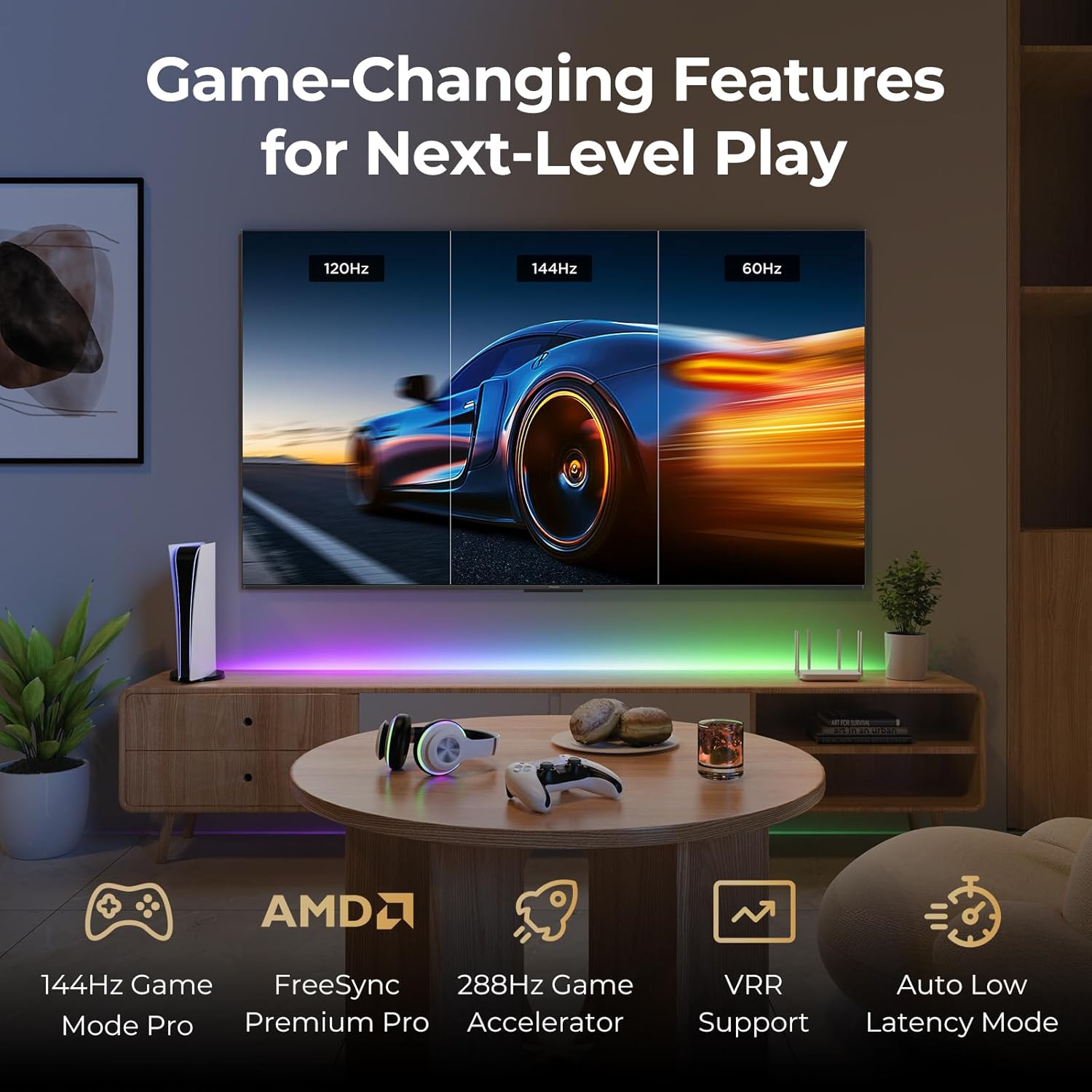
Image: A gaming setup featuring the iFFALCON TV, illustrating its high refresh rate and gaming-specific features for an optimized experience.
5. Vedligeholdelse
5.1 Rengøring af tv'et
Regelmæssig rengøring hjælper med at bevare TV'ets udseende og ydeevne.
- Skærm: Tør forsigtigt skærmen af med en blød, fnugfri klud. Tør forsigtigt genstridige mærker afampen the cloth with water or a screen-specific cleaning solution (do not spray directly on the screen).
- Legeme: Use a soft, dry cloth to wipe the TV's frame and back panel. Avoid abrasive materials or harsh chemicals.
- Porte: Ensure ports are free of dust. Use compressed air if necessary, holding the can upright.
5.2 Softwareopdateringer
Your TV may receive automatic software updates to improve performance and add new features. Ensure your TV is connected to the internet for these updates.
- You can check for updates manually in the TV's settings menu under System > About > System update.
6. Fejlfinding
If you encounter issues, try these common solutions before contacting support.
- Ingen strøm: Sørg for, at strømkablet er korrekt tilsluttet både tv'et og stikkontakten. Test stikkontakten med en anden enhed.
- Intet billede/lyd: Check the selected input source. Ensure all cables to external devices are connected correctly. Restart the TV and connected devices.
- Fjernbetjeningen virker ikke: Udskift batterierne. Sørg for, at der ikke er nogen forhindringer mellem fjernbetjeningen og tv'et. Genpar fjernbetjeningen, hvis den bruger Bluetooth.
- Problemer med netværksforbindelse: Restart your Wi-Fi router. Check TV network settings to ensure correct Wi-Fi password and connection.
- Problemer med billedkvaliteten: Juster billedindstillinger (lysstyrke, kontrast, farve). Sørg for, at indholdskilden er af høj kvalitet.
- Gendan fabriksindstillinger: If problems persist, a factory reset can resolve many software-related issues. Navigate to Settings > System > About > Reset. Advarsel: Dette vil slette alle personlige data og indstillinger.
7. Specifikationer
| Feature | Beskrivelse |
|---|---|
| Mærke | iFFALCON |
| Modelnummer | 85U85 |
| Skærmstørrelse | 85 tommer |
| Displayteknologi | QD-Mini LED |
| Opløsning | 4K UHD (3840 x 2160) |
| Opdateringshastighed | 144 Hz (indbygget), 288 Hz DLG |
| Højeste lysstyrke | Op til 1000 nits |
| Kontrastforhold | Op til 6500:1 |
| Lokale dæmpningszoner | 352 |
| Processor | AiPQ Pro-processor |
| Operativsystem | Google TV |
| Stemmeassistent | Google Assistant, Alexa-kompatibel |
| Lydsystem | 2.1-channel 50W, Dolby Atmos, DTS Virtual X |
| HDR-understøttelse | HDR10+, Dolby Vision IQ |
| Spilfunktioner | 144Hz VRR, FreeSync Premium Pro, ALLM, Game Bar |
| Forbindelse | Bluetooth, WiFi |
| Produktmål (D x B x H) | 15.2 x 74.4 x 45.5 tommer |
| Varens vægt | 76.7 pund |
8. Garanti og support
Your iFFALCON U85 Series TV is covered by a manufacturer's warranty. Please refer to the warranty card included with your product for specific terms and conditions.
For technical support, service inquiries, or additional information, please visit the official iFFALCON support website or contact their customer service. Keep your purchase receipt and product serial number handy for warranty claims.
Du kan finde flere oplysninger og supportressourcer ved at besøge iFFALCON Store on Amazon.


