Indledning

Image: Hamilton 1.1 cu ft Countertop Touchscreen Microwave Oven.
This manual provides essential information for the safe and efficient operation of your Hamilton 1.1 Cu. Ft. Countertop Touchscreen Microwave Oven. Please read this manual thoroughly before use and retain it for future reference.
Vigtige sikkerhedsinstruktioner
Ved brug af elektriske apparater skal grundlæggende sikkerhedsforanstaltninger altid følges for at reducere risikoen for brand, elektrisk stød og personskade, herunder følgende:
- Læs alle instruktioner før brug af apparatet.
- Brug ikke ovnen, hvis lågen eller lågens tætninger er beskadiget.
- Varm ikke væsker eller andre fødevarer i lukkede beholdere, da de kan eksplodere.
- Lad kun børn bruge ovnen uden opsyn, når der er givet tilstrækkelige instruktioner, så barnet er i stand til at bruge ovnen på en sikker måde og forstår farerne ved forkert brug.
- Refer to the "Child Safety Lock" section for specific instructions on this feature.
Produktegenskaber
- Powerful 1000W output for efficient cooking.
- 10 adjustable power levels for versatile cooking and reheating.
- User-friendly touchscreen control panel with LED display.
- Convenience cooking controls for popular foods (e.g., potatoes, popcorn, frozen dinners, pizza, beverages).
- 8 Smart Sensor auto cooking menus for precise results.
- Integrated child safety lock for enhanced security.
- Sleek white finish with stainless-steel accents.
Specifikationer
| Attribut | Detalje |
|---|---|
| Mærke | Hamilton |
| Modelnummer | HB8436193153-02 |
| Kapacitet | 1.1 Kubikfod |
| Wattage | 1000 watt |
| Voltage | 120 volt (AC) |
| Mål (D x B x H) | 21 cm x 12 cm x 19 cm |
| Installationstype | Bordplade |
| Material (Exterior) | Stål |
| Materiale (indvendigt) | Rustfrit stål |
| Inkluderede komponenter | Pladespiller i glas |
Opsætning
- Udpakning: Carefully remove the microwave oven and all packing materials from the carton. Check for any damage, such as dents or a misaligned door. Do not operate if damaged.
- Placering: Place the microwave on a flat, stable surface that can support its weight. Ensure adequate ventilation by leaving at least 4 inches of space around the sides, back, and top of the oven. Do not block air vents.
- Installation af pladespiller: Placer drejetallerkenringen midt i ovnrummet. Placer derefter glasdrejetallerkenen sikkert oven på drejetallerkenringen. Sørg for, at den kan dreje frit.
- Strømtilslutning: Plug the microwave oven into a grounded 120V AC electrical outlet.

Billede: Interiør view of the Hamilton microwave, highlighting the removable glass turntable for easy cleaning.
Betjeningsvejledning
Grundlæggende betjening
- Indstilling af uret:
- Tryk på UR knap.
- Use the number pads to enter the current time.
- Tryk på UR knappen igen for at bekræfte.
- Mikrobølgetilberedning:
- Placer maden i en mikrobølgeovnssikker beholder på glasdrejetallerkenen.
- Luk døren forsvarligt.
- Enter the desired cooking time using the number pads.
- Tryk på EFFEKT NIVEAU button to adjust power if needed (default is 100%). Use number pads to select power level (1-10).
- Trykke START/+30SEK at begynde at lave mad.
- Express Cook: For quick cooking, simply press the 1 MIN, 2 MIN, eller 3 MIN buttons for instant cooking at full power. Press PAUSE/ANNULLER to stop or clear settings. Press + 30 sek to add 30 seconds to cooking time.
- afrimning:
- Tryk på VÆGT AFrimning or TID AFrimning knap.
- Follow the prompts on the LED display to enter weight or time.
- Trykke START/+30SEK.
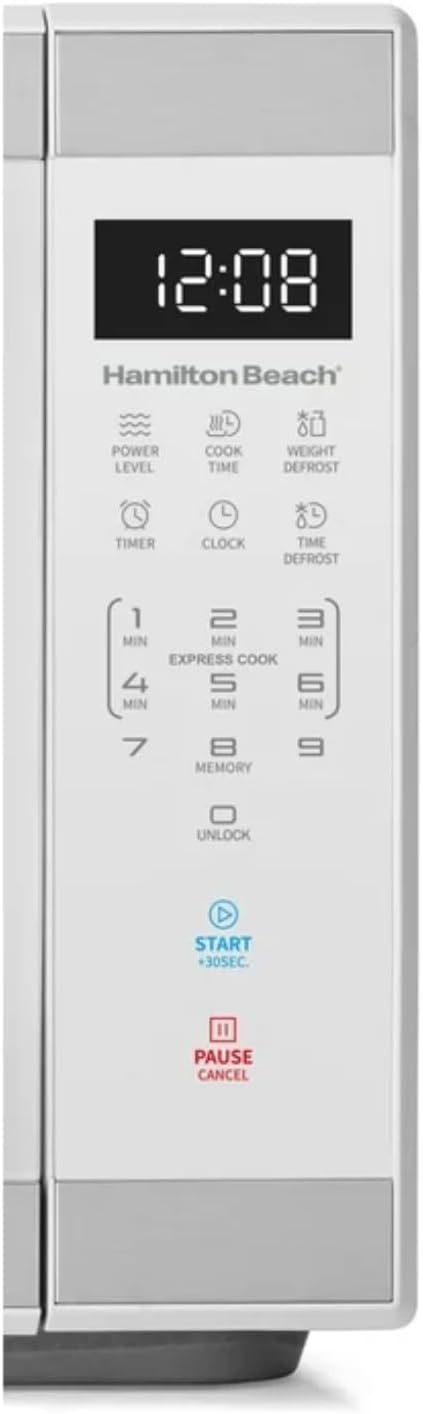
Billede: Detaljeret view of the intuitive touchscreen control panel and LED display.
Børnesikkerhedslås
This microwave features a child safety lock to prevent unintended operation. The door automatically locks when cooking starts.
To Open Microwave During or After Use:
- Tryk på 0/LÅS OP or PAUSE/ANNULLER pude.
- Grasp the handle and open the door.
To Deactivate the Child Safety Lock:
- Tryk på 0/LÅS OP pad for 3 seconds. The display will indicate "Loc".
- Tryk på 7 pude.
- Tryk på 9 pad. The display will show "ULoc".
To re-activate the child safety lock, repeat the above steps.
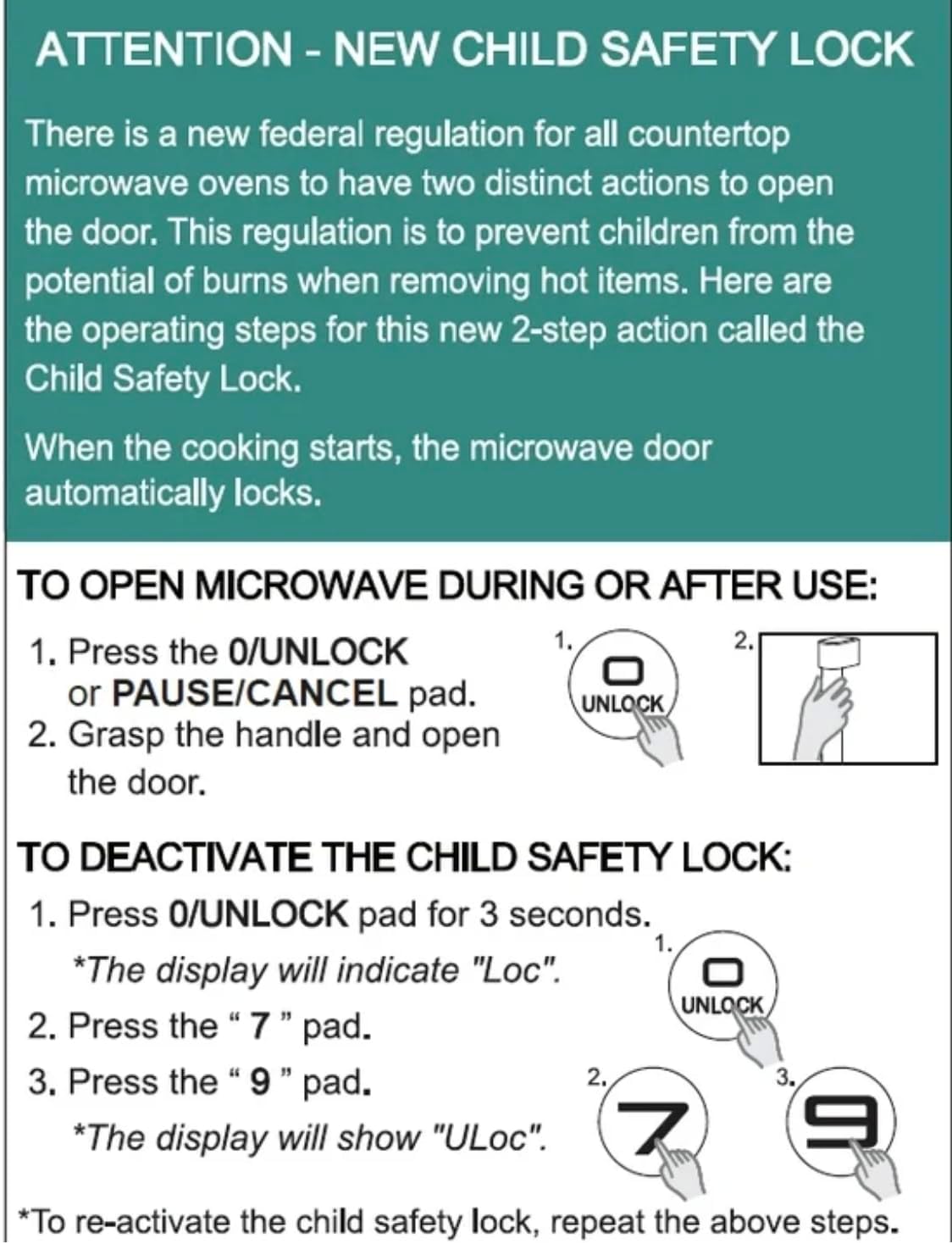
Image: Instructions for the new child safety lock feature, including how to open the door and deactivate the lock.
Vedligeholdelse og rengøring
- Indvendig rengøring: Tør indersiden af ovnen af med adamp cloth after each use. For stubborn stains, use a mild detergent. Ensure the interior is dry before next use.
- Udvendig rengøring: Rengør den udvendige overflade med en blød,amp klæde. Brug ikke slibende rengøringsmidler eller stærke kemikalier.
- Rengøring af pladespiller: The glass turntable and turntable ring can be removed for cleaning. They are dishwasher safe or can be hand-washed with warm, soapy water.
- Dørtætninger: Regularly inspect the door seals and surrounding areas for any damage or food residue. Clean as needed to ensure proper sealing.
Fejlfinding
| Problem | Mulig årsag/løsning |
|---|---|
| Ovnen starter ikke. |
|
| Maden tilberedes ikke jævnt. |
|
| Light bulb is out. | Contact customer support for bulb replacement. Do not attempt to replace it yourself. |
| Display shows "Loc". | Child safety lock is activated. Follow instructions in the "Child Safety Lock" section to deactivate. |
Garanti og support
For warranty information or technical support, please refer to the warranty card included with your purchase or contact Hamilton customer service. Keep your proof of purchase for warranty claims.
Kundeservice: Besøg venligst producentens webwebstedet eller se din produktemballage for kontaktoplysninger.


