1. Introduktion
The GEARELEC S3 is an advanced motorcycle helmet Bluetooth headset integrated with a 1080P HD camera. Designed for enhanced communication and recording during rides, it supports full-duplex intercom for up to 8 riders, features G-Sensor collision detection, and offers various audio functionalities including music sharing and FM radio. This manual provides detailed instructions for the proper setup, operation, and maintenance of your S3 unit.
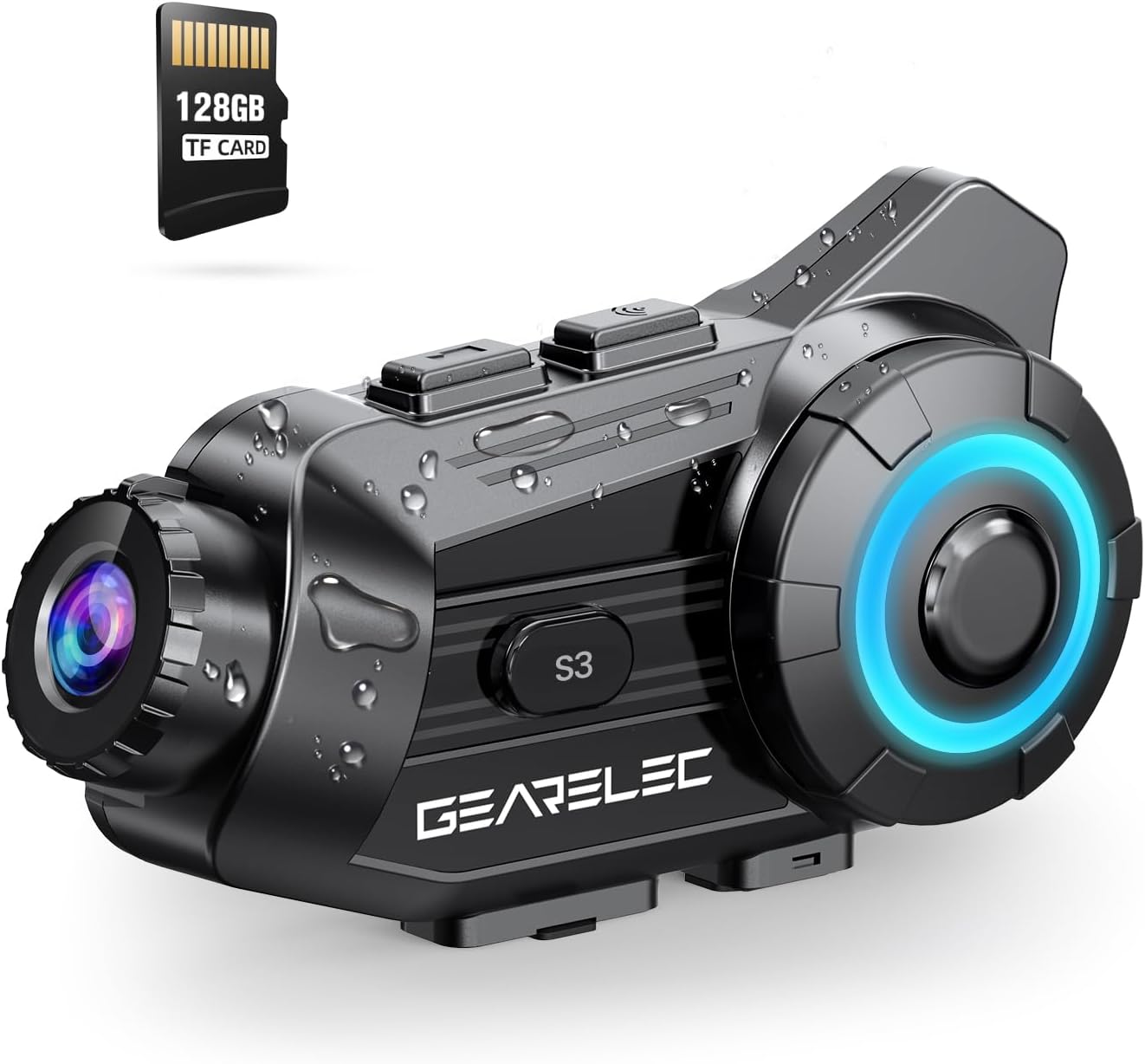
Figure 1.1: GEARELEC S3 Unit Overview. This image displays the compact design of the S3 unit, highlighting its integrated camera lens and control buttons, along with an included 128GB TF card.
2. Sikkerhedsoplysninger
- Prioritér altid trafiksikkerhed. Brug ikke enheden på en måde, der distraherer dig fra kørslen.
- Ensure the unit is securely mounted to your helmet before riding.
- Forsøg ikke at skille enheden ad eller ændre den. Dette kan ugyldiggøre garantien og forårsage skade.
- Hold enheden væk fra ekstreme temperaturer og direkte sollys i længere perioder.
- Brug kun det medfølgende opladningskabel og tilbehør.
3. Pakkens indhold
Kontroller venligst pakkens indhold ved udpakning:
- GEARELEC S3 Main Unit
- Helmet Mounting Bracket
- Speaker and Microphone Kit
- USB opladningskabel
- 128 GB TF-kort
- Brugermanual
4. Opsætning
4.1 Indledende opladning
Before first use, fully charge the S3 unit. The 2000mAh battery provides extended usage times.
- Connect the provided USB charging cable to the charging port on the S3 unit.
- Tilslut den anden ende af kablet til en USB-strømadapter (medfølger ikke) eller en USB-port på computeren.
- Opladningsindikatorlampen lyser. Når den er fuldt opladet (ca. 3 timer), skifter eller slukker lampen.

Figure 4.1: Battery Capacity and Charging. This image illustrates the 2000mAh battery capacity, showing a 3-hour charging time and various usage durations like 100 hours music time and 7 hours video recording.
4.2 Indsættelse af TF-kortet
The S3 unit supports up to 128GB TF cards for video recording. A 128GB TF card is included.
- Locate the TF card slot on the S3 unit.
- Sæt forsigtigt TF-kortet i stikket, indtil det klikker på plads. Sørg for, at kortet er vendt korrekt.
- For at fjerne det, tryk kortet indad, indtil det springer ud.
4.3 Montering af enheden på din hjelm
Securely attach the S3 unit to your helmet using the provided mounting bracket.
- Choose a suitable location on the side of your helmet for optimal camera view og tilgængelighed.
- Attach the mounting bracket firmly to the helmet. Ensure it is stable and does not obstruct your vision.
- Slide the S3 main unit onto the mounting bracket until it locks securely.
- Connect the speaker and microphone kit to the S3 unit and position them inside your helmet for clear audio.
5. Betjeningsvejledning
5.1 Tænd/sluk
- Tænd: Press and hold the Power button for approximately 3 seconds until the indicator light illuminates and you hear a power-on prompt.
- Sluk: Press and hold the Power button for approximately 3 seconds until the indicator light turns off and you hear a power-off prompt.
5.2 Bluetooth -parring
Pair your S3 unit with your mobile phone or other Bluetooth devices.
- With the S3 unit powered off, press and hold the Power button for about 5-7 seconds until the indicator light flashes rapidly, indicating pairing mode.
- Aktiver Bluetooth på din mobiltelefon, og søg efter tilgængelige enheder.
- Select "GEARELEC S3" from the list of devices to connect.
- Once connected, the indicator light will change to a slow flash.
5.3 Intercom-kommunikation
The S3 supports full-duplex communication for 2-8 riders within a 2000-meter range.

Figure 5.1: Multi-Rider Intercom. This image depicts multiple riders communicating via the S3 intercom system, illustrating the 6500ft (approx. 2000m) range for group communication.
- Start af intercom: After pairing multiple S3 units, short press the Intercom button on your unit to initiate a connection with another paired unit.
- Tilmelding til en gruppe: Follow the pairing instructions for each unit to create a group intercom. The system automatically connects to available units within range.
- Afslutning af intercom: Short press the Intercom button again to end the communication.
5.4 Kamerafunktioner
The integrated 1080P HD camera offers various recording features.

Figure 5.2: 1080P HD Lens Capability. This image compares 720P and 1080P video quality, demonstrating the S3's clear shooting capabilities and its 20° lens rotation feature.
- Start/stop optagelse: Press the Camera button once to start recording. Press it again to stop.
- Linse rotation: The lens supports 20° rotation for adjusting the shooting angle.
- G-sensorlås: In case of a collision, the built-in G-Sensor automatically locks the current video footage for at forhindre, at den bliver overskrevet.
- Loop-optagelse: When the TF card is full, the system automatically overwrites the oldest unprotected files, ensuring continuous recording.

Figure 5.3: Intelligent Gravity Sensor. This image illustrates the G-Sensor feature, showing how it automatically locks video footage in the event of a collision, securing it as evidence.
5.5 App Connection (RoadCam)
Use the "RoadCam" application to view and manage recorded videos and photos.

Figure 5.4: Built-in WiFi Hotspot and App Control. This image shows a rider using the 'RoadCam' app on a smartphone to view recorded videos and images, highlighting the convenience of the built-in WiFi hotspot.
- Download the "RoadCam" app from your device's app store (available on Google Play and App Store).
- Turn on the S3 unit's Wi-Fi hotspot (refer to the device's specific Wi-Fi activation instructions).
- Connect your smartphone to the S3 unit's Wi-Fi network.
- Open the RoadCam app to access recorded content.
5.6 Lydfunktioner
Enjoy high-quality audio for music, calls, and FM radio.

Figure 5.5: Stereo and Crystal-Clear Sound. This diagram illustrates the internal structure of the 40mm HiFi speaker, emphasizing its design for strong bass and clear audio output.
- Musikafspilning: Once paired with your phone, play music through your helmet speakers.
- Musikdeling: Share music with another S3 user within 30-50 meters.
- FM-radio: Activate the FM radio function to listen to local stations.
- Støjreduktion: The S3 features DSP & CVC noise reduction and a windproof microphone for clear audio even at high speeds.

Figure 5.6: Triple Noise Reduction Technology. This image highlights the three components of the S3's noise reduction system: a windproof microphone, DSP noise reduction, and CVC noise-canceling technology, ensuring clear audio at speeds up to 80mph.
6. Vedligeholdelse
- Rensning: Brug en blød, damp cloth to clean the exterior of the unit. Do not use harsh chemicals or abrasive cleaners.
- Linsepleje: Gently wipe the camera lens with a microfiber cloth to avoid scratches.
- Opbevaring: Store the unit in a cool, dry place when not in use. If storing for extended periods, charge the battery to about 50% to prolong its lifespan.
- Vandtæthed: The S3 has an IP65 protection level, making it suitable for outdoor use in rain or snow. However, avoid submerging the unit in water.
7. Fejlfinding
Se tabellen nedenfor for almindelige problemer og deres løsninger.
| Problem | Mulig årsag | Løsning |
|---|---|---|
| Enheden tænder ikke | Lavt batteri | Oplad enheden helt. |
| Kan ikke parres med telefonen | Not in pairing mode / Bluetooth off on phone | Ensure S3 is in pairing mode (rapid flashing light). Turn on phone's Bluetooth and retry. |
| Intercom forbinder ikke | Units out of range / Not properly paired | Move closer to other units. Re-pair all units in the group. |
| Problemer med videooptagelse | TF card full / TF card error | Check TF card storage. Format or replace TF card if corrupted. |
| Dårlig lydkvalitet | Microphone/speakers improperly positioned / High wind noise | Adjust microphone and speaker placement. Ensure microphone is not directly exposed to wind. |
8. Specifikationer
| Feature | Detalje |
|---|---|
| Modelnavn | S3 |
| Videooptagelsesopløsning | 1080p |
| Videooptagelsesformat | MP4 |
| Fotosensorteknologi | CMOS |
| Maksimal blænde | 1.8 millimeter |
| Linsevinkel | 135° vidvinkel |
| Linse rotation | 20° |
| Intercom rækkevidde | Up to 2000 meters (2-8 riders) |
| Batterikapacitet | 2000mAh |
| Opladningstid | Ca. 3 timer |
| Musik Tid | Op til 100 timer |
| Videooptagelsestid | Op til 7 timer |
| Vandtæt vurdering | IP65 |
| Forbindelsesteknologi | Wireless (Bluetooth 5.1, Wi-Fi) |
| Særlige funktioner | G-Sensor Lock, Loop Recording, Music Sharing, FM Radio, DSP & CVC Noise Reduction |
| Varens vægt | 15.2 ounce |
9. Garanti og support
GEARELEC products are designed for reliability and performance. For any questions or assistance, please contact our customer support team.
- Kundesupport: If you have any questions or require technical support, please reach out to "RuiSi Elctric" via the Amazon platform's "ASK A QUESTION" feature. Our team aims to reply within 6 hours.
- Garantioplysninger: Please refer to the product packaging or your purchase receipt for specific warranty terms and conditions.


