Indledning
This manual provides detailed instructions for the installation, operation, and maintenance of your Waveform DualMini 2x2 MIMO Window Antenna Kit. The DualMini is designed to enhance 4G and 5G cellular signal reception for compatible routers and hotspots, improving data rates, reducing latency, and increasing connection reliability. Its omnidirectional design simplifies placement, making it suitable for various environments including homes and RVs.
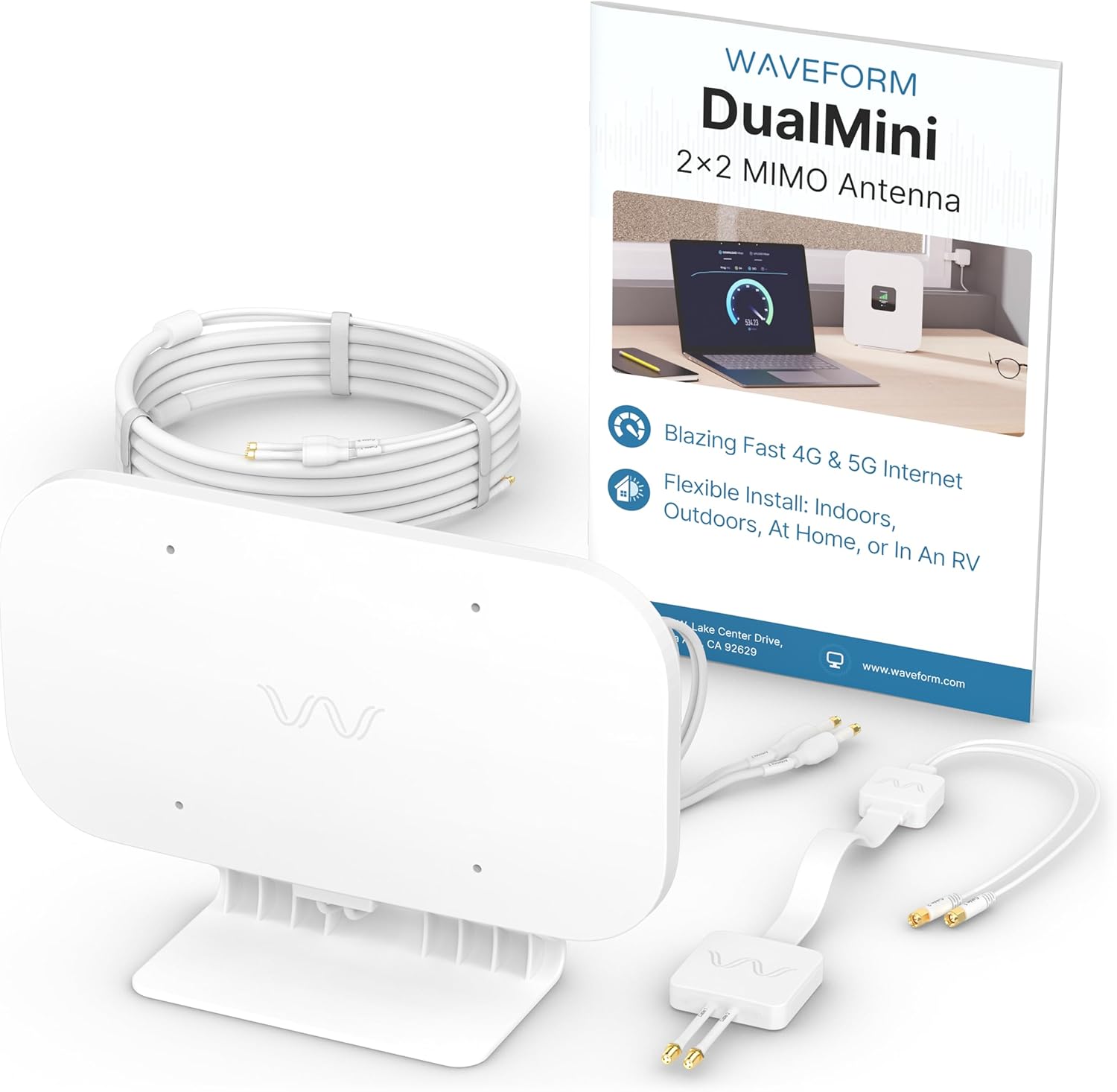
The Waveform DualMini 2x2 MIMO Antenna Kit includes the main antenna unit, connection cables, TS9 adapters, and the user manual.
Pakkens indhold
The Waveform DualMini Complete Kit includes the following components:
- DualMini Antenna
- Vinduesindgangskabel
- 10ft UltraFlex Twin Cable
- 2x TS9 Adapters
- Stationære stativ
- Sugekopper
- Vægskruer og ankre
- Stangmonteringsbeslag med kabelbindere
- Brugermanual

The complete kit includes the DualMini antenna, Window Entry Cable, 10ft UltraFlex Twin Cable, 2x TS9 Adapters, Desktop Stand, Suction Cups, Wall Screws & Anchors, Pole Mount Bracket with Zip Ties, and a User Manual.
Installationsvejledning
The DualMini antenna offers flexible installation options for both indoor and outdoor use. Optimal performance is typically achieved with outdoor placement.
1. Mount Your DualMini Antenna
Choose a mounting location that provides the best possible signal reception. The omnidirectional design means no precise aiming is required, but placing it on the side of your building or RV that receives the strongest signal is recommended.
- Udendørs montering: For optimal performance, consider wall or pole mounting. Use the provided wall screws, anchors, or the pole mount bracket with zip ties.
- Indendørs montering: For easier installation, use the included suction cups for window attachment or the desktop stand for placement on a flat surface.

This image demonstrates the various ways to mount the DualMini antenna for optimal performance or easier installation, including wall, pole, window, and desktop options.
2. Træk kabler indeni
Utilize the Window Entry Cable to route the antenna cables from outside to inside your building or RV without drilling. This cable is designed to pass through most window frames when closed.

The Window Entry Cable allows for routing antenna cables indoors without drilling, passing through a window frame to connect to your gateway.
3. Tilslut din 5G-gateway
Connect the UltraFlex Twin Cables from the antenna to the external antenna ports on your 4G LTE or 5G gateway or router. Some gateways may require the included TS9 adapters. After connecting, reboot your gateway to ensure it recognizes the external antenna.

This image illustrates the final step of connecting the antenna cables to the external antenna ports of your 4G LTE or 5G gateway. TS9 adapters may be required for some gateways.
Operation
Once installed and connected, the DualMini antenna will work with your compatible 4G/5G router or hotspot to improve cellular signal reception. The antenna's omnidirectional design means it receives signals from all directions, eliminating the need for precise aiming. Your router will automatically utilize the improved signal for faster and more reliable internet connectivity.

This diagram shows how the DualMini antenna connects to a cellular router, enhancing 4G or 5G internet performance for home use.
Kompatibilitet
The Waveform DualMini antenna is designed for use with 4G LTE and 5G cellular gateways, modems, and routers that feature two external antenna ports. It supports a wide range of devices and carriers.
Compatible Devices and Carriers:
- Routers/Hotspots: Inseego, Netgear (e.g., M5 & M6), Peplink, Cradlepoint, GL.iNet, Cudy, TP-Link, Teltonika, and others with 2 antenna ports.
- Transportører: Verizon, T-Mobile, AT&T, Rogers, Telus, Bell, and other 4G/5G networks.
Devices with TS9 ports will require the included TS9 adapters for connection.

The DualMini antenna is compatible with a wide range of 4G LTE and 5G gateways, modems, and routers from brands like Inseego, Netgear, Peplink, Cradlepoint, GL.iNet, Cudy, TP-Link, and Teltonika, across carriers such as Verizon, T-Mobile, AT&T, Rogers, Telus, and Bell.
Fejlfinding
If you experience issues with your DualMini antenna, consider the following:
- Tjek forbindelser: Ensure all cables are securely connected to both the antenna and your router/hotspot. Verify that TS9 adapters (if used) are properly attached.
- Router genstart: After connecting the antenna, always reboot your cellular gateway or router.
- Antenneplacering: Experiment with different antenna locations. While omnidirectional, placing the antenna on the side of your home or RV facing the nearest cell tower can still yield better results.
- Indikatorer for signalstyrke: Refer to your router's interface for signal strength metrics (e.g., RSRP, SINR) rather than just
Relaterede dokumenter - DMIN-1

Eksterne antenner til bølgeform MIMO: Installations- og optimeringsvejledning
Omfattende guide til installation, placering og optimering af eksterne Waveform MIMO-antenner for forbedret mobilsignal og datahastigheder. Dækker opsætning, kompatibilitet og fejlfinding.
Waveform 4x4 MIMO eksterne antenner: Installations- og optimeringsvejledning
Trinvise instruktioner fra Waveform til installation af 4x4 MIMO eksterne antenner for at forstærke mobilsignalet. Dækker opsætning, positionering, test og optimering af mobilroutere og hotspots.
Waveform Griddy Parabolantenne: Monterings-, opsætnings- og sigtevejledning
Omfattende guide til samling, konfiguration og indstilling af den parabolske Waveform Griddy-antenne for optimal ydeevne i mobil- og Wi-Fi-applikationer. Inkluderer valg af feedhorn, MIMO-opsætning og indstillingstips.
Installations- og opsætningsvejledning til Griddy Parabolantenne fra Waveform
Omfattende guide til samling, installation og indstilling af Waveform Griddy parabolantennen for optimal mobil- og WiFi-signalydelse. Inkluderer valg af feedhorn og MIMO-opsætning.
Installationsvejledning til Waveform QuadPro Duo Directional 8x8 MIMO-antennesæt
Denne vejledning indeholder omfattende instruktioner til installation og optimering af Waveform QuadPro Duo Directional 8x8 MIMO-antennesættet for at forbedre mobilsignal- og datahastigheder. Den dækker udpakning, opsætning, positionering, tilslutning, montering, vejrbeskyttelse, jording og avancerede optimeringsteknikker.
Installationsvejledning til Griddy Grid parabolantenne fra WAVEFORM
Omfattende installationsvejledning til WAVEFORM Griddy Grid parabolantennen, der dækker montering, valg af feedhorn, sigtning til mobilmaster og punkt-til-punkt WiFi samt MIMO-konfigurationer.